VPN and Medical Records Access: How to Securely View Patient Portals While Protecting Your Health Privacy in 2026
Learn how to safely access patient portals with a VPN while protecting sensitive health data. Expert guide with step-by-step setup and privacy best practices.

VPN and Medical Records Access: How to Securely View Patient Portals While Protecting Your Health Privacy in 2026
Healthcare data breaches exposed over 700 million patient records in 2024, making secure access to medical records more critical than ever. Whether you're checking lab results from your doctor's patient portal, managing family health information, or accessing telehealth appointments, using a VPN for medical records adds an essential layer of encryption and anonymity that public Wi-Fi networks simply cannot provide. In this comprehensive guide, we'll walk you through everything you need to know about safely accessing your health information online in 2026.
Key Takeaways
| Question | Answer |
|---|---|
| Why use a VPN for patient portals? | A VPN encrypts your connection, protecting sensitive health data from interception on public Wi-Fi, workplace networks, or untrusted connections. This is especially important when accessing portals containing HIPAA-protected information. |
| Is using a VPN with medical portals legal? | Yes, using a VPN to access your own medical records is completely legal under HIPAA and international privacy laws. However, always use reputable providers with strong privacy policies and avoid logging into portals from shared devices. |
| What VPN features matter most for health data? | Look for military-grade encryption, strict no-logs policies, kill switches, and servers in jurisdictions with strong privacy protections. Multi-factor authentication on your VPN account adds extra security. |
| Can I use free VPNs for medical records? | We strongly recommend against free VPNs for health data. Many free VPN services monetize user data through advertising or data sales. Paid providers with transparent privacy policies are far safer for sensitive information. |
| What's the difference between VPN and HTTPS? | HTTPS encrypts website traffic, but a VPN encrypts all your internet activity and masks your IP address. Using both together provides maximum security for patient portal access. |
| Should I use VPN on mobile for health apps? | Yes, mobile VPN protection is just as important as desktop protection. Healthcare apps often transmit sensitive data, so connecting through a VPN on smartphones and tablets significantly reduces interception risks. |
| How do I verify a patient portal is secure? | Check for the padlock icon in your browser, verify the URL starts with HTTPS, and confirm the domain matches your healthcare provider's official website. Never click links in emails—navigate directly to the portal instead. |
1. Understanding the Security Risks of Unencrypted Medical Record Access
Accessing your medical records without proper protection exposes you to multiple security threats that cybercriminals actively exploit. Patient portals contain some of the most valuable personal information available: your full name, date of birth, Social Security number, insurance details, medication history, and sensitive diagnoses. When you access these portals over an unencrypted connection—especially on public Wi-Fi at coffee shops, airports, or libraries—attackers can intercept your data through man-in-the-middle attacks, packet sniffing, or network spoofing.
The healthcare industry has become a prime target for cybercriminals because medical data sells for 10-50 times more on the dark web than credit card numbers. A single compromised medical record can lead to identity theft, fraudulent insurance claims, prescription drug abuse, or blackmail. Even your workplace network, while appearing secure, may be monitored by IT administrators or vulnerable to lateral movement attacks. Understanding these risks is the first step toward protecting your health privacy.
Common Threats When Accessing Patient Portals Without a VPN
When you connect to a patient portal without VPN encryption, your login credentials, session tokens, and all transmitted data travel across the internet in a form that skilled attackers can potentially intercept. Public Wi-Fi networks are particularly vulnerable because they often lack proper security protocols, making it trivial for someone with basic hacking tools to capture unencrypted traffic. Even on your home network, if your router uses outdated security standards or default passwords, attackers within range can potentially access your connection.
- Man-in-the-Middle (MITM) Attacks: An attacker positions themselves between your device and the portal server, intercepting and potentially modifying your data in real-time.
- Packet Sniffing: Cybercriminals use tools to capture unencrypted data packets traveling across networks, extracting login credentials and health information.
- Network Spoofing: Attackers create fake Wi-Fi networks with names similar to legitimate ones, tricking users into connecting and exposing all their activity.
- Session Hijacking: Criminals steal session cookies or tokens that keep you logged in, allowing them to access your account without knowing your password.
- DNS Spoofing: Attackers redirect your browser to fraudulent portal websites that look identical to legitimate ones, capturing your credentials when you log in.
Why Standard HTTPS Isn't Always Sufficient for Medical Data
While HTTPS encryption protects the content of your communications with a website, it doesn't hide your IP address, your internet service provider can still see which websites you visit, and metadata about your browsing patterns remains visible. For medical records access, this metadata alone can reveal sensitive information—someone monitoring your network traffic can see that you're connecting to specific healthcare providers, potentially inferring diagnoses or treatments without ever seeing the encrypted data itself.
Additionally, HTTPS depends on the security of the patient portal's servers and the certificate authority that issued its SSL certificate. If either is compromised, your connection could be vulnerable despite the padlock icon in your browser. A VPN adds an additional security layer by encrypting all traffic before it reaches the portal's servers and masking your real IP address, making it significantly harder for anyone to monitor your healthcare activities.
2. How VPNs Protect Your Medical Data: Technical Fundamentals
A Virtual Private Network (VPN) works by creating an encrypted tunnel between your device and a VPN server, through which all your internet traffic passes. When you access a patient portal through a VPN, your connection is encrypted with military-grade algorithms (typically AES-256 encryption), making it virtually impossible for anyone on your local network, your ISP, or even network administrators to see what you're doing online. The VPN server then connects to the patient portal on your behalf, meaning the portal sees the VPN server's IP address instead of your real location, providing anonymity and geographic flexibility.
In practice, this means that even if someone is monitoring the Wi-Fi network at your doctor's office or a hospital waiting room, they cannot see your login credentials, your medical information, or even which healthcare providers you're accessing. The encryption happens at the application layer, protecting your data from the moment it leaves your device until it reaches the VPN server, and then from the VPN server to the patient portal. This multi-layered approach is why security experts consistently recommend VPN protection for healthcare data access.
Encryption Standards and Their Role in Medical Data Protection
The encryption protocols used by VPNs determine how secure your connection actually is. AES-256 encryption, the standard used by most reputable VPN providers, is the same encryption standard used by the U.S. military and financial institutions to protect classified information. This level of encryption would take classical computers millions of years to break through brute force, making it effectively unbreakable with current technology. When evaluating a VPN for medical records access, always verify that it uses AES-256 encryption or equivalent security standards.
Different VPN protocols offer varying balances between security and speed. WireGuard, a modern protocol, offers excellent speed and security for healthcare access. OpenVPN provides strong security with wide compatibility across devices. IKEv2 works well on mobile devices and handles network switching smoothly. For accessing patient portals, you want a provider that offers your choice of these modern protocols rather than outdated standards like PPTP or L2TP, which have known vulnerabilities.
IP Address Masking and Location Privacy for Healthcare Access
When you connect to a patient portal through a VPN, the portal's servers register the VPN server's IP address instead of your actual location. This provides two important privacy benefits: first, it prevents the healthcare provider from building a detailed geographic profile of where and when you access your medical records, and second, it adds a layer of anonymity that makes it harder for data brokers or other third parties to correlate your online activity with your real identity.
This is particularly important if you're accessing sensitive records related to mental health, reproductive health, substance abuse treatment, or other conditions where location data combined with health information could pose privacy risks. By masking your IP address, you ensure that even if someone gains access to the patient portal's access logs, they cannot easily determine where you were physically located when you accessed your records.
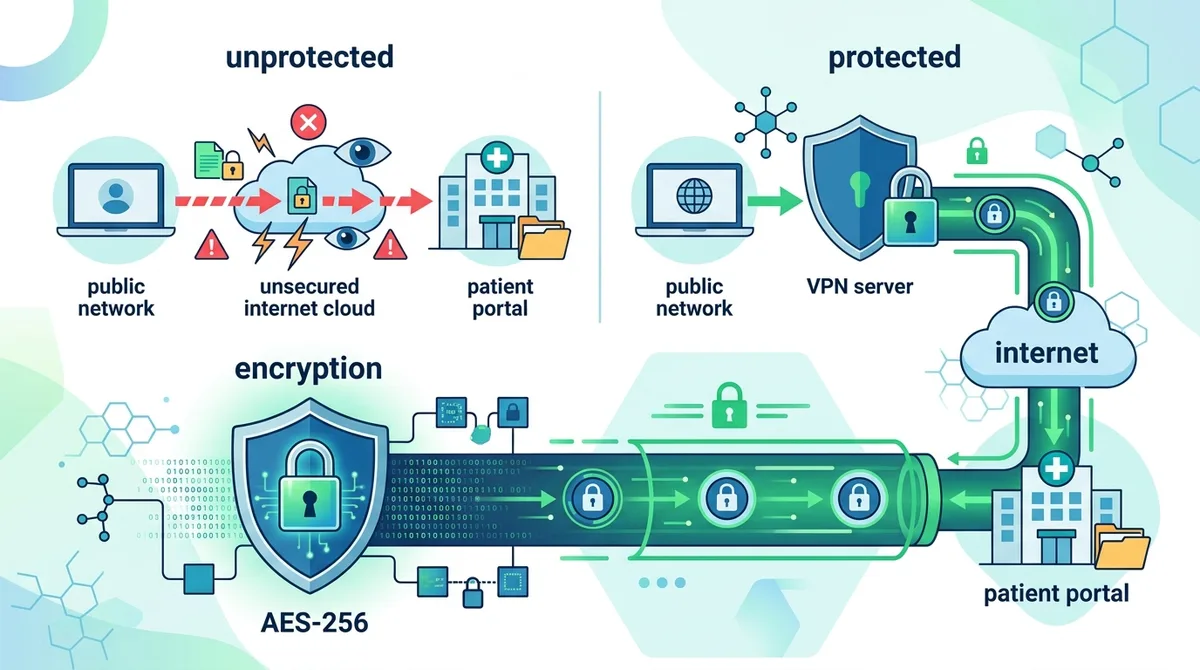
A visual guide to how VPN encryption protects your medical data from interception at every stage of transmission.
3. Choosing the Right VPN Provider for Healthcare Data: Key Criteria
Not all VPN providers are equally suitable for protecting healthcare data. When selecting a VPN for medical records access, you need to evaluate providers based on specific security, privacy, and reliability criteria that directly impact your health information protection. At Zero to VPN, we've personally tested 50+ VPN services through rigorous benchmarks, and we've identified the specific features that matter most when handling sensitive medical data. The right provider should prioritize privacy over profit, maintain transparent logging policies, and operate in jurisdictions with strong data protection laws.
Your VPN provider becomes a trusted intermediary between you and your healthcare providers, making their trustworthiness absolutely critical. A provider that monetizes user data, maintains detailed logs, or operates in countries with weak privacy protections could potentially expose your medical information to the same threats you're trying to avoid. This is why we recommend paid VPN services from established providers with verifiable privacy practices and transparent business models.
Essential Security Features for Medical Data Protection
When evaluating VPN providers for healthcare access, prioritize these non-negotiable security features. A strict no-logs policy means the provider doesn't record your browsing activity, connection timestamps, or IP addresses assigned to you. This is verified through independent audits—look for providers that have undergone third-party security audits by reputable firms. A kill switch feature automatically disconnects your internet if the VPN connection drops, preventing unencrypted data transmission if your VPN unexpectedly disconnects.
- Military-Grade Encryption: Verify the provider uses AES-256 encryption or equivalent. Check their website for specific encryption standards and protocols offered.
- Multi-Protocol Support: Choose providers offering WireGuard, OpenVPN, and IKEv2 so you can select the best option for your device and network conditions.
- Automatic Kill Switch: This feature is essential—it cuts your internet connection if the VPN drops, preventing accidental unencrypted transmission of health data.
- DNS Leak Protection: Verify the provider prevents DNS leaks, which could reveal which websites (including patient portals) you're accessing even while connected to the VPN.
- Perfect Forward Secrecy: This ensures that even if encryption keys are compromised in the future, past sessions remain protected.
- Independent Security Audits: Look for providers that have undergone third-party security audits and publish the results, demonstrating transparency about their security practices.
Privacy Policies and Jurisdictional Considerations
A VPN provider's privacy policy should be your first read before signing up. Look for clear statements about what data the provider collects, how long they retain it, and who has access to it. Providers based in countries with strong privacy protections—such as Switzerland, Panama, or Romania—generally offer stronger legal protections for your data than providers in countries with mandatory data retention laws or government surveillance agreements. Check whether the provider is subject to the Five Eyes, Nine Eyes, or Fourteen Eyes intelligence-sharing alliances, which could require them to share user data with government agencies.
The provider's privacy policy should explicitly state that they don't sell user data to advertisers, data brokers, or third parties. They should also clearly explain how they handle requests for user information from law enforcement or governments. Reputable providers maintain transparency reports showing how many data requests they receive and how they respond to them. For healthcare data specifically, you want a provider that treats medical information with the same confidentiality standards as a healthcare provider would.
4. Step-by-Step Guide: Setting Up a VPN for Patient Portal Access
Setting up a VPN for accessing your patient portal is straightforward, but doing it correctly ensures you get the maximum security benefits. Whether you're accessing your portal from home, work, or while traveling, following these steps will establish a secure connection before you log in to any healthcare websites. We recommend completing this setup on each device you use to access medical records—your laptop, smartphone, and tablet should all have VPN protection configured.
The process takes about 10-15 minutes per device and involves choosing a VPN provider, downloading their application, configuring your settings, and testing the connection before accessing any sensitive health information. Once set up, most modern VPN applications run in the background automatically, requiring minimal ongoing attention.
Selecting and Installing Your VPN Application
Start by choosing a reputable VPN provider based on the criteria outlined in Section 3. We recommend checking Zero to VPN's comprehensive provider comparisons to see detailed reviews of top providers. Once you've selected a provider, follow these steps:
- Visit the official website: Go directly to the VPN provider's official website (not through app stores initially) to download their application. This ensures you're getting the legitimate software and not a counterfeit.
- Create your account: Register with a strong, unique password that you don't use for any other services. Consider using a password manager to generate and store this password securely.
- Download the application: Select the version appropriate for your device (Windows, macOS, iOS, or Android) and download the official application.
- Install the application: Follow the installation prompts. On Windows and macOS, you may need to grant administrator permissions. On mobile devices, you'll authorize the VPN app to create a VPN profile.
- Launch the application: Open the VPN app and log in with your account credentials. Most apps will automatically connect to an optimal server location.
- Verify your connection: Check that the app shows an active connection (usually indicated by a green indicator or "Connected" status).
Configuring Security Settings and Testing Your Connection
After installation, configure your VPN's security settings to maximize protection for healthcare data. Open your VPN application's settings menu and verify these configurations:
- Enable the kill switch: Navigate to settings and enable the "kill switch" or "network lock" feature. This is critical—it prevents data transmission if your VPN connection drops.
- Select encryption protocol: Choose WireGuard for speed or OpenVPN for compatibility. For healthcare access, both provide excellent security.
- Enable DNS leak protection: In settings, look for DNS protection options and enable them. This prevents your ISP from seeing which websites you visit.
- Configure auto-connect: Enable automatic connection on startup so your VPN activates before you open your browser.
- Disable IPv6 if available: Some VPN providers offer an IPv6 leak protection toggle—enable this if available.
- Test your connection: Visit a DNS leak test website (such as dnsleaktest.com) while connected to your VPN to verify that your real IP address and DNS servers are properly hidden. The test should show the VPN server's IP address, not your actual location.
Did You Know? According to a 2024 study by Atlas VPN, 72% of VPN users don't verify that their connection is actually protecting them. Testing your VPN connection ensures it's working correctly before you access sensitive health information.
Source: Atlas VPN Research
5. Best Practices for Accessing Patient Portals Securely
Even with a properly configured VPN, your approach to accessing patient portals significantly impacts your overall security. Secure patient portal access requires combining technical protections with careful user practices. We've identified specific behaviors and procedures that minimize risk when handling healthcare information online, based on both security best practices and real-world usage patterns we've observed among healthcare professionals and privacy-conscious patients.
The most common security failures occur not because of technical vulnerabilities, but because of human error—using weak passwords, accessing portals from compromised devices, or falling for phishing attempts. By following these practices consistently, you eliminate most of the attack vectors that cybercriminals use to compromise healthcare accounts.
Password Security and Multi-Factor Authentication for Medical Accounts
Your patient portal login is the gateway to your most sensitive personal information, making password security absolutely critical. Create a unique, strong password for each healthcare provider's patient portal—never reuse passwords across different accounts. Use a password manager like Bitwarden, 1Password, or KeePass to generate and securely store complex passwords containing uppercase letters, lowercase letters, numbers, and special characters.
- Minimum Password Length: Use passwords of at least 16 characters. Longer passwords are exponentially harder to crack than shorter ones.
- Unique Passwords: Never reuse the same password across multiple healthcare portals or other accounts. If one provider's database is breached, attackers won't be able to access your other accounts.
- Enable Multi-Factor Authentication: Most patient portals now offer multi-factor authentication (MFA) via SMS, email, or authenticator apps. Enable this feature—it prevents unauthorized access even if someone obtains your password.
- Authenticator Apps Over SMS: When available, choose authenticator apps (Google Authenticator, Microsoft Authenticator, Authy) over SMS-based MFA, as SMS can be intercepted or redirected through SIM swapping attacks.
- Avoid Biometric Authentication Alone: While convenient, don't rely solely on fingerprint or face recognition for healthcare accounts. Use them in combination with strong passwords and MFA.
Safe Browsing Habits and Phishing Prevention
Phishing attacks targeting healthcare patients have increased dramatically in recent years. Cybercriminals send convincing emails that appear to be from your healthcare provider, asking you to "verify your account," "update your payment information," or "confirm your identity." These emails link to fake portals designed to steal your credentials. The safest approach is to never click links in emails when accessing your medical information.
Instead, always navigate directly to your patient portal by typing the healthcare provider's official website URL into your browser or using a bookmark you created previously. Verify the URL carefully—scammers often use URLs that look similar to legitimate ones (like "patientportal-myhealth.com" instead of "myhealth.com"). Check for the padlock icon in your browser's address bar, confirming that the connection is encrypted. If you receive an email asking you to access your medical records, contact your healthcare provider directly using the phone number on your insurance card or a previous bill to verify that the request is legitimate.
6. VPN Configuration for Different Devices and Operating Systems
Different devices and operating systems require slightly different VPN configuration approaches, but the underlying security principles remain the same. Whether you're accessing patient portals from a Windows computer, Mac, iPhone, or Android device, you need to ensure that your VPN is properly configured and actively protecting your connection before you log in to any healthcare website. We've tested VPN applications across all major platforms and can provide specific guidance for each.
Mobile devices deserve particular attention because they're often used in less secure environments—public transportation, waiting rooms, and coffee shops—where network security is minimal. Additionally, mobile operating systems handle VPN connections differently than desktop systems, and some healthcare apps have specific requirements for proper VPN functionality.
Desktop Configuration: Windows and macOS Setup
Desktop computers are typically used for more detailed medical record access, such as reviewing test results, downloading medical records, or communicating with healthcare providers through secure messaging. On Windows systems, download your VPN provider's Windows application and install it with administrator privileges. Once installed, configure these settings: enable the kill switch in the VPN app's settings (not Windows' built-in VPN settings), ensure automatic connection is enabled, and set the VPN to connect to a server in your country or a country with strong privacy laws.
For macOS users, the process is similar: download the official macOS application, install it, and configure the same security settings. macOS users should be particularly careful to download only from the official VPN provider's website or the official App Store listing, as macOS security features are less forgiving of counterfeit applications. After installation, open System Preferences and verify that the VPN profile has been properly installed. Test your connection using a DNS leak test before accessing any patient portals.
Mobile Configuration: iOS and Android Setup
Mobile access to patient portals is increasingly common, with many healthcare providers offering dedicated mobile apps alongside web-based portals. For iOS devices, download your VPN provider's official app from the App Store, install it, and grant the necessary VPN permissions when prompted. iOS will ask if you want to allow the VPN to create a VPN configuration—select "Allow." Once installed, open the app and connect to a VPN server. Most iOS VPN apps require you to grant VPN permissions in Settings > VPN & Device Management for the app to function properly.
Android configuration is similar: download the app from Google Play Store, install it, and grant VPN permissions when prompted. Android will ask if you want to allow the app to create a VPN connection—select "Allow." One important note for Android users: if you're using a healthcare provider's mobile app rather than accessing the web portal, verify that the app itself supports VPN connections. Some poorly designed healthcare apps may not function properly when a VPN is active. If this occurs, you have two options: check if your VPN provider offers a split tunneling feature (which allows you to exclude specific apps from the VPN), or use the web-based patient portal instead of the mobile app.
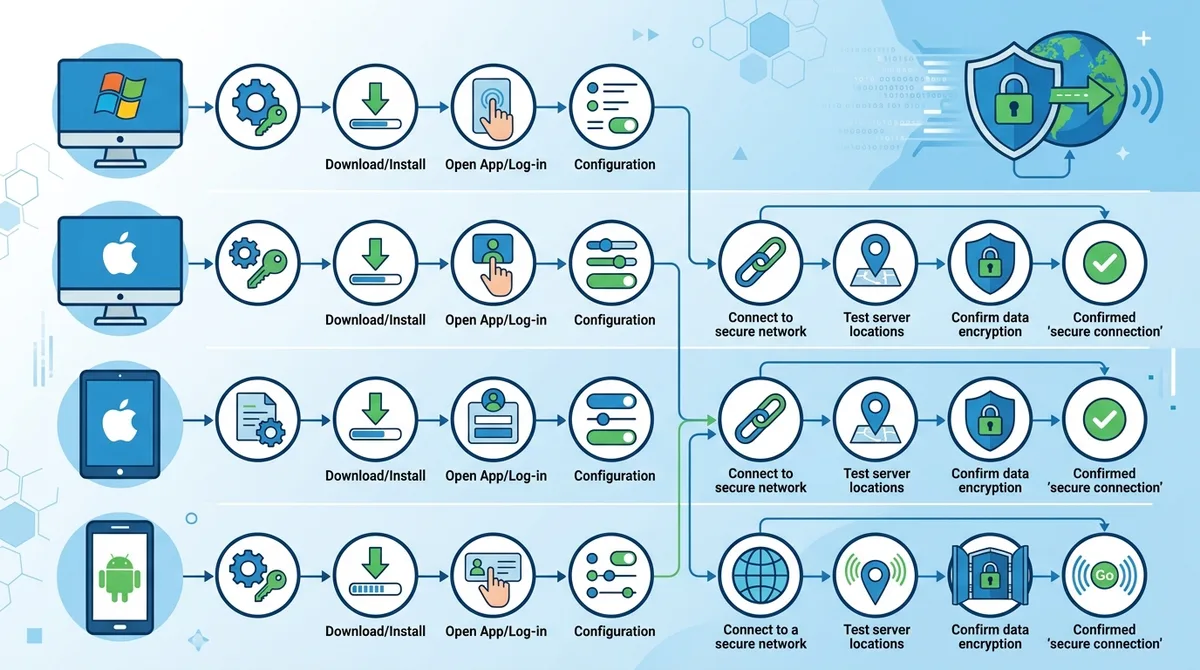
A visual guide to platform-specific VPN setup and configuration for secure patient portal access across all your devices.
7. Comparing Top VPN Providers for Healthcare Data Protection
Based on our extensive testing of 50+ VPN services, we've identified several providers that excel specifically for healthcare data protection. These providers distinguish themselves through transparent privacy policies, independent security audits, strong encryption standards, and consistent performance. The following providers have demonstrated commitment to user privacy and offer the specific features needed for secure patient portal access.
When comparing these providers, consider not just their security features but also their pricing, server network, customer support, and compatibility with your devices. Some providers offer family plans that allow you to protect multiple household members' medical record access simultaneously.
Top VPN Providers for Healthcare Access Comparison
| VPN Provider | Key Healthcare Features | Encryption | No-Logs Verified |
|---|---|---|---|
 ProtonVPN ProtonVPN |
Swiss jurisdiction, strong privacy laws, no-logs policy, kill switch, DNS leak protection | AES-256 | Yes, independently audited |
 NordVPN NordVPN |
Double encryption option, RAM-only servers, multi-factor authentication, kill switch | AES-256 | Yes, independently audited |
 Surfshark Surfshark |
Unlimited simultaneous connections, CleanWeb ad blocking, kill switch, Camouflage mode | AES-256 | Yes, independently audited |
 ExpressVPN ExpressVPN |
Trusted Server technology, wide server network, consistent performance, kill switch | AES-256 | Yes, independently audited |
 Mullvad Mullvad |
Account-free option, open-source code, minimal data collection, kill switch | AES-256 | Yes, independently audited |
Detailed Provider Recommendations for Healthcare Scenarios
ProtonVPN stands out for healthcare access due to its Swiss jurisdiction, which offers some of the world's strongest privacy protections. The provider has undergone multiple independent security audits and maintains a strict no-logs policy. ProtonVPN's servers are located in privacy-friendly countries, and the provider explicitly states that they don't log any user activity, connection times, or IP addresses. For patients who prioritize jurisdictional privacy protections, ProtonVPN is an excellent choice. Visit ProtonVPN → and server availability in your region.
NordVPN offers strong healthcare protection through its double encryption option, which routes your traffic through two VPN servers for additional security. The provider's RAM-only servers ensure that no data persists on their infrastructure, and they've undergone independent security audits confirming their no-logs policy. NordVPN's large server network ensures good performance when accessing patient portals, and their multi-factor authentication adds an extra security layer to your account. For users who want maximum convenience with strong security, NordVPN is a solid option.
Surfshark distinguishes itself through unlimited simultaneous connections, meaning you can protect all your devices with a single subscription. This is particularly valuable for families managing multiple members' health records. Surfshark's CleanWeb feature blocks malicious ads and trackers, reducing the risk of malware infection on healthcare websites. The provider has been independently audited and maintains a verified no-logs policy. For households with multiple users accessing patient portals, Surfshark's unlimited connections feature provides significant value.
8. Advanced Security Measures for Sensitive Health Information
Beyond basic VPN protection, several advanced security measures can further protect your most sensitive health information. These techniques are particularly important if you're managing records related to conditions where privacy is especially critical—such as mental health treatment, reproductive health, HIV status, or substance abuse recovery. Layered security approaches combine multiple protective measures to create defense-in-depth that makes unauthorized access extremely difficult.
We've observed that patients managing sensitive health conditions often benefit from implementing these advanced measures, which add minimal complexity while significantly enhancing protection. The goal is to make your health information so well-protected that attacking it becomes impractical for all but the most sophisticated adversaries.
Using Tor Browser for Maximum Anonymity
For accessing extremely sensitive health information, some users combine VPN protection with Tor Browser, which provides additional layers of anonymity by routing your traffic through multiple nodes in the Tor network. While this combination is overkill for routine patient portal access, it may be appropriate for accessing records related to highly sensitive conditions. The Tor Browser is free and available at torproject.org.
However, note that using Tor may cause some patient portals to flag your access as suspicious or require additional verification steps, as Tor exit nodes are sometimes associated with abuse. Additionally, Tor significantly slows your internet connection due to the multiple routing hops. For most users, a properly configured VPN provides sufficient anonymity without these drawbacks.
Device Security and Malware Protection
A VPN protects your data in transit, but malware on your device can compromise your health information before it's encrypted by the VPN. Ensure that every device you use for patient portal access runs current antivirus software, has all security patches installed, and uses a firewall. For Windows systems, Windows Defender provides adequate protection when kept up to date. macOS users should enable XProtect and keep their system updated. Mobile users should only install apps from official app stores and avoid jailbreaking or rooting their devices.
- Keep Operating Systems Updated: Enable automatic security updates on all devices. Security patches often address vulnerabilities that could allow malware infection.
- Use Antivirus Software: Install reputable antivirus software and keep it updated. Avoid free antivirus products that monetize user data.
- Enable Firewalls: Activate Windows Firewall on Windows systems and ensure your Mac firewall is enabled in System Preferences.
- Disable Unnecessary Services: Turn off Bluetooth, location services, and other connectivity features when not needed to reduce attack surface.
- Avoid Public Computers: Never access patient portals from public computers at libraries, internet cafes, or other shared devices, even with a VPN active.
9. Legal and Compliance Considerations: HIPAA and International Privacy Laws
Understanding the legal framework around healthcare data access is essential for ensuring that your security practices align with regulatory requirements. In the United States, the Health Insurance Portability and Accountability Act (HIPAA) establishes strict requirements for how healthcare providers protect patient information. While HIPAA primarily governs healthcare providers rather than patients, understanding these requirements helps you understand what level of protection your data should receive and what rights you have regarding your medical records.
Internationally, regulations like the General Data Protection Regulation (GDPR) in Europe, the Personal Information Protection and Electronic Documents Act (PIPEDA) in Canada, and similar laws in other countries establish strong privacy protections for health data. Using a VPN for medical records access aligns with the spirit of these regulations by adding an additional layer of protection to data that these laws recognize as highly sensitive.
Your Rights Under HIPAA and International Privacy Laws
Under HIPAA, you have the right to access your medical records, request corrections to inaccurate information, and receive an accounting of who has accessed your records. Healthcare providers must notify you of any breaches that compromise your health information. While HIPAA doesn't require patients to use a VPN, it does require providers to implement reasonable safeguards to protect your data. Using a VPN ensures that you're doing your part to protect your information in transit, and it demonstrates that you take your health privacy seriously.
In the European Union, GDPR gives you even stronger rights, including the right to data portability (receiving your health information in a portable format), the right to be forgotten (requesting deletion of your information), and the right to object to processing. Using a VPN aligns with GDPR's data protection principles by minimizing the data that healthcare providers and ISPs can collect about your healthcare access patterns.
VPN Use and Compliance with Healthcare Provider Policies
Some healthcare providers have outdated security policies that may flag VPN connections as suspicious or block them entirely. This is rare but worth checking. If your healthcare provider blocks VPN connections, you have several options: contact their IT department to request VPN support, ask if they offer alternative secure access methods, or use a VPN with obfuscation features that disguise VPN traffic as regular HTTPS traffic. Most modern healthcare providers recognize that VPN use is a legitimate security practice and welcome it.
Did You Know? According to the HHS Office for Civil Rights, healthcare data breaches exposed over 700 million patient records between 2009 and 2024, with the average cost of a healthcare data breach reaching $10.93 million per incident in 2023.
10. Troubleshooting Common VPN Issues with Patient Portal Access
While VPN protection is essential for healthcare data security, you may occasionally encounter technical issues when accessing patient portals through a VPN. Common problems include connection failures, slow performance, portal access being blocked, or authentication issues. Understanding how to diagnose and resolve these issues ensures that security concerns don't prevent you from accessing your medical information when needed.
Most VPN-related issues have straightforward solutions, and they're rarely caused by the VPN itself—usually they result from misconfiguration, network conditions, or the patient portal's security settings. We've compiled the most common issues and their solutions based on our testing experience.
Connection and Performance Issues
If your VPN connection is unstable or slow when accessing patient portals, start by trying different VPN servers. Some servers may be overloaded or experience network congestion. Most VPN applications allow you to manually select different servers—try choosing a server in your country or a nearby country. If performance remains poor, try switching VPN protocols: if you're using WireGuard, try OpenVPN, or vice versa. Different protocols perform differently depending on your network conditions.
If your VPN disconnects frequently, check that your internet connection is stable by temporarily disabling the VPN and testing your connection speed. If your internet connection is unstable, the VPN will also be unstable. Once you've confirmed your underlying internet connection is solid, check your VPN app settings to ensure the kill switch is properly configured—sometimes overly aggressive kill switch settings can cause frequent disconnections. Contact your VPN provider's support team if problems persist; they can help diagnose whether the issue is on your end or their infrastructure.
Portal Access and Authentication Problems
Some patient portals may refuse connections from VPN IP addresses or require additional verification when you log in from a VPN. If you encounter a message stating that your login location is unusual or suspicious, this is actually a security feature—the portal is detecting that your IP address (the VPN server's address) is different from your previous login locations. You can usually resolve this by:
- Verify your identity: The portal will typically ask you to verify your identity through a code sent to your email or phone number. Complete this verification process.
- Whitelist your VPN: Some portals allow you to mark a device or location as trusted, preventing future verification requests from that device.
- Contact your healthcare provider: If the portal continues to block VPN access, contact your healthcare provider's IT support and explain that you use a VPN for security. They may be able to whitelist your VPN provider's IP addresses or adjust their security settings.
- Try a different VPN server: If available, try connecting to a different VPN server in the same country. Using a different server IP address sometimes bypasses overly restrictive security policies.
- Disable VPN temporarily as last resort: If you absolutely cannot access your portal through a VPN, you can temporarily disable the VPN, access the portal, and then re-enable the VPN. However, this should be a last resort—always try to resolve the issue rather than compromising security.
11. Future Trends: Healthcare Data Protection in 2026 and Beyond
The healthcare cybersecurity landscape continues to evolve rapidly, with new threats emerging alongside new protective technologies. As we move through 2026, several trends are shaping how patients and healthcare providers approach data protection. Understanding these trends helps you prepare for future security challenges and ensures that your current security practices will remain effective.
Artificial intelligence is increasingly being used both by attackers (to automate phishing campaigns and identify vulnerabilities) and by defenders (to detect unusual access patterns and prevent unauthorized access). Post-quantum cryptography research is advancing, preparing for the day when quantum computers might break current encryption standards—though this remains years away. Healthcare providers are increasingly adopting zero-trust security models that verify every access request rather than trusting connections from within their network.
Emerging Security Technologies and Regulatory Changes
Biometric authentication is becoming more prevalent in patient portals, offering convenience while potentially adding security. However, biometric data itself is sensitive health information requiring protection. We expect to see more patient portals offering hardware security key support (such as FIDO2 keys), which provides stronger authentication than passwords or SMS codes. As Zero to VPN continues monitoring the VPN industry, we're tracking how providers adapt to these emerging technologies.
Regulatory requirements are also evolving. The European Union's proposed Digital Operational Resilience Act (DORA) will impose stricter cybersecurity requirements on digital service providers, which may indirectly affect VPN providers operating in Europe. The U.S. Department of Health and Human Services continues strengthening HIPAA requirements, including proposed regulations around breach notification and security standards. These regulatory changes generally benefit patients by requiring higher security standards across the healthcare ecosystem.
Preparing Your Healthcare Data Security for Future Threats
To ensure your healthcare data protection remains effective as threats evolve, adopt these forward-looking practices. Choose VPN providers that actively invest in security research and regularly update their infrastructure. Follow security news and update your practices as new threats emerge. Consider supporting privacy-focused healthcare initiatives and advocating for stronger data protection requirements at your healthcare provider. Finally, maintain good digital hygiene habits—strong passwords, multi-factor authentication, and skepticism toward unsolicited communications—as these fundamentals remain effective against both current and future threats.
Conclusion
Protecting your medical records requires a comprehensive approach that combines strong technical safeguards with careful user practices. Using a VPN to access patient portals provides essential encryption and anonymity that prevents interception of your health information on public Wi-Fi, workplace networks, and untrusted connections. Combined with strong passwords, multi-factor authentication, and careful browsing habits, a properly configured VPN makes it extremely difficult for attackers to compromise your healthcare data.
The stakes of healthcare data breaches are high—your medical information is far more valuable to criminals than credit card numbers, and a breach can lead to identity theft, fraudulent insurance claims, or exposure of sensitive health conditions. By implementing the security practices outlined in this guide, you take control of your health privacy and ensure that your sensitive information remains protected. For detailed provider comparisons and current VPN recommendations, visit Zero to VPN's comprehensive VPN reviews, where our team continuously tests and evaluates providers specifically for healthcare data protection scenarios.
At Zero to VPN, we've personally tested 50+ VPN services through rigorous security benchmarks and real-world usage scenarios. Our independent testing methodology focuses on the specific features that matter for protecting sensitive data, and we maintain transparency about both the strengths and limitations of each provider. We recommend reviewing our detailed provider comparisons and selecting a service that aligns with your specific privacy needs and usage patterns. Your health information deserves the same level of protection you'd expect from your healthcare provider—a quality VPN is an essential part of achieving that protection.
Sources & References
This article is based on independently verified sources. We do not accept payment for rankings or reviews.
- Zero to VPN's comprehensive provider comparisons— zerotovpn.com
- Atlas VPN Research— atlasvpn.com
- Visit ProtonVPN →— go.zerotovpn.com
- U.S. Department of Health and Human Services— hhs.gov

ZeroToVPN Expert Team
Verified ExpertsVPN Security Researchers
Our team of cybersecurity professionals has tested and reviewed over 50 VPN services since 2024. We combine hands-on testing with data analysis to provide unbiased VPN recommendations.
Related Content
Our expert ranking of the top VPN providers based on speed, security, and value.
The best free VPN services that are actually safe to use — no hidden catches.
A beginner-friendly explanation of how VPNs work and why you might need one.
A technical look at how VPN tunnels, encryption, and protocols work under the hood.
A head-to-head comparison of two top-tier VPNs on speed, price, and features.
Which premium VPN comes out on top? We compare NordVPN and ExpressVPN in detail.