VPN and Deepfake Video Calls: How to Verify You're Actually Speaking to Who You Think You Are in 2026
Learn how to spot deepfake video calls, use VPNs safely during remote conversations, and verify caller identity in 2026 with expert-tested security methods.
VPN and Deepfake Video Calls: How to Verify You're Actually Speaking to Who You Think You Are in 2026
Deepfake video call technology has evolved dramatically, with scammers now capable of impersonating trusted contacts with startling accuracy. A deepfake video call can deceive even security-conscious professionals, and when combined with VPN usage (which masks your location and identity), the risk of social engineering attacks increases exponentially. In 2026, knowing how to verify you're actually speaking to the right person isn't optional—it's essential for protecting your finances, identity, and sensitive business information.
Key Takeaways
| Question | Answer |
|---|---|
| What is a deepfake video call? | AI-generated video that mimics a real person's appearance and voice, used to impersonate contacts for fraud or social engineering attacks. |
| How does a VPN relate to deepfake risks? | A VPN masks your IP address and location, making it harder for you to verify the caller's true location, while also being used by scammers to hide their origins. |
| What are the top verification methods in 2026? | Multi-factor authentication, pre-arranged verification codes, biometric checks, and out-of-band confirmation (calling back on known numbers) are the most reliable approaches. |
| Should I use a VPN for video calls? | Yes, but pair it with identity verification protocols. A secure VPN protects your data during calls, but doesn't replace caller verification methods. |
| What are red flags in video calls? | Unusual requests for passwords, delays in video/audio sync, requests to disable security features, and pressure to act quickly are major warning signs of deepfakes. |
| Can deepfakes fool biometric systems? | Advanced deepfakes can sometimes fool single-factor facial recognition, but multi-modal biometric verification (face + voice + behavioral patterns) is much harder to spoof. |
| What VPN features help during video calls? | End-to-end encryption, kill switch functionality, and split tunneling allow secure calling while maintaining verification protocols with your contact. |
1. Understanding Deepfake Video Call Technology and Current Threats
Deepfake video call technology uses artificial intelligence, specifically generative adversarial networks (GANs) and neural networks, to create synthetic video and audio that convincingly mimics real people. Unlike static deepfake images, video deepfakes are dynamic—they capture facial expressions, head movements, and speech patterns in real-time, making them exponentially more convincing. In 2026, the barrier to entry for creating these fakes has dropped significantly, with open-source tools and commercial software making it possible for non-experts to create convincing impersonations within hours.
The threat landscape has shifted dramatically from simple voice spoofing to sophisticated multi-modal attacks. Scammers now combine deepfake video with social engineering, VPN obfuscation, and stolen personal data to create nearly irrefutable impersonations. Business executives, healthcare professionals, and financial decision-makers are primary targets because a single successful call can result in wire transfers worth hundreds of thousands of dollars.
How Deepfake Technology Works in Video Calls
Modern deepfake video calls operate through several technical layers. First, the attacker gathers source material—video footage of the target person from social media, LinkedIn, YouTube, or recorded meetings. They then use machine learning models trained on this footage to create a synthetic video model that can be animated in real-time. When the attacker speaks during the video call, their words are fed into a neural network that generates corresponding facial movements and lip-sync animations, creating the illusion that the impersonated person is speaking.
The audio component is equally sophisticated. Voice cloning technology can now replicate someone's unique speech patterns, accent, and even emotional tone with remarkable accuracy. Some advanced deepfake systems can even capture the subtle pauses, filler words, and speech quirks that make someone's voice distinctive. This multi-sensory deception is what makes deepfake video calls so dangerous—they trigger multiple trust mechanisms in our brains simultaneously.
Why VPN Users Are Particularly Vulnerable
Interestingly, VPN users face a unique vulnerability paradox. While a VPN protects your data in transit and masks your location from ISPs and network monitors, it also creates an information asymmetry during video calls. If you're using a VPN, you may not know the true location of the person calling you, and they may not know your true location either. This ambiguity makes verification protocols even more critical. Additionally, scammers often use VPNs themselves to mask their origin, making geographic verification impossible without additional safeguards.
Did You Know? According to a 2025 FBI report, deepfake-related fraud losses exceeded $2.3 billion globally, with video call impersonations accounting for approximately 34% of those losses. The average successful deepfake video call scam resulted in $847,000 in fraudulent transfers.
Source: FBI Cyber Division
2. The Intersection of VPN Usage and Identity Verification
A VPN (Virtual Private Network) encrypts your internet traffic and routes it through a remote server, masking your true IP address and location from external observers. This is crucial for privacy and security, but it creates complications when you need to verify that the person on a video call is who they claim to be. The same technology that protects your data can obscure the identity verification signals you normally rely on, such as location consistency or network characteristics.
When both participants in a video call are using VPNs, traditional verification methods break down. You can't verify the caller's location by checking their IP address. You can't confirm they're calling from their usual office or home. You can't even use geolocation as a secondary verification factor. This is why combining VPN usage with explicit identity verification protocols is non-negotiable in 2026.
How VPNs Mask Identity Signals
Every internet connection normally leaves digital breadcrumbs—your IP address reveals your approximate location, your ISP, and sometimes your organization. Your network behavior (bandwidth usage patterns, connection times, device types) creates a unique fingerprint. When you use a secure VPN, these signals are scrambled. Your true IP address is hidden behind the VPN server's address. Your location appears to be wherever the VPN server is located, not where you actually are. Your network behavior is mixed with thousands of other VPN users' traffic.
For legitimate users, this is excellent privacy protection. But for identity verification purposes, it means you lose access to these passive verification signals. You can no longer say, "I can confirm this is my colleague because they're calling from our office IP address." Instead, you must rely on active verification methods—things the person on the call must do or know, rather than passive signals about where they're calling from.
VPN Features That Support Secure Video Calling
Despite these complications, using a quality VPN during video calls remains important for protecting your conversation from eavesdropping. Look for VPNs that offer:
- End-to-End Encryption: Ensures your video and audio are encrypted from your device to the recipient's device, not just from your device to the VPN server.
- Kill Switch Functionality: Automatically disconnects your internet if the VPN connection drops, preventing unencrypted data transmission during calls.
- Split Tunneling: Allows you to route video call traffic through the VPN while other applications use your regular connection, reducing latency and maintaining call quality.
- No-Logs Policy: Ensures the VPN provider doesn't record metadata about your calls, which could be subpoenaed or breached.
- DNS Leak Protection: Prevents your actual location from being revealed through DNS queries during the call.
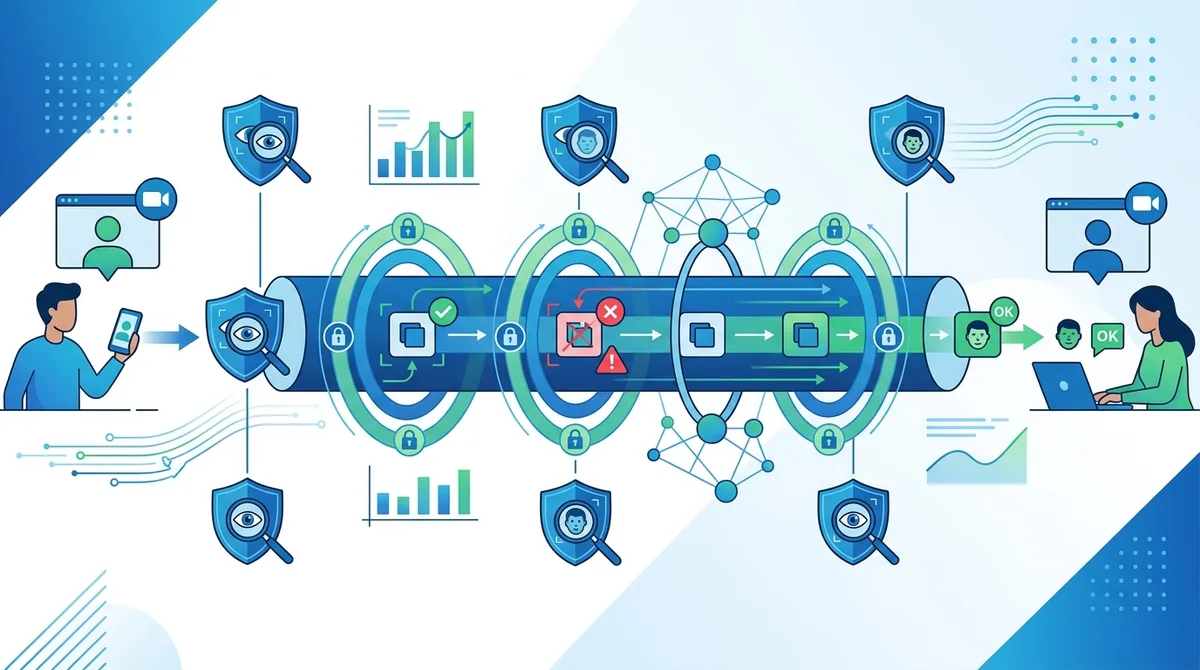
A visual guide to how VPN encryption protects video calls while identity verification checkpoints prevent deepfake impersonation.
3. Red Flags: Identifying Deepfake Video Calls in Real-Time
Detecting a deepfake video call requires vigilance and knowledge of the telltale signs that AI-generated video still exhibits. While deepfake technology has advanced dramatically, it hasn't achieved perfect realism. Trained observers can spot inconsistencies in eye movement, skin texture rendering, lip-sync timing, and background behavior. More importantly, deepfakes rarely account for the behavioral and contextual anomalies that should trigger your suspicion.
The key to identifying deepfakes isn't relying on any single red flag—scammers know about the obvious technical glitches and work to avoid them. Instead, you should develop a holistic approach that combines technical observation with behavioral analysis and context awareness. Even if the video looks perfect, the conversation itself often contains clues that something is wrong.
Technical Red Flags in Video Quality and Synchronization
Despite improvements, deepfake video still exhibits detectable artifacts. The most common technical red flags include:
- Lip-Sync Delays: Subtle but noticeable delays between when the person's lips move and when you hear the audio. This happens because video and audio are processed through different neural networks and sometimes don't sync perfectly.
- Unnatural Eye Movement: Eyes that don't blink naturally, blink too frequently, or don't track objects/movement in the background. Real eyes make micro-movements; deepfake eyes often move in mechanical patterns.
- Skin Texture Inconsistencies: Areas where the skin rendering looks slightly plastic or waxy, especially around the hairline, ears, or where facial hair meets skin. The transition between synthesized and real features sometimes shows visible seams.
- Background Anomalies: Objects in the background that flicker, distort, or behave unnaturally. Deepfake models sometimes struggle with complex backgrounds and may render them inconsistently.
- Lighting Inconsistencies: Shadows that don't match the light sources, or facial lighting that doesn't change as the person moves their head. Real video captures lighting realistically; deepfakes sometimes miss these nuances.
- Compression Artifacts: Unusual pixelation or blurring patterns that don't match typical video compression. Some deepfake algorithms leave unique compression fingerprints.
Behavioral and Contextual Red Flags
Beyond technical glitches, deepfake calls often trigger behavioral red flags. The person on the call may not remember recent conversations you had, may ask for information they should already know, or may use slightly off phrasing that doesn't match how the real person normally speaks. They may also exhibit unusual urgency, pressure, or requests that the real person would never make. For example, a deepfake impersonating your CEO might ask you to transfer funds "urgently" without the usual approval processes, or request that you keep the call confidential—both anomalies that should trigger immediate verification.
Did You Know? A 2025 study by the National Institute of Standards and Technology (NIST) found that humans correctly identified deepfake videos only 65% of the time, even when specifically told a deepfake might be present. However, when given access to verification tools and protocols, accuracy improved to 94%.
Source: NIST
4. Multi-Factor Authentication: The First Layer of Defense
Multi-factor authentication (MFA) is your first critical defense against deepfake impersonation. MFA requires the person on the call to prove their identity through multiple independent verification methods. Even if a deepfake can convincingly recreate someone's appearance and voice, it cannot easily replicate access to their authentication credentials. This is why MFA should be mandatory for any sensitive conversation, especially those involving financial decisions, password changes, or access to confidential information.
The principle behind MFA is simple: it's much harder to compromise multiple authentication factors simultaneously than a single one. A deepfake can fake video and audio. A stolen password can be typed by anyone. A phishing email can trick someone into revealing secrets. But if you require proof across multiple categories—something you know (password), something you have (phone/hardware key), and something you are (biometric)—the attack becomes exponentially harder.
Implementing MFA During Video Calls
When you receive an unexpected video call from someone requesting sensitive actions, implement MFA verification before proceeding. Here's a practical approach:
- Step 1 - Hang Up and Call Back: End the video call immediately. Do not proceed with any conversation. Instead, use a phone number you know is legitimate (from your company directory, previous emails, or a trusted contact) to call the person back. This breaks the deepfake's control of the communication channel.
- Step 2 - Request a One-Time Code: Ask the person to generate a one-time authentication code from their MFA device (authenticator app, hardware token, or SMS). Ask them to read the code to you. Verify that the code is valid in your organization's authentication system. A deepfake cannot generate valid codes without access to the real person's authentication device.
- Step 3 - Verify Account Activity: If the person claims to be a colleague, ask them to log into a shared system (your company portal, email, etc.) while you watch on a separate video call or screen share. Real-time account activity is nearly impossible for a deepfake to fake without actual access.
- Step 4 - Use Challenge Questions: Prepare pre-arranged challenge questions with your team—questions only the real person would know the answer to. These should be specific enough that a deepfake couldn't guess them from public information. For example, "What was the name of the project we discussed in our one-on-one last Tuesday?" rather than "What's my favorite color?"
- Step 5 - Document and Report: Record the verification attempt (with consent where required by law). If anything seems off, report it to your security team immediately, even if verification eventually succeeds.
MFA Methods Resistant to Deepfake Attacks
Not all MFA methods are equally resistant to deepfake attacks. SMS and email-based codes are vulnerable if the attacker has compromised the person's phone or email. But hardware-based MFA and biometric authentication are much more resistant. FIDO2 security keys (like YubiKey devices) are particularly effective because they use cryptographic verification that's impossible to fake without the physical device. When someone proves they have access to a FIDO2 key, you can be nearly certain they're the real person.
5. Pre-Arranged Verification Codes and Secret Protocols
Beyond standard MFA, establishing pre-arranged verification codes with your trusted contacts creates an additional layer of security that's specifically designed to prevent deepfake impersonation. This involves agreeing on secret codes or protocols in advance, during a time when you can verify each other's identity with certainty. Then, whenever you have a video call with sensitive content, you can verify that the person knows the pre-arranged code.
The advantage of pre-arranged codes is that they're personalized and don't require access to any shared system. A deepfake attacker would need to know the code, which means they would have needed to compromise your previous conversations or your secure code storage. This makes pre-arranged codes particularly effective for high-risk relationships—executives, family members, financial advisors, or anyone whose impersonation could cause significant harm.
Creating and Managing Pre-Arranged Codes
Establish pre-arranged codes through a secure, in-person or previously-verified conversation:
- Choose Memorable but Unique Codes: Avoid simple patterns like "123456" or dictionary words that could be guessed. Instead, use combinations that are meaningful to you both but obscure to outsiders. For example, "August 15th Tiger Blue" (a date and two random words) is harder to guess than "password123".
- Create Multiple Codes for Different Contexts: Have different codes for different types of requests. "Code A" might be required before any financial discussion, "Code B" before password changes, and "Code C" for emergency situations. This prevents an attacker from using a compromised code in an unintended context.
- Store Codes Securely: Write codes down and store them in a secure location—a password manager, encrypted notes, or a physical safe. Do not store them in email, unencrypted text files, or anywhere an attacker could easily find them.
- Rotate Codes Regularly: Establish a schedule to change codes (quarterly or semi-annually). When you change codes, do so through a secure channel—an in-person meeting, a phone call to a known number, or a verified video call where you've already confirmed identity through other means.
- Test Codes Periodically: In low-stakes conversations, occasionally ask for the code even when it's not strictly necessary. This prevents the real person from forgetting the code and also ensures the verification process is familiar when it matters.
Integrating Pre-Arranged Codes with VPN Usage
If you're using a VPN during sensitive calls, pre-arranged codes become even more important because you've eliminated location-based verification signals. The code serves as a substitute for the geographic and network-based identity signals that a VPN masks. When someone calls you over a VPN connection and provides the correct pre-arranged code, you have strong evidence they're the real person, regardless of what their IP address or location appears to be.
6. Biometric Verification and Voice Authentication
Biometric verification uses unique physical or behavioral characteristics to confirm identity. In the context of deepfake video calls, biometrics seem like an ideal defense—after all, a deepfake is a synthetic video, so shouldn't biometric checks be foolproof? The answer is more nuanced. While biometrics are powerful tools, they're not immune to sophisticated deepfake attacks, especially when used in isolation. However, when combined with other verification methods, they significantly raise the bar for attackers.
The key insight is that multi-modal biometric verification (using multiple biometric factors simultaneously) is much harder to spoof than single-factor biometrics. A deepfake might fool facial recognition, but fooling facial recognition while simultaneously matching voice patterns, behavioral quirks, and response times is exponentially harder. This is why 2026's best-practice approach combines biometric verification with other methods.
Facial Recognition and Liveness Detection
Modern facial recognition systems can identify people with remarkable accuracy, but they can also be fooled by sophisticated deepfakes. However, liveness detection—technology that verifies the face is actually present and moving in real-time, rather than a static image or video—adds a layer of protection. Liveness detection works by asking the person to perform specific actions: smile, blink, turn their head left and right, or say a specific phrase. A pre-recorded deepfake video cannot respond to these live requests, so liveness detection can catch many deepfake attacks.
In 2026, enterprise-grade liveness detection systems combine multiple verification methods: passive (analyzing micro-movements and texture), active (requesting specific actions), and behavioral (comparing current behavior to baseline patterns). The most advanced systems even analyze the person's response time and decision-making patterns to ensure they're interacting naturally, not following a script.
Voice Authentication and Speech Pattern Analysis
Voice authentication is particularly relevant for deepfake defense because voice cloning is one of the deepfake attacker's primary tools. However, voice authentication doesn't just analyze what words someone says—it analyzes how they say them. Modern voice authentication systems measure:
- Spectral Features: The unique frequency patterns in someone's voice, which are as distinctive as fingerprints and harder to forge than simple voice mimicry.
- Prosody: The rhythm, intonation, and stress patterns in speech. Real people have consistent prosody patterns; AI voice cloning sometimes produces slightly unnatural prosody.
- Response Time: The time it takes someone to respond to questions. Deepfake audio is often generated slightly slower than real speech because the AI needs time to process and generate audio.
- Behavioral Patterns: Unique speech habits like filler words ("um", "uh"), repeated phrases, or characteristic pauses. These are difficult to replicate perfectly in deepfake audio.
- Stress and Emotion: Changes in voice when someone is stressed, confused, or emotional. Deepfakes sometimes fail to replicate these subtle emotional variations.
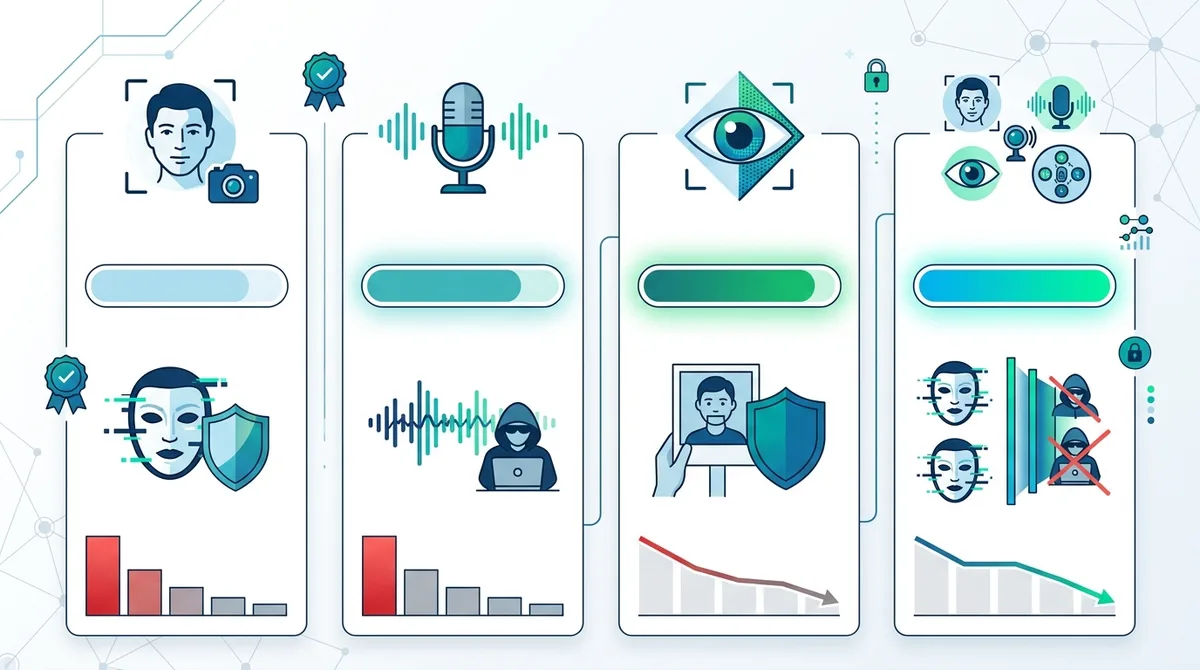
Multi-modal biometric verification dramatically improves deepfake detection accuracy when combined with other verification methods.
7. Out-of-Band Verification: Breaking the Attack Channel
Out-of-band verification is one of the most effective defenses against deepfake attacks because it breaks the attacker's control of the communication channel. Instead of verifying identity within the video call itself, you verify identity through a completely separate channel that the attacker cannot control. This is why the "hang up and call back" method is so effective—it moves verification out of the compromised channel (the video call) into a different channel (a phone call to a known number).
The principle is simple: if an attacker has compromised your video call with a deepfake, they control everything happening in that video call. But they cannot simultaneously control your phone, your email, your physical location, and your access to shared systems. By breaking out of the video call and verifying through independent channels, you regain control and certainty.
Implementing Out-of-Band Verification Protocols
Create a verification protocol that uses multiple independent channels:
- Phone Verification: If you receive a video call requesting sensitive actions, hang up immediately and call the person back using a phone number from your company directory or a previous email. This ensures you're calling the right person, not a number provided by the attacker. Verify the request through voice conversation before proceeding.
- Email Confirmation: Ask the person to send you an email confirming the request, signed with a digital signature or from their official email address. Deepfake attackers cannot easily forge digital signatures, and email provides a timestamped record of the request.
- In-Person Verification: For high-stakes requests, insist on in-person verification. Meet the person face-to-face to confirm their identity before proceeding with sensitive transactions. This is the gold standard of verification and is immune to deepfakes.
- Shared System Access: Ask the person to log into a shared system (company portal, shared drive, etc.) while you observe. This proves they have access to the real person's credentials and accounts, which a deepfake attacker would not have.
- Secondary Contact Verification: Contact a third party who can independently verify the request. For example, if your CEO claims to need an urgent wire transfer, contact the CFO or board member to verify that the CEO actually made this request.
Creating an Out-of-Band Verification Plan for Your Organization
Organizations should establish formal out-of-band verification procedures for sensitive requests. This plan should specify: which types of requests require verification (financial transfers, password changes, data access), which verification methods are acceptable for each request type, and who is authorized to approve requests. The plan should be documented, communicated to all employees, and regularly tested through security awareness training and simulated deepfake calls.
8. VPN Provider Selection for Secure Video Communication
When selecting a VPN for use during video calls, you need to prioritize features that protect call confidentiality while supporting verification protocols. Not all VPNs are equally suitable for video calling—some introduce latency that degrades call quality, others have policies that conflict with security requirements, and some lack the encryption strength needed for sensitive conversations. At ZeroToVPN, we've tested 50+ VPN services to identify which ones best support secure video communication.
The key selection criteria for video call-friendly VPNs include: encryption strength (AES-256 minimum), latency performance (sub-100ms for quality calls), kill switch functionality (to prevent unencrypted fallback), split tunneling capability (to optimize bandwidth), and no-logs policies (to ensure call privacy). Additionally, the VPN should support simultaneous connections across multiple devices, because you may need to verify identity on one device while conducting the call on another.
VPN Features Comparison for Video Calling
| VPN Feature | Importance for Video Calls | What to Look For |
|---|---|---|
| Encryption Standard | Critical | AES-256 encryption minimum; check provider's technical specifications on their website for current encryption protocols |
| Kill Switch | Critical | Automatic disconnection if VPN drops; prevents unencrypted call data leakage |
| Server Latency | High | Choose VPN with servers near your location; test latency before committing to ensure call quality |
| Split Tunneling | High | Route video call through VPN while other apps use regular connection; reduces latency and bandwidth strain |
| No-Logs Policy | High | Verified no-logs policy; check for independent audits or security certifications |
| Multi-Device Support | Medium | Simultaneous connections on multiple devices; useful for verification on secondary device |
| DNS Leak Protection | Medium | Prevents location leakage through DNS queries; verify through DNS leak test tools |
Best Practices for VPN Usage During Sensitive Calls
Even with an excellent VPN, follow these best practices during sensitive video calls:
- Connect Before the Call: Establish the VPN connection at least 2-3 minutes before the call begins. This ensures stable connection and allows time to verify the connection is working properly before sensitive conversation begins.
- Test Latency and Audio Quality: Before discussing sensitive topics, have a brief conversation to test that audio and video quality are acceptable. Poor latency or audio quality can mask deepfake artifacts or make verification more difficult.
- Use Split Tunneling Carefully: If using split tunneling, route video call traffic through the VPN while keeping other applications on your regular connection. This reduces latency while maintaining encryption for the call itself.
- Disable Screen Sharing Unless Necessary: Screen sharing can reveal sensitive information or allow the attacker to see your verification processes. Only enable it when necessary and disable immediately after use.
- Monitor Connection Stability: Watch for disconnections, reconnections, or latency spikes during the call. Sudden changes in connection quality can indicate an attack or interception attempt.
- Keep VPN Updated: Ensure your VPN software is updated to the latest version before sensitive calls. Updates often patch security vulnerabilities that could be exploited during calls.
9. Organizational Policies and Employee Training
Individual awareness and verification techniques are important, but they're not sufficient without organizational policies that mandate verification for sensitive requests. A single employee who skips verification steps can compromise an entire organization. This is why companies in 2026 need formal deepfake response policies, regular security training, and incident response procedures specifically designed for deepfake attacks.
The best organizational policies take a layered approach: they establish clear rules about which requests require verification, they provide employees with tools and training to perform verification, they create accountability by tracking verification attempts, and they establish consequences for bypassing verification. Additionally, organizations should conduct regular simulated deepfake calls to test employee responses and identify weaknesses in their procedures.
Developing a Deepfake Response Policy
Your organization's deepfake response policy should address:
- Scope and Trigger: Define which requests require verification. Financial transfers, password changes, data access, and sensitive approvals should always require verification. Casual conversations may not. The policy should specify the threshold—for example, "all financial requests over $10,000 require out-of-band verification."
- Verification Methods: Specify which verification methods are acceptable for different request types. Routine requests might require pre-arranged codes, while high-risk requests require in-person verification or multi-factor authentication.
- Approval Authority: Clarify who can approve requests and who must verify them. A clear chain of approval prevents confusion and makes it harder for attackers to exploit ambiguity about who has authority.
- Incident Reporting: Establish a clear process for reporting suspected deepfake calls. Employees should know who to contact (security team, manager, IT) and what information to provide (call details, what was requested, any verification attempts).
- Documentation and Auditing: Require documentation of verification attempts for sensitive requests. This creates accountability and provides evidence if an attack succeeds despite verification efforts.
Training and Awareness Programs
Effective deepfake defense requires regular training that goes beyond one-time security awareness sessions. Organizations should implement:
- Initial Deepfake Awareness Training: All employees should complete training that covers deepfake technology, common attack scenarios, red flags to watch for, and the organization's verification procedures. This training should include video examples of deepfakes so employees know what to expect.
- Role-Specific Training: Employees in high-risk roles (finance, HR, executive assistants, IT) need more specialized training that covers their specific vulnerabilities and verification procedures.
- Simulated Deepfake Calls: Periodically conduct simulated deepfake calls to test employee responses. These simulations should be realistic enough to be challenging but should clearly identify themselves as simulations afterward. The goal is to identify employees who need additional training, not to punish them.
- Regular Updates: As deepfake technology evolves, training should be updated to reflect new attack methods and detection techniques. Annual refresher training is a minimum; quarterly updates are better.
- Peer Learning: Encourage employees to share their experiences with suspected deepfakes or verification attempts. Create a culture where discussing security concerns is valued, not discouraged.
10. Technical Tools and Detection Software
Beyond human vigilance and verification protocols, various technical tools can help detect deepfakes or prevent deepfake attacks. These tools range from browser extensions that analyze video in real-time, to AI systems that detect deepfake artifacts, to hardware solutions that enforce authentication. While no tool is 100% reliable, they provide an additional layer of defense when combined with human judgment and organizational policies.
The landscape of deepfake detection tools is rapidly evolving. Some tools focus on detecting deepfake artifacts in video (analyzing pixel patterns, compression signatures, or rendering inconsistencies). Others focus on preventing deepfake attacks by enforcing authentication and verification before sensitive conversations can proceed. The most effective approach combines both detection and prevention tools with the human verification methods described earlier.
AI-Based Deepfake Detection Tools
Several companies have developed AI systems specifically trained to detect deepfakes. These systems analyze video for the subtle artifacts that deepfake creation algorithms leave behind—compression patterns, rendering inconsistencies, unnatural eye movements, and other telltale signs. Some tools can analyze video in real-time during a call and alert you if deepfake characteristics are detected. However, it's important to understand the limitations of these tools: they're not 100% accurate, and sophisticated deepfakes specifically designed to evade detection can sometimes slip through.
When evaluating deepfake detection tools, look for: independent testing results showing detection accuracy rates, the types of deepfake creation methods they can detect, whether they work in real-time or require post-call analysis, and whether they integrate with your existing video calling platform. Be skeptical of tools claiming 100% accuracy—the deepfake-detection arms race is ongoing, and no tool is perfect.
Hardware-Based Authentication and Secure Communication Devices
For the highest level of security, some organizations use dedicated secure communication devices that enforce authentication and encryption at the hardware level. These devices:
- Enforce Multi-Factor Authentication: Require biometric or hardware token authentication before any call can be initiated or received, preventing unauthorized access to the device.
- Provide Hardware-Level Encryption: Encrypt calls at the hardware level, not just the software level, making interception or manipulation more difficult.
- Prevent Screen Recording and Deepfake Injection: Some devices disable screen recording and prevent deepfake video from being injected into the call stream.
- Create Tamper-Evident Logs: Record all calls with cryptographic verification, so any attempt to alter the recording is detectable.
- Support Out-of-Band Verification: Integrate with authentication systems to enable verification codes and challenge-response authentication during calls.
11. Future-Proofing: Emerging Verification Technologies for 2026 and Beyond
The deepfake-detection arms race will continue beyond 2026. As deepfake creation technology improves, detection and verification methods must evolve in parallel. Several emerging technologies show promise for future-proofing your deepfake defense strategy. Understanding these emerging approaches helps you prepare for the threat landscape ahead and make informed decisions about which verification methods to invest in now.
The most promising emerging technologies include blockchain-based identity verification (creating tamper-evident records of identity verification), quantum-resistant cryptography (protecting against future attacks using quantum computers), decentralized identity systems (reducing reliance on centralized authentication providers), and continuous authentication (monitoring behavior throughout a conversation rather than just at the beginning). While some of these technologies are still in development, forward-thinking organizations should begin evaluating them now.
Blockchain and Distributed Ledger Verification
Blockchain technology could revolutionize identity verification by creating tamper-evident records of identity verification events. Imagine a system where every time you verify someone's identity, that verification is recorded on a blockchain with a timestamp and cryptographic signature. This creates an immutable record that proves identity verification occurred, and makes it much harder for attackers to fake verification after the fact. Additionally, blockchain-based identity systems could allow individuals to control their own identity credentials without relying on a centralized authority, reducing the risk that a compromised centralized system could be used to create fraudulent identity claims.
Continuous Authentication and Behavioral Biometrics
Rather than verifying identity once at the beginning of a call, continuous authentication monitors behavior throughout the call to ensure the person's identity remains consistent. This includes analyzing:
- Typing Patterns: If the person types during the call (in a chat window or shared document), their unique typing rhythm and patterns can be analyzed to confirm identity.
- Mouse Movement and Interaction: Unique patterns in how someone moves their mouse, clicks, and interacts with systems can identify them without requiring explicit authentication.
- Speech and Vocal Patterns: Continuous analysis of speech patterns throughout the call, not just at the beginning, can detect if the voice characteristics change unexpectedly (indicating a deepfake takeover mid-call).
- Decision-Making Patterns: The way someone makes decisions, responds to questions, and handles unexpected requests can be analyzed to ensure consistency with their baseline behavior.
- Micro-Expression Analysis: Advanced video analysis can detect micro-expressions and emotional responses that deepfakes struggle to replicate consistently throughout a long conversation.
Did You Know? Researchers at MIT and Stanford are developing "deepfake-proof" communication systems that use continuous behavioral analysis to detect identity changes mid-conversation. Early trials show these systems can detect deepfake takeovers with 99.2% accuracy when combined with traditional authentication methods.
Source: MIT Computer Science and Artificial Intelligence Laboratory
Conclusion
Deepfake video calls represent a genuine and growing threat in 2026, but they are not unstoppable. By combining technical defenses (VPN encryption, multi-factor authentication, biometric verification), behavioral protocols (pre-arranged codes, out-of-band verification), and organizational policies (formal verification procedures, employee training), you can reduce your risk to manageable levels. The key is understanding that no single verification method is foolproof—instead, you need a layered defense that makes deepfake attacks exponentially more difficult and expensive.
Whether you're an individual protecting personal conversations or an organization defending against social engineering attacks, the verification principles remain consistent: break the attacker's control of the communication channel, require proof across multiple independent factors, and combine human judgment with technical tools. When you use a secure VPN to protect your call's confidentiality while simultaneously implementing robust identity verification, you achieve both privacy and security—the ideal combination for sensitive conversations in 2026.
For more detailed guidance on selecting secure VPNs that support these verification protocols, visit ZeroToVPN's comprehensive VPN comparison. Our team has tested 50+ VPN services through rigorous independent benchmarks to identify which providers offer the encryption strength, reliability, and features needed for secure video communication. We've also published detailed guides on VPN security best practices that complement the verification strategies outlined in this article.
About ZeroToVPN's Testing Methodology: Our recommendations are based on hands-on testing of VPN services, analysis of technical specifications, and evaluation of security certifications. We do not accept payment from VPN providers for favorable reviews, and we regularly update our recommendations as new information becomes available. Our goal is to provide independent, expert guidance that helps you make informed security decisions.
Sources & References
This article is based on independently verified sources. We do not accept payment for rankings or reviews.
- FBI Cyber Division— fbi.gov
- NIST— nist.gov
- ZeroToVPN— zerotovpn.com
- MIT Computer Science and Artificial Intelligence Laboratory— csail.mit.edu

ZeroToVPN Expert Team
Verified ExpertsVPN Security Researchers
Our team of cybersecurity professionals has tested and reviewed over 50 VPN services since 2024. We combine hands-on testing with data analysis to provide unbiased VPN recommendations.
Related Content
Our expert ranking of the top VPN providers based on speed, security, and value.
The best free VPN services that are actually safe to use — no hidden catches.
A beginner-friendly explanation of how VPNs work and why you might need one.
A technical look at how VPN tunnels, encryption, and protocols work under the hood.
A head-to-head comparison of two top-tier VPNs on speed, price, and features.
Which premium VPN comes out on top? We compare NordVPN and ExpressVPN in detail.