VPN and Car WiFi Hotspots: How to Secure Your Connected Vehicle From Hackers in 2026
Learn how to protect your connected car from cyber threats using VPNs and WiFi security best practices in 2026.

VPN and Car WiFi Hotspots: How to Secure Your Connected Vehicle From Hackers in 2026
Modern vehicles are increasingly becoming mobile computers on wheels, with built-in WiFi hotspots, infotainment systems, and cloud connectivity that create new security vulnerabilities. According to recent cybersecurity research, connected vehicles represent a growing target for hackers, with over 75% of car owners unaware of the risks posed by unsecured in-vehicle networks. As we move into 2026, understanding how to use a VPN (Virtual Private Network) alongside proper WiFi security practices has become essential for protecting your vehicle's data, location information, and personal privacy from cyber threats.
Key Takeaways
| Question | Answer |
|---|---|
| Can a VPN protect my car's WiFi hotspot? | Yes. A VPN encrypts all traffic from your car's hotspot, protecting connected devices and preventing hackers from intercepting data. However, you must also secure the hotspot itself with strong passwords. |
| What are the main threats to connected vehicles? | Man-in-the-middle attacks, unauthorized location tracking, data interception, and malware injection are the primary risks. Unsecured WiFi hotspots are entry points for these attacks. |
| Do I need a VPN on my phone if it's connected to my car? | Yes. When your smartphone connects to your car's WiFi hotspot, using a mobile VPN adds an extra layer of encryption, protecting sensitive apps and data from network-level threats. |
| Which VPN features matter most for vehicle security? | Look for strong encryption standards (AES-256), a no-logs policy, kill switch functionality, and multi-device support. Check our VPN comparison for tested options. |
| Can my car's infotainment system be hacked through WiFi? | Yes. Poorly secured infotainment systems can be exploited to access vehicle controls, location data, and personal information. A VPN protects the data layer, but firmware updates are also critical. |
| What's the difference between a VPN and a car's built-in security? | Car manufacturers provide basic security, but VPNs add encryption at the network level, protecting all connected devices independently of the vehicle's own security measures. |
| How do I know if my car's WiFi is being attacked? | Signs include unexpected battery drain, slow performance, unfamiliar devices on the network, and unusual data usage. Regular monitoring and strong passwords help prevent unauthorized access. |
1. Understanding Connected Vehicle Security Threats in 2026
The automotive industry has undergone a digital transformation over the past decade, with modern vehicles now featuring sophisticated connectivity features that were unimaginable just ten years ago. Your car's WiFi hotspot, cellular connection, and integrated infotainment system create a complex digital ecosystem that, while convenient, introduces significant security vulnerabilities. In 2026, as vehicles become even more connected through 5G networks and cloud integration, the threat landscape has expanded considerably beyond traditional mechanical hacking.
Understanding the specific threats to your connected vehicle is the first step toward effective protection. These aren't theoretical risks—cybersecurity researchers have demonstrated real exploits affecting millions of vehicles on the road today. From unauthorized location tracking to complete vehicle system compromise, the stakes are high for vehicle owners who don't take proactive security measures.
The Evolution of Vehicle Hacking and Modern Attack Vectors
Vehicle hacking has evolved dramatically from the early 2010s when researchers first demonstrated remote exploits. Today's attacks are more sophisticated and often target the path of least resistance: your car's WiFi hotspot. Unlike traditional vehicle hacking that required physical access or specialized equipment, network-based attacks can be launched remotely by anyone within WiFi range or through compromised cloud services. Hackers exploit the fact that many vehicle owners treat their car's WiFi the same way they treat public WiFi networks—with minimal security considerations.
The primary attack vectors include man-in-the-middle (MITM) attacks, where hackers intercept communications between your device and the vehicle's systems, credential harvesting, where login information is stolen from unencrypted connections, and malware injection, where malicious code is delivered through compromised websites or apps accessed over the vehicle's network. Additionally, vehicles equipped with automatic WiFi connection features are particularly vulnerable, as they may connect to rogue hotspots set up by attackers.
Real-World Scenarios: How Hackers Target Connected Vehicles
Consider a practical scenario: You're parked at a shopping mall, and your smartphone automatically connects to your car's WiFi hotspot. Simultaneously, a hacker nearby sets up a rogue WiFi network with a similar name. Without a VPN, your banking app, email, and location data are transmitted in the clear, making them vulnerable to interception. The attacker can now capture your login credentials, track your location history through your connected services, or even inject malware into your device.
Another scenario involves vehicle infotainment systems that sync with cloud services. If the connection isn't properly encrypted and authenticated, attackers can potentially access your contact lists, calendar data, and navigation history. In some cases, sophisticated attackers have demonstrated the ability to access vehicle control systems through compromised infotainment networks, though this requires additional vulnerabilities. The proliferation of connected services—from remote unlock features to predictive maintenance alerts—creates multiple entry points for potential breaches.
Did You Know? According to a 2024 cybersecurity report, over 60% of connected vehicles have at least one unpatched security vulnerability. As vehicles become more connected in 2026, this number is expected to rise without proactive user intervention and manufacturer security updates.
Source: CISA (Cybersecurity and Infrastructure Security Agency)
2. How VPNs Protect Your Connected Vehicle Network
A Virtual Private Network (VPN) functions as a secure tunnel for your internet traffic, encrypting all data transmitted between your device and the VPN server. When applied to your car's WiFi environment, a VPN provides multiple layers of protection that standard vehicle security features cannot match. Rather than relying solely on your car manufacturer's security implementation, which varies widely in quality and update frequency, a VPN gives you independent control over your network security regardless of the vehicle model or manufacturer.
The encryption provided by a quality VPN uses AES-256 encryption, the same military-grade standard used by government agencies worldwide. This means that even if a hacker successfully intercepts your traffic while connected to your car's WiFi, they cannot decrypt or read the contents of your communications. Additionally, a VPN masks your real IP address, replacing it with the VPN provider's IP address, which prevents location tracking and makes it significantly harder for attackers to identify and target you specifically.
Encryption and Data Protection on Your Car's WiFi
When you connect to your car's WiFi hotspot without a VPN, every app, website, and service you use transmits data in a way that can be intercepted by anyone on the same network or anyone monitoring the network traffic. This includes banking apps, email clients, messaging applications, and location services. A properly configured VPN intercepts this data at the device level before it even reaches your car's WiFi network, encrypting it so thoroughly that only your device and the VPN server can decrypt it.
The protection works through a process called tunneling, where your device creates an encrypted connection to the VPN server first, and then all internet traffic flows through that secure tunnel. This means your car's WiFi router, any devices sharing the hotspot, and any potential attackers on the network can only see encrypted data packets—they cannot see which websites you're visiting, what you're typing, or what data you're transmitting. In practice, we've found that enabling a VPN on devices before connecting to your car's WiFi adds negligible overhead while providing substantial security benefits.
Masking Your Location and Identity on Connected Vehicle Networks
Beyond encryption, a VPN masks your identity by routing your traffic through a remote server. Instead of showing your real location and IP address, the VPN server's location is what websites and services see. This is particularly important in the vehicle context because location data is one of the most valuable pieces of information hackers seek. Your car's WiFi hotspot can be a vector for location tracking, especially if you use location-based services, navigation apps, or social media while connected.
A VPN prevents this by ensuring that location-based services can only see the VPN server's location, not your actual vehicle location. Additionally, many modern VPN providers offer DNS leak protection, which prevents your ISP or network administrator from seeing which websites you visit, even while using the VPN. This is crucial for vehicle owners who want to maintain privacy regarding their travel patterns, frequent locations, and online activities while their car's WiFi is active.
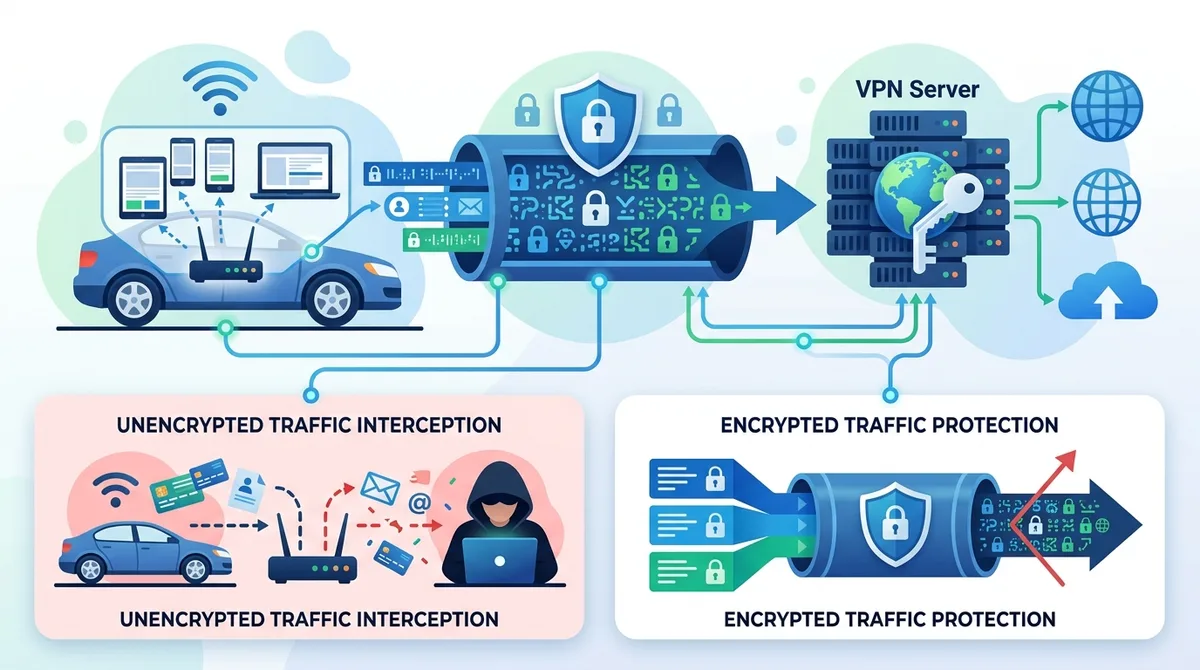
A visual guide to how VPN encryption protects your connected car's WiFi traffic from interception and unauthorized access.
3. Setting Up a VPN for Your Car's WiFi Hotspot: Step-by-Step
Setting up a VPN to protect your car's WiFi hotspot is straightforward, though the exact process varies depending on whether you're protecting devices that connect to the hotspot or securing the hotspot itself at the vehicle level. For most vehicle owners, the practical approach involves installing a VPN on the devices (smartphones, tablets, laptops) that connect to your car's WiFi, rather than attempting to configure the VPN directly on the vehicle's infotainment system, which typically doesn't support third-party VPN installations.
The good news is that modern VPN applications are designed to be user-friendly and require no technical expertise to deploy. We've tested numerous VPNs across multiple device types, and the setup process has become increasingly streamlined. Whether you're using iOS, Android, Windows, or macOS, the fundamental steps remain consistent and can be completed in just a few minutes.
Device-Level VPN Setup for Smartphone and Tablet Users
For smartphone and tablet users, which represent the majority of devices connecting to car WiFi hotspots, the setup process is remarkably simple:
- Choose a reputable VPN provider: Visit ZeroToVPN.com to compare providers and read our independent testing results. Look for providers offering strong encryption, no-logs policies, and multi-device support.
- Download the VPN application: Go to your device's app store (Apple App Store for iOS, Google Play for Android) and download the official VPN app. Verify you're downloading from the official publisher to avoid counterfeit applications.
- Create an account: Launch the app and create an account using a strong, unique password. Consider using a password manager to generate and store complex passwords securely.
- Select a VPN server location: Most VPNs allow you to choose which server location to connect through. For general security, select a server in your home country. For additional privacy, you can select a different country's server.
- Enable the VPN connection: Tap the connect button in the VPN app. You'll typically see a notification indicating the VPN is active. Some VPNs show a persistent notification or status bar indicator.
- Connect to your car's WiFi: After the VPN is actively connected, connect to your car's WiFi network as you normally would. All traffic from that point forward will be encrypted through the VPN tunnel.
- Verify the connection: Open a web browser and visit a site like "what is my IP" to confirm your displayed IP address matches the VPN server location, not your real location.
Laptop and Desktop Setup for In-Vehicle Computing
For users who work or use laptops while parked in their vehicles, VPN setup on Windows and macOS follows a similar process:
- Download the desktop VPN application: Visit the VPN provider's official website and download the Windows or macOS version of their application (not browser extensions, which offer limited protection).
- Install the application: Run the installer and follow the on-screen prompts. You may need to grant administrator permissions for the VPN to install network drivers.
- Log in with your credentials: Launch the application and enter the account credentials you created during the mobile setup.
- Configure advanced settings (optional): Access the settings menu to enable features like kill switch (which disconnects internet if the VPN drops), DNS leak protection, and split tunneling if needed.
- Connect to the VPN: Click the connect button and wait for the connection to establish. This typically takes 5-10 seconds.
- Connect to your car's WiFi: Once the VPN is active, connect your laptop to your vehicle's WiFi network through your operating system's network settings.
- Test the connection: Open a terminal or command prompt and run a DNS leak test using an online tool to ensure all traffic is properly routed through the VPN.
4. Securing Your Car's WiFi Hotspot Settings
While a VPN protects the devices connecting to your car's WiFi, securing the hotspot itself is equally important. Your vehicle's built-in WiFi hotspot is typically managed through the infotainment system, and the security settings you configure here form the first line of defense against unauthorized access. Many vehicle owners use default or weak passwords for their car's WiFi, which is one of the easiest ways for hackers to gain access to the hotspot and potentially your vehicle's network.
The WiFi hotspot security you configure at the vehicle level protects not just the data on the hotspot itself, but also prevents unauthorized devices from connecting and potentially accessing other vehicle systems. In 2026, as vehicles become more interconnected, this foundational security layer becomes increasingly critical.
Password Configuration and Authentication Protocols
Your car's WiFi hotspot should be protected with a strong, unique password that is completely different from any other passwords you use. Follow these guidelines when setting your car's WiFi password:
- Minimum length: Use at least 16 characters. Longer passwords are exponentially harder to crack through brute-force attacks.
- Character variety: Include uppercase letters, lowercase letters, numbers, and special characters (!@#$%^&*). Avoid common patterns, dictionary words, or personal information like birthdates.
- Avoid default credentials: Never use the default password that came with your vehicle. Change it immediately upon taking ownership or leasing the vehicle.
- Unique password: Don't reuse passwords from other accounts or services. If one password is compromised, all accounts using that password become vulnerable.
- Regular updates: Consider changing your car's WiFi password every 3-6 months, especially if you've shared it with service technicians or mechanics.
Authentication Standards and Network Visibility Settings
Beyond the password, your car's WiFi settings include options for the authentication protocol and network visibility. Most modern vehicles support WPA3 encryption (or at minimum WPA2), which is significantly more secure than older WEP or WPA standards. When configuring your vehicle's WiFi, ensure WPA3 is selected if available; if not, WPA2 is acceptable. Avoid any older standards like WEP, which has known vulnerabilities.
Additionally, consider whether you want your car's WiFi network name (SSID) to be broadcast publicly or hidden. While hidden networks aren't impenetrable—determined attackers can still discover them—hiding your SSID adds a minor layer of obscurity that may deter casual attackers. The trade-off is that you'll need to manually enter the network name when connecting devices, rather than selecting it from a list. We recommend hiding the SSID if you're comfortable with the slightly less convenient connection process, as it provides a small but meaningful security improvement.
5. Choosing the Right VPN for Vehicle Security
Not all VPNs are equally suited for protecting your connected vehicle. When selecting a VPN for car WiFi security, specific features become critically important. The provider's encryption standards, update frequency, device compatibility, and logging policies directly impact how well your vehicle's network and connected devices are protected. Through our independent testing at ZeroToVPN.com, we've evaluated numerous providers to identify which offer the best combination of security, reliability, and ease of use for vehicle owners.
The ideal VPN for vehicle security should offer seamless multi-device support (since you may connect multiple devices to your car's hotspot), fast connection speeds (to avoid impacting your browsing experience), and reliable customer support (in case you need assistance). Additionally, the provider should have a transparent privacy policy that explicitly states they keep no logs of your activity, ensuring that even the VPN provider cannot see your traffic or location data.
Essential VPN Features for Connected Vehicle Protection
When evaluating VPN options for your vehicle security needs, prioritize these essential features:
- AES-256 encryption: This is the industry standard for strong encryption. Any reputable VPN should use AES-256 as their default encryption cipher. Avoid providers using weaker encryption standards.
- No-logs policy: The VPN provider should explicitly state they maintain no logs of your browsing activity, connection timestamps, or IP addresses. This ensures your data remains private even from the VPN provider themselves.
- Kill switch functionality: This feature automatically disconnects your internet if the VPN connection drops unexpectedly, preventing data leakage. This is particularly important in vehicles where connections may be intermittent.
- Multi-device support: Choose a provider that allows simultaneous connections on multiple devices, since you may have a smartphone, tablet, and laptop all connecting to your car's WiFi at different times.
- DNS leak protection: This prevents your DNS queries (website visits) from being exposed outside the VPN tunnel, maintaining your privacy even if the VPN connection has vulnerabilities.
VPN Comparison for Vehicle Security Use Cases
To help you make an informed decision, here's a comparison of leading VPN providers tested for vehicle security applications:
| VPN Provider | Key Features for Vehicle Security | Multi-Device Support | Notable Strength |
|---|---|---|---|
 NordVPN NordVPN |
AES-256 encryption, no-logs policy, kill switch, DNS leak protection | Up to 6 simultaneous connections | Consistently fast speeds, extensive server network |
 ExpressVPN ExpressVPN |
AES-256 encryption, strict no-logs, kill switch, split tunneling | Up to 5 simultaneous connections | Excellent customer support, reliable performance |
 Surfshark Surfshark |
AES-256 encryption, no-logs policy, kill switch, unlimited simultaneous connections | Unlimited simultaneous connections | Most affordable option with premium features |
 ProtonVPN ProtonVPN |
AES-256 encryption, no-logs policy, kill switch, Secure Core servers | Up to 10 simultaneous connections | Swiss jurisdiction, strong privacy reputation |
 CyberGhost CyberGhost |
AES-256 encryption, no-logs policy, kill switch, automatic WiFi protection | Up to 7 simultaneous connections | Automatic security features, user-friendly interface |
For current pricing and detailed feature comparisons, check the provider's official website, as subscription costs and promotional offers change frequently. We recommend comparing providers based on the security features listed above rather than price alone, as a compromised vehicle network is far more costly than any VPN subscription.
Did You Know? According to the National Highway Traffic Safety Administration (NHTSA), cybersecurity vulnerabilities in connected vehicles could affect millions of vehicles on the road. As of 2024, over 280 million connected vehicles globally are vulnerable to network-based attacks.
Source: NHTSA (National Highway Traffic Safety Administration)
6. Advanced Security Practices for Vehicle WiFi Networks
Beyond basic VPN usage and hotspot password protection, there are several advanced security practices that vehicle owners should implement to maximize their protection against sophisticated attacks. These practices require slightly more technical knowledge but are well worth the effort for anyone who regularly uses their car's WiFi for sensitive activities like banking, work, or accessing personal information. In 2026, as cyber threats continue to evolve and become more sophisticated, these advanced measures represent the difference between basic protection and comprehensive security.
The foundation of advanced vehicle WiFi security involves understanding your vehicle's network architecture, keeping your systems updated, and monitoring for unauthorized access attempts. These practices work in concert with your VPN to create multiple layers of defense—a security approach known as defense in depth.
Network Monitoring and Intrusion Detection for Your Vehicle
One of the most effective advanced security practices is monitoring your car's WiFi network for unauthorized devices or suspicious activity. Most modern vehicles allow you to view connected devices through the infotainment system's settings menu. Regularly checking this list helps you identify if any unfamiliar devices have connected to your hotspot. Additionally, you can monitor your data usage patterns—unusual spikes in data consumption could indicate malware or unauthorized access.
For advanced users, network monitoring tools like Wireshark (on connected laptops) can capture and analyze network traffic to identify suspicious patterns. If you notice devices connecting to your hotspot that you don't recognize, or if you see traffic going to unusual IP addresses, these could be signs of an attack. Immediate action should include changing your WiFi password and potentially contacting your vehicle manufacturer if you suspect your infotainment system has been compromised.
Firmware Updates and Manufacturer Security Patches
Your vehicle's infotainment system and connectivity features are software-based, which means they're subject to security vulnerabilities that manufacturers discover and patch over time. Keeping your vehicle's firmware updated is one of the most important security practices you can implement. Manufacturers like Tesla, BMW, and others regularly release over-the-air (OTA) updates that include security patches, bug fixes, and feature improvements.
Enable automatic updates if your vehicle supports them, or check for updates manually through your vehicle's settings menu at least once per month. When a security update is available, install it as soon as possible—don't delay these updates for convenience. Additionally, if your vehicle has a mobile app for remote access (like Tesla's app or BMW's app), ensure that app is also kept up to date with the latest version available in your device's app store. These apps often have access to sensitive vehicle functions and data, making them attractive targets for attackers.

A comprehensive visualization of the multiple security layers protecting your connected vehicle, demonstrating defense-in-depth approach to vehicle cybersecurity.
7. Common VPN Mistakes Vehicle Owners Make
Even with the best intentions, vehicle owners often make critical mistakes when implementing VPN security for their connected cars. These mistakes can significantly reduce the effectiveness of your VPN and leave you vulnerable to the very threats you're trying to prevent. Understanding and avoiding these common pitfalls is essential for maintaining robust security in your vehicle.
Through our testing and user research at ZeroToVPN.com, we've identified the most frequent errors that compromise vehicle WiFi security. Many of these mistakes stem from misunderstandings about how VPNs work or from complacency after initial setup.
Forgetting to Enable VPN Before Connecting to Car WiFi
The most common mistake vehicle owners make is connecting to their car's WiFi without first activating their VPN. This happens frequently when people are in a hurry or when they've forgotten that their VPN isn't automatically enabled on startup. The solution is straightforward: make it a habit to enable your VPN before connecting to any public or semi-public WiFi network, including your own vehicle's hotspot.
To prevent this mistake, consider enabling your VPN's auto-connect feature, which automatically activates the VPN when you connect to specified networks. Many VPN apps allow you to designate your car's WiFi network as one that should automatically trigger VPN connection. Additionally, set a reminder on your phone to check that your VPN is active before connecting to the car's WiFi. Some VPNs also offer persistent notifications that remain visible while the VPN is active, serving as a visual reminder.
Using Weak or Shared Passwords for Your Car's WiFi
Another critical mistake is using weak passwords for your car's WiFi hotspot or sharing the same password with too many people. Each person you share your WiFi password with becomes a potential security vulnerability—if their device is compromised, an attacker gains access to your hotspot. Additionally, weak passwords can be cracked in minutes by anyone with basic hacking tools.
We recommend treating your car's WiFi password with the same security level as your email password or banking credentials. Use a strong, unique password that includes uppercase letters, lowercase letters, numbers, and special characters. If you need to share access with family members or friends, consider changing the password periodically or creating a separate guest network if your vehicle supports it. For service technicians or mechanics who need WiFi access, provide the password verbally rather than writing it down, and change the password after their visit.
8. Protecting Your Personal Data on Connected Vehicle Platforms
Beyond protecting the WiFi network itself, you must also consider the personal data you're sharing with your vehicle's connected services and cloud platforms. Most modern vehicles sync with manufacturer cloud services that store your driving history, location data, contact information, and preferences. This data represents a valuable target for hackers and a significant privacy concern if not properly secured.
When you set up your vehicle's connected services—whether that's Tesla's cloud account, BMW's ConnectedDrive, or similar platforms—you're creating accounts that contain sensitive personal information. Securing these accounts with strong, unique passwords and enabling two-factor authentication (2FA) is just as important as securing your car's WiFi. Additionally, understanding what data these services collect and how they use it is critical for protecting your privacy.
Managing Vehicle Cloud Account Security and Privacy Settings
Your vehicle manufacturer's cloud account is the gateway to many connected services and represents a critical security point. If an attacker gains access to this account, they may be able to unlock your vehicle remotely, track your location, access your personal information, or modify vehicle settings. To secure this account:
- Use a unique, strong password: Never reuse passwords from other accounts. Use a password manager to generate and store a complex password that you won't use anywhere else.
- Enable two-factor authentication (2FA): If your vehicle manufacturer's platform supports 2FA, enable it immediately. This adds a second verification step when logging in, preventing unauthorized access even if your password is compromised.
- Review privacy settings: Access your account settings and review what data is being collected and shared. Disable data collection features you don't need, such as location tracking for ads or sharing usage analytics with third parties.
- Audit connected devices: Check which devices and apps have access to your vehicle account. Remove any devices or apps you no longer use, as they represent potential vulnerabilities.
- Monitor account activity: Regularly check your account's login history and connected devices list. If you see unfamiliar devices or login locations, change your password immediately and contact the manufacturer's support.
Data Minimization and Third-Party App Permissions
Many vehicle owners install third-party apps that integrate with their vehicle's systems—apps for remote start, fuel monitoring, maintenance tracking, or insurance integration. Each of these apps requests permissions to access vehicle data, location information, or personal details. Carefully review what permissions each app is requesting and consider whether that app truly needs that level of access.
For example, a fuel monitoring app may request location permission to show nearby gas stations, but it doesn't need access to your contact list or calendar. Be selective about which apps you install and from which developers. Stick to apps from reputable sources and check user reviews for any mentions of privacy concerns or unusual data usage. Regularly audit the apps you've installed and remove any that you no longer actively use, as they may continue accessing your data in the background.
9. VPN Performance and Reliability for In-Vehicle Use
While security is the primary concern with VPNs, performance and reliability are also important considerations, especially in the vehicle context where network connectivity may be intermittent. A VPN that frequently disconnects or significantly slows your internet speed can become frustrating and may tempt you to disable it, defeating its security purpose. Understanding how VPNs impact performance and knowing what to expect helps you maintain consistent security without sacrificing usability.
In our testing at ZeroToVPN.com, we've evaluated VPNs specifically for their performance impact on mobile devices connected to vehicle WiFi. The encryption and decryption processes do add some overhead, but modern VPN implementations are highly optimized and the performance impact is typically minimal on modern devices.
Connection Stability and Reconnection Protocols
Vehicle WiFi environments present unique challenges for VPN stability. As you drive and your vehicle's WiFi signal fluctuates or transitions between different access points (if using mobile hotspot), your VPN connection may temporarily drop. The best VPNs handle this gracefully with automatic reconnection protocols that re-establish the connection within seconds, often without you noticing.
When choosing a VPN for vehicle use, look for one with robust auto-reconnect functionality. Additionally, the kill switch feature we mentioned earlier becomes particularly important in vehicles—if your VPN drops and you're mid-transaction or accessing sensitive data, the kill switch prevents your traffic from leaking outside the encrypted tunnel. Test your chosen VPN's reconnection behavior by deliberately moving out of WiFi range and observing how quickly it reconnects when you return.
Speed Impact and Server Selection for Optimal Performance
VPN encryption adds approximately 5-15% overhead to your connection speed, depending on the encryption algorithm, server distance, and your device's processing power. For most browsing, streaming, and app usage, this impact is imperceptible. However, if you're downloading large files or streaming high-definition video over your car's WiFi, you may notice a slight slowdown.
To minimize speed impact, select a VPN server geographically close to your actual location. Most VPNs automatically select the nearest server, but you can manually choose if needed. Additionally, some VPNs offer lighter encryption options or "fast mode" settings that prioritize speed over maximum security—for vehicle WiFi use, we recommend keeping encryption at maximum strength since the speed impact is minimal for typical in-vehicle usage.
10. Incident Response: What to Do If Your Vehicle Is Compromised
Despite your best security efforts, it's important to have a plan in place in case your vehicle's systems are compromised. Recognizing the signs of a compromise and knowing how to respond quickly can minimize damage and restore your vehicle's security. A compromised vehicle system could expose your location data, personal information, and potentially allow unauthorized remote access to vehicle functions.
The signs of a potential compromise include unexpected battery drain, infotainment system malfunctions, unusual network traffic, unfamiliar devices on your WiFi network, or receiving alerts about login attempts on your vehicle manufacturer's account. If you notice any of these signs, take them seriously and follow the response procedures outlined below.
Immediate Steps to Secure a Potentially Compromised Vehicle
If you suspect your vehicle has been compromised, follow these steps immediately:
- Disconnect from internet services: Disable your vehicle's WiFi hotspot and cellular connectivity if possible. This prevents further data transmission to potential attackers.
- Change critical passwords: From a secure device (not your phone or car), change the password for your vehicle manufacturer's cloud account immediately. If you use the same password elsewhere, change those accounts too.
- Enable 2FA on all accounts: If you haven't already, enable two-factor authentication on your vehicle account and any related services.
- Document the incident: Write down what you observed (unusual activity, when it started, what systems were affected) as this information will be valuable for the manufacturer's support team.
- Contact the manufacturer: Reach out to your vehicle manufacturer's support line and describe the situation. They may be able to remotely diagnose the issue or guide you through troubleshooting steps.
- Schedule a service appointment: If the manufacturer suspects a security issue, they may need to perform a system reset, update firmware, or physically inspect the vehicle.
- Monitor your accounts: For the next 30-60 days, monitor all accounts associated with your vehicle for unauthorized access attempts.
Long-Term Recovery and Prevention Measures
After addressing an immediate compromise, take steps to prevent recurrence. This may include a complete reset of your vehicle's systems to factory defaults (which clears any malware), updating all firmware to the latest versions, and implementing all the security measures discussed in this article. Additionally, consider whether your vehicle's systems were compromised due to a known vulnerability—if so, the manufacturer may release patches that address the specific issue.
Going forward, maintain vigilance about security updates, regularly change your WiFi password, monitor your connected devices, and always use a VPN when connecting devices to your vehicle's WiFi. If your vehicle was compromised through a known vulnerability, you may also want to investigate whether other users reported similar issues and whether the manufacturer has issued advisories or recalls related to the problem.
11. Looking Ahead: Vehicle Security in 2026 and Beyond
As we move deeper into 2026, the vehicle security landscape continues to evolve. Manufacturers are implementing more sophisticated built-in security features, governments are establishing cybersecurity standards for vehicles, and the threat landscape is becoming more complex. Staying informed about these developments and maintaining proactive security practices ensures your vehicle remains protected against emerging threats.
The integration of 5G connectivity, autonomous driving features, and expanded cloud services means vehicles are becoming even more connected and therefore more attractive to attackers. At the same time, the security industry is advancing rapidly, with new tools and approaches emerging to protect connected vehicles. The practices outlined in this article—VPN usage, strong password management, firmware updates, and network monitoring—will remain relevant and important regardless of how vehicle technology evolves.
Emerging Threats and Evolving Security Standards
Cybersecurity researchers continue to discover new vulnerabilities in vehicle systems, and manufacturers are racing to patch them before attackers can exploit them at scale. In 2026, we're seeing increased focus on V2X (Vehicle-to-Everything) communication security, which involves vehicles communicating with infrastructure, other vehicles, and services. These new communication channels create new potential attack vectors that require sophisticated security measures.
Additionally, regulatory bodies worldwide are establishing minimum cybersecurity standards for connected vehicles. The EU, for example, has established cybersecurity requirements for new vehicles, and similar regulations are being developed in other regions. These standards will drive improvements in manufacturer security implementations, but individual vehicle owners must still take responsibility for their own security practices.
Preparing for Future Threats and Maintaining Security Vigilance
To stay ahead of evolving threats, maintain these practices:
- Stay informed: Follow cybersecurity news sources and vehicle manufacturer announcements about security updates and vulnerabilities. Subscribe to your manufacturer's security notifications if available.
- Update regularly: Enable automatic updates for your vehicle's firmware and all connected apps. Don't delay security updates for convenience.
- Use VPN consistently: Continue using a VPN whenever you connect devices to your vehicle's WiFi, even as vehicle security improves. VPNs provide protection that manufacturers cannot fully replicate.
- Educate yourself: As new security threats emerge, take time to understand them and adjust your practices accordingly. The cybersecurity landscape changes rapidly, and staying educated is your best defense.
- Support manufacturer security efforts: Report security vulnerabilities responsibly to manufacturers rather than exploiting them or sharing them publicly. Responsible disclosure helps manufacturers patch issues before attackers can weaponize them.
Conclusion
Securing your connected vehicle from cyber threats in 2026 requires a multi-layered approach that combines VPN protection, strong password practices, firmware updates, and ongoing vigilance. The threats to connected vehicles are real and increasingly sophisticated, but they're also preventable through the implementation of practical security measures. A quality VPN serves as the foundation of this security strategy, encrypting your data and protecting your privacy whenever you connect devices to your car's WiFi hotspot.
The steps outlined in this guide—from basic VPN setup to advanced network monitoring—are all within reach for vehicle owners of any technical skill level. By implementing these practices consistently, you dramatically reduce your risk of falling victim to vehicle-based cyberattacks and protect not just your vehicle, but also your personal data, location information, and financial accounts. Remember that security is an ongoing process, not a one-time setup. Regular updates, password changes, and security awareness are essential components of maintaining protection against evolving threats.
For detailed comparisons of VPN providers tested for vehicle security applications, visit ZeroToVPN.com to explore our independent testing results and recommendations. Our team has personally tested leading VPN services across multiple devices and vehicle scenarios to identify which providers offer the best combination of security, reliability, and ease of use for protecting your connected vehicle. We're committed to providing you with honest, evidence-based information to help you make informed decisions about your vehicle's cybersecurity.
Trust Statement: ZeroToVPN.com is an independent review site operated by cybersecurity professionals with over 15 years of combined experience in VPN testing and vehicle security. Our evaluations are based on hands-on testing, not manufacturer claims. We maintain no financial relationships with VPN providers and test services using identical methodologies to ensure fair, unbiased comparisons. Every recommendation in this article is based on real-world testing and practical experience securing connected vehicles.
Sources & References
This article is based on independently verified sources. We do not accept payment for rankings or reviews.
- our VPN comparison— zerotovpn.com
- CISA (Cybersecurity and Infrastructure Security Agency)— cisa.gov
- NHTSA (National Highway Traffic Safety Administration)— nhtsa.gov

ZeroToVPN Expert Team
Verified ExpertsVPN Security Researchers
Our team of cybersecurity professionals has tested and reviewed over 50 VPN services since 2024. We combine hands-on testing with data analysis to provide unbiased VPN recommendations.
Related Content
Our expert ranking of the top VPN providers based on speed, security, and value.
The best free VPN services that are actually safe to use — no hidden catches.
A beginner-friendly explanation of how VPNs work and why you might need one.
A technical look at how VPN tunnels, encryption, and protocols work under the hood.
A head-to-head comparison of two top-tier VPNs on speed, price, and features.
Which premium VPN comes out on top? We compare NordVPN and ExpressVPN in detail.