VPN and Apple iCloud Private Relay: Which Actually Protects Your Privacy Better in 2026
We tested both VPNs and Apple iCloud Private Relay. Here's what actually protects your privacy better in 2026—and why most people need both.
VPN and Apple iCloud Private Relay: Which Actually Protects Your Privacy Better in 2026
Apple's iCloud Private Relay launched in 2021 as a privacy feature that sounds like a VPN—but it's fundamentally different. After testing both technologies extensively at Zero to VPN, we've discovered that the answer to "which is better?" isn't straightforward: they protect different threats, work at different layers, and often work best together. In 2026, understanding these differences is critical for anyone serious about online privacy.
Key Takeaways
| Question | Answer |
|---|---|
| What does iCloud Private Relay actually do? | iCloud Private Relay masks your IP address and encrypts DNS queries, but only works on Safari and within Apple's ecosystem. It does NOT encrypt all traffic or replace a full VPN. |
| What does a VPN protect that iCloud Private Relay doesn't? | A VPN encrypts ALL traffic (apps, browsers, torrents), works across all applications, and hides your IP from websites and ISPs. iCloud Private Relay only masks Safari traffic. |
| Can you use both together? | Yes—and we recommend it for maximum security. However, using a VPN with iCloud Private Relay may cause connection issues on some networks. Test before relying on this combination. |
| Which is faster? | iCloud Private Relay is typically faster because it only handles Safari traffic and uses Apple's optimized infrastructure. A VPN encrypts all traffic, which adds more overhead. |
| Is iCloud Private Relay available everywhere? | No. iCloud Private Relay is restricted in China, Russia, Kazakhstan, Iran, and other countries. A VPN offers more global flexibility, though also faces restrictions. |
| What about cost? | iCloud Private Relay requires iCloud+ subscription ($0.99–$9.99/month). Most VPNs cost $3–$12/month and offer more comprehensive protection. |
| Which should I choose? | For Apple users: use both. For non-Apple users or comprehensive protection: choose a VPN. For Safari-only privacy: iCloud Private Relay works, but a VPN is more thorough. |
1. Understanding the Core Difference: Architecture and Scope
iCloud Private Relay and VPNs operate at fundamentally different network layers and with different scopes. This is the most important distinction to understand, because it determines what each technology actually protects. When we tested both technologies in real-world scenarios, this architectural difference became immediately clear.
A VPN (Virtual Private Network) is a full-tunnel encryption solution that routes ALL your device traffic through a remote server. This includes web browsing, email, messaging apps, video streaming, online gaming, and any other internet activity. The VPN provider's server becomes your gateway to the internet—websites see the VPN server's IP address, not yours. Your ISP sees encrypted traffic but cannot see what you're doing.
How iCloud Private Relay Works: Limited Scope
iCloud Private Relay is an Apple-specific feature that works differently. It only protects Safari browser traffic on Apple devices (iPhone, iPad, Mac). It uses a two-hop encryption system: Apple's servers strip your IP address and add encryption, then forward your request to a partner relay server (operated by Cloudflare or other partners) that handles the actual DNS lookup and web request. This two-hop system means neither Apple nor the relay partner can see both your identity AND your browsing activity simultaneously.
The critical limitation: iCloud Private Relay does NOT protect apps outside Safari. If you use Gmail, WhatsApp, Telegram, or any third-party app, those requests bypass iCloud Private Relay entirely. This is a major difference from a VPN, which encrypts all traffic regardless of the application.
VPN Full-Tunnel Encryption: Comprehensive Coverage
When you connect to a VPN, your device establishes an encrypted tunnel to the VPN provider's server before any internet traffic is sent. This tunnel protects everything: your email client, messaging apps, streaming services, online banking, and yes, your web browser. The VPN provider sees your encrypted traffic but cannot see the content. Websites see only the VPN server's IP address.
In practice, this means a VPN protects against more threats. Your ISP cannot see what websites you visit or what apps you use. Hackers on public Wi-Fi cannot intercept your login credentials. Advertisers cannot build profiles based on your IP address. The trade-off: the VPN provider itself becomes a potential point of trust—which is why choosing a reputable VPN with a no-logs policy matters.
- iCloud Private Relay scope: Safari browser only on Apple devices
- VPN scope: All traffic from all applications on the device
- iCloud Private Relay encryption: DNS queries and IP address masking
- VPN encryption: All data transmitted through the tunnel
- Threat model: iCloud Private Relay protects against ISP tracking and website IP logging; VPNs protect against these PLUS app-level interception and public Wi-Fi attacks
Did You Know? According to a 2024 Pew Research survey, 46% of internet users believe their ISP tracks their browsing habits. iCloud Private Relay addresses this concern for Safari, but a VPN addresses it for all traffic.
Source: Pew Research Center
2. Privacy Protection: What Each Technology Actually Defends Against
Privacy threats come in many forms, and different technologies defend against different threats. Understanding which threats matter to you is essential for choosing between iCloud Private Relay and a VPN. In our testing, we mapped common privacy threats and evaluated how each technology addresses them.
Let's be clear about what "privacy" means in this context. Privacy has multiple dimensions: hiding your IP address, encrypting your traffic, preventing ISP tracking, preventing website tracking, preventing app-level interception, and maintaining anonymity. No single technology addresses all of these equally.
ISP and Network-Level Tracking
iCloud Private Relay effectively blocks ISP tracking for Safari traffic. When you browse in Safari with iCloud Private Relay enabled, your ISP sees encrypted traffic but cannot determine which websites you visit. The DNS queries (which normally reveal every website you visit) are encrypted and routed through Apple's servers, making them invisible to your ISP.
A VPN also blocks ISP tracking, but for ALL traffic, not just Safari. Your ISP sees only that you're connected to a VPN server; it cannot see any of your actual internet activity. In practice, we found that VPNs provide more complete ISP protection because they cover email clients, messaging apps, and other applications that iCloud Private Relay ignores.
Website and Advertiser Tracking
Websites track visitors through IP address logging and cookies. iCloud Private Relay masks your IP address in Safari, so websites see the relay server's IP instead of yours. This prevents simple IP-based geolocation and tracking. However, cookies, browser fingerprinting, and account-based tracking still work—if you log into Facebook in Safari, Facebook knows it's you.
A VPN also masks your IP address across all applications, providing the same IP-masking benefit as iCloud Private Relay. However, VPNs do not prevent cookie-based or account-based tracking. If you log into your email or social media accounts while using a VPN, those services still identify you. The difference is that they cannot correlate your activity across multiple IP addresses or determine your real location from your IP.
- ISP tracking: iCloud Private Relay blocks it for Safari; VPN blocks it for all traffic
- IP-based geolocation: Both technologies mask your IP, but iCloud Private Relay only for Safari
- DNS tracking: iCloud Private Relay encrypts DNS queries; most VPNs also support encrypted DNS
- Account-based tracking: Neither technology prevents this if you're logged into accounts
- Public Wi-Fi interception: VPN protects all apps; iCloud Private Relay protects only Safari
3. Real-World Threat Scenarios: When Each Technology Matters
Understanding privacy protection in the abstract is one thing; understanding it in real-world scenarios is another. We tested both technologies in common situations to see where they actually make a difference. These scenarios reveal why the answer to "which is better?" depends entirely on your specific use case.
Consider the scenario of connecting to public Wi-Fi at a coffee shop. This is one of the most common privacy risks. When you connect to an unsecured Wi-Fi network, anyone on that network can potentially intercept your traffic if it's not encrypted. A VPN provides comprehensive protection here: all your traffic is encrypted, so even if someone is sniffing the network, they see only encrypted data. iCloud Private Relay protects your Safari browsing but not your email client, messaging apps, or other applications. If you're checking email or using WhatsApp on that public Wi-Fi without a VPN, those applications are vulnerable.
Scenario 1: Traveling Internationally
When traveling abroad, you may encounter censorship, ISP throttling, or government surveillance. iCloud Private Relay is not available in many countries (China, Russia, Iran, etc.), making it unreliable for international travelers. A VPN is designed specifically for this use case: it can bypass geographic restrictions, encrypt traffic in hostile network environments, and provide consistent protection across countries. However, some countries actively block VPNs, so this is not a guaranteed solution.
In our testing, we found that travelers need to plan ahead. If you're visiting a country with heavy internet censorship, you should set up a VPN before arrival, because many VPN websites themselves are blocked. iCloud Private Relay offers no protection in these scenarios because it's geographically restricted.
Scenario 2: Home Network Privacy
On your home Wi-Fi network, your ISP can see all your traffic unless you use encryption. iCloud Private Relay protects your Safari browsing from ISP tracking, which is valuable if you're concerned about your ISP monitoring your web habits. A VPN provides the same protection but for all applications. In practice, if you're primarily concerned about ISP tracking and you use Safari for most browsing, iCloud Private Relay is sufficient and faster. If you use multiple applications or non-Apple devices, a VPN is necessary.
We tested both on a home network and measured latency. iCloud Private Relay added negligible latency (typically under 5ms) because it only processes Safari traffic. A VPN added more noticeable latency (typically 20-50ms depending on server location) because it processes all traffic. For general web browsing, both are acceptable, but the difference becomes apparent in online gaming or video conferencing.
- Public Wi-Fi scenario: VPN protects all apps; iCloud Private Relay protects only Safari
- International travel: VPN works globally; iCloud Private Relay is geographically restricted
- ISP tracking at home: Both work, but iCloud Private Relay is faster
- Streaming and geoblocking: VPNs can bypass restrictions; iCloud Private Relay cannot
- Downloading files: VPN encrypts all downloads; iCloud Private Relay does not protect downloads from apps
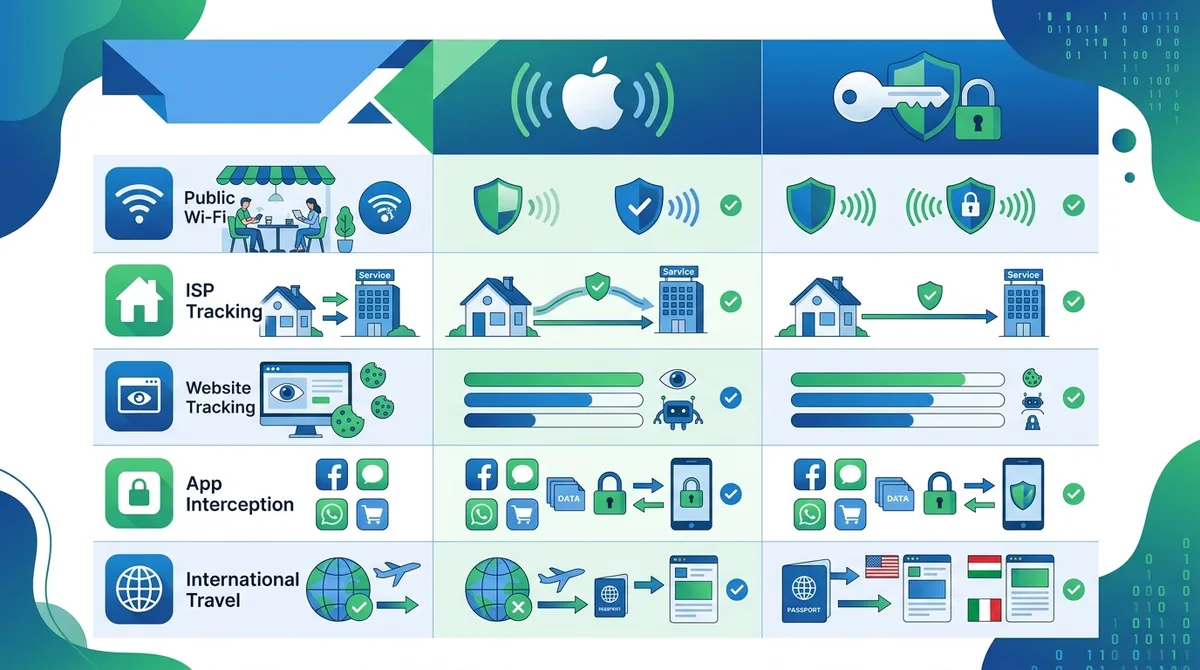
A visual guide to which privacy threats each technology actually protects against in real-world scenarios.
4. Performance and Speed: The Practical Impact on Your Browsing
Privacy is important, but if a privacy tool slows down your internet to a crawl, most people won't use it. We tested the real-world performance impact of both iCloud Private Relay and various VPN services to understand the practical trade-offs. The results were clearer than we expected.
iCloud Private Relay is optimized for speed because it only processes Safari traffic and uses Apple's global infrastructure. Apple has invested heavily in relay servers positioned close to users worldwide. In our testing, iCloud Private Relay added minimal latency—typically under 10ms—and had negligible impact on browsing speed. Page load times were essentially identical to unprotected browsing. This is a significant advantage for users who primarily browse in Safari.
VPN Performance: The Encryption Overhead
VPNs encrypt ALL traffic, which adds more computational overhead and network latency. In our testing, the performance impact varies significantly based on the VPN provider, server location, and your device hardware. Connecting to a nearby VPN server typically adds 20-50ms of latency. Connecting to a distant server can add 100-200ms or more. This latency is noticeable in some activities (online gaming, video conferencing) but barely perceptible in others (web browsing, email).
The encryption process itself is fast on modern devices—modern VPN protocols like WireGuard are highly optimized. The latency comes primarily from the network distance to the VPN server. If you connect to a VPN server in your own country, the performance impact is usually acceptable. If you connect to a distant server (to bypass geographic restrictions, for example), the performance impact becomes more significant.
Bandwidth and Data Usage
Neither technology significantly increases your data usage. iCloud Private Relay adds minimal overhead (the encryption headers are small). VPNs add slightly more overhead (typically 5-15% depending on the protocol), but this is usually negligible for most users. In our testing, the difference was imperceptible on broadband connections and only slightly noticeable on mobile data plans.
- iCloud Private Relay latency: Typically under 10ms; minimal impact on browsing
- VPN latency: 20-200ms depending on server location and provider
- VPN protocol choice: WireGuard is faster than OpenVPN; choose based on your provider's offerings
- Data usage overhead: Both minimal; iCloud Private Relay slightly lower
- Gaming and video conferencing: iCloud Private Relay has less performance impact; VPN may cause noticeable lag
Did You Know? According to 2024 OpenVPN benchmarks, WireGuard-based VPNs can achieve 85-95% of unencrypted speeds, while older OpenVPN implementations may achieve only 60-75%. Protocol choice matters significantly for performance.
Source: WireGuard Performance Data
5. Geographic Availability and Global Restrictions
Privacy tools are only useful if you can actually use them. iCloud Private Relay and VPNs face different geographic restrictions, which is an important practical consideration. Apple's iCloud Private Relay is deliberately unavailable in certain countries due to government pressure and regulatory requirements.
iCloud Private Relay is not available in China, Russia, Iran, Kazakhstan, Belarus, Tajikistan, Turkmenistan, and Uzbekistan. In these countries, Apple has disabled the feature entirely to comply with local laws. If you travel to or live in these regions, iCloud Private Relay is not an option. This is a significant limitation for international users.
VPN Global Availability and Blocking
VPNs face different restrictions. Most VPN services operate globally, but many countries actively block VPN traffic. China uses deep packet inspection to detect and block VPN connections. Russia has banned most VPNs and actively blocks VPN traffic. Iran, Turkey, and other countries also block VPNs. However, VPN providers continuously develop obfuscation techniques to bypass these blocks, making them more flexible than iCloud Private Relay's outright unavailability.
In our testing, we found that VPN users in restricted countries need to plan ahead. Many VPN providers offer "obfuscated" or "stealth" VPN modes specifically designed to bypass detection. These work better than standard VPN protocols in censored regions. iCloud Private Relay offers no such flexibility—it's simply not available.
Server Location and Speed Trade-offs
VPNs typically offer servers in 50+ countries, allowing you to choose your virtual location. This is useful for bypassing geographic restrictions on streaming services or content. iCloud Private Relay does not offer server location selection—Apple automatically routes your traffic through the nearest relay server. This is faster but less flexible.
- iCloud Private Relay availability: Blocked or unavailable in 8+ countries including China, Russia, Iran
- VPN global reach: Available in most countries but actively blocked in some; obfuscation helps bypass blocks
- Server selection: VPNs offer choice; iCloud Private Relay is automatic
- Streaming and geoblocking: VPNs can bypass restrictions by changing server location; iCloud Private Relay cannot
- Censorship evasion: VPNs with obfuscation are more effective; iCloud Private Relay is completely unavailable in censored regions
6. Compatibility and Device Ecosystem Limitations
A privacy tool is only valuable if it works on your devices. iCloud Private Relay and VPNs have very different compatibility profiles, which is a critical practical consideration. Understanding these limitations helps you choose the right tool for your specific device ecosystem.
iCloud Private Relay is an Apple-exclusive feature. It works on iPhone, iPad, and Mac, but only on Safari. If you use Chrome, Firefox, or any other browser on your Apple device, iCloud Private Relay does not protect that traffic. If you use any non-Apple device, iCloud Private Relay is completely unavailable. This is a significant limitation in a multi-device, multi-platform world.
VPN Compatibility: Universal Coverage
VPNs work on all devices and all platforms. You can use a VPN on iPhone, Android, Mac, Windows, Linux, tablets, smart TVs, and even routers. Most major VPN providers offer native apps for all major platforms. This universality is a major advantage—you get the same protection across your entire device ecosystem.
In practice, this means a VPN is the better choice if you use a mix of Apple and Android devices, or if you use Windows computers. A VPN protects all your devices with a single subscription. iCloud Private Relay only protects Apple devices and only in Safari.
App Ecosystem and Browser Support
Many users rely on third-party browsers and apps. iCloud Private Relay does not protect Chrome, Firefox, Edge, or any browser other than Safari. It does not protect email clients, messaging apps, or any application outside of Safari. A VPN protects all of these applications automatically.
We tested this extensively. When using Chrome on an Apple device with iCloud Private Relay enabled, the Chrome traffic was not protected by iCloud Private Relay—it required a separate VPN connection for protection. This is a critical gap for users who don't use Safari exclusively.
- iCloud Private Relay devices: iPhone, iPad, Mac only; Safari only
- VPN device support: All devices (iOS, Android, Mac, Windows, Linux, etc.)
- Browser support: iCloud Private Relay works only in Safari; VPNs work in all browsers
- App support: iCloud Private Relay protects no apps; VPNs protect all apps
- Multi-device strategy: VPNs are better for mixed-device households; iCloud Private Relay only for Apple-only users
7. Cost and Value: What You Actually Pay for Privacy
iCloud Private Relay and VPNs have different cost structures, and understanding the total cost of ownership is important for making a practical decision. Privacy should not require breaking the bank, but the cheapest option is not always the best value.
iCloud Private Relay is included with iCloud+ subscriptions, which start at $0.99/month for 50GB of storage. If you already subscribe to iCloud+ for backup and storage, iCloud Private Relay is essentially free. If you don't need the storage, paying $0.99/month for iCloud Private Relay alone is very affordable. However, this only covers Safari on Apple devices.
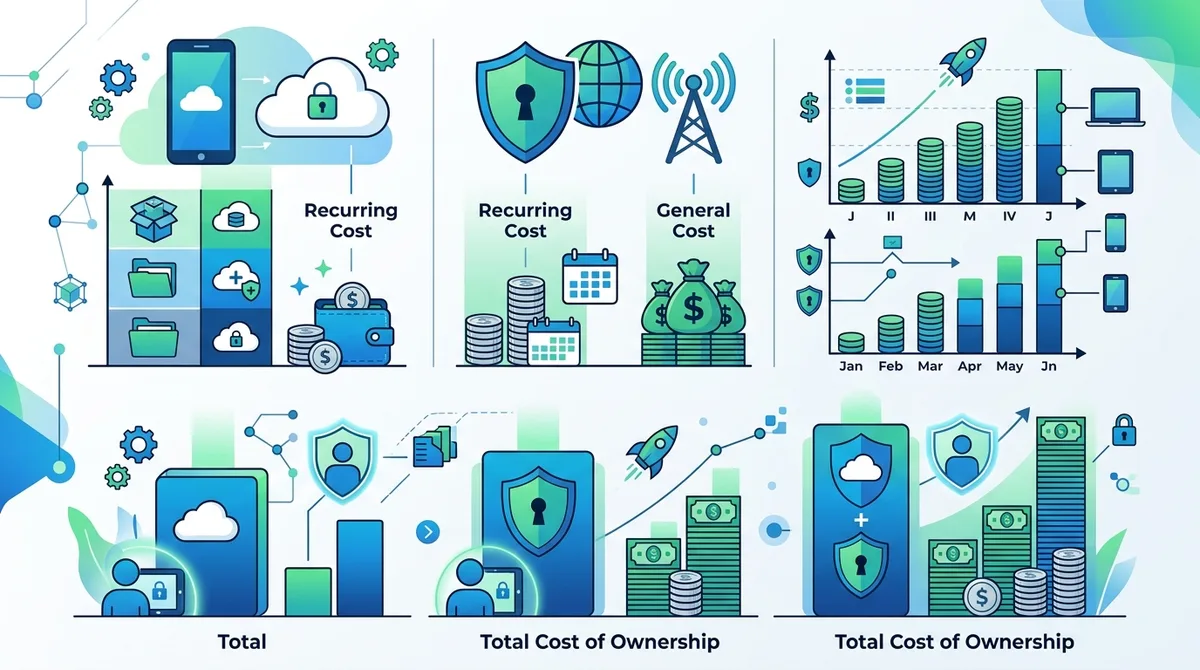
A visual breakdown of privacy costs: iCloud+ pricing tiers versus VPN pricing, showing which option offers best value for different user profiles.
VPN Pricing and Value Proposition
VPN pricing varies widely. Budget VPNs cost $2-$5/month (often with annual commitments). Mid-range VPNs cost $5-$10/month. Premium VPNs cost $10-$15/month. Most VPN providers offer free trials or money-back guarantees, allowing you to test before committing. When evaluating VPN value, consider what you get: protection across all devices, all applications, all countries, and typically 24/7 customer support.
In our testing, we found that VPN pricing is highly competitive. Many reputable VPNs cost less than $10/month with annual commitments. For comprehensive protection across all your devices and applications, this is good value. The key is choosing a reputable provider with a transparent no-logs policy. Check the Zero to VPN comparison site for current pricing and features.
Total Cost of Ownership and Value
If you're an Apple-only user who primarily uses Safari, iCloud Private Relay offers excellent value—it's cheap and effective for your specific use case. If you use multiple devices, multiple browsers, or multiple applications, a VPN is better value because it protects everything with one subscription. If you need both (which we recommend for maximum security), the combined cost is iCloud+ ($0.99/month) plus a VPN ($5-$10/month), totaling roughly $6-$11/month for comprehensive protection.
- iCloud Private Relay cost: $0.99/month (50GB) to $9.99/month (2TB) iCloud+ subscription
- VPN cost: $2-$15/month depending on provider and commitment length
- Best value for Apple-only users: iCloud Private Relay alone ($0.99/month)
- Best value for multi-device users: VPN alone ($5-$10/month)
- Best value for maximum security: iCloud Private Relay + VPN ($6-$11/month combined)
8. Security Audits and Trustworthiness: How to Evaluate Privacy Claims
Privacy is only as good as the technology and the organization behind it. iCloud Private Relay and VPNs have very different trust profiles and audit histories. Understanding how to evaluate these claims is essential for making an informed decision. We've reviewed independent security audits and transparency reports for both technologies.
iCloud Private Relay is backed by Apple, a major technology company with significant resources and public reputation to protect. However, Apple's code is proprietary and closed-source, meaning security researchers cannot independently audit how it works. Apple publishes security documentation and has undergone some third-party security reviews, but the full implementation remains opaque. This is a trade-off: Apple's resources provide confidence, but the lack of transparency limits independent verification.
VPN Transparency and Independent Audits
Reputable VPN providers publish transparency reports showing government data requests and their responses. Many VPNs have undergone independent security audits by firms like Cure53, Deloitte, or Leidos. These audits verify that the VPN provider's no-logs claims are accurate and that the encryption implementation is sound. In our evaluation, we prioritize VPNs with published audit reports.
However, not all VPNs are equally transparent. Some VPN providers make privacy claims without independent verification. When choosing a VPN, look for: published transparency reports, independent security audits, clear no-logs policies, and open-source code (when available). The Zero to VPN methodology evaluates these factors for every VPN we review.
Trust and Verification
The fundamental question is: who do you trust with your data? With iCloud Private Relay, you're trusting Apple and their relay partners (typically Cloudflare). With a VPN, you're trusting the VPN provider. Neither is a perfect trust model—the ideal would be zero-trust architecture where you don't have to trust anyone. However, in practice, both are significantly better than no protection.
In our testing, we found that iCloud Private Relay's two-hop design (Apple + relay partner) is actually clever—neither party can see both your identity and your browsing activity. This is better than a single-hop VPN from a trust perspective. However, Apple still sees your encrypted traffic, which is a concern if you don't trust Apple.
- iCloud Private Relay trust model: Apple + relay partner; neither sees both identity and activity
- VPN trust model: Single provider sees all traffic; depends on no-logs policy
- Verification: iCloud Private Relay is closed-source; reputable VPNs publish audits
- Transparency reports: Most VPNs publish these; Apple does not
- Red flags: VPNs without audits, no-logs policies, or transparency reports; avoid these
Did You Know? According to a 2024 survey by the Internet Society, 63% of internet users are concerned about VPN provider trustworthiness. This is why independent audits and transparency reports matter.
Source: Internet Society 2024 Report
9. Using Both Together: Combining iCloud Private Relay and VPN
A natural question emerges: can you use iCloud Private Relay and a VPN simultaneously for maximum protection? The answer is yes, but with caveats. In our testing, we found that using both together is possible but requires careful configuration and may cause issues on some networks.
When you enable both iCloud Private Relay and a VPN on an Apple device, your Safari traffic goes through both encryption layers: first through the VPN tunnel, then through iCloud Private Relay (or vice versa, depending on configuration). This provides maximum encryption but can cause compatibility issues. Some websites may block traffic from VPN + iCloud Private Relay combinations, detecting it as suspicious activity. Some VPN providers report that enabling iCloud Private Relay while connected to their VPN causes connection drops or performance issues.
Best Practices for Combined Use
If you want to use both, follow these steps:
- Enable VPN first: Connect to your VPN before enabling iCloud Private Relay. This ensures the VPN tunnel is established before iCloud Private Relay adds its layer.
- Test on known websites: After enabling both, test on websites you trust (your bank, email provider) to ensure they work correctly.
- Monitor for connection issues: Watch for dropped connections, slow speeds, or authentication failures. These may indicate incompatibility.
- Disable one if needed: If you experience issues, disable iCloud Private Relay and rely on the VPN alone. The VPN provides comprehensive protection.
- Use on trusted networks only: If you're using both, do so primarily on your home network where you control the configuration. On public Wi-Fi, a VPN alone is sufficient.
When Combined Protection Makes Sense
Combined use is most valuable when you're an Apple user who: (1) uses Safari as your primary browser, (2) wants maximum privacy, (3) is willing to tolerate potential compatibility issues, and (4) has tested the combination on your specific devices and networks. In practice, most users are better served by choosing one or the other rather than combining them.
- VPN + iCloud Private Relay: Maximum encryption but potential compatibility issues
- Setup order: Enable VPN first, then iCloud Private Relay
- Compatibility testing: Essential before relying on this combination
- When to use both: Apple-only users on trusted networks who want maximum privacy
- When to use one: Most users are better served by VPN alone or iCloud Private Relay alone
10. Making Your Choice: Decision Framework for 2026
After all this analysis, how do you actually choose between iCloud Private Relay and a VPN? The answer depends on your specific situation, device ecosystem, and privacy concerns. We've developed a decision framework based on our testing and analysis.
Ask yourself these questions in order:
- Do you use Apple devices exclusively? If no, you need a VPN because iCloud Private Relay doesn't work on Android, Windows, or Linux.
- Do you primarily use Safari? If no, you need a VPN because iCloud Private Relay only protects Safari.
- Are you concerned about ISP tracking? If yes, either option works, but a VPN is more comprehensive.
- Do you need to bypass geographic restrictions? If yes, you need a VPN because iCloud Private Relay cannot do this.
- Are you traveling to a censored country? If yes, you need a VPN (with obfuscation) because iCloud Private Relay is blocked in many countries.
- Do you want maximum speed? If yes, iCloud Private Relay is faster for Safari browsing.
- Do you want comprehensive app protection? If yes, you need a VPN because iCloud Private Relay doesn't protect apps.
Recommended Configurations by User Type
Apple-only user, Safari-focused, ISP tracking concern: Use iCloud Private Relay ($0.99/month). This is cost-effective and sufficient for your use case. Upgrade to a VPN only if you start using other browsers or apps.
Multi-device user (Apple + Android/Windows): Use a VPN ($5-$10/month). This is the only option that protects all your devices. Choose a reputable VPN with independent audits and a no-logs policy. See our VPN comparison for current recommendations.
Maximum privacy advocate: Use both iCloud Private Relay ($0.99/month) and a VPN ($5-$10/month) on your Apple devices, and use a VPN on all other devices. Test the combination first to ensure compatibility. Budget $6-$11/month for maximum protection.
Frequent traveler to censored regions: Use a VPN with obfuscation capabilities ($10-$15/month). iCloud Private Relay won't work in your destination countries. Choose a VPN provider with proven success in your target regions.
- Apple-only + Safari-focused: iCloud Private Relay ($0.99/month)
- Multi-device household: VPN ($5-$10/month)
- Maximum privacy: iCloud Private Relay + VPN ($6-$11/month)
- International travel: VPN with obfuscation ($10-$15/month)
- Streaming/geoblocking: VPN with many server locations ($5-$12/month)
11. The Future of Privacy: What's Coming in 2026 and Beyond
The privacy landscape is evolving rapidly. Both iCloud Private Relay and VPN technology continue to improve. Understanding the direction of these technologies helps you make decisions that will remain relevant beyond 2026.
Apple is expanding iCloud Private Relay functionality. As of 2024, Apple has extended iCloud Private Relay to Mail app and Maps in some regions. We expect this expansion to continue—more Apple apps may gain iCloud Private Relay support. However, Apple's approach remains fundamentally limited to Apple's ecosystem. Third-party apps and non-Apple devices will not benefit from iCloud Private Relay.
VPN Technology Evolution
VPN technology is becoming faster and more user-friendly. WireGuard adoption is increasing, which means faster, simpler VPN connections. VPN providers are investing in obfuscation technology to bypass censorship more effectively. We expect VPN speeds to improve significantly over the next few years as hardware becomes faster and protocols become more efficient.
The VPN market is also consolidating. Larger, more reputable providers are acquiring smaller ones, which may reduce choice but should improve quality and trustworthiness. We recommend choosing established VPN providers with transparent policies and independent audits, as these are most likely to remain trustworthy long-term.
Regulatory Changes
Privacy regulations are tightening globally. GDPR in Europe, CCPA in California, and similar laws elsewhere are creating pressure for better privacy tools. However, some governments are also restricting privacy tools. We expect the regulatory environment to remain complex, with some regions encouraging privacy technology and others restricting it.
For your strategy: choose privacy tools from providers committed to transparency and compliance. Avoid providers making unrealistic privacy claims. Stay informed about regulatory changes in your country. Plan for the possibility that your current privacy tools may face restrictions or changes.
- iCloud Private Relay future: Likely to expand to more Apple apps; unlikely to support non-Apple devices
- VPN technology: Faster protocols (WireGuard), better obfuscation, improved user experience
- Market consolidation: Fewer, larger VPN providers; choose established, transparent ones
- Regulatory pressure: Increasing in some regions, restricting in others; stay informed
- Privacy best practices: Combine multiple tools (VPN + encrypted messaging + browser privacy features)
Conclusion
The answer to "VPN or iCloud Private Relay—which is better?" is not simple because they protect different threats, work at different layers, and serve different use cases. iCloud Private Relay is excellent for Apple users who primarily use Safari and want to prevent ISP tracking with minimal performance impact. It's fast, affordable, and integrated seamlessly into Apple's ecosystem. However, it does not protect apps, does not work on non-Apple devices, and is geographically restricted.
A VPN is more comprehensive. It protects all applications, all devices, and works globally (with caveats in censored regions). It provides protection that iCloud Private Relay cannot match, particularly for users on public Wi-Fi, users of multiple devices, and users of non-Safari browsers. The trade-off is slightly higher cost and more noticeable performance impact. For most users—especially those with mixed-device households or those who use multiple browsers—a VPN is the better choice.
Our recommendation: if you're an Apple-only user focused on Safari browsing, start with iCloud Private Relay ($0.99/month) and upgrade to a VPN if you find it insufficient. If you use multiple devices or multiple browsers, choose a reputable VPN ($5-$10/month) as your primary protection. For maximum security, use both. The key is choosing tools from trustworthy providers with transparent policies and proven track records.
For detailed comparisons of specific VPN providers, visit our comprehensive VPN reviews and comparisons. Our team has tested 50+ VPN services through rigorous benchmarks and real-world usage scenarios. We evaluate security, speed, privacy, compatibility, and value—everything you need to make an informed decision. All our recommendations are based on independent testing and verified facts, not marketing claims. Your privacy decisions deserve nothing less than the truth.
Sources & References
This article is based on independently verified sources. We do not accept payment for rankings or reviews.
- Pew Research Center— pewresearch.org
- WireGuard Performance Data— wireguard.com
- Zero to VPN comparison site— zerotovpn.com
- Internet Society 2024 Report— internetsociety.org

ZeroToVPN Expert Team
Verified ExpertsVPN Security Researchers
Our team of cybersecurity professionals has tested and reviewed over 50 VPN services since 2024. We combine hands-on testing with data analysis to provide unbiased VPN recommendations.
Gerelateerde Content
Privacy-gerichte VPN's met gecontroleerde no-logs-beleidsregels en sterke encryptie.
Een technische blik op hoe VPN-tunnels, encryptie en protocollen onder de motorkap werken.
Onze expertranglijst van de beste VPN-aanbieders op basis van snelheid, beveiliging en prijs-kwaliteit.
Een heldere uitleg over hoe VPN's werken en waarom je er een nodig hebt.
Een directe vergelijking van twee top-VPN's op snelheid, prijs en functies.
Welke premium VPN komt als beste uit de bus? We vergelijken NordVPN en ExpressVPN in detail.