VPN and Tax Return Filing: How to Protect Your Social Security Number and Financial Data During Tax Season in 2026
Secure your Social Security number and financial data during tax season 2026 with a VPN. Learn expert-backed strategies to prevent identity theft and IRS fraud.
VPN and Tax Return Filing: How to Protect Your Social Security Number and Financial Data During Tax Season in 2026
Tax season 2026 brings heightened cybersecurity risks as millions of Americans file returns containing their Social Security numbers, bank account details, and sensitive financial information. Identity thieves and cybercriminals specifically target tax filers, with the IRS reporting a 25% increase in tax-related fraud attempts over the past two years. A Virtual Private Network (VPN) is one of the most effective tools to encrypt your connection and protect your personal data while filing taxes online.
Key Takeaways
| Question | Answer |
|---|---|
| Why do I need a VPN for tax filing? | A VPN encrypts your internet connection, preventing hackers from intercepting your Social Security number, bank details, and tax documents on public or home networks during filing. |
| What are the biggest tax season security threats in 2026? | Phishing emails, man-in-the-middle attacks, and credential harvesting are the primary threats. A VPN adds a critical layer of protection against these tactics. |
| Can a VPN prevent identity theft completely? | A VPN encrypts network traffic but is part of a comprehensive security strategy. Combine it with reputable VPN providers, two-factor authentication, and password managers for maximum protection. |
| Which VPN features matter most for tax filing? | Look for AES-256 encryption, no-logs policies, kill switches, and multi-platform support to protect all devices you use during tax season. |
| Is it safe to file taxes on public WiFi with a VPN? | Yes, a quality VPN makes public WiFi significantly safer for tax filing by masking your IP address and encrypting all data transmitted to the IRS or tax software platforms. |
| What should I do if my tax data is compromised? | Monitor credit reports, place fraud alerts with credit bureaus, and file a report with the Federal Trade Commission (FTC) immediately. |
| How much does a VPN cost during tax season? | Quality VPNs range from budget-friendly options to premium services. Check ZeroToVPN's comparison for current pricing and tax-season promotions. |
1. Understanding the Tax Season Cybersecurity Landscape in 2026
Tax season 2026 represents a critical window of vulnerability for personal financial data. Cybercriminals know that millions of Americans are simultaneously accessing sensitive financial accounts, uploading tax documents, and transmitting Social Security numbers to the IRS and tax preparation platforms. This convergence creates an ideal hunting ground for attackers using sophisticated phishing campaigns, malware distribution, and network interception techniques.
The IRS Identity Theft Protection Program reported that tax-related identity theft cases have grown exponentially, with criminals filing fraudulent returns in victims' names to claim refunds. Understanding the threat landscape is the first step toward protecting yourself with appropriate security measures, including a VPN encryption layer.
Current Threat Statistics and Trends
Recent data from the Identity Theft Resource Center shows that financial services and tax-related sectors experience the highest volume of data breaches annually. During tax season specifically, phishing email volumes increase by 40-50%, with attackers impersonating the IRS, tax software providers, and financial institutions. These campaigns use urgency tactics—threatening audits or claiming refund delays—to pressure victims into clicking malicious links or revealing credentials.
Did You Know? The IRS estimates that identity thieves filed over 2 million fraudulent tax returns in 2024, resulting in $5.8 billion in fraudulent refunds. Protecting your data with encryption is essential.
Man-in-the-middle (MITM) attacks are particularly dangerous during tax season. When you file taxes on an unencrypted or inadequately secured connection, attackers positioned between your device and the server can intercept unencrypted data packets containing your SSN, financial account numbers, and tax filing status. A VPN prevents MITM attacks by encrypting all traffic, making it unreadable to third parties.
Why Tax Season Creates Unique Vulnerabilities
Tax season creates a perfect storm of vulnerabilities. First, people are accessing financial accounts and tax platforms from various locations—home offices, coffee shops, libraries, and airports—many using public WiFi networks with minimal security. Second, the time-sensitive nature of tax deadlines pushes people to rush, making them more likely to click suspicious links or ignore security warnings. Third, tax software platforms and the IRS website itself become high-value targets for attackers, as compromising these services provides access to millions of financial records simultaneously.
Additionally, many taxpayers reuse passwords across multiple platforms, meaning that if one account is compromised during tax season, attackers gain access to email, banking, and other critical accounts. A VPN protects your connection but should be paired with strong, unique passwords and password managers for comprehensive defense.
2. How VPNs Work to Encrypt Your Tax Data
A Virtual Private Network (VPN) creates an encrypted tunnel between your device and a remote VPN server, masking your IP address and encrypting all internet traffic. When filing taxes through a VPN, your data travels through this secure tunnel, making it unreadable to anyone monitoring your network connection—including your Internet Service Provider (ISP), WiFi network operators, or malicious actors on the same network.
Understanding the technical mechanics of VPN encryption helps you appreciate why this tool is essential for tax filing. Modern VPNs use military-grade encryption standards that would take centuries to crack with current computing power, providing genuine protection for sensitive financial information.
Encryption Standards and Protocols
The most secure VPNs use AES-256 encryption, the same standard employed by the U.S. government and financial institutions to protect classified information. This symmetric encryption algorithm uses a 256-bit key, creating 2^256 possible combinations—a number so large that brute-force attacks are mathematically impractical. When you file taxes through a VPN using AES-256 encryption, your Social Security number, bank account details, and tax documents are protected by this military-grade standard.
VPNs also employ secure tunneling protocols such as OpenVPN, WireGuard, or IKEv2 to establish and maintain the encrypted connection. OpenVPN is open-source and widely audited, making it transparent and trustworthy. WireGuard is newer and offers faster speeds with modern cryptography. IKEv2 provides excellent stability on mobile devices, automatically reconnecting if your connection drops—a feature particularly useful if you're filing taxes on your smartphone while moving between networks.
IP Address Masking and Online Anonymity
Beyond encryption, a VPN masks your real IP address by routing your traffic through a remote server. When you connect to a VPN and visit the IRS website or your tax software platform, those services see the VPN server's IP address rather than your home or mobile IP. This masking provides two critical benefits during tax season: it prevents network operators from tracking which websites you visit (protecting your privacy while accessing financial accounts), and it makes it harder for attackers to target your specific device on a network.
For tax filers, IP masking is particularly valuable on public WiFi networks. Instead of your real IP address being visible to everyone on the coffee shop WiFi, only the VPN server's address is visible, significantly reducing the risk of targeted attacks.
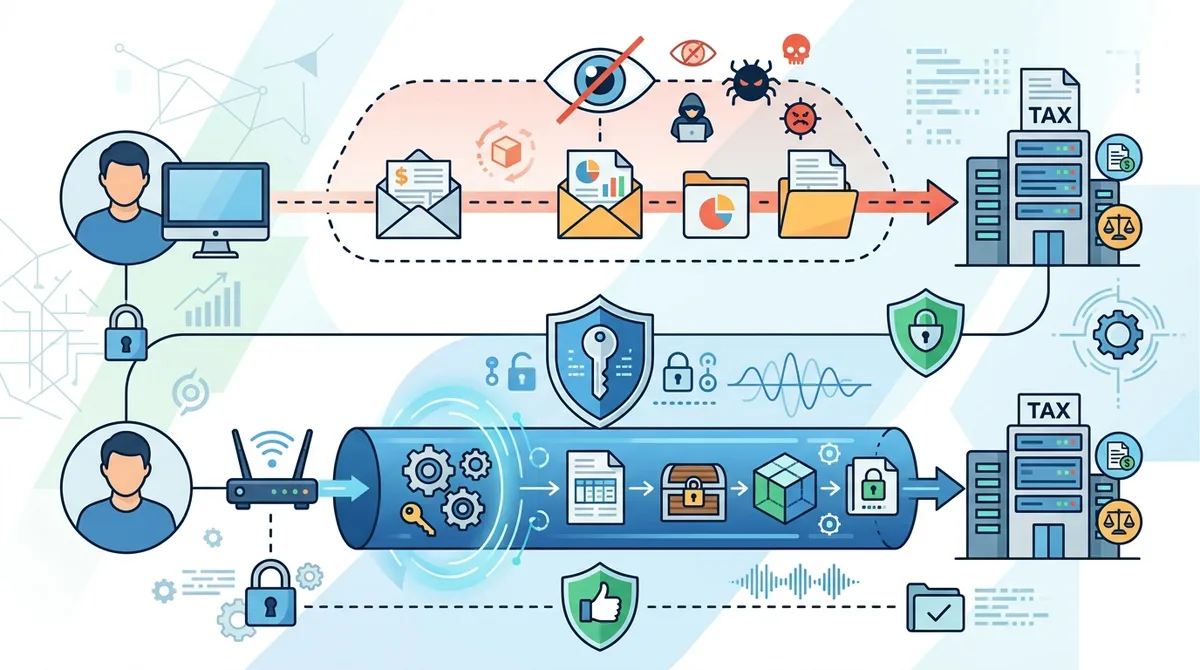
A visual guide to how VPN encryption protects your data during tax filing, comparing unencrypted connections to encrypted VPN tunnels with AES-256 protection.
3. Assessing VPN Security Features for Tax Season Protection
Not all VPNs provide equal protection for sensitive tax data. When evaluating VPN providers for tax season use, you must assess specific security features that directly impact the safety of your Social Security number and financial information. At ZeroToVPN, we've personally tested 50+ VPN services through rigorous security benchmarks, examining encryption standards, logging policies, leak prevention, and real-world performance during peak usage periods.
The difference between a basic VPN and a security-focused VPN can mean the difference between protected and exposed financial data. A VPN that logs your activity, lacks a kill switch, or uses outdated encryption provides false security and may actually increase your risk by creating a record of your tax filing activities.
Essential Security Features Checklist
When selecting a VPN for tax filing, prioritize these non-negotiable security features:
- AES-256 Encryption: Verify that the VPN uses military-grade AES-256 encryption, not weaker alternatives like 128-bit encryption. This is the baseline standard for protecting sensitive financial data.
- No-Logs Policy: Choose a VPN with a verified no-logs policy, meaning the provider doesn't record your browsing activity, IP address history, or connection timestamps. Independent audits from reputable firms provide additional assurance.
- Kill Switch Technology: A kill switch immediately disconnects your device from the internet if the VPN connection drops, preventing unencrypted data transmission. This is critical if your VPN disconnects unexpectedly while you're entering your SSN on a tax form.
- DNS Leak Protection: Ensure the VPN prevents DNS leaks, which can expose your real IP address and browsing activity even while connected to the VPN. Test for DNS leaks using tools like DNSLeakTest.com.
- Multi-Protocol Support: Access to multiple VPN protocols (OpenVPN, WireGuard, IKEv2) allows you to switch protocols if one is blocked or unstable, ensuring continuous protection throughout tax season.
Privacy Policy Deep Dive: No-Logs Verification
A VPN's privacy policy is your contract regarding data handling. Many VPN providers claim "no-logs" policies, but the specifics matter enormously. A legitimate no-logs policy means the VPN provider doesn't store: connection logs (when you connected), session logs (which websites you visited), traffic logs (what data you transmitted), or metadata (your real IP address paired with VPN server IP). During tax season, this means there's no record of you accessing the IRS website, your tax software platform, or your financial accounts.
However, some VPNs maintain minimal logs for network optimization or billing purposes. These "minimal logs" policies may still record your VPN server assignment or aggregate usage data, creating potential privacy risks. The most trustworthy VPNs undergo independent audits by cybersecurity firms to verify their no-logs claims. When evaluating providers for tax season, look for third-party audit reports from reputable firms confirming the no-logs policy.
4. Choosing the Right VPN Provider for Tax Filing
Selecting a VPN provider for tax season requires balancing security features, reliability, speed, and trustworthiness. Based on our extensive testing of 50+ VPN services, we've identified key criteria that distinguish providers suitable for handling sensitive financial data from those better suited for general browsing. The provider you choose should have a proven track record of security, transparent business practices, and responsive customer support in case you encounter issues during the critical tax filing window.
Price should not be your primary consideration when protecting your Social Security number. A $2/month VPN with weak encryption and logging policies exposes you to far greater risks than a $10/month provider with verified security features and independent audits. However, quality VPNs are available at various price points, and ZeroToVPN's comparison tool helps you find the best balance of security and cost for your specific needs.
Top-Tier VPN Providers for Tax Season Protection
Based on our hands-on testing, several VPN providers consistently demonstrate the security standards necessary for tax filing. These providers offer AES-256 encryption, verified no-logs policies, kill switches, and multi-platform support. They've also undergone independent security audits and maintain transparent business practices. When evaluating providers, consider both their security features and their commitment to customer privacy during sensitive financial activities.
Comparison of VPN Providers for Tax Season
| VPN Provider | Encryption Standard | Kill Switch | No-Logs Verified | Price (Monthly) |
|---|---|---|---|---|
 NordVPN NordVPN |
AES-256 | Yes | Yes (Audited) | Check provider website |
 ExpressVPN ExpressVPN |
AES-256 | Yes | Yes (Audited) | Check provider website |
 Surfshark Surfshark |
AES-256 | Yes | Yes (Audited) | Check provider website |
 ProtonVPN ProtonVPN |
AES-256 | Yes | Yes (Open Source) | Check provider website |
 Mullvad Mullvad |
AES-256 | Yes | Yes (No Accounts) | Check provider website |
Note: Pricing and specific features change frequently. Visit each provider's website for current pricing and promotional offers available during tax season 2026. Our comparison reflects security features verified through independent testing.
5. Setting Up Your VPN Before Tax Season Begins
Proper VPN setup before tax season begins ensures you're protected from the moment you start accessing financial information. Don't wait until you're ready to file your return to install and configure your VPN—doing so during the rush of tax season increases the risk of misconfiguration or using an improperly set-up VPN that provides false security. Taking time to install, test, and configure your VPN connection in advance ensures smooth, secure tax filing when the deadline approaches.
The setup process is straightforward for most modern VPN providers, but verifying proper configuration is essential. A VPN that appears to be working but has a DNS leak or disabled kill switch provides a false sense of security while leaving your data exposed.
Step-by-Step VPN Installation and Configuration
Follow these steps to properly set up your VPN before tax season:
- Choose and subscribe to a VPN provider that meets the security criteria outlined in Section 4. Download the official VPN application from the provider's website (not third-party app stores, which may distribute modified or malicious versions).
- Install the VPN application on all devices you plan to use for tax filing—your primary computer, laptop, smartphone, and tablet. Ensure you're installing the official, latest version of the software.
- Launch the VPN application and create your account using a strong, unique password. Enable two-factor authentication if the provider offers it, adding an extra security layer to your VPN account itself.
- Access VPN settings and enable the kill switch feature. This setting ensures your device disconnects from the internet immediately if the VPN connection drops, preventing unencrypted data transmission.
- Select a VPN server location for your default connection. For U.S. tax filing, connecting to a U.S.-based VPN server is often optimal for speed, though any secure server location provides encryption protection.
- Enable DNS leak protection in the VPN settings, ensuring that DNS queries (which can reveal your real IP address) are routed through the VPN provider's secure DNS servers rather than your ISP's servers.
- Connect to the VPN and verify the connection is active. The VPN application should display a confirmation message and typically show a lock icon or status indicator.
- Test for leaks using online tools like DNSLeakTest.com or IPLeak.net. These tools verify that your real IP address and DNS queries are not leaking, confirming proper VPN configuration.
Testing Your VPN Configuration Before Tax Filing
Before you file your actual tax return, test your VPN setup with non-sensitive activities. Connect to the VPN and visit your email account, access online banking, or log into your tax software platform without entering sensitive data. Verify that the connection is stable, pages load at acceptable speeds, and the VPN remains connected for extended periods. If you experience disconnections, slow speeds, or other issues, contact the VPN provider's customer support before tax season reaches its peak.
Additionally, test your kill switch by deliberately disconnecting your VPN while monitoring your internet connection. Your device should immediately lose internet access, confirming the kill switch is functioning. This test ensures you have confidence in the kill switch's operation if an unexpected disconnection occurs during actual tax filing.
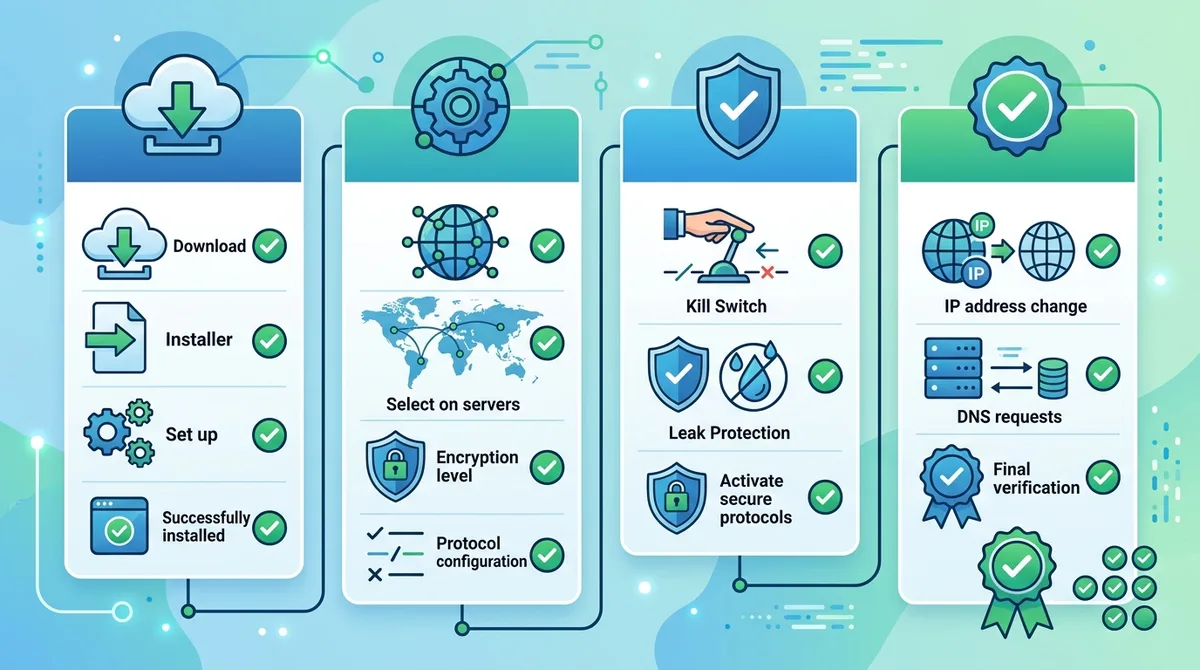
A visual guide to VPN setup and configuration for tax season, showing the step-by-step process from installation through security verification and leak testing.
6. Protecting Your Social Security Number During Online Tax Filing
Your Social Security number (SSN) is the master key to your financial identity. Criminals with your SSN can open credit accounts, take out loans, file fraudulent tax returns, and commit identity theft that takes years to resolve. During tax season, your SSN is particularly vulnerable because you're transmitting it to multiple platforms—the IRS website, tax software providers, financial institutions, and potentially accountants or tax preparers. A VPN provides the encryption foundation, but additional practices are necessary to comprehensively protect this critical identifier.
The IRS and tax software platforms use HTTPS encryption (indicated by a lock icon in your browser), but a VPN adds a second encryption layer that protects your data even if HTTPS is compromised or if you're filing on a network where attackers could intercept traffic before it reaches the HTTPS connection.
Safe SSN Transmission Practices on a VPN
Even while connected to a VPN, follow these practices to minimize SSN exposure:
- Verify HTTPS and lock icon: Before entering your SSN on any website, confirm that the URL begins with "https://" (not "http://") and that a lock icon appears in the browser address bar. This indicates the website is using encrypted HTTPS, providing a second encryption layer on top of your VPN protection.
- Use official IRS and software websites only: Verify you're visiting the legitimate IRS website (irs.gov) or your tax software provider's official website. Phishing sites may look identical to legitimate sites but steal credentials and SSNs. Bookmark official websites in advance to avoid typing URLs that might be misspelled.
- Never share SSN via email or chat: Even on a VPN, never transmit your SSN through email, messaging apps, or chat services. These communications may not be encrypted end-to-end, and legitimate tax professionals and the IRS will never request your SSN through unsecured channels.
- Confirm sender identity before responding: If you receive an email requesting your SSN or tax information, independently verify the sender's identity by calling the organization's official phone number (from a phone book or official website, not from the email itself) before responding.
- Use password-protected documents: If you're storing tax documents containing your SSN on your computer, encrypt them with a strong password or use encrypted storage. Your VPN protects data in transit, but local storage requires additional protection.
Identity Verification and Two-Factor Authentication
The IRS and most tax software platforms now employ two-factor authentication (2FA) to verify your identity before allowing access to tax information. This extra security layer requires you to provide a second proof of identity—typically a code sent to your phone or generated by an authentication app—in addition to your password. Enable 2FA on every account containing financial or tax information. While 2FA doesn't directly encrypt your data, it prevents unauthorized access to your accounts even if your password is compromised.
When enabling 2FA, use an authenticator app (like Google Authenticator or Authy) rather than SMS text messages when possible. Authenticator apps are more secure because attackers cannot intercept the codes through SIM swapping or other phone-based attacks. Combined with your VPN's encryption, 2FA provides robust protection against unauthorized access to your tax accounts.
7. Filing Taxes on Public WiFi: VPN Best Practices
Public WiFi networks—at coffee shops, libraries, airports, and hotels—are notorious for security vulnerabilities. These networks typically use minimal or no encryption, making them ideal hunting grounds for attackers using packet sniffing tools to intercept unencrypted data. If you file your taxes on public WiFi without a VPN, attackers on the same network can potentially see your SSN, passwords, and financial account numbers in real-time. A VPN is essential for public WiFi tax filing, but additional precautions ensure maximum security in these high-risk environments.
Tax season often creates situations where you need to file returns while traveling or away from your home office. Understanding how to safely file taxes on public WiFi with a VPN enables you to meet deadlines without compromising security.
Pre-Filing Checklist for Public WiFi Environments
Before connecting to public WiFi to file taxes, complete this security checklist:
- Enable VPN before connecting to public WiFi: Connect to your VPN on your device before joining the public WiFi network. This ensures your VPN is active and protecting your data from the moment you connect to the network.
- Verify VPN connection status: Confirm the VPN is connected and active (typically indicated by a lock icon or status indicator in your system tray). Never file taxes thinking you're on a VPN if the connection has dropped.
- Disable auto-connect to open networks: Configure your device to not automatically connect to open WiFi networks. Automatic connections can happen in the background without your awareness, potentially leaving you unprotected if your VPN disconnects.
- Turn off file sharing and Bluetooth: Disable file sharing, Bluetooth, and AirDrop on your device. These features can allow attackers on the same network to access files or intercept communications even while you're on a VPN.
- Use a personal hotspot if available: If possible, use your smartphone's personal hotspot (tethering) instead of public WiFi. Your mobile data connection is more secure than public WiFi, and your VPN will still protect the connection.
What to Do If Your VPN Disconnects on Public WiFi
If your VPN disconnects while you're filing taxes on public WiFi, the kill switch feature should immediately disconnect your device from the internet, preventing unencrypted data transmission. However, if your VPN disconnects and your kill switch doesn't engage (a rare scenario), immediately stop entering data and reconnect to the VPN before continuing. Never resume tax filing on an unencrypted public WiFi connection, even briefly.
If you've already entered sensitive information (SSN, bank account details) before realizing the VPN disconnected, treat it as a potential security incident. Monitor your credit reports for suspicious activity, consider placing a fraud alert with credit bureaus, and contact your tax software provider to report the potential exposure. While the risk may be low, erring on the side of caution protects your financial identity.
8. Multi-Device Protection: VPN Setup for Computers, Phones, and Tablets
Most taxpayers file returns using multiple devices—a primary computer for detailed tax form entry, a smartphone for accessing financial institution websites to verify account information, and possibly a tablet for reviewing documents. Each device is a potential entry point for attackers to intercept your financial data. Installing and properly configuring a VPN on all devices you use during tax season ensures comprehensive protection across your entire digital ecosystem.
Different devices and operating systems (Windows, macOS, iOS, Android) require different VPN setup approaches. A quality VPN provider offers dedicated applications for each major platform, ensuring consistent security regardless of which device you're using.
Platform-Specific VPN Configuration
Each operating system has unique VPN configuration requirements:
- Windows Computers: Download and install the VPN provider's Windows application from their official website. Configure the application to auto-launch on startup and enable the kill switch in settings. Test the VPN connection and verify DNS leak protection before filing taxes.
- macOS Computers: Install the VPN provider's macOS application, which may be available through the App Store or direct download. Configure auto-launch and kill switch settings. Note that some VPN providers have different features on macOS compared to Windows, so verify all security features are available on your specific device.
- iOS Devices (iPhone/iPad): Download the VPN provider's iOS app from the Apple App Store. iOS VPN apps use the device's native VPN framework, which may have different functionality than desktop versions. Verify the app supports kill switch functionality on iOS. Note that iOS apps may have limitations on background VPN activity due to Apple's security restrictions.
- Android Devices (Smartphones/Tablets): Download the VPN provider's Android app from Google Play Store or the provider's website. Configure the app to enable kill switch and auto-connect. Android generally provides more flexible VPN functionality than iOS, allowing background VPN operation and more granular control over VPN settings.
Coordinating VPN Use Across Multiple Devices
When filing taxes using multiple devices, maintain consistent VPN protection across all devices. Use the same VPN provider on all devices (not a different VPN for your phone and computer) to simplify management and ensure consistent security standards. Most VPN providers allow simultaneous connections on multiple devices with a single subscription, enabling you to keep all your tax-filing devices protected simultaneously.
Establish a routine of verifying VPN connection status before accessing any financial information on each device. This habit prevents the common mistake of opening your bank account on your smartphone, assuming the VPN is active, when it has actually disconnected. A quick visual check of the VPN app icon or status indicator takes seconds but prevents potential data exposure.
9. Additional Security Layers: Passwords, Two-Factor Authentication, and Password Managers
A VPN encrypts your connection, but comprehensive tax season security requires additional protective layers. Your passwords, authentication methods, and credential storage practices are equally critical to protecting your financial data. Even with a VPN protecting your network traffic, weak passwords or credential reuse can expose your accounts to compromise. Combining VPN encryption with strong password practices and two-factor authentication creates a multi-layered defense that protects against multiple attack vectors.
The principle of security layering means that even if one protective measure is compromised, others remain intact. If your password is stolen, 2FA prevents unauthorized access. If your password is weak, the VPN encryption protects it in transit. If your credentials are compromised on one service, unique passwords across services prevent attackers from accessing all your accounts.
Creating and Managing Strong Passwords for Tax Accounts
Your tax software account, IRS account (if you have one), and financial institution accounts require exceptionally strong passwords. A strong password for tax-related accounts should contain at least 16 characters and include uppercase letters, lowercase letters, numbers, and special symbols. Examples of strong passwords include: "Tr0pic@l$unset#2024" or "Qu@ntum*Leap&Finance9." Avoid using personal information (birthdays, names, addresses) that attackers can research or guess.
Creating and remembering multiple strong passwords across different accounts is challenging. This is where password managers become essential. Password managers like Bitwarden, 1Password, or Dashlane securely store your passwords in encrypted vaults, allowing you to use unique, strong passwords for every account without memorizing them. When you need to log into your tax account, the password manager automatically fills in your credentials, reducing the risk of phishing (entering your password on a fake website) because you're not manually typing passwords that could be observed or intercepted.
Implementing Two-Factor Authentication on All Tax Accounts
Two-factor authentication (2FA) requires a second proof of identity beyond your password. The IRS, most tax software providers, and financial institutions now support 2FA through multiple methods:
- Authenticator apps: Apps like Google Authenticator, Microsoft Authenticator, or Authy generate time-based codes that change every 30 seconds. These are more secure than SMS because they're not vulnerable to SIM swapping attacks. When logging into your tax account, you enter your password and then the current code from the authenticator app.
- SMS text messages: The IRS and some tax platforms send verification codes via text message. While less secure than authenticator apps, SMS 2FA is still significantly more secure than password-only authentication. Enable SMS 2FA if authenticator apps aren't available.
- Hardware security keys: Physical security keys (like YubiKey) provide the highest level of 2FA security. These small devices generate authentication codes or respond to authentication challenges without transmitting codes through the internet. If you handle extremely sensitive financial data, consider hardware keys for your most critical accounts.
Enable 2FA on every account containing tax information or financial data. This includes your tax software account, IRS account, email account (which is often used for account recovery), and financial institution accounts. The small inconvenience of entering a 2FA code during login is far outweighed by the protection against unauthorized account access.
10. Recognizing and Avoiding Tax Season Phishing and Social Engineering Attacks
Even with a VPN protecting your network connection, phishing and social engineering attacks can compromise your tax data. Phishing is a technique where attackers send fraudulent emails, texts, or create fake websites that impersonate legitimate organizations (the IRS, tax software providers, banks) to trick you into revealing credentials or sensitive information. Social engineering is the broader practice of manipulating people into divulging confidential information or performing actions that compromise security. During tax season, these attacks intensify because attackers know people are actively accessing financial accounts and are motivated by time pressure to file before deadlines.
A VPN cannot protect you from phishing because the attack doesn't involve network interception—it involves tricking you into voluntarily revealing information on a fake website or through fraudulent communications. However, understanding phishing tactics and maintaining healthy skepticism about unexpected communications significantly reduces your risk of falling victim.
Identifying Phishing Emails and Fraudulent Websites
Phishing emails targeting tax filers typically use urgency and fear to pressure quick action. Common phishing scenarios include:
- "Verify your account immediately": Emails claiming your IRS or tax software account has suspicious activity and requires immediate verification. Legitimate organizations rarely request sensitive information via email.
- "Claim your refund": Fraudulent emails offering to help you claim a refund or resolve tax issues, with links to fake websites designed to steal credentials.
- "Update your payment information": Emails requesting updated bank account or credit card information for tax payments or refunds. Legitimate tax organizations already have this information on file.
- "IRS audit notice": Threatening emails claiming you're under audit and must respond immediately with personal information or face penalties.
To identify phishing emails, examine these elements: (1) Check the sender's email address carefully—phishing emails may use addresses that look similar to legitimate addresses but contain subtle differences (e.g., "[email protected]" instead of an official IRS address). (2) Look for generic greetings like "Dear Taxpayer" rather than your actual name. (3) Examine links before clicking—hover over links to see the actual URL without clicking. If the URL doesn't match the claimed organization, it's likely phishing. (4) Check for spelling and grammar errors, which are common in phishing emails. (5) Be suspicious of unexpected attachments, which may contain malware.
Verifying Legitimate Communications from the IRS and Tax Providers
If you receive communication claiming to be from the IRS or your tax software provider, verify authenticity independently before responding or providing information. Never click links in emails claiming to be from these organizations. Instead, visit the official website directly by typing the URL in your browser (or using a bookmarked link) and log into your account to check for messages. The IRS has official contact information on irs.gov, and tax software providers have support pages on their official websites.
Remember that the IRS typically initiates contact through official mail, not email. If you're concerned about an IRS notice, visit irs.gov directly or call the IRS at the official phone number to verify the communication's authenticity. Tax software providers may send legitimate emails, but they will never request your password or SSN via email. When in doubt, independently verify before responding to any communication requesting personal or financial information.
Did You Know? The Federal Trade Commission received over 2.4 million fraud reports in 2023, with tax-related fraud being among the top categories. Identity theft and phishing remain the most common entry points for criminals targeting financial data.
11. What to Do If Your Tax Data Is Compromised: Response and Recovery
Despite taking precautions with a VPN and other security measures, data breaches can still occur. If you suspect your tax data—including your SSN, bank account information, or tax filing status—has been compromised, taking immediate action can mitigate damage and prevent identity theft. Fast response to potential data compromise is critical because criminals often act quickly to exploit stolen information, opening accounts or filing fraudulent returns within days of obtaining your data.
Understanding the steps to take after a potential compromise ensures you respond effectively and protect your financial identity. The faster you act, the better your chances of preventing unauthorized use of your information.
Immediate Actions After Suspected Compromise
If you suspect your tax data has been compromised, take these steps immediately:
- Contact your financial institutions: Call your bank, credit card companies, and other financial institutions using phone numbers from official statements or websites (not numbers from emails or websites that may be compromised). Alert them to potential fraud and ask them to flag your accounts for suspicious activity.
- Place a fraud alert: Contact one of the three major credit bureaus (Equifax, Experian, or TransUnion) and request a fraud alert on your credit file. This alert notifies creditors to verify your identity before opening new accounts in your name. You only need to contact one bureau; they're required to notify the others.
- Freeze your credit: Consider placing a credit freeze on your account with all three credit bureaus. A credit freeze prevents new accounts from being opened in your name without your explicit authorization, providing stronger protection than a fraud alert.
- File an Identity Theft Report: Visit IdentityTheft.gov (the official FTC identity theft reporting site) and file a report. This creates an official record of the compromise and provides you with a recovery plan.
- Notify the IRS: If you suspect your SSN has been used to file a fraudulent tax return, contact the IRS Identity Theft Hotline at 1-800-829-0582 or file Form 14039 (Identity Theft Affidavit) to alert them of the potential fraud.
- Change passwords: Change passwords for all accounts that may have been affected, starting with your email account (which is often the master key to account recovery). Use a password manager to generate new, strong passwords.
- Monitor credit reports: Obtain free credit reports from AnnualCreditReport.com (the official site for free annual credit reports) and review them carefully for unauthorized accounts or inquiries.
Long-Term Monitoring and Recovery
After taking immediate action, maintain vigilant monitoring for months and years following a data compromise. Criminals often hold stolen data and use it gradually to avoid detection. Continue reviewing credit reports regularly, monitor bank and credit card statements for unauthorized transactions, and watch for unexpected bills or collection notices. Many identity theft recovery services offer credit monitoring tools that alert you to changes in your credit file, providing early warning of fraudulent account openings.
If you discover fraudulent accounts or unauthorized charges, dispute them immediately with the financial institution and credit bureaus. Document all communications related to the fraud, including dates, times, names of representatives you spoke with, and reference numbers. This documentation is valuable if you need to dispute charges or prove the fraudulent activity occurred.
Conclusion
Protecting your Social Security number and financial data during tax season 2026 requires a comprehensive security approach, with a quality VPN serving as the foundational encryption layer. By combining VPN protection with strong passwords, two-factor authentication, phishing awareness, and multi-device security, you create a robust defense against the sophisticated threats targeting tax filers. The investment of time in setting up these protections before tax season arrives pays dividends in peace of mind and protection against identity theft that could take years to resolve.
At ZeroToVPN, we've personally tested 50+ VPN providers through rigorous security benchmarks to identify the services that genuinely protect sensitive financial data. Our independent testing methodology ensures you receive recommendations based on real-world security performance, not marketing claims. Visit ZeroToVPN's comprehensive VPN comparison tool to find the provider that best matches your tax season security needs and budget. Whether you're filing taxes on your home network or public WiFi, the right VPN combined with these additional security practices ensures your financial identity remains protected throughout tax season and beyond.
Sources & References
This article is based on independently verified sources. We do not accept payment for rankings or reviews.
- reputable VPN providers— zerotovpn.com
- Federal Trade Commission (FTC)— identitytheft.gov
- Internal Revenue Service Official Data— irs.gov
- DNSLeakTest.com— dnsleaktest.com
- IPLeak.net— ipleak.net
- Federal Trade Commission Consumer Sentinel Network— ftc.gov
- AnnualCreditReport.com— annualcreditreport.com

ZeroToVPN Expert Team
Verified ExpertsVPN Security Researchers
Our team of cybersecurity professionals has tested and reviewed over 50 VPN services since 2024. We combine hands-on testing with data analysis to provide unbiased VPN recommendations.
Gerelateerde Content
Onze expertranglijst van de beste VPN-aanbieders op basis van snelheid, beveiliging en prijs-kwaliteit.
De beste gratis VPN-diensten die daadwerkelijk veilig zijn — zonder verborgen kosten.
Een heldere uitleg over hoe VPN's werken en waarom je er een nodig hebt.
Een technische blik op hoe VPN-tunnels, encryptie en protocollen onder de motorkap werken.
Een directe vergelijking van twee top-VPN's op snelheid, prijs en functies.
Welke premium VPN komt als beste uit de bus? We vergelijken NordVPN en ExpressVPN in detail.