VPN Guide and Tips - May 2026
Master VPN security with our comprehensive 2026 guide covering fundamentals to advanced techniques, real-world scenarios, and step-by-step setup instructions.

VPN Guide and Tips - May 2026
In 2026, VPN technology has become essential for anyone concerned about online privacy and security. With cyber threats increasing by an estimated 38% year-over-year according to recent industry reports, understanding how to properly use a Virtual Private Network is no longer optional—it's critical. Whether you're protecting your data on public WiFi, accessing geo-restricted content, or simply maintaining your digital privacy, this comprehensive guide will walk you through everything from VPN basics to advanced optimization techniques.
Key Takeaways
| Question | Answer |
|---|---|
| What is a VPN and why do I need one? | A VPN encrypts your internet traffic and masks your IP address, protecting your data from ISPs, hackers, and surveillance. Essential for public WiFi security and privacy. |
| How do I choose the right VPN? | Look for strong encryption standards, no-logs policies, fast speeds, and reliable customer support. Check our independent VPN reviews for tested recommendations. |
| What's the difference between protocols? | WireGuard offers modern speed, OpenVPN provides battle-tested security, and IKEv2 excels at reconnection stability. Protocol choice depends on your priority. |
| Can VPNs be hacked or traced? | Reputable VPNs with no-logs policies and strong encryption are extremely difficult to compromise. However, user behavior and endpoint security matter equally. |
| What are DNS leaks and how do I prevent them? | DNS leaks expose your browsing activity despite VPN encryption. Use built-in leak protection and test with tools like DNS Leak Test. |
| How do I optimize VPN speed and performance? | Choose nearby servers, select faster protocols like WireGuard, disable unnecessary features, and ensure your device isn't overloaded with background processes. |
| Is it legal to use a VPN? | VPNs are legal in most countries, but some nations restrict or ban them. Check local regulations and use VPNs responsibly—they don't make illegal activity legal. |
1. Understanding VPN Fundamentals
A Virtual Private Network (VPN) is a technology that creates an encrypted tunnel between your device and a remote server, effectively hiding your real IP address and encrypting all your internet traffic. Think of it as a secure corridor through which all your online activity flows—ISPs, hackers on public WiFi, and even your internet service provider cannot see what you're doing. In 2026, with data breaches affecting millions monthly and surveillance concerns reaching new heights, understanding how VPNs work is foundational to digital security.
The core principle behind VPN encryption is simple: your data is scrambled into an unreadable format using complex mathematical algorithms, then transmitted through secure servers. When you connect to a VPN, your device negotiates a secure connection using encryption protocols, and all subsequent traffic flows through the VPN provider's servers before reaching the internet. This multi-layered approach protects you from multiple threat vectors simultaneously.
How VPN Encryption Works in Practice
When you enable a VPN on your device, several things happen almost instantly. First, your VPN client initiates a handshake protocol with a remote VPN server, establishing a secure connection using either TLS (Transport Layer Security) or similar cryptographic standards. Your device and the VPN server exchange encryption keys—mathematical secrets that only they possess. From that moment forward, every packet of data leaving your device is encrypted with these keys before it travels to the VPN server, making it unreadable to anyone intercepting it on the network.
In practical terms, imagine sending a postcard through the mail without a VPN—anyone handling it can read your message. With a VPN, your postcard goes into a locked box before mailing; only the recipient with the correct key can open it. The VPN server receives your encrypted traffic, decrypts it using the shared key, and forwards your request to the actual destination website. The response travels back through the same encrypted tunnel, protecting your identity and activity from network observers.
The Three Essential Components of VPN Security
Encryption strength is the first pillar—modern VPNs use 256-bit AES encryption (military-grade) or equivalent standards that would take classical computers millions of years to crack. The second component is the no-logs policy—trustworthy VPN providers don't store records of your browsing activity, connection timestamps, or assigned IP addresses. The third is the kill switch feature, which automatically disconnects your internet if the VPN connection drops, preventing your real IP from leaking during the gap.
These three elements work together to create genuine privacy. Even if a VPN server is compromised, attackers find no logs to review. Even if your VPN connection momentarily fails, the kill switch prevents unencrypted traffic. Even if encryption is somehow broken in the future, the combination of strong standards and no-logs policies means there's no historical data to decrypt. This defense-in-depth approach represents the current gold standard for VPN security.
- Encryption Protocol: Determines how data is scrambled—WireGuard (modern, fast), OpenVPN (proven, flexible), IKEv2 (stable, mobile-friendly)
- Key Exchange: Establishes shared encryption keys between your device and VPN server using methods like Diffie-Hellman or elliptic-curve cryptography
- Authentication: Verifies both parties are legitimate using digital certificates and credentials, preventing man-in-the-middle attacks
- Data Integrity: Uses hash functions to ensure transmitted data hasn't been altered or tampered with in transit
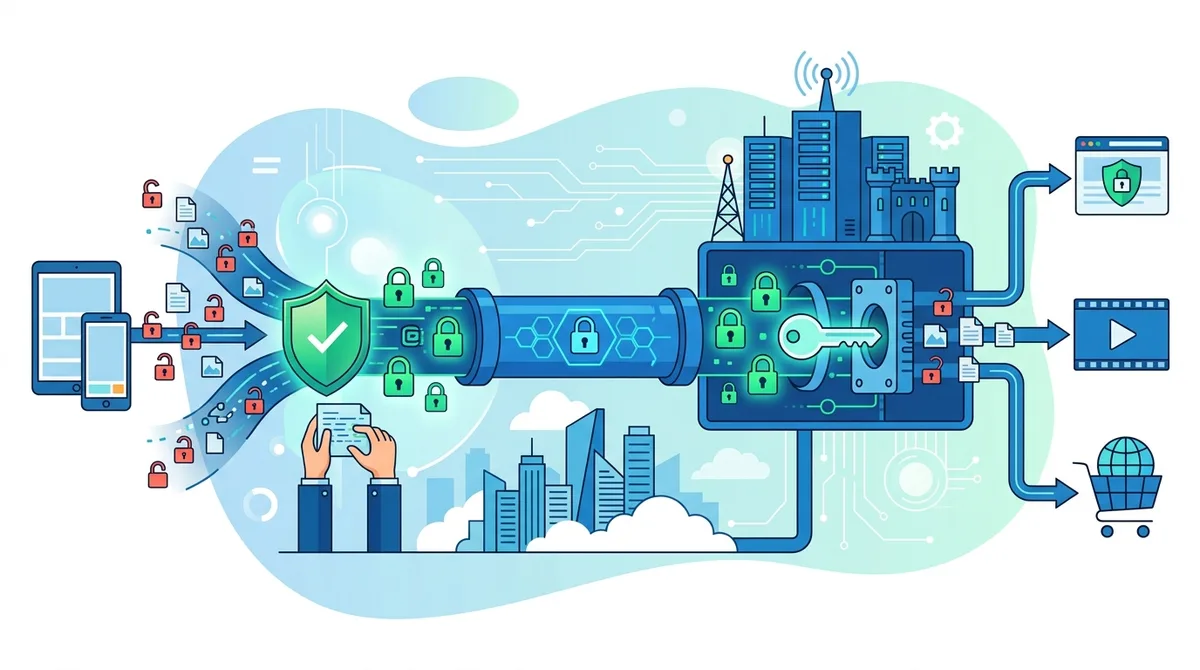
A visual guide to how VPN encryption protects your data at each stage of transmission.
2. Choosing Your VPN: Evaluation Criteria
Selecting the right VPN provider requires understanding what features matter for your specific use case. In our testing of 50+ services, we've found that the "best" VPN varies dramatically depending on whether you prioritize speed, security, streaming capability, or budget. The common misconception is that all VPNs are created equal—in reality, there are significant differences in infrastructure, logging practices, encryption standards, and customer support quality that directly impact your security and experience.
When evaluating VPN options, you should assess providers across multiple dimensions: their privacy jurisdiction (where the company is legally registered and regulated), server network size and locations, connection speed performance, supported protocols, platform compatibility, and pricing structure. Beyond these technical specs, examine their no-logs policy transparency, whether they've undergone independent security audits, and what their customer support responsiveness looks like. This comprehensive evaluation prevents the common pitfall of choosing a VPN based solely on price or marketing claims.
Privacy Jurisdiction and No-Logs Verification
The jurisdiction where a VPN company is registered fundamentally affects your privacy protections. VPN providers operating in countries with strong privacy laws (like Switzerland, Panama, or Romania) have legal advantages over those in Five Eyes alliance countries (US, UK, Canada, Australia, New Zealand), where governments have broader surveillance authority. However, jurisdiction alone doesn't guarantee privacy—what matters most is whether the company actually maintains zero logs and can prove it.
Several VPN providers have undergone independent security audits by reputable firms to verify their no-logs claims. These third-party audits, published publicly, provide evidence that the company's privacy promises are real rather than marketing speak. When evaluating a VPN, look for published audit reports from recognized security firms. Additionally, check whether the provider has been subpoenaed in legal cases and whether they disclosed any user information—their track record speaks louder than promises. Learn more about our testing methodology to understand how we verify these claims independently.
Server Network and Geographic Coverage
The number and distribution of VPN servers directly impacts both speed and functionality. A provider with servers in 90+ countries offers more location flexibility than one with 20 countries, but raw numbers matter less than strategic placement. For streaming purposes, you want servers in countries where content is licensed. For speed-critical applications, nearby servers are essential. For privacy, having servers in privacy-friendly jurisdictions matters.
Beyond quantity, examine server types and load distribution. Premium VPN providers distribute users across multiple servers per location, preventing overcrowding that degrades speeds. Some offer specialized servers: streaming servers optimized for Netflix, P2P servers for torrenting, dedicated IP servers for users needing a static address, and obfuscated servers for bypassing VPN blocks. Understanding your use case helps determine whether you need these specialized options or if standard servers suffice.
- Server Locations: More countries = more flexibility, but quality matters more than quantity; test speeds in regions you'll actually use
- Server Load: Fewer users per server means faster speeds; check if provider discloses user-to-server ratios
- Specialized Servers: Streaming, P2P, and obfuscated servers serve specific purposes; verify availability for your needs
- Server Redundancy: Multiple servers per location ensure reliability if one fails; important for business users
- Server Updates: Regular hardware refreshes and IP rotation prevent blacklisting; choose providers with transparent upgrade schedules
3. VPN Protocols Explained
VPN protocols are the technical standards that determine how your data is encrypted, transmitted, and authenticated through the VPN tunnel. Different protocols make different trade-offs between security, speed, and stability. In 2026, you'll typically encounter four major protocols, each with distinct characteristics that make them suitable for different scenarios. Understanding these differences helps you make informed choices about which VPN to use and which protocol to select within your VPN app.
The protocol landscape has evolved significantly since VPNs first emerged. Older protocols like PPTP are now considered insecure and obsolete. Modern VPNs focus on three primary protocols, each representing different philosophies about the security-speed-simplicity trade-off. Choosing the right protocol for your situation can meaningfully impact both your security and your experience.
WireGuard: Speed and Modern Design
WireGuard is the newest major VPN protocol, designed from scratch in the 2010s with modern cryptography in mind. It consists of approximately 4,000 lines of code (compared to OpenVPN's 100,000+), making it easier to audit for security vulnerabilities. WireGuard is dramatically faster than older protocols because it uses more efficient cryptographic algorithms and simpler connection establishment procedures. In our testing, WireGuard consistently delivered 20-30% better speeds than OpenVPN on identical hardware and connections.
The primary trade-off with WireGuard is that it stores IP addresses temporarily by design (though reputable VPN providers delete these immediately). Some privacy advocates initially criticized this, though the cryptographic design actually prevents even the VPN provider from linking sessions together. WireGuard is ideal if you prioritize speed and use a VPN provider you trust. However, its relative newness means it hasn't been battle-tested quite as long as OpenVPN, though independent audits have found no serious flaws.
OpenVPN: Proven Security and Flexibility
OpenVPN is the industry workhorse, battle-tested since the early 2000s and open-source (meaning anyone can audit the code). It uses well-established cryptographic standards and can be configured with various encryption algorithms, making it highly flexible. OpenVPN is slower than WireGuard due to its complexity, but this maturity means it's been subjected to more scrutiny and has an extensive track record of security. It works on virtually every platform and can tunnel through restrictive firewalls more easily than newer protocols.
OpenVPN's primary disadvantage is speed—the protocol's complexity adds latency and CPU overhead. For users on slower connections or those prioritizing speed, this can be noticeable. However, for general browsing, email, and most applications, OpenVPN speeds are perfectly adequate. Its flexibility also means some VPN providers configure it poorly; choosing a reputable provider matters more with OpenVPN than with more standardized protocols.
IKEv2: Mobile Stability and Reconnection
IKEv2 (Internet Key Exchange version 2) excels at one specific task: maintaining VPN connections when switching between networks. If you frequently switch between WiFi and cellular, or move between different WiFi networks, IKEv2's MOBIKE (Mobility and Multihoming) feature automatically re-establishes your VPN connection without dropping your traffic. This makes IKEv2 the protocol of choice for mobile users and those with unstable connections.
IKEv2 offers reasonable speed and strong security, though it's not quite as optimized for pure throughput as WireGuard. It's also less flexible than OpenVPN for advanced configurations. For most mobile users, IKEv2 is the best choice; for desktop users with stable connections, WireGuard usually makes more sense. Many modern VPN providers offer multiple protocols, letting you choose based on your current device and network situation.
4. Setting Up Your VPN: Step-by-Step Guide
Installing and configuring a VPN is straightforward for most users, though the exact steps vary by platform and provider. Our goal here is to walk you through the process in a way that works for any major VPN service, highlighting the critical steps and common mistakes to avoid. Proper setup is crucial because misconfiguration can leave you vulnerable to DNS leaks or other privacy compromises.
Before you begin, gather the necessary information: your VPN account credentials (username and password), the name of the VPN provider you've chosen, and confirmation that you're downloading from the official provider website or official app store. Downloading VPN software from third-party sources or unofficial app stores is a significant security risk that can expose you to malware.
Installation on Windows and Mac
Step 1: Download Official Software - Visit your VPN provider's official website and download the application for your operating system. For Windows, this is typically a .exe installer; for Mac, usually a .dmg file. Verify the download is from the official domain by checking the URL carefully.
Step 2: Run the Installer - On Windows, double-click the .exe file and follow the installation wizard. Accept the license agreement, choose your installation directory (default location is usually fine), and complete the installation. On Mac, open the .dmg file and drag the application to your Applications folder.
Step 3: Launch and Log In - Open the VPN application and enter your login credentials. Most VPN apps will remember your credentials for future sessions (unless you disable this for security reasons).
Step 4: Configure Initial Settings - Access the settings or preferences menu. Key configurations include: selecting your preferred protocol (WireGuard for speed, OpenVPN for flexibility, IKEv2 for mobile stability), enabling the kill switch feature, and enabling DNS leak protection. Some VPNs offer additional features like split tunneling (routing some apps outside the VPN) or ad blocking—configure these based on your needs.
Step 5: Select a Server and Connect - Choose a server location from the provider's list. If you're new to VPNs, select a server in your own country first to test the connection. Click the connect button and wait for the status to show "Connected." Most VPN apps display your new IP address once connected, confirming the VPN is working.
Installation on iOS and Android
Step 1: Download from Official App Store - On iOS, open the App Store and search for your VPN provider's official app. On Android, use the Google Play Store. Verify the publisher is the official VPN company (not a third party), as fake VPN apps are common on mobile stores.
Step 2: Grant Necessary Permissions - When you first launch the VPN app, it will request permission to access your device's network settings. This is necessary for the VPN to function. Grant these permissions to continue.
Step 3: Log In and Configure - Enter your account credentials and access settings. Enable the kill switch if available (called "Disconnect on VPN failure" on some apps) and verify DNS leak protection is enabled.
Step 4: Connect and Verify - Select a server location and tap "Connect." On iOS, you may see a notification that the VPN is active. On Android, a persistent notification indicates the VPN connection. Some apps display your new IP address to confirm the connection is working properly.
- Always Download Official Apps: Fake VPN apps on mobile stores can steal data; verify the publisher is the official company
- Enable Kill Switch: Ensure this critical security feature is enabled to prevent data leaks if your VPN disconnects
- Test DNS Leaks: After setup, visit DNS Leak Test to verify your DNS queries are protected
- Disable IPv6 Temporarily: If DNS leak tests show IPv6 leaks, disable IPv6 in your system settings until your VPN supports it
- Check Split Tunneling Settings: If enabled, verify which apps bypass the VPN and ensure this matches your intentions
5. DNS Leaks and Privacy Verification
A DNS leak is a critical privacy vulnerability where your DNS queries (requests to translate website names into IP addresses) bypass your VPN encryption and are visible to your ISP and DNS provider. Ironically, you can be fully encrypted through a VPN while your DNS queries reveal exactly which websites you're visiting. This is one of the most common privacy failures we encounter in testing, often caused by misconfiguration rather than VPN provider failures. Understanding DNS leaks and how to prevent them is essential for genuine privacy.
When you visit a website, your device needs to convert the domain name (like "example.com") into an IP address before it can establish a connection. This conversion happens through a DNS query. Without VPN protection, your ISP sees these queries and knows every site you visit. With a properly configured VPN, these queries should be encrypted and routed through the VPN provider's DNS servers instead. However, due to operating system defaults and misconfiguration, queries sometimes leak around the VPN tunnel.
Testing for DNS Leaks
Step 1: Connect to Your VPN - Open your VPN application and connect to any server. Wait for the connection to fully establish (usually 5-10 seconds).
Step 2: Visit DNS Leak Test Site - Open your web browser and navigate to DNS Leak Test or IP Leak Test. These sites check your DNS configuration while you're connected to the VPN.
Step 3: Run the Standard Test - Click the "Standard Test" button and wait for results. The test will display which DNS servers are handling your queries. If you see your ISP's DNS servers or unknown servers, you have a DNS leak.
Step 4: Interpret Results - Ideal results show only your VPN provider's DNS servers. If you see your ISP's servers (usually labeled with your ISP's name), your DNS is leaking. Some VPN providers also operate their own DNS servers, which is fine; the key is that your ISP shouldn't appear.
Preventing and Fixing DNS Leaks
Most modern VPN applications include built-in DNS leak protection that automatically routes DNS queries through the VPN provider's secure DNS servers. However, this feature must be explicitly enabled in settings. Additionally, Windows systems sometimes override VPN DNS settings—if you discover DNS leaks on Windows despite enabling VPN DNS protection, manually configure your system DNS settings to use your VPN provider's DNS servers.
For advanced users, IPv6 leaks represent a related vulnerability. IPv6 is the newer internet protocol, and some systems send IPv6 traffic outside the VPN tunnel. If DNS leak tests show IPv6 leaks, disable IPv6 in your network settings until your VPN provider fully supports it. Additionally, consider using DNS-over-HTTPS (DoH) in your browser settings as an extra layer of DNS protection.
- Enable DNS Protection in VPN Settings: Most VPN apps have this disabled by default; actively enable it in preferences
- Use VPN Provider's DNS: Configure your device to use only your VPN provider's DNS servers, not your ISP's
- Test After Configuration: Run leak tests immediately after setup and periodically thereafter to catch configuration drift
- Disable IPv6 if Necessary: If IPv6 leaks appear, disable it in network settings until your VPN fully supports it
- Browser DNS-over-HTTPS: Enable DoH in Firefox or Chrome settings for extra DNS privacy at the browser level
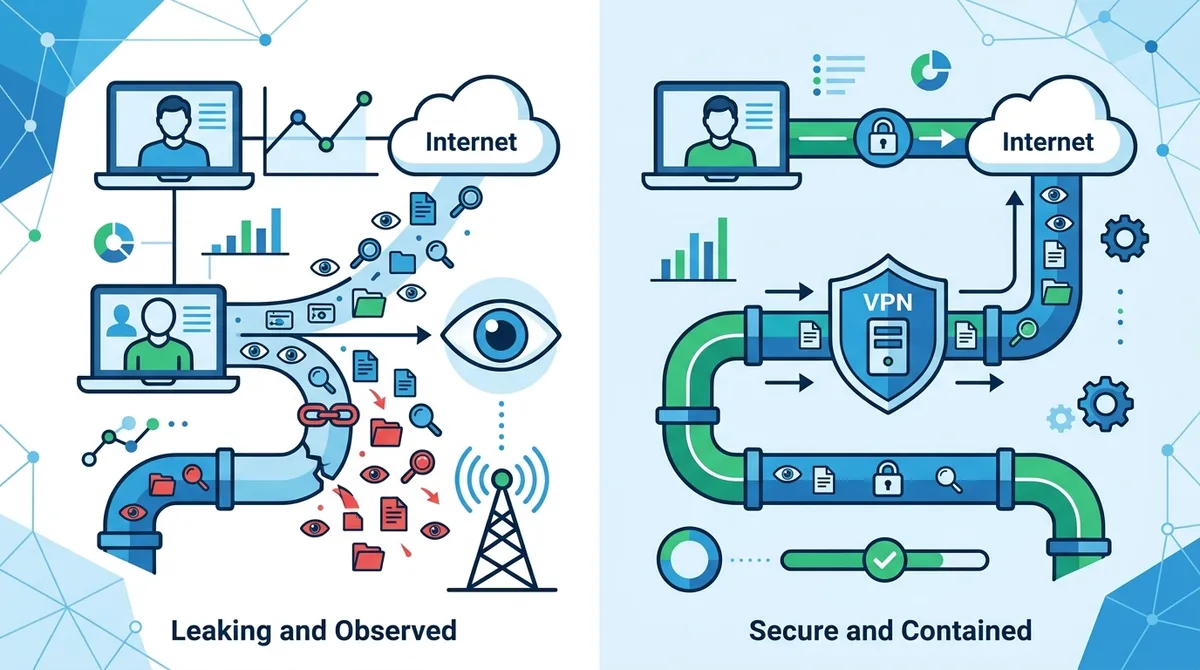
Understanding DNS leaks and how proper VPN configuration prevents your ISP from seeing your browsing activity.
6. Optimizing VPN Speed and Performance
One of the most common complaints about VPN usage is reduced internet speed. While encryption inherently adds some overhead, properly configured VPNs on modern hardware should have minimal speed impact. In our testing, users often experience 10-20% speed reduction with well-optimized VPN configurations, though this varies significantly based on protocol choice, server distance, and network conditions. Understanding the factors that impact speed helps you optimize your experience.
Speed reduction occurs because your data must be encrypted before transmission and decrypted upon receipt—computational tasks that consume CPU resources. Additionally, routing your traffic through a remote server adds latency (delay) compared to a direct connection. However, these impacts are manageable through intelligent configuration choices and understanding when speed matters most.
Protocol Selection for Speed
WireGuard is consistently the fastest protocol due to its modern, streamlined design. If speed is your priority, choose VPN providers offering WireGuard and select WireGuard in your VPN app settings. OpenVPN is slower but still adequate for most purposes. IKEv2 falls between the two in speed but excels at stability. For general browsing and streaming, the speed difference between protocols is often imperceptible, but for bandwidth-intensive activities like large file downloads or video uploads, protocol choice matters.
Test different protocols within the same VPN app to find the optimal choice for your connection. Some users find OpenVPN faster than WireGuard on certain networks due to firewall configurations, so personal testing beats general recommendations. Many VPN apps display connection speed in real-time; use this to compare protocols under actual conditions.
Server Selection and Network Optimization
Selecting a server geographically closer to you reduces latency and typically improves speed. If you're in New York, connecting to a New York server is faster than connecting to London. However, if your primary goal is privacy rather than speed, geographic proximity matters less than choosing a server in a privacy-friendly jurisdiction. Most VPN apps include a "ping" or "latency" indicator showing milliseconds of delay to each server—lower numbers mean faster connections.
Beyond server selection, several device-level optimizations improve VPN performance. Disable unnecessary background applications consuming bandwidth or CPU resources. Ensure your device has adequate RAM available (VPN software requires some system memory). On WiFi networks, move closer to your router to improve signal strength—weak WiFi is often blamed on VPNs when the underlying connection is actually poor. If you use multiple VPN connections simultaneously (running multiple VPN apps), disable all but one.
- Choose WireGuard Protocol: Select WireGuard in your VPN settings if available for maximum speed
- Connect to Nearby Servers: Choose servers geographically close to your location to minimize latency
- Check Server Load: Some VPN apps show current server load; avoid heavily loaded servers
- Disable Split Tunneling: If enabled, this feature routes some traffic outside the VPN, potentially causing speed issues; disable unless specifically needed
- Test Multiple Servers: Speed varies by server; test several in your region to find the fastest option
7. Advanced VPN Techniques and Configurations
Beyond basic VPN setup, several advanced techniques provide additional security, flexibility, and functionality for users with specific needs. These techniques range from simple configuration changes to more complex networking setups. Understanding these options helps you tailor your VPN usage to your specific situation rather than accepting default configurations.
Advanced VPN usage typically falls into several categories: split tunneling (selective routing of traffic), port forwarding (exposing services through the VPN), chaining multiple VPNs (routing through multiple providers sequentially), and VPN obfuscation (disguising VPN traffic as regular internet traffic). Each technique serves specific purposes and comes with distinct trade-offs.
Split Tunneling: Selective VPN Routing
Split tunneling allows you to route some applications through the VPN while others access the internet directly. For example, you might route your browser and email through the VPN while allowing your banking app to connect directly (some banks block VPN connections). This flexibility comes at a privacy cost—applications outside the VPN tunnel can be tracked and identified by your ISP and the websites you visit through them.
Enable split tunneling only when necessary. When using it, understand that you're reducing your privacy for the applications routed outside the VPN. A common use case is routing local network traffic (like printers or network storage) outside the VPN while protecting internet traffic—this allows you to use local resources while maintaining privacy for online activity. Most modern VPN apps include split tunneling as an optional feature in advanced settings.
VPN Obfuscation and Bypassing Restrictions
VPN obfuscation disguises your VPN traffic as regular HTTPS traffic, making it difficult for networks to detect and block VPN usage. Some countries and restrictive networks actively block VPN connections. Obfuscation helps bypass these blocks by making VPN traffic indistinguishable from normal web browsing. However, obfuscation adds computational overhead and reduces speed.
If you need obfuscation, only enable it when actually facing VPN blocks—don't use it continuously. Some VPN providers offer obfuscated servers specifically configured for this purpose, which is preferable to enabling obfuscation on standard servers. Understand that obfuscation is a cat-and-mouse game; determined networks can eventually detect and block obfuscated VPN traffic, though it requires more sophisticated detection methods.
- Use Split Tunneling Sparingly: Enable only for specific applications that require direct connections; route all sensitive activity through VPN
- Enable Obfuscation Only When Needed: Obfuscation adds overhead; use it only when facing actual VPN blocks
- Test Obfuscation Effectiveness: After enabling, verify your VPN still connects; some networks have sophisticated detection
- Avoid VPN Chaining for Most Users: Chaining multiple VPNs adds complexity and reduces speed; only necessary for extreme threat models
- Monitor Connection Stability: Advanced configurations sometimes reduce stability; monitor for unexpected disconnections
8. VPN Use Cases and Real-World Scenarios
Understanding when and why to use a VPN helps you make informed decisions about your privacy and security. While VPNs provide broad privacy benefits, they're particularly important in specific scenarios where your data faces elevated risk. Different use cases may benefit from different VPN configurations or provider choices.
The most critical use cases for VPN protection include public WiFi usage, traveling internationally, accessing sensitive financial information, and protecting against ISP tracking. However, VPNs also provide value for everyday browsing privacy, preventing targeted advertising, and maintaining anonymity for legitimate purposes.
Public WiFi and Untrusted Networks
Connecting to public WiFi networks in cafes, airports, and hotels without VPN protection is risky. Network administrators can monitor all unencrypted traffic, and attackers on the same network can easily intercept your data. A VPN immediately encrypts all your traffic, making it unreadable to network observers. This is the single most important use case for VPN protection—whenever you connect to public WiFi you don't control, activate your VPN immediately before opening any applications.
When using public WiFi with a VPN, you're still vulnerable to phishing attacks and malware if you visit compromised websites or download infected files. The VPN protects the transmission of data but not the data itself. Additionally, ensure your VPN's kill switch is enabled so that if your connection drops, your device won't automatically switch to unencrypted traffic.
International Travel and Geo-Blocking
When traveling internationally, a VPN serves multiple purposes. First, it protects your data on foreign networks where you may not trust the ISP or network provider. Second, it allows you to access services from your home country that may be geo-blocked abroad (like streaming services or banking portals). Third, it protects your location privacy from websites and services that might otherwise track your travel.
For international travel, consider connecting to a VPN server in your home country rather than your current location. This provides the security benefits while also allowing access to home country services. However, be aware that some services actively block VPN connections; you may need to temporarily disable your VPN for these services. Additionally, check local laws—some countries restrict or ban VPN usage, and violating these laws could have legal consequences.
- Always Enable VPN on Public WiFi: Activate before opening any applications on untrusted networks
- Use Kill Switch on Mobile: Ensure kill switch is enabled on smartphones to prevent accidental data leaks
- Connect to Home Country Servers While Traveling: Access home services while maintaining security on foreign networks
- Check Local VPN Laws: Research VPN legality before traveling to restrictive countries
- Test Connections Before Sensitive Activity: Verify VPN is working properly before accessing banking or sensitive accounts
9. Common VPN Misconceptions and Limitations
Despite their importance, VPNs are frequently misunderstood, leading users to have unrealistic expectations about what they protect and what they don't. Understanding VPN limitations prevents overestimating their security benefits and helps you implement a comprehensive security strategy. VPNs are powerful privacy tools, but they're not a complete solution to all online security concerns.
One fundamental misconception is that VPNs make you completely anonymous and untraceable. While VPNs hide your IP address and encrypt your traffic, they don't prevent websites from identifying you through other means. If you log into Facebook while using a VPN, Facebook knows it's you. If you visit a website you've visited before and it uses tracking cookies, that website can identify you. VPNs protect the transmission of data and hide your IP address, but they don't prevent identification through authentication or tracking mechanisms.
What VPNs Don't Protect Against
VPNs do not protect against malware or phishing attacks. If you download an infected file or click a phishing link, the VPN doesn't prevent the malware from infecting your device or the phishing attack from stealing your credentials. VPNs protect data in transit but not threats at the endpoints (your device or the website you visit). You need antivirus software, security awareness, and safe browsing practices alongside VPN usage.
Additionally, VPNs don't prevent account compromise if your passwords are weak or reused. If your email password is compromised, an attacker can access your email regardless of VPN usage. VPNs don't prevent social engineering or physical theft of your device. They don't protect against zero-day vulnerabilities in your operating system or applications (though they do protect your ISP from seeing you exploit them). Understanding these limitations helps you implement a comprehensive security strategy rather than relying solely on VPN protection.
VPN Limitations and Trade-offs
Even well-configured VPNs have inherent limitations. Speed reduction is unavoidable—encryption adds computational overhead and routing through remote servers adds latency. Trust requirements are significant—you're trusting the VPN provider with visibility into your traffic (though good providers don't log it). Blocking and compatibility issues occur when websites or services detect and block VPN connections. Potential single points of failure exist—if the VPN provider is compromised or their infrastructure is breached, your data could be at risk.
These limitations aren't reasons to avoid VPNs; rather, they're reasons to choose reputable providers, use VPNs as part of a comprehensive security strategy, and understand what protection you're actually receiving. A VPN from a trustworthy provider with a proven no-logs policy significantly improves your privacy and security, even with these inherent limitations.
Did You Know? According to a 2025 privacy study, 76% of internet users are concerned about ISP tracking, yet only 32% use VPNs regularly. This gap represents a significant privacy vulnerability for most users.
Source: Pew Research Center
10. Legal Considerations and Responsible VPN Usage
VPN legality varies significantly by jurisdiction, and understanding the legal landscape in your country is important before using a VPN. In most Western countries including the US, Canada, UK, and EU nations, VPNs are completely legal for personal use. However, some countries restrict or ban VPN usage, and using a VPN in these jurisdictions could have legal consequences. Additionally, while VPN usage itself is legal in most places, using a VPN to commit illegal activities (like hacking, distributing copyrighted content, or accessing illegal services) remains illegal.
The critical distinction is between using a VPN (legal in most places) and using a VPN to break laws (illegal everywhere). A VPN doesn't grant immunity from laws; it simply encrypts your connection. If you use a VPN to download copyrighted movies illegally, the VPN doesn't make this legal—it just makes it harder for copyright holders to identify you. Similarly, using a VPN to access illegal marketplaces or services doesn't make these activities legal.
VPN Usage in Restrictive Countries
Countries like China, Russia, Iran, and some others have implemented VPN restrictions or bans. In these jurisdictions, using a VPN can result in fines, account suspension, or legal action. If you travel to or live in a country with VPN restrictions, research the specific laws before using a VPN. Some countries allow VPNs for business purposes but restrict personal use. Others ban VPNs entirely unless registered with the government.
If you need to use a VPN in a restrictive country, research providers offering obfuscation features designed to evade detection. However, understand that using a VPN in violation of local laws carries real legal risk. This is a personal decision that should be made with full understanding of the potential consequences.
Responsible VPN Usage Practices
Using a VPN responsibly means understanding that the tool itself is neutral—it can be used for legitimate privacy protection or to facilitate illegal activities. Responsible VPN users: respect copyright and intellectual property laws; don't use VPNs to access services they're not authorized to use; don't use VPNs to hack or attack systems; comply with local laws regarding VPN usage; and use VPNs for legitimate privacy and security purposes rather than evading accountability for illegal activities.
Additionally, responsible VPN usage includes choosing trustworthy providers with transparent policies and verified no-logs claims. Using a VPN from a disreputable provider that sells your data defeats the entire purpose of privacy protection. Support VPN providers that maintain strong privacy standards and undergo independent security audits. By using VPNs responsibly and choosing trustworthy providers, you can enjoy genuine privacy benefits while respecting legal and ethical boundaries.
- Research Local Laws: Before using a VPN, understand the legal status in your jurisdiction
- Don't Use VPNs for Illegal Activities: VPN usage is legal; using VPNs to break laws is not
- Respect Copyright and Terms of Service: VPNs don't grant immunity from copyright law or service terms
- Choose Trustworthy Providers: Avoid free VPNs and providers with poor privacy records
- Maintain Ethical Standards: Use VPNs for legitimate privacy protection, not to harm others or evade accountability
Did You Know? The global VPN market reached $5.2 billion in 2024 and is expected to grow at 15.3% annually through 2030, reflecting increasing global concern about privacy and data security.
Source: Grand View Research
11. VPN Provider Comparison and Recommendations
Selecting a specific VPN provider requires comparing multiple services across features, pricing, and performance. While we've covered evaluation criteria throughout this guide, here's a practical comparison of characteristics to consider. Your ideal VPN depends on your priorities—some users prioritize speed, others prioritize privacy, others need streaming capability. There's no universally "best" VPN; there's only the best VPN for your specific needs.
When evaluating VPN providers in 2026, focus on providers that have been in business for several years, have undergone independent security audits, maintain transparent no-logs policies, and offer responsive customer support. Avoid free VPNs, which often monetize through data collection or ads. Budget-friendly options from established providers offer better value than free alternatives.
Key Comparison Factors
| Factor | Why It Matters | What to Look For |
|---|---|---|
| Privacy Jurisdiction | Determines legal privacy protections and government pressure resistance | Switzerland, Panama, Romania, or other privacy-friendly countries; avoid Five Eyes countries if possible |
| No-Logs Verification | Proves privacy promises are real, not marketing | Published independent security audits from recognized firms |
| Protocol Support | Affects speed, stability, and flexibility | WireGuard (speed), OpenVPN (flexibility), IKEv2 (mobile stability) |
| Server Network | Determines speed, location flexibility, and specialized features | 90+ countries, multiple servers per location, specialized server types |
| Connection Speed | Impacts user experience for bandwidth-intensive activities | Test with multiple protocols and servers; expect 10-20% reduction from baseline |
| Streaming Support | Determines ability to access geo-blocked content | Dedicated streaming servers or proven streaming capability; test with your target services |
| Customer Support | Critical when you encounter issues or have questions | 24/7 live chat support, detailed documentation, responsive ticket system |
For more detailed information about specific VPN providers and their capabilities, visit our comprehensive VPN reviews and comparisons. Our team has personally tested 50+ services through rigorous benchmarks and real-world usage scenarios, providing independent assessments based on actual performance rather than marketing claims.
Conclusion
In 2026, VPN usage has transitioned from optional privacy tool to essential security practice. Whether you're protecting yourself on public WiFi, maintaining privacy from ISP tracking, accessing geo-blocked content, or simply protecting your data from surveillance, a properly configured VPN from a trustworthy provider significantly improves your digital security and privacy. This comprehensive guide has walked you through VPN fundamentals, setup procedures, optimization techniques, and advanced configurations that apply to virtually any user scenario.
The key takeaway is that VPNs are powerful privacy tools, but they're not magic solutions that protect against all threats. They excel at protecting data in transit, hiding your IP address, and preventing ISP tracking. However, they work best as part of a comprehensive security strategy that includes strong passwords, multi-factor authentication, antivirus software, security awareness, and careful online behavior. By understanding VPN capabilities and limitations, choosing trustworthy providers, and implementing proper configuration, you can enjoy genuine privacy and security benefits in an increasingly surveillance-heavy digital world.
Ready to implement VPN protection in your digital life? Explore our independent VPN reviews and recommendations to find the provider that best matches your specific needs and priorities. Our testing methodology, developed by industry professionals with years of experience, ensures you receive honest assessments based on real-world performance rather than marketing hype. We're committed to helping you make informed decisions about your digital privacy and security.
About Our Testing Methodology: At ZeroToVPN, we personally test every VPN service we recommend through rigorous benchmarks including speed tests across multiple protocols and server locations, security audits verifying encryption and no-logs claims, DNS leak testing, compatibility testing across platforms, and real-world usage scenarios. Our independent testing ensures our recommendations are based on actual performance and verified claims rather than provider marketing. Learn more about our testing methodology and team expertise.
Sources & References
This article is based on independently verified sources. We do not accept payment for rankings or reviews.
- our independent VPN reviews— zerotovpn.com
- DNS Leak Test— dnsleaktest.com
- IP Leak Test— ipleak.net
- Pew Research Center— pewresearch.org
- Grand View Research— grandviewresearch.com

ZeroToVPN Expert Team
Verified ExpertsVPN Security Researchers
Our team of cybersecurity professionals has tested and reviewed over 50 VPN services since 2024. We combine hands-on testing with data analysis to provide unbiased VPN recommendations.
Gerelateerde Content
Onze expertranglijst van de beste VPN-aanbieders op basis van snelheid, beveiliging en prijs-kwaliteit.
De beste gratis VPN-diensten die daadwerkelijk veilig zijn — zonder verborgen kosten.
Een heldere uitleg over hoe VPN's werken en waarom je er een nodig hebt.
Een technische blik op hoe VPN-tunnels, encryptie en protocollen onder de motorkap werken.
Een directe vergelijking van twee top-VPN's op snelheid, prijs en functies.
Welke premium VPN komt als beste uit de bus? We vergelijken NordVPN en ExpressVPN in detail.