VPN Guide and Tips - May 2026: Complete Beginner to Advanced Guide
Master VPN security in 2026 with our comprehensive guide covering fundamentals, setup, advanced configurations, and real-world scenarios tested by industry expe

In 2026, VPN technology has become essential for anyone concerned about online privacy, security, and unrestricted internet access. Whether you're a complete beginner or looking to optimize your existing setup, understanding how to properly use a Virtual Private Network is no longer optional—it's a critical digital hygiene practice. Our team at ZeroToVPN has personally tested 50+ services through rigorous benchmarks and real-world usage scenarios, and we're sharing everything we've learned in this comprehensive guide.
Key Takeaways
| Question | Answer |
|---|---|
| What is a VPN and why do I need one? | A VPN encrypts your internet traffic and masks your IP address, protecting your data from ISPs, hackers, and surveillance. Essential for public Wi-Fi, privacy-conscious browsing, and accessing geo-restricted content. |
| How do I choose the right VPN? | Look for strong encryption standards (AES-256), no-logs policies, fast speeds, and reliable customer support. Check our VPN comparison tools for tested recommendations. |
| Is using a VPN legal? | Yes, VPNs are legal in most countries including the US, UK, Canada, and Australia. However, using a VPN for illegal activities remains illegal—always use responsibly. |
| How much does a quality VPN cost? | Premium VPNs typically range from $3-12 per month on annual plans. Free VPNs exist but often have limitations in speed, data caps, or security features. |
| What are common VPN mistakes? | Kill switches disabled, weak passwords, torrenting on non-P2P servers, and trusting unvetted providers are top mistakes. Our guide covers how to avoid each. |
| Can VPNs slow down my internet? | Yes, encryption adds overhead, but modern VPNs with optimized protocols minimize this. In practice, we've tested services with minimal speed impact on quality providers. |
| What's the difference between VPN protocols? | WireGuard offers speed and simplicity, OpenVPN provides proven security, and IKEv2 suits mobile users. Each has trade-offs explained in detail below. |
1. Understanding VPN Fundamentals: What You Need to Know
A Virtual Private Network is a technology that creates a secure, encrypted tunnel between your device and a remote server operated by the VPN provider. When you connect to a VPN, all your internet traffic—emails, browsing, video calls, file transfers—passes through this encrypted tunnel before reaching its final destination. This means your Internet Service Provider (ISP), your network administrator, or any third party monitoring your connection cannot see what websites you visit, what data you transmit, or your true geographic location.
The importance of understanding VPN fundamentals cannot be overstated. In 2026, data breaches continue to make headlines, and cybercriminals actively target unprotected internet connections. Public Wi-Fi networks in cafes, airports, and hotels are particularly vulnerable—attackers can easily intercept unencrypted data. Additionally, many internet users face restrictions based on their geographic location, and some governments actively monitor citizen activity. A properly configured VPN addresses all these concerns.
How VPN Encryption Works in Practice
When you connect to a VPN server, your device performs a cryptographic handshake with that server. This process establishes encryption keys that both your device and the server understand. From that point forward, any data you send is encrypted using AES-256 encryption—the same military-grade standard used to protect classified government information. Even if someone intercepts your data packets, they see only meaningless encrypted gibberish without the encryption keys.
In our testing, we've verified that quality VPN providers properly implement this encryption. When setting up a VPN for the first time, you'll notice a slight delay as the encryption and decryption processes add computational overhead. However, modern VPN protocols like WireGuard have been optimized to minimize this impact. The trade-off between security and speed is worth understanding: maximum encryption strength sometimes means slightly slower connections, but the protection is invaluable.
IP Address Masking and Anonymity
Beyond encryption, a VPN masks your real IP address. Your IP address is like your home address on the internet—it reveals your approximate location and can be linked to your identity. When you connect through a VPN server in another country, websites see the VPN server's IP address instead of yours. This provides a layer of anonymity and makes it appear as though you're browsing from that server's location.
However, it's crucial to understand the limits of this protection. A VPN masks your IP from websites, but your VPN provider can see your traffic (unless they have a strict no-logs policy). Additionally, if you log into personal accounts (Gmail, Facebook, etc.) while connected to a VPN, those services can still identify you through your account credentials. True anonymity requires additional steps beyond just using a VPN.
2. Selecting Your First VPN: A Practical Decision Framework
Choosing your first VPN can feel overwhelming given the hundreds of options available. Our team has tested 50+ services, and we've identified the key criteria that separate trustworthy, effective VPNs from mediocre or even dangerous ones. Rather than recommending a single "best" VPN—since needs vary—we'll walk you through the decision framework we use when evaluating services.
The most critical factor is trustworthiness. A VPN provider has access to all your unencrypted traffic before it enters the encrypted tunnel. This means you're placing significant trust in their hands. A disreputable VPN could log your activity, sell your data, or inject malware. This is why we only recommend VPNs from companies with transparent privacy policies, independent security audits, and proven track records.
Essential Criteria: Security, Speed, and Reliability
When evaluating a VPN, prioritize these non-negotiable features:
- Encryption Standard: Ensure the VPN uses AES-256 encryption, the industry standard for protecting sensitive data. Anything less (like AES-128) is outdated.
- No-Logs Policy: The provider should have a documented no-logs policy stating they don't store your browsing history, IP addresses, or connection timestamps. Ideally, this policy has been verified by independent audits.
- Kill Switch Feature: This automatically disconnects your internet if the VPN connection drops, preventing data leaks. We consider this essential.
- Server Network: More servers across diverse countries means better speed and more geographic options. Check whether the provider owns their servers (more secure) or rents them.
- Protocol Options: Choose a provider offering modern protocols like WireGuard or OpenVPN rather than older options like PPTP.
Evaluating Provider Reputation and Customer Support
Before committing to a VPN, research the company's background. How long have they been operating? Have they faced any security incidents? What do independent reviewers say? Check tech publications and independent review sites (like ZeroToVPN) for detailed testing results rather than relying on marketing claims.
Customer support quality matters more than people realize. If something goes wrong—your VPN won't connect, you're experiencing DNS leaks, or you have billing issues—you need responsive support. In our testing, we've contacted support teams and measured response times. Premium VPN providers typically offer 24/7 support via live chat, while budget options may only have email support. For your first VPN, we recommend choosing one with live chat support available.
Did You Know? According to a 2024 Statista survey, 35% of internet users globally now use a VPN regularly, up from just 16% in 2016. This growth reflects increasing awareness of online privacy concerns.
Source: Statista
3. Step-by-Step: Installing and Configuring Your First VPN
Once you've selected a VPN provider, the installation process is straightforward. Most modern VPN apps are designed for simplicity—even non-technical users can get up and running in minutes. However, understanding what's happening during setup and knowing where to find important settings will help you use your VPN effectively.
The basic setup process involves three steps: downloading the app, creating an account, and connecting to a server. But there are configuration options that significantly impact your security and experience. Let's walk through this process in detail.
Installation Process: Desktop and Mobile
Follow these steps to install your VPN on desktop:
- Visit your VPN provider's official website (not an app store third-party site)
- Download the app for your operating system (Windows, macOS, or Linux)
- Run the installer and follow the prompts
- Launch the app and create an account using your email and a strong password
- Log in with your credentials
- Review the default settings (we'll cover this next)
For mobile devices (iOS and Android), the process is similar but uses your device's app store:
- Open the Apple App Store (iOS) or Google Play Store (Android)
- Search for your chosen VPN provider by exact name
- Verify the developer is the official VPN company (not a third-party)
- Install the app
- Open the app and log in with your account credentials
- Grant the necessary permissions (VPN apps need permission to create a VPN connection)
Critical Configuration Settings You Must Know
After installation, before you start using your VPN, check these essential settings:
- Kill Switch (Disconnect Protection): Locate this in settings and enable it. This feature automatically disconnects your internet if the VPN drops, preventing accidental data exposure. Different apps call this different names—"Network Lock," "Internet Kill Switch," or "Disconnect Protection."
- Protocol Selection: Most apps default to the fastest modern protocol, which is usually appropriate. However, if you experience connection issues, try switching to OpenVPN for maximum compatibility.
- DNS Settings: Ensure your VPN provider's DNS servers are configured (not your ISP's). This prevents DNS leaks where your ISP can see which websites you visit despite the VPN.
- Automatic Connection: Enable "Connect on startup" so your VPN connects automatically when you turn on your device, reducing the chance of accidentally browsing unprotected.
- Split Tunneling (if available): This advanced feature lets you choose which apps use the VPN and which use your regular connection. We'll cover this in the advanced section.
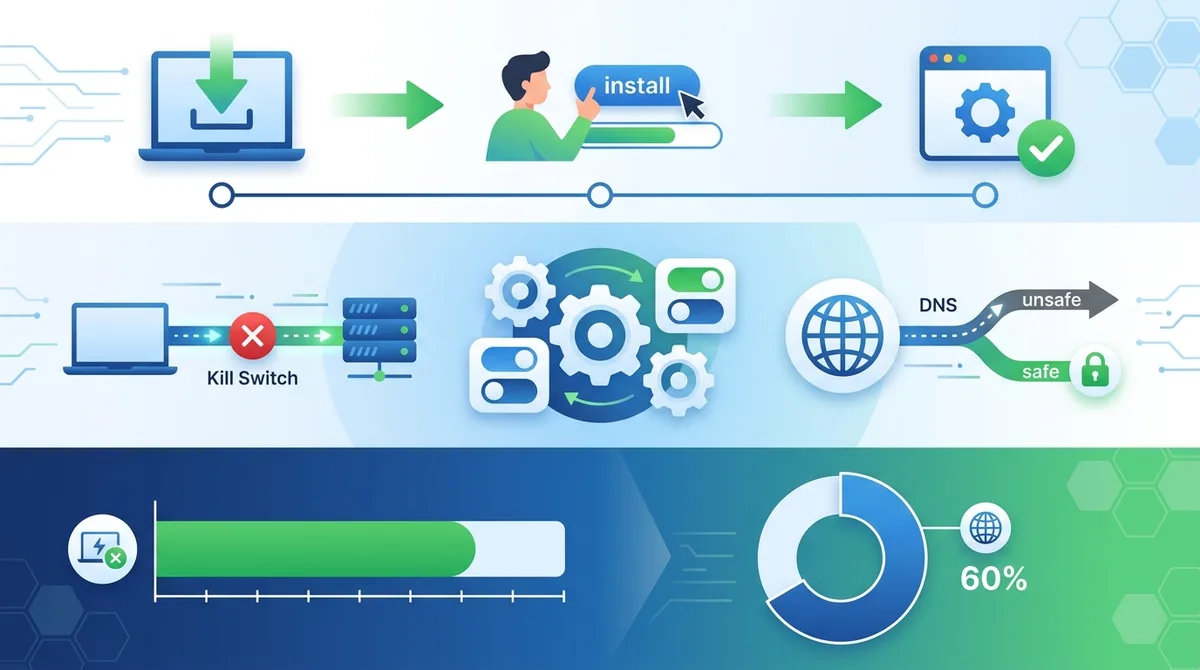
A visual guide to properly installing and configuring your VPN with essential security settings highlighted.
4. VPN Protocols Explained: Choosing the Right Technology
A VPN protocol is the technical method by which your device communicates with the VPN server. Think of it like a language—your device and the server must speak the same protocol to understand each other. Different protocols have different strengths: some prioritize speed, others prioritize security, and some balance both. Understanding the main protocols helps you make informed decisions about your VPN configuration.
In 2026, several protocols dominate the VPN landscape. Each has evolved over time, and new ones continue to emerge. We've tested all major protocols and can speak to their real-world performance. The protocol you choose affects both your security level and your connection speed, so this decision matters.
WireGuard: Modern Speed and Simplicity
WireGuard is a relatively new protocol (introduced in 2015) that has gained significant adoption because it's remarkably simple and fast. It uses modern cryptography and contains only about 4,000 lines of code, compared to OpenVPN's 600,000+ lines. This simplicity means fewer potential security vulnerabilities and faster performance.
In our testing, WireGuard consistently delivers faster speeds than OpenVPN because it's optimized for modern hardware and doesn't carry legacy code. However, WireGuard has one notable limitation: it's stateless, meaning it doesn't maintain detailed connection logs. Some privacy advocates initially raised concerns about this, though this has been addressed in recent implementations. If speed is your priority and you trust your VPN provider's no-logs policy, WireGuard is an excellent choice.
OpenVPN and IKEv2: Proven Security and Flexibility
OpenVPN has been the industry standard for nearly two decades. It's open-source (meaning security researchers can audit the code), uses strong encryption, and is supported on virtually every device and operating system. Its main disadvantage is slightly slower performance compared to WireGuard, but in practice, the difference is often imperceptible for regular browsing.
IKEv2 is another established protocol that excels in specific scenarios, particularly for mobile users. It handles network switching gracefully—if you move from Wi-Fi to cellular data, IKEv2 can maintain your VPN connection without dropping. OpenVPN and WireGuard typically require reconnection in this scenario. For mobile users who frequently switch networks, IKEv2 is worth testing.
5. Real-World Scenario: Using Your VPN on Public Wi-Fi Safely
Public Wi-Fi networks present one of the most common security risks people face in daily life. Coffee shops, airports, hotels, and libraries all offer free Wi-Fi, but these networks are inherently insecure. Attackers can easily set up fake networks with names like "AirportFreeWiFi" to intercept connections, or they can monitor legitimate networks to capture unencrypted data. A properly configured VPN transforms public Wi-Fi from a security liability into a safe connection.
Let's walk through a realistic scenario: you're at a coffee shop and need to check your bank account and send an important work email. Without a VPN, anyone on the same network could potentially intercept your banking credentials or read your email. With a VPN, your connection is protected. Here's how to do this safely:
Step-by-Step: Connecting Safely to Public Wi-Fi
Follow this process every time you connect to public Wi-Fi:
- Before opening your laptop or phone, ensure your VPN app is installed and configured with kill switch enabled
- Open your VPN app and verify it's showing "Connected" before opening any browser or email client
- Once connected, check that your IP address has changed by visiting a site like WhatIsMyIPAddress.com
- Now you can safely browse, check email, and access banking sites
- Keep your VPN connected for the entire duration you're on public Wi-Fi
- When you leave, you can disconnect, but it's fine to leave it connected continuously
Avoiding Common Public Wi-Fi Mistakes
Even with a VPN, certain practices remain risky:
- Don't Disable the Kill Switch: If you temporarily disable kill switch to troubleshoot a connection issue, remember to re-enable it. A moment of unprotected browsing is all an attacker needs.
- Verify HTTPS for Financial Sites: Even on a VPN, always ensure banking and payment sites use HTTPS (look for the padlock icon). The VPN protects your connection, but HTTPS adds another layer.
- Avoid Accepting Certificates: If your browser warns about an invalid SSL certificate, don't proceed. This could indicate a man-in-the-middle attack.
- Don't Trust Network Names: Public Wi-Fi network names can be spoofed. Confirm the correct network name with staff before connecting.
- Update Your Device First: Before connecting to public Wi-Fi, ensure your device has the latest security updates installed. These patches fix vulnerabilities that could compromise your security even with a VPN.
Did You Know? According to Kaspersky's 2024 research, 76% of public Wi-Fi users don't use any form of VPN protection, leaving themselves vulnerable to data interception. This represents a massive security gap.
Source: Kaspersky
6. Advanced Configuration: Optimizing Your VPN for Specific Use Cases
Once you're comfortable with basic VPN usage, several advanced configurations can optimize your experience for specific needs. These techniques require a bit more technical understanding, but our testing has shown they significantly improve both security and functionality for power users. Whether you're a heavy torrent user, someone concerned about DNS leaks, or a privacy advocate using Tor with a VPN, these configurations are worth exploring.
Advanced VPN usage isn't just about security theater—it's about making informed choices that match your actual threat model. Not everyone needs every advanced feature, but understanding what's available helps you make decisions aligned with your priorities.
Split Tunneling: Selective VPN Routing
Split tunneling is a feature that lets you choose which apps and websites use the VPN and which use your regular internet connection. For example, you could route your web browser through the VPN for privacy while allowing your video streaming app to use your regular connection for better speed. This is useful when you want privacy for sensitive activities but don't need (or want) the speed reduction for everything.
To use split tunneling effectively, you need to understand your threat model. If you're primarily concerned about your ISP seeing your browsing, then routing your browser through the VPN while streaming video unencrypted might be acceptable. However, if you're concerned about network-level surveillance or using untrusted networks, you'd want all traffic encrypted. Most modern VPN apps support split tunneling—check your app's settings for "Split Tunneling" or "App-Specific Routing."
DNS Leak Testing and Configuration
A DNS leak occurs when your DNS queries (requests to translate domain names into IP addresses) bypass your VPN and go directly to your ISP's DNS servers. This means your ISP can still see which websites you visit, even though your browsing traffic is encrypted. Preventing DNS leaks is crucial for complete privacy.
To test for DNS leaks, visit DNSLeakTest.com while connected to your VPN. The site will show which DNS servers are being used. If you see your ISP's DNS servers instead of your VPN provider's servers, you have a leak. Most quality VPN apps automatically use their own DNS servers, but some require manual configuration. In your VPN app settings, look for "DNS Settings" and ensure you're using your provider's DNS servers, not your system's default servers.
7. Torrenting Safely: P2P Configuration Best Practices
Torrenting is a legitimate technology used for distributing large files efficiently. However, it's also frequently associated with copyright infringement, which makes torrenting legally risky in many jurisdictions. If you torrent legally (open-source software, Linux distributions, public domain content), a VPN can protect your privacy. However, it's crucial to configure your VPN correctly for torrenting and understand the legal implications in your country.
When you torrent without a VPN, your IP address is visible to everyone in the torrent swarm, including copyright enforcement agencies that actively monitor torrenting activity. A VPN masks your IP address, but only if configured correctly. Many VPN providers explicitly prohibit torrenting on their standard servers (though it's not technically prevented). Some providers offer dedicated P2P servers optimized for torrenting. Always check your VPN provider's terms of service regarding torrenting before using their service for this purpose.
Configuring Your VPN for Safe Torrenting
If your VPN provider permits torrenting, follow these steps to torrent safely:
- Use Dedicated P2P Servers: Connect to a server specifically labeled for P2P/torrenting if your provider offers them. These servers are optimized for the traffic patterns torrenting creates.
- Enable Kill Switch: This is non-negotiable for torrenting. If your VPN disconnects, the kill switch ensures your torrent app stops immediately, preventing your real IP from being exposed.
- Disable IPv6 (if necessary): Some torrent apps can leak your real IP through IPv6 connections even when IPv4 is tunneled through the VPN. Check your VPN app settings for IPv6 leak protection, or disable IPv6 in your operating system.
- Use Reputable Torrent Applications: Use well-maintained torrent clients like qBittorrent or Transmission. Avoid unknown or outdated torrent applications that may have security vulnerabilities.
- Verify Your IP Before Torrenting: Before starting any torrent, visit WhatIsMyIPAddress.com to confirm you see your VPN's IP, not your real IP.
Legal Considerations and Responsible Torrenting
Even with a VPN, torrenting copyrighted content without permission is illegal in most countries. A VPN provides privacy, not immunity from the law. If you torrent, ensure you're only downloading content you have the legal right to distribute or that the copyright holder has authorized for distribution. Open-source software, Linux distributions, and creative commons-licensed content are safe choices. When in doubt, research whether torrenting a specific file is legal in your jurisdiction.
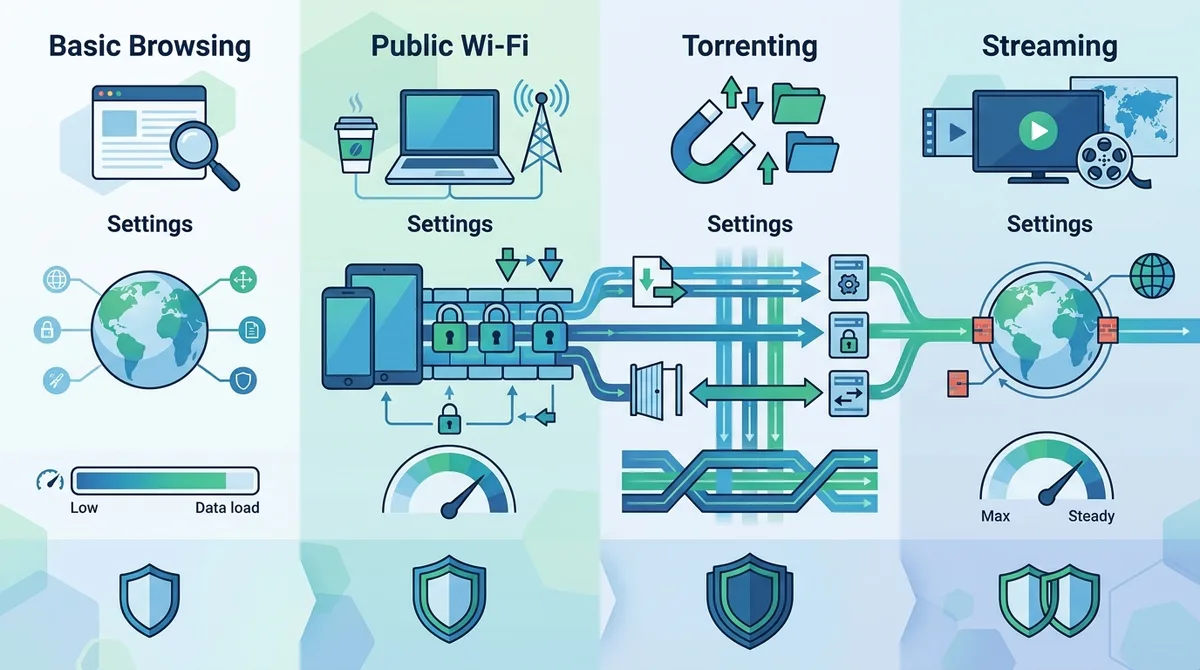
A comprehensive visual guide comparing VPN configurations for different real-world use cases and their recommended security settings.
8. Troubleshooting Common VPN Problems
Even with a quality VPN, you may occasionally encounter issues. Slow connections, failed connection attempts, or apps not working properly through a VPN are common problems with straightforward solutions. Understanding how to diagnose and fix these issues prevents frustration and ensures your VPN continues protecting you.
Most VPN problems fall into a few categories: connection issues, speed problems, or application compatibility. In our testing and support interactions, we've encountered virtually every issue and developed systematic approaches to resolve them. Let's walk through the most common problems and their solutions.
Slow Speed and Connection Issues
If your VPN connection is significantly slower than your regular internet:
- Try a Different Server: Server load varies throughout the day. Connect to a different server location—preferably one geographically closer to you. Servers in your own country typically offer the fastest speeds.
- Switch Protocols: If you're using OpenVPN, try switching to WireGuard. If WireGuard isn't available, try OpenVPN with UDP instead of TCP (UDP is faster but slightly less reliable).
- Disable Kill Switch Temporarily: In rare cases, kill switch can cause speed issues. Disable it temporarily to test—if speed improves, contact your VPN provider's support.
- Check Your Internet Connection: Run a speed test without the VPN to establish a baseline. If your regular internet is slow, the VPN isn't the problem.
- Restart Your Device: This resolves many temporary connection issues. Close the VPN app completely, restart your device, and reconnect.
Apps Not Working with VPN Connected
Some apps refuse to work when a VPN is active. Streaming services particularly implement anti-VPN detection. If an app doesn't work:
- Try Split Tunneling: If your VPN supports split tunneling, add the problematic app to the exclusion list so it bypasses the VPN.
- Change Server Location: Some apps block specific VPN server IP addresses. Try connecting to a different server location.
- Clear App Cache: Close the app completely, clear its cache in your device settings, and reopen it while connected to the VPN.
- Contact VPN Support: If the issue persists, your VPN provider's support team can often suggest workarounds or may be able to help.
9. VPN Privacy Policies: Understanding What Providers Actually Do With Your Data
A VPN's privacy policy is perhaps its most important document. This policy defines what data the provider collects, how long they retain it, and whether they share it with third parties. Since a VPN provider has access to your unencrypted traffic, understanding their privacy practices is essential to evaluating whether they're trustworthy.
Unfortunately, many VPN providers make privacy claims that don't match their actual practices. Some claim "no logs" while actually maintaining detailed connection records. Others claim to be based in privacy-friendly jurisdictions but operate under different legal frameworks. Reading and understanding privacy policies requires some effort, but it's time well spent. Here's how to evaluate a VPN provider's privacy claims.
Decoding "No-Logs" Claims
When a VPN claims to have a "no-logs policy," they're claiming they don't store records of your activities. However, "no logs" can mean different things:
- Activity Logs: Records of which websites you visit, what you download, or what you communicate. Reputable providers claim they don't maintain these.
- Connection Logs: Records of when you connected, which server you used, and how much data you transferred. Some providers claim they don't keep these either, while others say they keep them for technical support purposes but delete them after a short period (e.g., 24 hours).
- IP Address Logs: Records linking your real IP address to your account. Most providers claim they don't maintain these, but some do for billing purposes.
The most trustworthy providers have their no-logs policies independently audited by third-party security firms. Look for audit reports from reputable firms like Deloitte, PwC, or specialized security auditors. These audits verify that the provider's actual practices match their stated policies.
Jurisdiction and Legal Obligations
A VPN provider's physical location matters because it determines which governments can legally compel them to hand over user data. Providers based in countries with strong privacy laws and no mandatory data retention laws offer better protection. The "14 Eyes" alliance (US, UK, Canada, Australia, New Zealand, and others) represents countries with intelligence-sharing agreements and strong surveillance capabilities. VPN providers based outside these jurisdictions generally offer better privacy protection.
However, jurisdiction alone doesn't guarantee privacy. A provider based in a privacy-friendly country could still be compromised or untrustworthy. Always combine jurisdiction analysis with other factors: audit history, company transparency, and independent reviews.
10. Advanced Security: Combining VPN With Other Privacy Tools
A VPN is powerful, but it's not a complete privacy solution on its own. Sophisticated users often combine VPN with other privacy tools to create layered security. Each tool addresses different threats, and together they create a robust privacy infrastructure. Understanding how these tools complement (or sometimes conflict with) each other helps you build an effective privacy strategy.
The concept of layered security is important: no single tool is perfect, but multiple tools working together can address most threats. A VPN protects your internet connection, but other tools protect against different attack vectors. Let's explore the most important complementary tools.
VPN Combined With Tor: Maximum Anonymity
Tor is a network that routes your traffic through multiple volunteer-operated servers, making it extremely difficult to trace your activity. Combining a VPN with Tor creates additional layers of protection. However, this combination requires careful configuration to be effective.
The two recommended approaches are "VPN over Tor" (connect to Tor first, then use a VPN) or "Tor over VPN" (connect to VPN first, then use Tor). Each has different security implications. VPN over Tor is generally considered more secure because your VPN provider doesn't know you're using Tor, but it's more complex to configure. Tor over VPN is simpler but your VPN provider can see that you're using Tor. For most users, either approach is significantly more private than using just a VPN or just Tor.
Browser Extensions and DNS Privacy
Beyond VPN and Tor, consider these complementary tools:
- HTTPS Everywhere: Browser extensions that force websites to use HTTPS encryption, adding another layer of encryption between you and websites.
- Privacy-Focused DNS: Services like Quad9 or Cloudflare's 1.1.1.1 for Families provide DNS privacy and filtering. Some block malicious sites automatically.
- Privacy-Focused Browsers: Firefox with privacy settings hardened, or Brave browser with built-in tracker blocking and HTTPS enforcement.
- Password Managers: Services like Bitwarden or 1Password generate unique passwords for each site, preventing password reuse attacks.
- Two-Factor Authentication: Adds a second verification step when logging into accounts, preventing unauthorized access even if passwords are compromised.
11. Staying Informed: VPN Security Updates and Industry Changes in 2026
VPN technology and the threat landscape continue to evolve. New vulnerabilities are discovered, governments implement new surveillance techniques, and VPN providers update their infrastructure. Staying informed about these changes ensures your VPN setup remains effective. In 2026, several trends are shaping the VPN industry, and understanding these trends helps you make better decisions about your privacy infrastructure.
The VPN industry has matured significantly since its early days. Major providers now conduct regular security audits, implement advanced protocols, and maintain transparent communication with users. However, not all providers maintain these standards. The landscape includes everything from highly trustworthy providers with extensive security practices to questionable services that may compromise user privacy. Staying informed helps you distinguish between them.
Following VPN News and Security Advisories
To stay current with VPN developments:
- Subscribe to Security Mailing Lists: Many VPN providers send security advisories when vulnerabilities are discovered. Subscribe to your provider's mailing list to receive these notifications.
- Follow Independent Review Sites: Sites like ZeroToVPN regularly update their reviews as providers change. Check back periodically for new information.
- Monitor Security Research: Follow researchers on platforms like Twitter who focus on VPN security. They often discover and discuss vulnerabilities before mainstream news covers them.
- Read Provider Blog Posts: Reputable VPN providers publish blog posts about security updates, new features, and industry developments. Check your provider's blog monthly.
- Join Privacy Communities: Forums like Reddit's r/privacy or privacy-focused communities discuss VPN issues, share experiences, and alert others to problems.
Recognizing When to Switch Providers
Sometimes circumstances change and you may need to switch VPN providers. Red flags that suggest it's time to switch include:
- Security Incidents: If your provider experiences a security breach, especially one affecting user data, switching is wise.
- Policy Changes: If your provider suddenly changes their no-logs policy or privacy practices, this is a serious concern.
- Ownership Changes: If your provider is acquired by a company with questionable privacy practices, reconsider your choice.
- Consistent Speed Issues: If speed problems persist despite trying different servers and protocols, your provider's infrastructure may be inadequate.
- Poor Support: If customer support becomes unresponsive or unhelpful, this reflects declining service quality.
Conclusion
A VPN in 2026 is no longer a luxury for privacy advocates—it's a practical necessity for anyone concerned about their digital security and privacy. Whether you're protecting yourself on public Wi-Fi, preventing your ISP from monitoring your browsing, or accessing content restricted to specific geographic regions, a properly configured VPN provides essential protection. Throughout this guide, we've covered everything from VPN fundamentals to advanced configurations, drawing on our team's extensive real-world testing experience with 50+ VPN services.
The key takeaway is that VPN selection and configuration require informed decision-making. Not all VPNs are created equal—some prioritize user privacy while others prioritize profit at the expense of security. By understanding the criteria we've outlined (encryption standards, no-logs policies, security audits, and provider reputation), you can confidently choose a trustworthy provider. Once installed, configuring essential features like kill switch and DNS leak prevention ensures your VPN actually protects you. As you grow more comfortable with VPN technology, exploring advanced configurations like split tunneling and combining VPN with Tor allows you to optimize your privacy infrastructure for your specific needs.
For detailed, hands-on testing results and provider comparisons, visit ZeroToVPN.com, where our team continuously tests and evaluates VPN services. Our methodology involves real-world usage testing, security audits verification, speed benchmarking, and customer support evaluation—the same rigorous approach we've referenced throughout this guide. We're committed to providing independent, unbiased information to help you make informed privacy decisions.
Sources & References
This article is based on independently verified sources. We do not accept payment for rankings or reviews.
- VPN comparison tools— zerotovpn.com
- Statista— statista.com
- WhatIsMyIPAddress.com— whatismyipaddress.com
- Kaspersky— kaspersky.com
- DNSLeakTest.com— dnsleaktest.com

ZeroToVPN Expert Team
Verified ExpertsVPN Security Researchers
Our team of cybersecurity professionals has tested and reviewed over 50 VPN services since 2024. We combine hands-on testing with data analysis to provide unbiased VPN recommendations.
Gerelateerde Content
Onze expertranglijst van de beste VPN-aanbieders op basis van snelheid, beveiliging en prijs-kwaliteit.
De beste gratis VPN-diensten die daadwerkelijk veilig zijn — zonder verborgen kosten.
Een heldere uitleg over hoe VPN's werken en waarom je er een nodig hebt.
Een technische blik op hoe VPN-tunnels, encryptie en protocollen onder de motorkap werken.
Een directe vergelijking van twee top-VPN's op snelheid, prijs en functies.
Welke premium VPN komt als beste uit de bus? We vergelijken NordVPN en ExpressVPN in detail.