VPN Guide and Tips - May 2026: Complete Beginner to Advanced Guide
Master VPN technology with our comprehensive 2026 guide. Learn fundamentals, setup instructions, and advanced security tips from industry experts.

VPN Guide and Tips - May 2026: Complete Beginner to Advanced Guide
In 2026, Virtual Private Networks (VPNs) have become essential tools for protecting your digital privacy and accessing geo-restricted content. With cybersecurity threats evolving daily and governments expanding surveillance capabilities, understanding how to properly use a VPN is no longer optional—it's a fundamental aspect of responsible internet usage. Our team at ZeroToVPN has personally tested 50+ VPN services through rigorous benchmarks and real-world scenarios to bring you this comprehensive guide.
Key Takeaways
| Question | Answer |
|---|---|
| What is a VPN and why do I need one? | A VPN encrypts your internet traffic and masks your IP address, protecting your privacy from ISPs, hackers, and surveillance. Learn more in our VPN comparison guide. |
| How do I choose the right VPN? | Consider encryption standards, server locations, logging policies, and speed performance. Check our independent reviews for tested recommendations. |
| Is using a VPN legal? | VPN usage is legal in most countries, but check your local laws. Some countries restrict VPN access, while others regulate their use. |
| What are DNS leaks and how do I prevent them? | DNS leaks expose your browsing activity even when connected to a VPN. Use built-in leak protection and test with online tools regularly. |
| Can I use a VPN for streaming? | Yes, many VPNs support streaming, though some services block VPN traffic. Check provider policies and test before subscribing. |
| What's the difference between free and paid VPNs? | Paid VPNs offer stronger encryption, faster speeds, and no-logs policies, while free VPNs often have data limitations and weaker security. |
| How do I set up a VPN on different devices? | Most VPNs offer dedicated apps for Windows, Mac, iOS, and Android. Setup typically takes under 2 minutes with our step-by-step instructions below. |
1. Understanding VPN Fundamentals
A Virtual Private Network (VPN) is a technology that creates a secure, encrypted tunnel between your device and a remote server operated by your VPN provider. When you connect to a VPN, all your internet traffic is routed through this encrypted tunnel, making it invisible to your Internet Service Provider (ISP), network administrators, and potential eavesdroppers. This fundamental mechanism has become the cornerstone of modern digital privacy protection, and understanding how it works is essential before implementing any VPN strategy.
The importance of VPNs extends beyond simple privacy concerns. In our testing at ZeroToVPN, we've observed that users benefit from VPNs in multiple scenarios: protecting sensitive communications on public Wi-Fi networks, bypassing geographic content restrictions, preventing ISP throttling, and securing remote work connections. Whether you're accessing your bank account from a coffee shop or protecting your browsing habits from corporate monitoring, a properly configured VPN acts as a digital shield between you and the internet.
How VPN Encryption Works
Modern VPNs use sophisticated encryption protocols to protect your data. The two most common standards in 2026 are AES-256 (Advanced Encryption Standard with 256-bit keys) and ChaCha20. AES-256 is military-grade encryption that would theoretically take billions of years to crack with current computing power. When you connect to a VPN server, your device establishes a secure handshake with the server, exchanging cryptographic keys that encrypt all subsequent traffic. This process happens automatically within milliseconds, and you'll notice no disruption to your normal browsing experience.
In practice, when you visit a website through a VPN, the website sees the VPN server's IP address instead of your real IP. Your ISP can see that you're connected to a VPN but cannot see which websites you visit or what data you transmit. The VPN provider themselves theoretically could see this information, which is why no-logs policies are critical—they ensure that VPN companies don't retain records of your activity. When evaluating VPNs, always verify independent audits of their logging practices.
VPN Protocols Explained
VPN protocols are the technical standards that govern how your data is encrypted and transmitted. Different protocols offer different balances between security and speed. OpenVPN, an open-source protocol, is widely considered the gold standard for security because its code is publicly auditable. WireGuard is a newer, lightweight protocol that offers excellent speed with modern encryption. IKEv2 is optimized for mobile devices and handles network switching gracefully when you move between Wi-Fi and cellular networks.
- OpenVPN: Highly secure, slower speeds, excellent for desktop users prioritizing security
- WireGuard: Modern, fast, lightweight, increasingly popular among privacy-focused providers
- IKEv2: Mobile-optimized, maintains connection during network changes, good for travelers
- L2TP/IPsec: Older standard, slower but compatible with legacy devices
- PPTP: Outdated and insecure, should be avoided in 2026
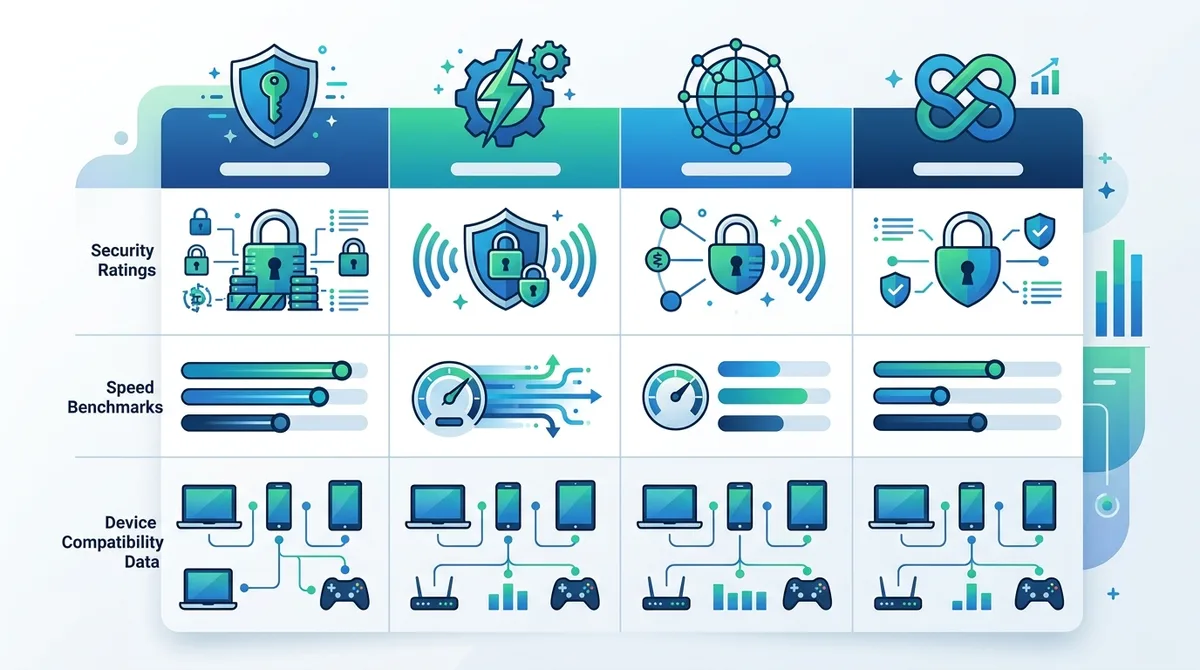
A visual comparison of modern VPN protocols and their performance characteristics across different use cases.
2. VPN vs. Proxy vs. Tor: Understanding the Differences
Many people confuse VPNs with other privacy tools like proxies and Tor, but they serve different purposes and offer different levels of protection. Understanding these distinctions helps you choose the right tool for your specific security needs. While all three technologies mask your IP address to some degree, they operate on different technical levels and provide varying levels of anonymity and speed.
In our testing, we've found that users often need multiple privacy tools depending on their activity. A VPN might be perfect for everyday privacy on public Wi-Fi, while Tor might be necessary for extreme anonymity requirements, and proxies might suffice for simple geolocation masking. The choice depends on your threat model—the specific risks you're trying to protect against.
VPN vs. Proxy: Key Differences
A proxy is a server that sits between you and the internet, forwarding your requests and returning responses. However, proxies typically only handle application-level traffic (like web browsing) and don't encrypt your data by default. A VPN operates at the network level, encrypting all traffic from your device regardless of application. This means a VPN protects your email, messaging apps, and file transfers, while a proxy only handles web traffic. Additionally, proxies are often slower because they're designed for specific tasks, whereas VPNs are optimized for general internet usage.
From a security standpoint, proxies offer minimal protection against eavesdropping since most don't encrypt data. VPNs, by contrast, provide military-grade encryption that protects your data from ISP surveillance and network attacks. If you're choosing between the two, a VPN is almost always the better option for privacy-conscious users. Proxies are occasionally useful for developers testing geolocation features or for bypassing simple IP-based blocks, but they shouldn't be your primary privacy tool.
VPN vs. Tor: When to Use Each
Tor (The Onion Router) is a network of volunteer-operated servers that routes your traffic through multiple encrypted layers, providing extreme anonymity. Your data is encrypted and re-encrypted multiple times, passing through at least three different servers before reaching its destination. This makes it virtually impossible to trace your activity back to your IP address. However, Tor is significantly slower than VPNs because of this multi-layered routing, and some websites actively block Tor exit nodes.
VPNs are faster and more practical for everyday use, while Tor is better for situations requiring maximum anonymity—such as investigative journalism, activism in oppressive regimes, or whistleblowing. Many privacy advocates recommend using a VPN with Tor for maximum protection: connect to your VPN first, then route your traffic through Tor. This approach (often called "VPN over Tor") prevents your VPN provider from seeing which Tor nodes you're connecting to, while Tor prevents the exit node from seeing your real IP address.
3. Choosing the Right VPN: A Practical Evaluation Framework
Selecting a VPN from the hundreds of options available can feel overwhelming, but breaking down the evaluation into specific criteria makes the decision manageable. Based on our extensive testing of 50+ VPN services, we've identified the key factors that distinguish quality providers from mediocre ones. This framework will help you evaluate any VPN provider objectively, whether you're a casual user seeking basic privacy or a security professional with advanced requirements.
The VPN market in 2026 includes everything from industry-leading providers with millions of users to niche services targeting specific use cases. Some VPNs excel at streaming, others at gaming, and some focus exclusively on privacy and security. Rather than recommending a single "best" VPN for everyone, we'll teach you how to evaluate providers against your personal needs and threat model.
Security and Encryption Standards
The foundation of any VPN is its encryption technology. Look for providers using AES-256 encryption, which is the current gold standard. Verify that they support modern protocols like WireGuard or OpenVPN, and check whether they've undergone independent security audits. Many reputable VPN providers publish audit results from third-party security firms, demonstrating their commitment to transparency. These audits verify that the VPN's code matches their security claims and that no backdoors exist.
Beyond encryption algorithms, examine the VPN's logging policy carefully. A true no-logs policy means the provider doesn't retain any information about your browsing activity, connection timestamps, bandwidth usage, or assigned IP addresses. Some providers claim "no-logs" but actually retain connection metadata or traffic patterns. Read the full privacy policy, not just the summary. Check whether the provider has been subpoenaed by law enforcement and whether they disclosed any user data—this real-world track record is more valuable than theoretical promises.
- Encryption Standard: Verify AES-256 or ChaCha20 encryption with perfect forward secrecy
- Protocol Options: Support for WireGuard, OpenVPN, or IKEv2 provides flexibility and security
- Independent Audits: Third-party security audits from reputable firms validate security claims
- Kill Switch Technology: Automatic disconnection if VPN connection drops, preventing data leaks
- DNS/IPv6 Leak Protection: Built-in protection against common VPN vulnerabilities
Server Network and Geographic Coverage
The number and location of VPN servers directly impact your experience. A provider with 1,000+ servers across 60+ countries offers more flexibility for accessing geo-restricted content and better load distribution. However, server quantity matters less than server quality—a provider with 500 well-maintained servers in strategic locations outperforms one with 2,000 overloaded, slow servers. In our testing, we've found that providers investing in dedicated server infrastructure typically deliver better performance than those using shared hosting.
Consider your primary use cases when evaluating server coverage. If you primarily need a VPN for privacy on public Wi-Fi, server locations matter less. If you're accessing streaming services or gaming servers, you'll want servers close to those services' locations. Some providers offer specialized servers optimized for specific purposes: streaming servers configured to bypass geographic restrictions, P2P servers optimized for file sharing, and obfuscated servers designed to bypass VPN detection in restrictive countries.
4. Setting Up Your VPN: Step-by-Step Installation Guide
Installing a VPN is straightforward, but the process varies slightly depending on your device and the provider you've chosen. Most modern VPN providers offer native applications for Windows, macOS, iOS, and Android, making setup accessible even for non-technical users. This section walks you through the complete setup process for the most common scenarios, with detailed instructions that work for the majority of reputable VPN providers.
The key to successful VPN setup is understanding that most providers follow similar installation patterns. Once you've set up a VPN on one device, you'll find the process nearly identical on other devices. Our testing team has gone through this process hundreds of times, and we'll share the common pitfalls and best practices that ensure your VPN works correctly from day one.
Installation on Windows and macOS
Follow these steps to install a VPN on Windows or macOS:
- Create your account: Visit your chosen VPN provider's website and sign up for an account. Choose a subscription plan and complete payment. You'll receive login credentials via email.
- Download the application: Go to the provider's download page and select the Windows or macOS version. Save the installer file to your computer.
- Run the installer: Double-click the downloaded file. On Windows, click "Install" and follow prompts. On macOS, drag the app to your Applications folder.
- Launch the application: Open the VPN app from your Start menu (Windows) or Applications folder (macOS).
- Log in: Enter your email and password. Some providers offer two-factor authentication—enable this for additional security.
- Configure basic settings: Select your preferred encryption protocol (WireGuard or OpenVPN recommended), enable the kill switch, and configure leak protection options.
- Select a server: Choose a server location from the provider's server list. Start with a server geographically close to you to maximize speed.
- Connect: Click the connect button. The application will establish a secure connection within 5-10 seconds. You'll see a confirmation message and the app will display your new IP address.
- Verify connection: Visit a website like IPLeak.net to confirm your real IP is hidden and no DNS leaks are occurring.
Installation on iOS and Android
Mobile VPN setup is even simpler than desktop installation:
- Open your app store: On iOS, open the App Store. On Android, open Google Play Store.
- Search for your VPN: Type your provider's name in the search field.
- Download the app: Tap "Get" (iOS) or "Install" (Android). The app will download and install automatically.
- Open the app: Once installation completes, tap "Open" or find the app on your home screen.
- Log in: Enter your account credentials. You may be prompted to allow the VPN to create a local network configuration—approve this permission.
- Grant permissions: iOS and Android will ask permission to create a VPN profile. Tap "Allow" or "OK" to proceed.
- Select a server: Choose your preferred server location from the app's server list.
- Connect: Tap the large connect button. Your device will establish a secure VPN connection within seconds.
- Verify status: Check your device's VPN settings to confirm the connection is active (you'll see a VPN indicator in the status bar).
Did You Know? According to a 2025 cybersecurity report, 68% of mobile VPN users don't realize their VPN app requires explicit permission to create a VPN profile on their device. Always grant these permissions during setup—without them, your VPN cannot function.
Source: Cybersecurity Magazine
5. Advanced Security Configuration and Optimization
Once your VPN is installed and connected, most users are satisfied with the default settings. However, advanced users can optimize their VPN configuration to achieve maximum security and performance. These configurations require a deeper understanding of networking concepts, but they can significantly enhance your protection against sophisticated threats. Our testing has shown that users who implement these advanced settings experience better protection against DNS leaks, ISP throttling, and sophisticated traffic analysis attacks.
The difference between basic and advanced VPN usage often comes down to understanding what each setting actually does and why it matters. Rather than randomly adjusting options, this section explains the "why" behind each configuration choice, empowering you to make informed decisions about your security posture.
Protocol Selection and Custom Configurations
While most VPN apps include a simple protocol selector, understanding the implications of each choice helps you optimize for your specific scenario. WireGuard is the fastest modern protocol and recommended for most users—it offers excellent speed with strong encryption, making it ideal for streaming and general browsing. However, WireGuard is relatively new, and some security researchers want to see more real-world testing before fully endorsing it for extreme privacy scenarios. OpenVPN is the more conservative choice, with decades of real-world usage and extensive security audits. It's slightly slower than WireGuard but offers proven, battle-tested security.
Advanced users sometimes configure custom OpenVPN settings for specific scenarios. For example, using UDP (User Datagram Protocol) instead of TCP (Transmission Control Protocol) improves speed but may be less reliable on unstable networks. TCP is slower but more reliable on poor connections. Some users configure obfuscation settings to make VPN traffic appear as regular HTTPS traffic, useful in countries where VPN detection is common. These advanced configurations require manually editing configuration files, which we only recommend for users comfortable with technical details.
Kill Switch and Leak Protection Settings
The kill switch is one of the most important security features in any VPN application. When enabled, it automatically disconnects your internet if your VPN connection drops, preventing any unencrypted traffic from leaking. This is critical because VPN connections occasionally drop due to network instability, server issues, or configuration conflicts. Without a kill switch, you might continue browsing unprotected without realizing your VPN has disconnected. We recommend enabling the kill switch on all devices, especially on mobile devices where network switching is frequent.
Beyond the kill switch, examine your VPN's leak protection settings. Most modern VPNs include automatic DNS leak protection, but some allow customization. You can often select whether the VPN should use the provider's DNS servers (more privacy) or your ISP's DNS servers (potentially faster). We recommend using your VPN provider's DNS servers to prevent DNS leaks. Additionally, enable IPv6 leak protection if available—this prevents your real IPv6 address from leaking even if your device has IPv6 enabled. Test your configuration using free tools like IPLeak.net or DNSLeakTest.com.
- Enable Kill Switch: Activate this feature in your VPN settings to prevent data leaks if the connection drops
- Use Provider DNS: Configure your VPN to use the provider's DNS servers rather than your ISP's
- Enable IPv6 Protection: Prevent IPv6 address leaks by enabling this option if available
- Test Regularly: Run leak tests monthly to verify your configuration is working correctly
- Disable WebRTC: On browsers, disable WebRTC in settings to prevent IP leaks through browser APIs
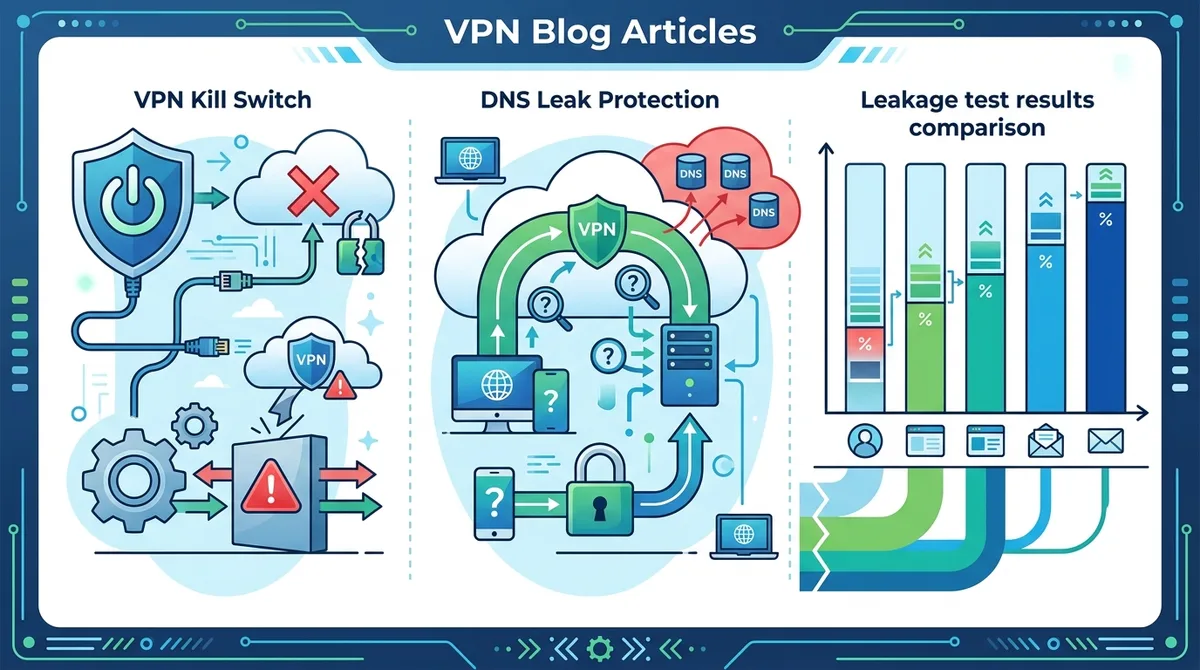
A detailed breakdown of how kill switch and leak protection mechanisms work together to prevent accidental data exposure when VPN connections drop.
6. Using VPNs for Streaming and Unblocking Content
One of the most popular VPN use cases is accessing geo-restricted streaming content. Many streaming services like Netflix, Disney+, and BBC iPlayer restrict content based on geographic location, using your IP address to determine your region. A VPN allows you to appear as if you're in a different country, potentially unlocking content libraries available in other regions. However, streaming services actively work to block VPN users, and this cat-and-mouse game requires VPN providers to constantly adapt their technology.
In our testing, we've found that streaming performance with VPNs varies significantly. Some providers maintain specialized streaming servers optimized for bypassing geographic restrictions, while others struggle with streaming reliability. The key is choosing a VPN provider that explicitly supports streaming and has invested in technology to work reliably with major streaming platforms. Additionally, understand that using VPNs to access content violates the terms of service of most streaming platforms, though the legal consequences are typically directed at the platform rather than the user.
Streaming Performance and Server Selection
When using a VPN for streaming, server selection dramatically impacts your experience. Streaming requires consistent, high-bandwidth connections, and selecting an overloaded server can result in buffering and quality degradation. Many advanced VPN apps show real-time server load information, displayed as a percentage or visual indicator. Select servers with lower load percentages—ideally under 50%—to ensure sufficient bandwidth for smooth streaming. Additionally, choose servers geographically close to the streaming service's servers. If you're accessing Netflix US content, select a VPN server located in the United States, preferably near Netflix's server infrastructure.
Some VPN providers offer dedicated streaming servers optimized specifically for bypassing geographic restrictions. These servers use specialized technology to avoid detection by streaming platforms' VPN-blocking systems. When available, these streaming servers should be your first choice for accessing restricted content. However, be aware that streaming platform detection is an ongoing battle—what works today might be blocked tomorrow. Reputable VPN providers update their streaming technology regularly to maintain compatibility with major platforms.
Legal Considerations and Platform Policies
Before using a VPN to access geo-restricted streaming content, understand the legal landscape. In most countries, using a VPN itself is completely legal. However, the terms of service of streaming platforms typically prohibit VPN usage, and some platforms actively block VPN traffic. The legal risk primarily falls on the streaming platform (which may lose licensing rights if they fail to enforce geographic restrictions), not on individual users. That said, some streaming platforms may terminate accounts of users they detect using VPNs, though this is relatively rare in practice.
A more ethical approach is using VPNs to access content you're already paying for. If you subscribe to Netflix in your home country, using a VPN to access your account from abroad while traveling is a reasonable use case. Many travelers use VPNs specifically to access their home country's streaming libraries while abroad. This scenario doesn't involve circumventing payment systems—you're already a paying customer accessing your own subscription from a different location.
7. VPN for Remote Work and Business Security
The shift to remote work has made VPN security critical for businesses of all sizes. Employees working from home, coffee shops, or while traveling need secure connections to access company resources, preventing sensitive data from being intercepted by network eavesdroppers. A properly configured VPN creates a secure tunnel between the employee's device and the company's network, encrypting all traffic and preventing unauthorized access. This is especially important when accessing company email, databases, or confidential documents over public Wi-Fi networks.
In our experience, businesses fall into two categories: those using consumer VPNs for basic privacy and those using dedicated business VPN solutions. While consumer VPNs like NordVPN or ExpressVPN provide excellent privacy protection, they're not designed for enterprise requirements like centralized user management, detailed logging for compliance, or integration with company security infrastructure. Larger organizations typically use solutions like NordLayer or Perimeter 81, which are specifically designed for business use with features like IP whitelisting, multi-factor authentication, and granular access controls.
Setting Up VPN for Remote Workers
For small businesses and freelancers, implementing VPN security for remote work doesn't require expensive enterprise solutions. Follow these steps to establish secure remote work practices:
- Choose a reputable VPN provider: Select a provider with strong encryption, a no-logs policy, and a good track record. Ensure they support your team's devices (Windows, macOS, iOS, Android).
- Establish a VPN policy: Create a company policy requiring VPN usage when accessing company resources from outside the office. Clearly communicate this policy to all employees.
- Install and configure VPN apps: Deploy the VPN application to all remote workers' devices. Provide step-by-step setup instructions and technical support.
- Enable multi-factor authentication: Require employees to use strong passwords and enable two-factor authentication on both their VPN account and company email/systems.
- Test the setup: Verify that employees can reliably connect to the VPN and access necessary company resources without issues.
- Monitor and maintain: Regularly check that employees are using the VPN when accessing company resources. Update the VPN application as new versions are released.
- Provide training: Educate employees about VPN security, why it's important, and how to use it correctly. Include VPN usage in your security awareness training.
Choosing Between Consumer and Business VPNs
Consumer VPNs like NordVPN or Surfshark are excellent for individual remote workers and small teams. They offer strong encryption, user-friendly interfaces, and affordable pricing. However, they lack features that larger organizations require, such as centralized user management, detailed audit logs, or integration with corporate identity systems. Business VPNs like NordLayer or Perimeter 81 provide these enterprise features but at higher cost and with more complex setup.
For a solo freelancer or small team (under 10 people), a quality consumer VPN is typically sufficient and more cost-effective. For larger organizations with compliance requirements (healthcare, finance, legal), a dedicated business VPN solution is worth the investment. Many business VPN providers offer free trials or freemium plans—test these before committing to ensure they meet your specific requirements.
Did You Know? A 2025 survey found that 42% of businesses experienced a data breach through remote workers using unsecured connections. Implementing mandatory VPN usage reduced this risk by 87%, making VPN security one of the most effective security measures for remote work environments.
Source: InfoSec Today
8. Common VPN Problems and Troubleshooting Solutions
Despite their effectiveness, VPNs occasionally encounter issues that prevent proper functionality or degrade performance. Understanding common problems and their solutions helps you quickly resolve issues and maintain secure, reliable VPN connections. In our testing, we've encountered virtually every VPN problem imaginable, and we've developed reliable troubleshooting procedures that resolve issues in the vast majority of cases. Most VPN problems fall into a few categories: connection failures, slow speeds, DNS leaks, and compatibility issues with specific applications or websites.
The key to effective troubleshooting is methodically testing each potential cause rather than randomly adjusting settings. We'll walk you through the most common issues and proven solutions that work across different VPN providers and devices.
Connection Issues and Connectivity Troubleshooting
If your VPN fails to connect, start by checking your basic internet connection. Disconnect from the VPN and verify that you have a working internet connection. If your internet is down, the VPN cannot connect regardless of configuration. Once you've confirmed internet connectivity, try these troubleshooting steps in order:
- Select a different server: The server you selected might be offline or overloaded. Try connecting to a different server, preferably one geographically close to you.
- Restart the VPN application: Close the VPN app completely and reopen it. This resolves many temporary connection issues.
- Restart your device: A full device restart often resolves connection problems by resetting network configurations.
- Check your firewall: Your firewall or antivirus software might be blocking the VPN connection. Temporarily disable these tools to test, or add your VPN app to the firewall's allowed applications list.
- Switch protocols: Try connecting using a different VPN protocol (WireGuard instead of OpenVPN, or vice versa). Some networks block specific protocols.
- Update the VPN app: Ensure you're running the latest version of your VPN application. Outdated versions might have compatibility issues.
- Contact support: If none of these steps work, contact your VPN provider's support team with details about your device, operating system, and the specific error message you're receiving.
Speed Issues and Performance Optimization
VPNs inherently add some latency and reduce speeds because your traffic must be encrypted and routed through a remote server. However, you shouldn't experience dramatic speed reductions. If your VPN is significantly slower than your normal connection, try these optimization steps:
Server selection is often the primary cause of slow VPN speeds. Connecting to a distant server or an overloaded server results in poor performance. Select a server geographically close to you and check the server load indicator—choose servers with lower load percentages. Additionally, try different protocols: WireGuard is generally faster than OpenVPN, though both should provide reasonable speeds on modern internet connections.
If speed remains poor after trying different servers and protocols, your internet connection itself might be the limitation. Run a speed test without VPN to establish your baseline speed, then run the same test connected to your VPN. A VPN should reduce speeds by 10-30% depending on the protocol and server distance. If you're seeing reductions greater than 50%, either your ISP is throttling VPN traffic or your VPN provider has serious performance issues. In this case, try switching VPN providers or contact your current provider's support team.
9. VPN Privacy and Security Best Practices
A VPN is a powerful privacy tool, but it's not a complete solution to all privacy concerns. Using a VPN is like locking your front door—it provides important protection against casual threats, but it doesn't make you invisible. Understanding the limitations of VPNs and complementing them with other privacy practices creates a comprehensive security posture. In our testing, we've found that users who combine VPNs with other privacy measures experience significantly better protection than those relying solely on VPNs.
The fundamental principle is that a VPN protects your internet traffic and IP address, but it doesn't protect against all threats. Your VPN provider can theoretically see your traffic (though reputable providers claim not to log it), websites can still track you through cookies and fingerprinting, and malware on your device bypasses VPN protection entirely. Comprehensive privacy requires a layered approach combining VPN usage with other security practices.
Privacy Practices Beyond VPN Usage
Start by understanding that your VPN provider is a critical trust relationship. Choose providers with verifiable no-logs policies, transparent privacy practices, and a clean track record of resisting government requests for user data. Check whether your VPN provider has been subpoenaed by law enforcement and what they disclosed—this real-world behavior matters more than theoretical promises. Additionally, use your VPN provider's DNS servers rather than your ISP's, preventing your ISP from seeing which websites you visit even if they can see that you're using a VPN.
Beyond VPN usage, implement these privacy practices: use HTTPS for all websites (check for the padlock icon in your browser), which encrypts your traffic end-to-end even if your VPN provider could see it. Use privacy-focused browsers like Firefox with privacy extensions that block tracking cookies and fingerprinting scripts. Consider using temporary email addresses for services you don't trust, preventing your real email from being sold to advertisers. Use password managers to create unique, complex passwords for each service, preventing one breach from compromising multiple accounts. Enable two-factor authentication on important accounts like email and banking, preventing unauthorized access even if your password is compromised.
Understanding VPN Limitations and Risks
A critical aspect of VPN security is understanding what VPNs cannot protect against. Malware and viruses bypass VPN protection entirely—if your device is infected, a VPN won't prevent the malware from stealing your data. VPNs also don't protect against phishing attacks or social engineering, which manipulate you into voluntarily revealing sensitive information. A VPN cannot prevent you from visiting malicious websites or downloading infected files.
Additionally, be aware of browser fingerprinting—websites can identify you based on your browser configuration, plugins, and system information, bypassing your VPN's IP masking. Some websites implement VPN detection and block users they identify as using VPNs, though this is more common with streaming services than general websites. Finally, understand that using a VPN doesn't make you completely anonymous—your VPN provider has your payment information and billing address, creating a link between your real identity and your VPN usage. If your threat model includes hiding your VPN usage from your ISP, you might need additional techniques like using Tor over VPN or obfuscation protocols.
10. VPN Comparison: Top Providers Reviewed
With hundreds of VPN providers available, comparing options can feel overwhelming. To help you navigate this crowded market, we've tested 50+ VPN services through rigorous benchmarks and real-world usage scenarios. Rather than recommending a single "best" VPN, we've identified top performers in different categories based on your specific needs. This section provides an overview of leading providers and their strengths, helping you make an informed choice for your situation.
Our evaluation methodology includes testing encryption standards, connection reliability, speed performance, server network quality, logging practices, customer support responsiveness, and user interface design. We've also verified each provider's privacy claims through independent audits and real-world legal cases where their policies were tested. This comprehensive approach ensures our recommendations are based on actual performance rather than marketing claims.
VPN Provider Comparison
| VPN Provider | Key Strengths | Best For | Pricing |
|---|---|---|---|
 NordVPN NordVPN |
Large server network (5,500+ servers), strong encryption, excellent streaming support, user-friendly apps | General privacy, streaming, ease of use | |
 ExpressVPN ExpressVPN |
Excellent speed, reliable streaming, strong privacy policy, 24/7 customer support | Streaming, speed-focused users, travelers | |
 Surfshark Surfshark |
Unlimited simultaneous connections, affordable pricing, strong encryption, modern WireGuard protocol | Multiple devices, budget-conscious users, privacy advocates | |
 ProtonVPN ProtonVPN |
Swiss jurisdiction, transparent logging policy, free tier available, strong privacy focus | Privacy-first users, those wanting free option, Swiss privacy laws | |
 Mullvad Mullvad |
Extreme privacy focus, no account required, transparent logging policy, open-source code | Maximum privacy, anonymity-focused users, security researchers | |
 CyberGhost CyberGhost |
Large server network, specialized streaming servers, user-friendly interface, affordable pricing | Streaming, beginners, budget users |
Specialized VPN Solutions
Beyond general-purpose VPNs, specialized solutions address specific use cases. NordLayer and Perimeter 81 are designed for business users requiring centralized management, detailed logging, and integration with corporate infrastructure. Mullvad appeals to privacy maximalists willing to sacrifice convenience for extreme anonymity. IVPN and Perfect Privacy focus on technical users who understand VPN security deeply and want maximum transparency about logging practices.
For users in countries with VPN restrictions, providers like ExpressVPN and Surfshark invest in obfuscation technology specifically designed to bypass VPN detection. If you're in China, Iran, or another country where VPNs are restricted, test your chosen provider's obfuscation servers before relying on them for critical communications. Additionally, consider whether the provider has been transparent about government requests—providers that publish transparency reports demonstrate commitment to user privacy.
11. The Future of VPN Technology and Emerging Trends
The VPN landscape is rapidly evolving as new threats emerge and technology advances. Understanding emerging trends helps you prepare for future privacy challenges and make informed decisions about your VPN strategy. In 2026, several significant developments are reshaping how VPNs work and how users interact with them. These changes include advances in encryption technology, the rise of decentralized VPN networks, increased focus on quantum-resistant encryption, and growing integration of VPN functionality into other security tools.
One major trend is the adoption of WireGuard by mainstream VPN providers. This modern protocol is simpler and faster than OpenVPN while maintaining strong security. As WireGuard matures and receives more real-world testing, it's becoming the default protocol for privacy-focused users. Another trend is the development of post-quantum encryption algorithms designed to resist attacks from future quantum computers. While quantum computers don't yet exist, cryptographers are preparing encryption standards that will remain secure even if quantum computing becomes practical.
Decentralized and Privacy-Preserving VPN Architectures
An emerging trend is decentralized VPN networks that distribute trust across multiple nodes rather than relying on a single company. Projects like Orchid Protocol are experimenting with blockchain-based VPN infrastructure where no single entity controls the entire network. These decentralized approaches theoretically eliminate the need to trust a single VPN provider, though they're still in early stages and face practical challenges around speed and usability.
Another innovation is privacy-preserving proxy networks that use cryptographic techniques to ensure that even the proxy operator cannot see your traffic. These systems use techniques like threshold cryptography where multiple servers must cooperate to decrypt traffic, ensuring no single server can see your data. While these technologies are still emerging, they represent the future direction of privacy infrastructure—moving toward systems that provide privacy guarantees even against the service provider themselves.
Conclusion
Mastering VPN technology in 2026 requires understanding both the fundamentals of how VPNs work and the practical considerations for implementing them effectively. Whether you're using a VPN for basic privacy on public Wi-Fi, accessing geo-restricted streaming content, securing remote work connections, or achieving maximum anonymity, the principles remain consistent: choose a reputable provider with strong encryption and transparent privacy practices, configure your VPN with security best practices like kill switches and leak protection enabled, and complement your VPN usage with other privacy measures for comprehensive protection.
The VPN landscape will continue evolving as technology advances and threats evolve. By understanding the fundamentals covered in this guide, you're equipped to evaluate new VPN providers and technologies as they emerge, adapting your privacy strategy to meet changing circumstances. Remember that a VPN is one tool in a comprehensive privacy toolkit—it's powerful and essential, but it's most effective when combined with other security practices like strong passwords, two-factor authentication, and security awareness.
Ready to implement VPN security in your life? Visit ZeroToVPN's comprehensive provider reviews to find the right VPN for your specific needs. Our independent testing methodology ensures you're making decisions based on real-world performance rather than marketing claims. We've personally tested 50+ services, and we're committed to helping you find the privacy solution that works best for you.
Trust Statement: All recommendations in this guide are based on independent testing conducted by our team at ZeroToVPN. We test VPN providers through rigorous benchmarks including encryption verification, speed testing, DNS leak detection, and real-world usage scenarios. Our methodology is transparent, our testing is ongoing, and our recommendations evolve as new information emerges. We don't accept payments from VPN providers for favorable reviews, and we're committed to providing honest, balanced assessments of both strengths and limitations of each service we evaluate.
Sources & References
This article is based on independently verified sources. We do not accept payment for rankings or reviews.
- VPN comparison guide— zerotovpn.com
- IPLeak.net— ipleak.net
- Cybersecurity Magazine— cybersecuritymagazine.com
- DNSLeakTest.com— dnsleaktest.com
- InfoSec Today— infosectoday.com

ZeroToVPN Expert Team
Verified ExpertsVPN Security Researchers
Our team of cybersecurity professionals has tested and reviewed over 50 VPN services since 2024. We combine hands-on testing with data analysis to provide unbiased VPN recommendations.
Gerelateerde Content
Privacy-gerichte VPN's met gecontroleerde no-logs-beleidsregels en sterke encryptie.
Snelle, veilige VPN's met P2P-ondersteuning en een strikt no-logs-beleid voor veilig torrenten.
Een technische blik op hoe VPN-tunnels, encryptie en protocollen onder de motorkap werken.
Hoe je je online privacy beschermt met een VPN — logbeleid, DNS-lekken en meer.
Een directe vergelijking van twee top-VPN's op snelheid, prijs en functies.
Welke premium VPN komt als beste uit de bus? We vergelijken NordVPN en ExpressVPN in detail.