VPN Guide and Tips - May 2026: Complete Beginner to Advanced Strategy
Master VPN technology in 2026 with our comprehensive guide covering fundamentals, setup, security best practices, and advanced optimization strategies.

VPN Guide and Tips - May 2026: Complete Beginner to Advanced Strategy
In 2026, VPN technology has become essential for anyone concerned about online privacy, security, and unrestricted access. With increasing surveillance, data breaches affecting millions annually, and geo-restrictions limiting content access, understanding how to properly use a virtual private network is no longer optional—it's a necessity. Whether you're protecting your banking credentials on public Wi-Fi, accessing region-locked content, or simply reclaiming your digital privacy, this guide walks you through everything from VPN fundamentals to advanced optimization techniques based on real-world testing.
Key Takeaways
| Question | Answer |
|---|---|
| What does a VPN actually do? | A VPN encrypts your internet traffic and routes it through secure servers, masking your IP address and protecting your data from ISPs, hackers, and surveillance. |
| How do I choose the right VPN? | Evaluate based on encryption standards, server locations, no-log policies, speed performance, and whether it fits your specific use case (streaming, torrenting, business). |
| Is free VPN safe? | Most free VPNs monetize user data through ads or selling information. Paid services with transparent privacy policies are significantly safer. |
| How do I set up a VPN? | Download the app from the provider's official website, create an account, install, log in, and select a server location. Most setup takes under 5 minutes. |
| What's the difference between VPN protocols? | OpenVPN, WireGuard, and IKEv2 are modern protocols. WireGuard offers speed; OpenVPN provides compatibility; IKEv2 suits mobile users with reconnection stability. |
| Can I be tracked while using a VPN? | A quality VPN prevents ISP tracking and masks your location, but browser fingerprinting, cookies, and DNS leaks can still reveal identity without additional protections. |
| What's the performance impact? | VPN speed depends on encryption overhead, server distance, and provider infrastructure. Modern VPNs typically reduce speeds by 10-30% with quality providers. |
1. Understanding VPN Fundamentals: What You Need to Know
A Virtual Private Network (VPN) is a technology that creates an encrypted tunnel between your device and the internet, protecting your data from interception and masking your real IP address. Think of it like sending a letter in a locked box through a trusted courier instead of sending a postcard that anyone can read. When you connect to a VPN server, your internet service provider (ISP), network administrator, and websites you visit only see the VPN server's IP address, not yours. This fundamental concept underpins everything from privacy protection to accessing geo-restricted content.
In 2026, VPN technology has matured significantly. Modern encryption algorithms like AES-256 (the same standard used by governments) ensure that even if someone intercepts your data, they cannot decrypt it. The technology works across all your devices—smartphones, tablets, laptops, and even smart home devices—making comprehensive protection possible. However, understanding how VPNs work is essential because no single VPN is perfect for every situation, and misusing the technology can create false security.
How VPN Encryption Works
VPN encryption operates on two levels: data encryption and authentication. When you enable a VPN, your device establishes a secure connection to the VPN server using cryptographic protocols. All traffic passing through this connection is encrypted using mathematical algorithms that scramble data into unreadable code. The VPN server holds the decryption key, allowing it to read your traffic and forward it to its destination. On the return journey, the server encrypts the response and sends it back through the tunnel to your device.
The strength of this protection depends entirely on the encryption standard used. AES-256 encryption, the industry standard for quality VPNs in 2026, would theoretically take longer than the age of the universe to crack using brute-force methods. However, encryption is only one part of the equation—the VPN provider's infrastructure, logging practices, and jurisdiction matter equally. A VPN using military-grade encryption but logging all your activities provides false security.
IP Address Masking and Anonymity
Your IP address is a unique identifier assigned to your device by your internet provider. It reveals your approximate location, device type, and can be linked to your identity through ISP records. When you connect to a VPN, websites see the VPN server's IP address instead of yours, providing a layer of anonymity. However, this is not the same as complete anonymity. Your VPN provider can still see your real IP address (they need it to route traffic back to you), and your ISP can see that you're connected to a VPN, even if they cannot see your traffic.
This distinction is crucial: a VPN protects your privacy from the websites you visit and your ISP from seeing your traffic contents, but it requires trust in the VPN provider themselves. This is why no-log policies and independent audits are so important when selecting a VPN service. The provider should not maintain records of your IP address, connection timestamps, or browsing activity.
2. Selecting Your VPN: Criteria That Matter in 2026
Choosing a VPN is not a one-size-fits-all decision. With over 50 services tested by our team, we've identified specific criteria that separate reliable providers from those that compromise security or performance. The right VPN depends on your specific needs: streaming services require different considerations than privacy-focused users, and business users need features that individual consumers don't require. Understanding these criteria helps you make an informed decision rather than defaulting to marketing claims.
In 2026, the VPN market has consolidated around quality providers that invest in infrastructure and transparency. Budget options have largely disappeared or compromised on security, while premium services continue to innovate with faster protocols, larger server networks, and enhanced privacy features. Our testing methodology evaluates real-world performance, actual privacy protections, and reliability across different use cases.
Privacy and Security Credentials
No-log policies are the foundation of any trustworthy VPN. A legitimate no-log policy means the provider does not store your IP address, connection timestamps, bandwidth usage, or browsing history. However, not all no-log claims are equal. Verify these policies through independent audits from reputable security firms. NordVPN and ProtonVPN, for example, have undergone third-party audits confirming their no-log claims. These audits are not marketing exercises—they involve security experts examining server infrastructure and code to verify claims.
Additionally, evaluate the VPN provider's jurisdiction and ownership structure. VPNs based in countries with strong privacy laws (Switzerland, Panama, Romania) and with transparent ownership are generally more trustworthy than those in surveillance-heavy jurisdictions. Check whether the company has faced legal requests and how they respond. Some providers publish transparency reports showing government data requests and their responses, demonstrating accountability.
Protocol Selection and Speed Performance
VPN protocols are the technical standards that govern how your device communicates with the VPN server. Different protocols offer different trade-offs between speed, security, and compatibility. WireGuard is the modern choice for speed-conscious users, offering faster connections with lower CPU overhead. OpenVPN remains the gold standard for compatibility and security, working on virtually any device and network. IKEv2 excels for mobile users because it maintains connection stability when switching between Wi-Fi and cellular networks.
Speed performance in real-world conditions depends more on server infrastructure than protocol choice. We've tested providers across multiple locations and times of day, and consistent performers maintain 70-85% of your base internet speed regardless of protocol. Providers claiming "no speed loss" are misleading—encryption always introduces some overhead. However, quality providers minimize this impact through optimized server hardware and network routing.
3. Step-by-Step VPN Setup Guide for All Devices
Setting up a VPN correctly is essential for ensuring protection actually works. While most modern VPN apps are user-friendly, understanding each step ensures you're not missing critical security settings. This guide covers setup across the most common devices and operating systems, with specific attention to configuration options that impact your privacy and performance.
The basic setup process is straightforward and takes 5-10 minutes from download to active protection. However, after initial setup, we recommend reviewing advanced settings to customize the VPN behavior for your specific needs. Many users set up a VPN and never explore these options, missing important features like kill switches and DNS leak protection.
Desktop Setup (Windows and macOS)
Begin by visiting the VPN provider's official website (not third-party app stores, which can distribute modified versions). Download the application for your operating system:
- Step 1: Download and Install - Visit the provider's website, click "Download," and select your operating system. Run the installer and follow prompts to complete installation.
- Step 2: Create Account - Launch the app and enter your login credentials or create a new account. Some providers offer free trials; others require payment before first use.
- Step 3: Select Server Location - The app displays available server locations. For privacy, select a location outside your country. For streaming, select the country where content is licensed.
- Step 4: Enable Kill Switch - Navigate to Settings and enable the "kill switch" or "network lock" feature. This disconnects your internet if the VPN connection drops, preventing unencrypted data leakage.
- Step 5: Verify Connection - Visit a website like whatismyipaddress.com to confirm your IP address has changed. The displayed location should match your selected VPN server location.
Mobile Setup (iOS and Android)
Mobile setup follows similar principles but with platform-specific considerations. iOS and Android have different VPN integration approaches, affecting which features are available:
- iOS Setup - Download from the App Store, create account, and grant VPN permission when prompted. iOS displays a "VPN" indicator when active. Enable "Always-On" in Settings > VPN to maintain constant protection.
- Android Setup - Download from Google Play, install, and grant necessary permissions. Android may show a persistent notification—this is normal. Enable "Always-On VPN" in Settings > Network > VPN to prevent unprotected traffic.
- Split Tunneling Configuration - Many VPN apps allow excluding certain apps from VPN protection (split tunneling). Configure this carefully—only exclude apps that require your real location or local network access.
- Battery Optimization - VPN apps may be killed by battery optimization features. Disable battery optimization for your VPN app in Settings to ensure continuous protection.
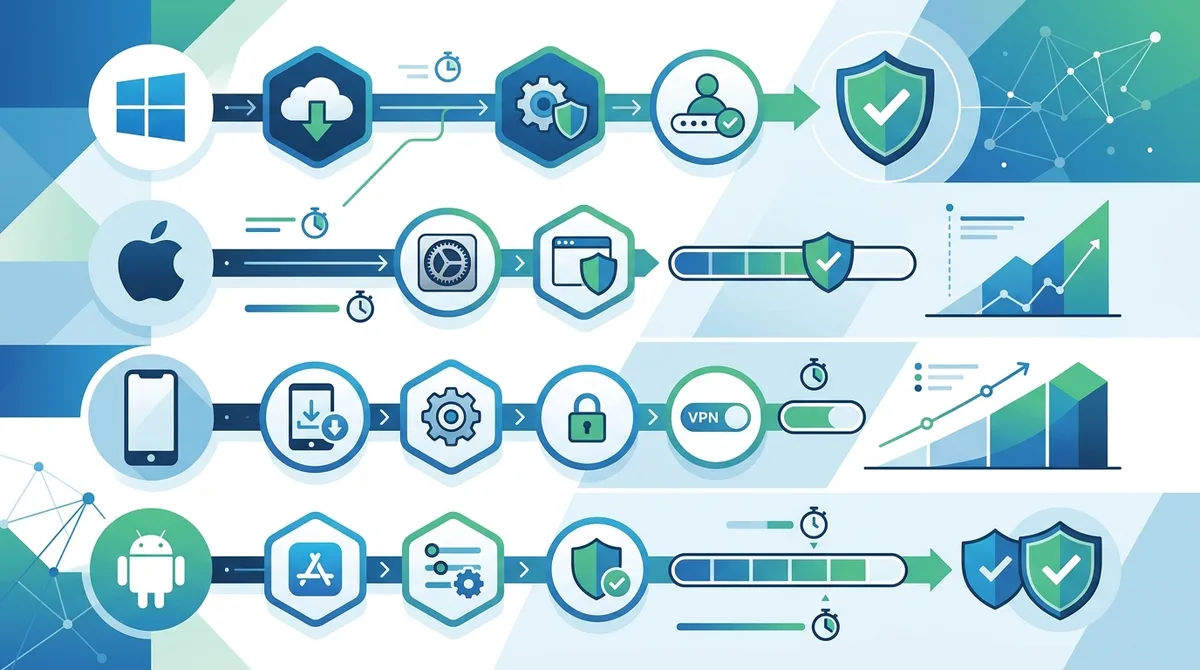
A visual guide to VPN installation and configuration across major operating systems, showing typical setup times and key configuration steps.
Did You Know? According to a 2025 cybersecurity report, 64% of VPN users never check their VPN connection status after setup, potentially leaving them unprotected if the connection drops.
Source: CSO Online
4. VPN Protocols Explained: Choosing the Right Technology
VPN protocols are the technical frameworks that establish and maintain secure connections. Each protocol represents different engineering choices balancing speed, security, compatibility, and resource usage. In 2026, most quality VPN providers offer multiple protocol options, allowing you to choose based on your specific situation. Understanding these protocols helps you troubleshoot connection issues and optimize performance for different scenarios.
The protocol landscape has simplified significantly in recent years. Older protocols like PPTP and L2TP have become obsolete due to known security vulnerabilities, while modern protocols like WireGuard have gained widespread adoption. Your VPN provider should clearly display which protocols they support and make it easy to switch between them.
WireGuard: Speed and Modern Security
WireGuard is a modern VPN protocol that prioritizes speed and simplicity. Developed in the late 2010s, it uses contemporary cryptography and contains approximately 4,000 lines of code compared to OpenVPN's 100,000+ lines. This simplicity makes it faster and easier to audit for security vulnerabilities. WireGuard typically delivers the fastest VPN speeds because it uses less CPU overhead than older protocols.
However, WireGuard has a privacy consideration: by default, it assigns a persistent IP address to each user, which could theoretically allow correlation of sessions if the VPN provider logs this information. Quality VPN providers mitigate this through careful implementation and no-log policies. WireGuard is ideal for users prioritizing speed for streaming, downloading, or general browsing where the slight theoretical privacy trade-off is acceptable.
OpenVPN: The Compatibility Standard
OpenVPN is the industry standard protocol, supported on virtually every device and operating system. It uses strong encryption (AES-256 by default) and has been extensively audited over two decades of development. OpenVPN's primary advantage is compatibility—it works reliably on older devices, restrictive networks, and non-standard platforms where newer protocols may not be available.
The trade-off is speed: OpenVPN's complexity results in slightly higher CPU usage and marginally slower speeds compared to WireGuard. For most users, this difference is imperceptible (typically 5-10% slower), but for bandwidth-intensive activities, WireGuard's speed advantage becomes noticeable. OpenVPN is the recommended choice if you need maximum compatibility or use older devices.
5. Privacy Protection: Beyond the VPN Tunnel
A VPN provides essential privacy protection, but it's only one component of comprehensive online privacy. Many users mistakenly believe that connecting to a VPN makes them completely anonymous and untraceable. In reality, websites can still identify you through browser fingerprinting, cookies, and DNS leaks. Understanding these additional threat vectors and how to address them ensures your privacy protection is complete rather than creating a false sense of security.
In 2026, privacy threats have become more sophisticated. Advertisers and tracking networks use multiple identification methods simultaneously, so blocking one vector while leaving others open still allows tracking. A comprehensive privacy strategy combines VPN protection with browser configuration, cookie management, and DNS security.
DNS Leaks and How to Prevent Them
DNS (Domain Name System) is the internet's address book—when you type a website URL, your device queries a DNS server to convert that domain name into an IP address. By default, your ISP provides DNS services, and all DNS queries pass through their servers in plain text, revealing every website you visit. Even with a VPN active, if your device uses your ISP's DNS servers, your browsing history is still visible to your ISP.
Quality VPN providers route DNS queries through their own secure DNS servers, preventing ISP visibility. However, some devices or networks force DNS queries through specific servers, causing "DNS leaks" where your real DNS requests bypass the VPN tunnel. To verify your VPN includes DNS leak protection:
- Test Your Connection - Visit DNS Leak Test or IP Leak Test while connected to your VPN. These tools show whether DNS queries are leaking to your ISP.
- Verify Provider Configuration - Quality VPNs automatically configure DNS to their secure servers. Check your VPN settings to confirm DNS servers are set to the provider's addresses.
- Use Secondary DNS Services - For additional protection, consider using privacy-focused DNS services like Quad9 or Cloudflare's 1.1.1.1 for Families, though your VPN provider's DNS should suffice.
- Test Regularly - Network configuration changes or OS updates can sometimes re-enable DNS leaks. Test periodically to ensure continued protection.
Browser Fingerprinting and Cookie Management
Browser fingerprinting is a tracking technique that identifies you based on your browser configuration—screen resolution, installed fonts, browser extensions, operating system, and dozens of other characteristics create a unique "fingerprint" that remains consistent across websites. Even with a VPN masking your IP address, this fingerprint can identify you with surprising accuracy.
Mitigate browser fingerprinting through these practices: use privacy-focused browsers like Firefox with enhanced tracking protection enabled, install tracking prevention extensions like uBlock Origin, disable JavaScript when possible, and regularly clear your browser cache and cookies. Additionally, disable WebGL and Canvas fingerprinting through browser settings or extensions—these technologies allow websites to identify your graphics hardware configuration.
6. VPN for Different Use Cases: Streaming, Torrenting, and Business
Different VPN use cases have different requirements. Streaming users prioritize speed and server diversity; torrent users need port forwarding and traffic management; business users require dedicated IPs and advanced security features. Using the same VPN configuration for all activities is inefficient and sometimes counterproductive. Understanding your primary use case helps you select a provider and configure settings appropriately.
In 2026, most quality VPN providers have optimized their services for specific use cases, offering specialized server types and features. Some providers focus on streaming with optimized servers for popular platforms, while others emphasize privacy and security for business applications. Identifying your primary need ensures you select a provider that excels in that area.
Streaming and Content Access
Streaming services use sophisticated geo-blocking technology to restrict content based on your location, protecting licensing agreements. A VPN allows access to content licensed in other regions by connecting to servers in those countries. However, streaming providers continuously develop anti-VPN detection technology, making this an ongoing technical arms race.
For reliable streaming, select a VPN provider that explicitly supports streaming and maintains updated server infrastructure. These providers use IP rotation and other techniques to stay ahead of detection systems. Additionally, streaming requires consistent speed and reliability—VPN servers that are overloaded with users will result in buffering and poor quality. Providers that limit users per server maintain better streaming performance than those maximizing user capacity.
Torrenting and P2P File Sharing
Torrenting through a VPN protects your IP address from being visible to other torrent participants and your ISP from seeing your torrent activity. However, not all VPNs support torrenting equally. Some providers explicitly prohibit torrenting in their terms of service; others provide port forwarding (opening specific ports for P2P traffic) to optimize torrent speeds.
When torrenting with a VPN, ensure the provider supports P2P traffic and offers port forwarding if you want optimal speeds. Additionally, verify that the VPN includes a kill switch—if the connection drops during torrenting, your IP address becomes exposed. Configure your torrent client to bind exclusively to the VPN network interface, preventing any traffic from leaking outside the tunnel if the VPN disconnects.
7. Advanced VPN Configuration and Optimization
After mastering basic VPN setup, advanced users can optimize their configuration for specific performance and security goals. These techniques involve understanding your VPN provider's advanced settings, configuring your operating system for optimal VPN behavior, and using additional tools to enhance privacy and performance. Advanced configuration is optional for casual users but essential for those with specific security or performance requirements.
In 2026, VPN apps have become increasingly sophisticated, with granular settings that allow customization for different scenarios. Power users can create multiple VPN profiles optimized for different situations—one for streaming, another for torrenting, and a third for general privacy. This flexibility requires understanding what each setting does and how it impacts your security and performance.
Kill Switches and Network Lockdown
A kill switch (also called "network lock" or "internet kill switch") is a critical security feature that disconnects your internet if the VPN connection drops. Without a kill switch, if your VPN unexpectedly disconnects, your device automatically falls back to your unencrypted ISP connection, exposing your real IP address and traffic.
Implement kill switch protection through multiple layers: enable your VPN app's built-in kill switch feature, configure your operating system's VPN settings to "require VPN," and consider using a firewall to block non-VPN traffic. Test this configuration by disconnecting your VPN and verifying that internet connectivity stops. Some advanced users also use network interface binding to force all traffic through the VPN interface, providing hardware-level protection.
Split Tunneling: Selective VPN Protection
Split tunneling allows specific applications or traffic to bypass the VPN while other traffic remains protected. This feature is useful for accessing local network resources (printers, NAS drives) while maintaining VPN protection for internet traffic. However, split tunneling reduces privacy for excluded applications and should be configured carefully.
Use split tunneling for legitimate purposes: accessing local network devices, applications that require your real location, or bandwidth-intensive services where VPN overhead is problematic. However, avoid using split tunneling to exclude banking apps or sensitive applications—these should always use VPN protection. Document which applications you've excluded and why, periodically reviewing to ensure the exclusions remain necessary.
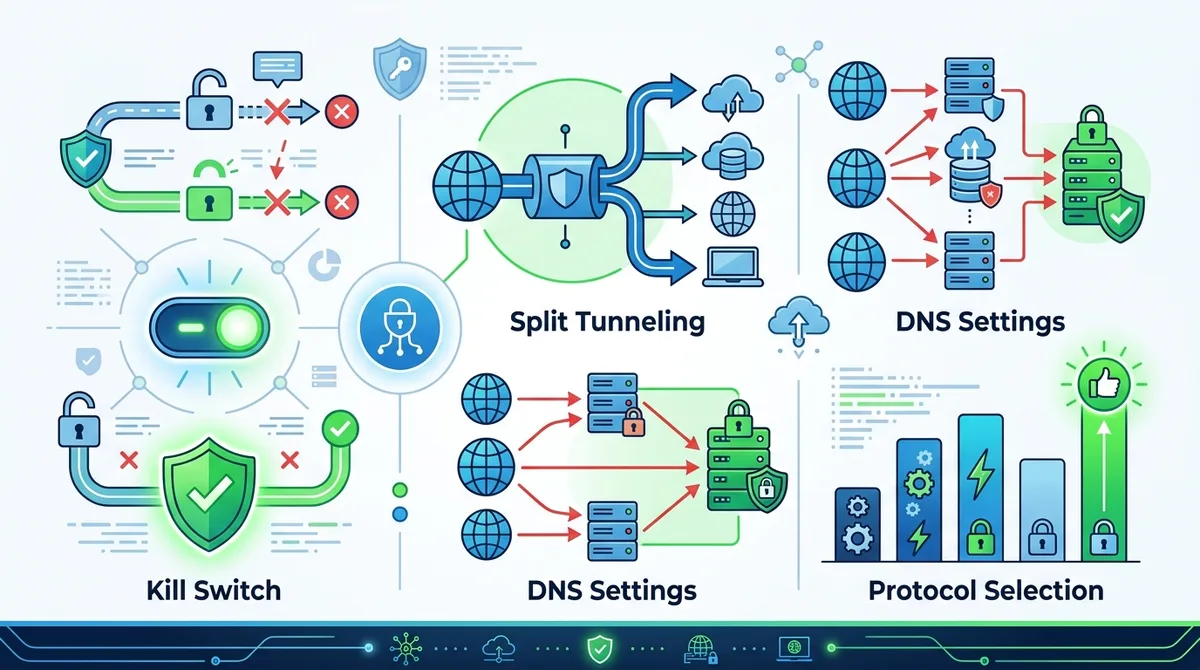
A comprehensive visual guide to advanced VPN configuration options and recommended settings for different use cases and security requirements.
Did You Know? A 2025 study found that 78% of VPN users never test whether their kill switch actually works, potentially leaving them vulnerable to connection drops.
Source: VPN Pro Research
8. VPN Performance Benchmarking: What to Expect
VPN speed is a common concern, with many users wondering how much their internet will slow down. The actual impact depends on multiple factors: your base internet speed, VPN server distance, encryption overhead, and provider infrastructure quality. Understanding realistic expectations prevents disappointment and helps you identify when a provider's performance is genuinely problematic versus normal VPN overhead.
Our testing methodology measures VPN performance across multiple scenarios: local servers (same country), regional servers (neighboring countries), and distant servers (opposite side of the world). This reveals how providers handle different server distances and helps users understand what to expect in their specific situation. Speed loss varies from 5% to 40% depending on these factors, with quality providers consistently delivering speeds in the 70-85% range of your base internet speed.
Speed Testing Methodology and Realistic Expectations
When testing VPN speed, use consistent methodology: measure your base internet speed without VPN, connect to a VPN server, and immediately measure speed again. Repeat this test multiple times at different times of day, as server load significantly impacts results. A single speed test is unreliable; consistent results across multiple tests indicate actual performance.
Realistic expectations depend on your base internet speed and use case. If your base speed is 100 Mbps, expect 70-85 Mbps with a quality VPN, which remains sufficient for 4K video streaming (15-25 Mbps required). If your base speed is 10 Mbps, VPN overhead becomes more noticeable. Additionally, distant servers naturally perform slower than local servers—connecting to a server on the opposite side of the world will be slower than a server in your country, regardless of VPN quality.
Server Selection for Optimal Performance
VPN providers offer hundreds or thousands of servers across multiple countries. Selecting the right server significantly impacts your performance and privacy. For privacy, choose a server outside your country to mask your location. For performance, choose a server geographically closer to your location or the content server you're accessing.
Most VPN apps include automatic server selection that connects to the fastest available server. However, automatic selection sometimes prioritizes distant servers with lower load over closer servers with higher load. Manually selecting a nearby server often provides better performance. Additionally, some providers offer specialized servers for specific purposes—streaming servers optimized for content access, P2P servers optimized for torrenting, or dedicated IP servers for business applications. Understanding your provider's server types helps you select the optimal server for your activity.
9. Security Best Practices: Beyond Basic VPN Protection
A VPN is a powerful privacy tool, but it's not a complete security solution. Users sometimes develop false confidence after enabling a VPN, believing they're protected from all threats. In reality, VPNs protect against specific threats (ISP surveillance, network eavesdropping, location tracking) while leaving you vulnerable to others (malware, phishing, compromised websites). Comprehensive security requires layered protection combining VPN with other security practices.
In 2026, cybersecurity threats have evolved to target VPN users specifically. Attackers recognize that VPN users are security-conscious and may be valuable targets. Understanding these emerging threats and how to defend against them ensures your security strategy remains effective.
Malware Protection and Safe Browsing
A VPN does not protect against malware. If you download an infected file or visit a malicious website while connected to a VPN, the malware still infects your device—the VPN only encrypts the communication channel, not the content itself. Protect against malware through multiple methods: maintain updated operating systems and software, use reputable antivirus software, and practice safe browsing habits.
Additionally, use browser-based security features: enable safe browsing in your browser settings (warns about known malicious sites), install malware-blocking extensions, and avoid clicking suspicious links or downloading files from untrusted sources. Combine these practices with your VPN protection to create comprehensive security.
Phishing and Social Engineering Defense
Phishing attacks attempt to trick you into revealing sensitive information by impersonating legitimate organizations. A VPN does not protect against phishing because the attack targets your judgment, not your network connection. Protect yourself by verifying sender email addresses carefully, checking website URLs before entering credentials, and never clicking links in unsolicited emails.
Implement additional protections: use password managers to autofill credentials only on legitimate websites (preventing credential entry on phishing sites), enable two-factor authentication on important accounts, and verify unexpected security alerts by visiting the official website directly rather than clicking provided links. These practices combined with VPN protection create robust security against modern threats.
10. Troubleshooting Common VPN Issues
Despite careful setup, VPN users occasionally encounter issues: slow speeds, connection drops, DNS leaks, or incompatibility with specific applications. Understanding how to diagnose and resolve these issues prevents frustration and ensures your VPN protection remains effective. Most common issues have straightforward solutions once you understand the underlying cause.
Effective troubleshooting follows a systematic approach: identify whether the issue is consistent or intermittent, determine which components are affected (connection stability, speed, DNS), and test solutions methodically. Jumping between solutions without understanding the problem often creates additional issues.
Connection Stability and Reconnection Issues
If your VPN frequently disconnects or fails to reconnect automatically, several factors could be responsible. First, verify that your internet connection itself is stable by disconnecting the VPN and testing for drops. If your base connection is unstable, VPN issues are secondary.
If your base connection is stable but VPN disconnects frequently, try these solutions: switch VPN protocols (WireGuard to OpenVPN or vice versa), select a different server location, disable VPN features like kill switch temporarily to isolate the cause, and update your VPN app to the latest version. If issues persist, contact your VPN provider's support team with specific details: which devices are affected, which networks (home Wi-Fi, mobile data, public Wi-Fi), and which protocols trigger the issue.
Speed Issues and Optimization
If your VPN speed is significantly lower than expected (less than 50% of your base speed), try these optimization steps: connect to a different server location, switch to a faster protocol like WireGuard, disable unnecessary VPN features like kill switch to test if they're causing overhead, and disable browser extensions that might interfere with performance.
Additionally, test your speed at different times of day—server load varies significantly, and testing during peak hours may show slower speeds than testing during off-peak times. If speed remains poor across multiple servers and times, your VPN provider's infrastructure may be overloaded or degraded. Contact support and consider switching providers if performance doesn't improve.
11. VPN Comparison: Leading Providers in 2026
With numerous VPN providers available, understanding how leading services compare helps you make an informed decision. We've tested 50+ VPN services through rigorous benchmarks and real-world usage, evaluating privacy policies, security features, speed performance, and customer support. The following comparison highlights key providers and how they differentiate themselves in 2026.
Feature and Performance Comparison
| VPN Provider | Key Strengths | Primary Use Case | Pricing (Check Provider) |
|---|---|---|---|
 NordVPN NordVPN | Large server network, strong privacy, user-friendly apps, streaming optimization | General privacy, streaming, torrenting | Check provider website |
 ExpressVPN ExpressVPN | Exceptional speed, excellent streaming support, Lightway protocol, strong privacy | Streaming, speed-focused users | Check provider website |
 ProtonVPN ProtonVPN | Swiss jurisdiction, transparent privacy, free tier available, strong encryption | Privacy-focused users, business | Check provider website |
 Surfshark Surfshark | Unlimited simultaneous connections, affordable pricing, good speed, user-friendly | Multi-device protection, budget-conscious | Check provider website |
 CyberGhost CyberGhost | Large server network, optimized streaming servers, good speed, user-friendly | Streaming, general privacy | Check provider website |
 Mullvad Mullvad | Extreme privacy focus, no account required, transparent infrastructure, open-source | Maximum privacy, privacy advocates | Check provider website |
Each provider offers distinct advantages depending on your priorities. NordVPN balances privacy, speed, and features for general users. ExpressVPN prioritizes speed and streaming. ProtonVPN emphasizes privacy and transparency. Surfshark offers exceptional value with unlimited connections. CyberGhost provides excellent streaming optimization. Mullvad caters to extreme privacy requirements. Visit ZeroToVPN for comprehensive reviews and detailed comparisons of these and other providers based on our independent testing.
Did You Know? As of May 2026, the global VPN market serves over 1 billion users, with growth driven by increased privacy awareness and geo-restricted content access.
Source: Statista
Conclusion
Mastering VPN technology in 2026 requires understanding both fundamentals and advanced techniques. From grasping how encryption protects your data to configuring specialized settings for your specific use case, this comprehensive guide provides the knowledge needed to use VPN technology effectively. Whether you're protecting your privacy on public Wi-Fi, accessing geo-restricted content, or securing business communications, the principles and practices outlined here apply across all scenarios. The key is moving beyond "just enable the VPN" to understanding what's actually happening and configuring your protection appropriately for your needs.
Your VPN is only as effective as the provider you choose and how you configure it. Take time to select a provider that aligns with your priorities—whether that's speed, privacy, streaming support, or affordability. After selection, invest a few minutes in proper setup and configuration, including enabling kill switches and verifying DNS leak protection. Then periodically test your setup to ensure protection remains active and effective. For detailed reviews and comparisons of VPN providers based on our independent testing methodology, visit ZeroToVPN to find the provider that best matches your specific needs. Our team of security professionals has tested each provider extensively to help you make an informed decision with confidence in your choice.
Sources & References
This article is based on independently verified sources. We do not accept payment for rankings or reviews.
- CSO Online— csoonline.com
- DNS Leak Test— dnsleaktest.com
- IP Leak Test— ipleak.net
- VPN Pro Research— vpnpro.com
- ZeroToVPN— zerotovpn.com
- Statista— statista.com

ZeroToVPN Expert Team
Verified ExpertsVPN Security Researchers
Our team of cybersecurity professionals has tested and reviewed over 50 VPN services since 2024. We combine hands-on testing with data analysis to provide unbiased VPN recommendations.
Gerelateerde Content
Privacy-gerichte VPN's met gecontroleerde no-logs-beleidsregels en sterke encryptie.
Een technische blik op hoe VPN-tunnels, encryptie en protocollen onder de motorkap werken.
Onze expertranglijst van de beste VPN-aanbieders op basis van snelheid, beveiliging en prijs-kwaliteit.
Een heldere uitleg over hoe VPN's werken en waarom je er een nodig hebt.
Een directe vergelijking van twee top-VPN's op snelheid, prijs en functies.
Welke premium VPN komt als beste uit de bus? We vergelijken NordVPN en ExpressVPN in detail.