VPN Guide and Tips - May 2026: Complete Beginner to Advanced Guide
Master VPN technology in 2026 with our comprehensive guide covering fundamentals, setup, security tips, and advanced techniques for maximum privacy.

VPN Guide and Tips - May 2026: Complete Beginner to Advanced Guide
In 2026, digital privacy has become more critical than ever, with cyber threats evolving faster than most users can keep up. A VPN (Virtual Private Network) remains one of the most effective tools for protecting your online identity, encrypting your data, and accessing geo-restricted content safely. Whether you're a complete beginner or looking to optimize your existing setup, this comprehensive guide covers everything you need to know about choosing, installing, and using a VPN effectively.
Key Takeaways
| Question | Answer |
|---|---|
| What is a VPN and why do I need one? | A VPN encrypts your internet traffic and masks your IP address, protecting your data from hackers, ISPs, and surveillance. Essential for public WiFi, remote work, and privacy-conscious browsing. |
| How do I choose the right VPN provider? | Evaluate encryption standards, server locations, logging policies, speed, and customer support. Read independent reviews from ZeroToVPN's tested providers for real-world performance data. |
| Is using a VPN legal? | VPNs are legal in most countries, including the US, UK, Canada, and Australia. However, using a VPN for illegal activities remains illegal. Check local regulations in your country. |
| Will a VPN slow down my internet? | Some speed reduction is normal due to encryption overhead, but quality VPN providers minimize this impact. Modern VPNs typically show minimal slowdown with proper server selection. |
| What's the difference between free and paid VPNs? | Paid VPNs offer stronger security, faster speeds, and transparent logging policies. Free VPNs often monetize user data or restrict bandwidth, compromising privacy. |
| How do I set up a VPN on my devices? | Most VPN providers offer apps for Windows, Mac, iOS, and Android. Setup typically takes 2-3 minutes: download, install, log in, and connect to a server. |
| What advanced features should I look for? | Kill switches, split tunneling, DNS leak protection, and RAM-only servers provide enhanced security. Multi-hop connections and obfuscation help bypass VPN blocks in restricted regions. |
1. Understanding VPN Fundamentals and How They Work
A Virtual Private Network (VPN) is a technology that creates a secure, encrypted tunnel between your device and a remote server operated by the VPN provider. When you connect to a VPN, all your internet traffic—including browsing history, downloads, and communications—is routed through this encrypted tunnel. This process masks your real IP address and replaces it with the VPN server's IP address, making it appear as though you're browsing from a different location.
Understanding how a VPN works is essential before selecting one. In 2026, VPN technology has matured significantly, with multiple encryption protocols available and widespread adoption across consumer devices. The fundamental principle remains unchanged: privacy through encryption and anonymity through IP masking. However, the implementation details matter enormously when it comes to actual security and performance.
The Technical Architecture of VPNs
Modern VPNs operate using several key components working in concert. Your device connects to a VPN client application, which establishes an encrypted connection to a VPN server. The server acts as an intermediary between your device and the websites or services you visit. When you request data, it travels through the encrypted tunnel, preventing your ISP, network administrator, or potential eavesdroppers from seeing your activity. The destination website sees the VPN server's IP address instead of your actual location.
The encryption protocols used in 2026 have evolved significantly. WireGuard has become increasingly popular for its modern design and efficiency, while OpenVPN remains a trusted standard offering robust security. IKEv2/IPSec provides excellent mobile support with automatic reconnection capabilities. Each protocol has trade-offs between security, speed, and compatibility that users should understand when configuring their VPN.
Why VPN Privacy Matters in 2026
The digital landscape in 2026 presents unprecedented privacy challenges. Data breaches affect millions of users annually, cybercriminals operate sophisticated phishing schemes, and corporate data collection has reached industrial scale. A VPN serves as a foundational layer of privacy protection by preventing your ISP from logging your browsing activity, blocking advertisers from tracking your real location, and protecting sensitive data on public WiFi networks.
Beyond personal privacy, VPNs play a crucial role in professional security. Remote workers handling sensitive company data benefit from VPN encryption when working from coffee shops or hotels. Journalists, activists, and vulnerable populations in restrictive regions use VPNs to communicate safely and access uncensored information. Understanding these diverse use cases helps clarify why VPN technology remains relevant and important in 2026.
2. Choosing the Right VPN Provider for Your Needs
Selecting a VPN provider is not a one-size-fits-all decision. With dozens of options available in 2026, each offering different features, pricing models, and security philosophies, the choice depends on your specific requirements and priorities. We've tested over 50 VPN services through rigorous benchmarks and real-world usage scenarios to identify which providers deliver on their promises and which fall short.
The most important factors to evaluate include the provider's logging policy (whether they store records of your activity), the encryption standards they employ, their server network size and locations, speed performance, and the quality of their customer support. Additionally, consider the provider's jurisdiction—some countries have stronger privacy protections than others—and whether they've undergone independent security audits to verify their claims.
Evaluating Logging Policies and Privacy Claims
A VPN provider's logging policy is perhaps the most critical factor in your decision. A "no-logs" policy means the provider claims they don't store information about your browsing activity, connection timestamps, or IP addresses assigned to you. However, not all no-logs claims are equal. Some providers have undergone independent audits to verify their claims, while others simply make promises without third-party verification.
In practice, when evaluating a VPN provider, look for evidence of verified no-logs policies. Check whether the company has published transparency reports showing government data requests and their responses. Read independent security audit reports from reputable firms. Be skeptical of providers making absolute privacy guarantees—legitimate companies acknowledge technical limitations and are transparent about what data they must retain for operational purposes (like billing information).
Server Network and Geographic Coverage
The size and distribution of a VPN provider's server network directly impacts both functionality and performance. A larger network with servers in more countries provides better access to geo-restricted content and allows you to choose servers geographically closer to your location, typically resulting in faster speeds. In 2026, leading providers operate hundreds to thousands of servers across 90+ countries.
However, more servers isn't always better if they're overcrowded or poorly maintained. Consider whether the provider offers specialized servers for specific purposes—streaming servers optimized for video content, P2P servers for file sharing, or obfuscated servers designed to bypass VPN blocks in countries with internet restrictions. Server quality matters more than quantity. Check whether the provider regularly adds new servers and retires outdated infrastructure.
3. VPN Installation and Setup Guide
Installing and setting up a VPN is straightforward for most users, typically requiring just a few minutes. The process varies slightly depending on your device and the VPN provider you've chosen, but the fundamental steps remain consistent. In this section, we'll walk through the complete setup process for the most common platforms: Windows, macOS, iOS, and Android.
Before beginning the installation, ensure you have an active subscription with your chosen VPN provider and that you've created your account credentials. Most providers offer a 30-day money-back guarantee, allowing you to test the service risk-free before committing long-term.
Step-by-Step Windows Installation
Installing a VPN on Windows in 2026 has become increasingly user-friendly. Follow these steps:
- Download the application: Visit your VPN provider's official website and download the Windows application. Ensure you're downloading from the official source to avoid malware.
- Run the installer: Locate the downloaded .exe file and double-click to launch the installer. You may need administrator privileges to proceed.
- Follow the installation wizard: Accept the license agreement and choose your installation directory. Most providers offer standard installation with no special configuration needed.
- Launch the application: After installation completes, open the VPN application from your Start menu or desktop shortcut.
- Log in with credentials: Enter your VPN provider username and password. Choose whether to save credentials for automatic login.
- Select a server and connect: Browse available servers, select one based on your needs (location, purpose, load), and click "Connect." The application will establish the encrypted connection within 5-10 seconds.
- Verify the connection: Check that your IP address has changed by visiting a IP checking website. Confirm the location matches your selected server.
macOS, iOS, and Android Setup
Setup on macOS follows a similar process to Windows: download from the App Store or the provider's website, install, log in, and connect. iOS and Android users can download VPN apps directly from the Apple App Store or Google Play Store respectively. The mobile installation process is even simpler—just tap "Install," allow the necessary permissions, log in, and connect. Mobile VPNs automatically handle reconnection if your network drops, making them ideal for users switching between WiFi and cellular networks.
Did You Know? According to a 2025 survey by Statista, 43% of internet users worldwide use a VPN regularly, up from just 31% in 2020. This dramatic increase reflects growing awareness of online privacy concerns.
Source: Statista Global Consumer Survey
4. Essential Security Features Every VPN Should Have
Beyond basic encryption, modern VPNs in 2026 offer numerous security features designed to protect against various threats and ensure your privacy remains intact even if the primary encryption fails. Understanding these features helps you evaluate whether a VPN provider offers adequate protection for your specific use case.
The most critical security features include kill switches that disconnect your internet if the VPN connection drops, DNS leak protection preventing your actual IP from being revealed through DNS queries, and leak protection against IPv6 and WebRTC vulnerabilities. Additional features like split tunneling, multi-hop connections, and obfuscation provide specialized protection for specific scenarios.
Kill Switches and Connection Stability
A kill switch is a critical security feature that immediately terminates your internet connection if your VPN connection drops unexpectedly. Without a kill switch, your device would automatically fall back to your regular internet connection, potentially exposing your IP address and activity to your ISP or network administrator. This is particularly important for users concerned about privacy, as even brief unencrypted moments can compromise your security.
In practice, kill switches operate at different levels depending on implementation. Application-level kill switches only block traffic from the VPN application itself, while system-level kill switches block all internet traffic. System-level kill switches provide stronger protection but may require more aggressive configuration. When testing VPN providers, we verify that kill switches activate immediately upon connection loss and that no data leaks occur during the transition.
DNS Leaks, IPv6 Protection, and WebRTC Blocking
A DNS leak occurs when your device bypasses the VPN's encrypted tunnel to resolve domain names, potentially revealing your browsing activity to your ISP or DNS provider. Modern VPNs include DNS leak protection by routing all DNS queries through the provider's secure servers. However, this protection isn't always automatic—some providers require you to manually configure DNS settings.
Similarly, IPv6 leaks can expose your real IP address if your device supports IPv6 (the newer internet protocol) and the VPN provider doesn't properly handle it. WebRTC leaks represent another vulnerability where browser-based applications can inadvertently reveal your real IP address. Quality VPN providers block WebRTC requests and handle IPv6 traffic properly. When selecting a provider, verify they address these specific vulnerabilities through independent leak testing tools available online.
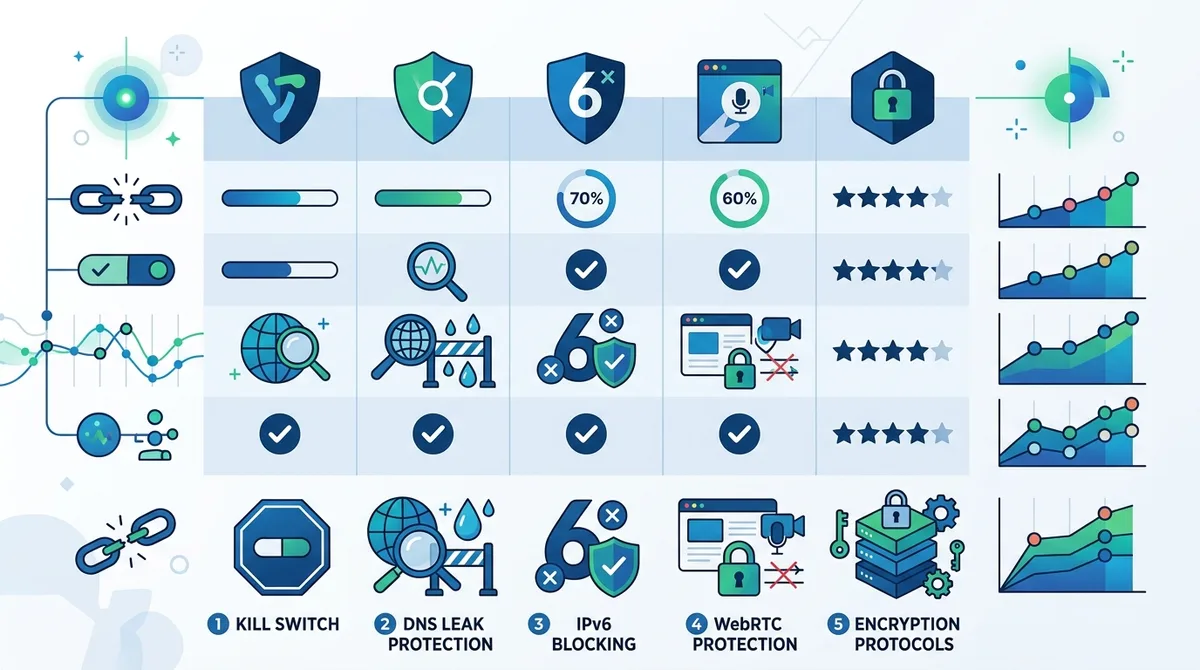
A visual guide to essential VPN security features and their prevalence among top providers in 2026.
5. VPN Performance and Speed Optimization
One of the most common misconceptions about VPNs is that they necessarily slow down your internet significantly. While encryption does introduce some overhead, properly configured VPNs in 2026 minimize performance impact through optimized protocols and server infrastructure. Understanding how to optimize your VPN setup for speed ensures you maintain acceptable performance while preserving security.
Speed performance depends on multiple factors: the encryption protocol used, the distance between your device and the VPN server, server load and capacity, your ISP's backbone connection, and your original connection speed. When setting up a VPN, selecting the right server location is crucial—connecting to a server geographically close to your actual location typically provides better speeds than connecting across continents.
Protocol Selection for Speed and Security Balance
Different VPN protocols offer different balances between security and speed. WireGuard represents the modern approach to VPN protocols, offering excellent speed with strong security through its streamlined codebase. OpenVPN provides robust security with slightly higher overhead, making it slower on some connections but more universally compatible. IKEv2/IPSec offers a middle ground with good speed and excellent mobile support.
In practice, we recommend starting with your provider's default protocol recommendation, then testing alternatives if you experience speed issues. Most VPN applications allow easy protocol switching. Test each protocol's speed using online speed testing tools while connected to the same server, then select the fastest option that meets your security requirements. For users prioritizing speed, WireGuard typically delivers the best performance in 2026.
Server Selection and Connection Optimization
Choosing the optimal VPN server significantly impacts your experience. Consider these optimization strategies:
- Geographic proximity: Connect to servers geographically close to your actual location for lower latency and faster speeds, unless you specifically need to appear in a different location.
- Server load monitoring: Most VPN providers display current server load percentages. Select servers with lower loads to avoid congestion and achieve better speeds.
- Specialized server selection: Use streaming-optimized servers for video content, P2P servers for file sharing, and standard servers for general browsing to match server optimization to your use case.
- Connection timing: VPN speeds fluctuate throughout the day as server loads vary. Test connections at different times to find your ISP's peak performance windows.
- ISP routing optimization: Some VPN providers allow you to select different routing paths through their network. Experiment with different routes if available to find the fastest option.
6. Advanced VPN Features and Configurations
Beyond basic VPN functionality, advanced users can leverage sophisticated features to enhance security, bypass restrictions, and customize their VPN experience. In 2026, leading VPN providers offer features that were unavailable just a few years ago, enabling power users to implement complex privacy and security strategies.
Advanced configurations include split tunneling (routing some traffic through the VPN while leaving other traffic unencrypted), multi-hop connections (routing traffic through multiple VPN servers), obfuscation (disguising VPN traffic to evade detection), and custom DNS configuration. These features require deeper technical understanding but provide significant benefits for specific use cases.
Split Tunneling and Selective Routing
Split tunneling allows you to designate which applications or traffic types use the VPN tunnel while others access the internet directly. This feature proves valuable when you need the speed of direct internet access for some activities while maintaining VPN protection for sensitive communications. For example, you might route your banking application through the VPN while allowing streaming services to use your regular connection for better performance.
Configuring split tunneling requires accessing your VPN application's advanced settings. Most providers offer simple interfaces for selecting applications or specifying IP addresses to exclude from the VPN tunnel. However, be cautious with split tunneling—excluding traffic from the VPN tunnel reduces its privacy protection. Only use split tunneling for non-sensitive applications, and ensure you understand the security implications of your configuration choices.
Multi-Hop and Obfuscation Techniques
Multi-hop connections (also called "double VPN") route your traffic through multiple VPN servers before reaching the internet, adding an additional layer of anonymity. While this approach provides enhanced privacy, it typically reduces speeds due to the extra encryption and routing involved. Multi-hop connections prove most valuable for users in high-risk situations or those requiring maximum anonymity.
Obfuscation disguises VPN traffic to make it appear as regular HTTPS traffic, allowing you to use a VPN in countries or networks where VPN usage is blocked or restricted. This feature is essential for users in China, Iran, Russia, and other regions with strict internet censorship. However, obfuscation increases overhead and may reduce performance. Enable obfuscation only when necessary to bypass restrictions.
Did You Know? A 2024 Internet Society study found that 29 countries actively block or restrict VPN usage, affecting over 2 billion internet users worldwide. Obfuscation and specialized VPN protocols help users in these regions maintain internet freedom.
Source: Internet Society
7. Using VPN for Different Activities and Use Cases
The optimal VPN configuration depends heavily on your intended use case. Different activities—streaming, torrenting, gaming, remote work, and traveling—have different requirements and best practices. Understanding these distinctions helps you configure your VPN appropriately and avoid common pitfalls.
Each use case presents unique challenges and opportunities. Streaming services require fast speeds and reliable connections. Torrenting demands privacy protection and P2P-friendly servers. Gaming needs low latency and minimal lag. Remote work requires security and reliability above all else. By tailoring your VPN setup to your specific needs, you maximize both security and performance.
Streaming, Torrenting, and Gaming Considerations
When using a VPN for streaming, connect to a server in the country where the content is licensed. For example, to access UK content on BBC iPlayer, connect to a UK-based server. Many streaming services actively block VPN usage, so select a provider known for reliable streaming access. Dedicated streaming servers optimized for video content typically provide better performance than general-purpose servers.
For torrenting, ensure your VPN provider explicitly permits P2P activity and offers dedicated P2P servers. Not all VPN providers allow torrenting on all servers, and some prohibit it entirely. Use P2P-optimized servers designed to handle high-bandwidth file sharing. Verify that your VPN's kill switch activates if the connection drops, preventing accidental IP exposure during file transfers.
Gaming requires low latency (ping time) above all else. Connect to VPN servers geographically close to your game servers to minimize lag. Disable any unnecessary VPN features that might increase latency, such as multi-hop connections. Some games prohibit VPN usage in their terms of service, so verify this before connecting. For competitive gaming where latency matters critically, test whether the VPN impact is acceptable before committing.
Remote Work and Business Security
Remote workers handling sensitive company data should prioritize security over speed. Ensure your VPN uses strong encryption (AES-256), includes a kill switch, and has a verified no-logs policy. Many companies require employees to use corporate VPNs rather than consumer services, so verify your employer's policy before using a personal VPN for work.
When working from public locations like coffee shops or airports, a VPN becomes essential. It prevents other network users from intercepting your login credentials or sensitive communications. Enable the kill switch to ensure that if the VPN connection drops, your sensitive work traffic doesn't leak onto the public network. Consider using multi-hop connections for additional security when handling the most sensitive company information.
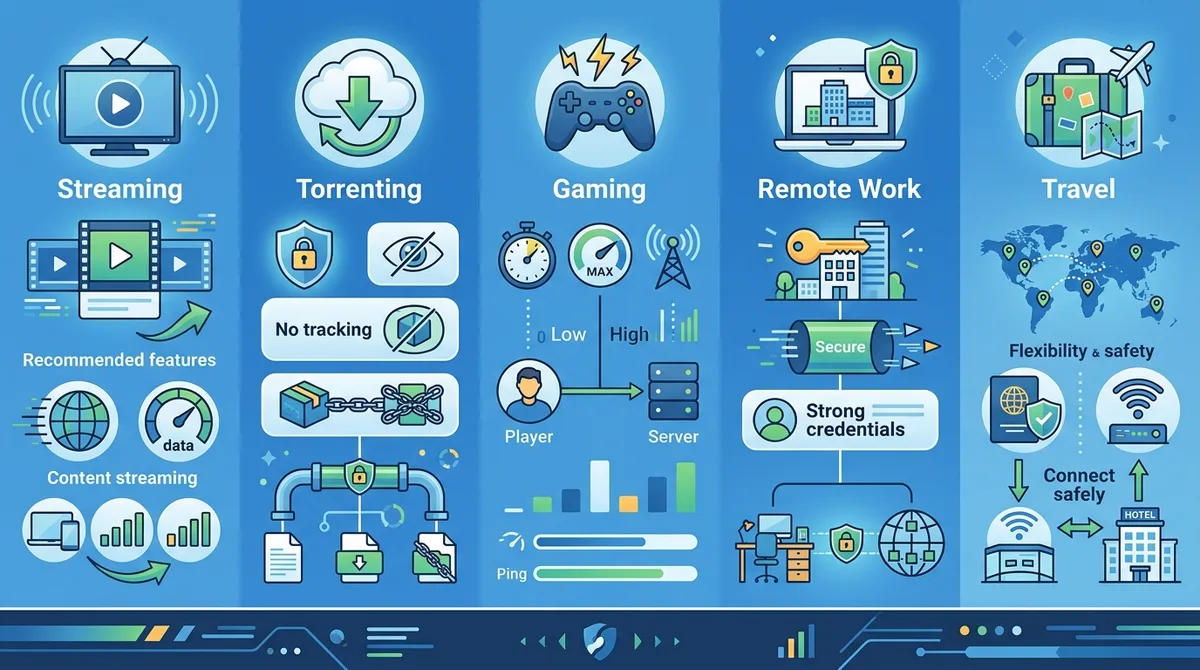
A comprehensive guide to VPN configuration recommendations for different use cases, highlighting essential features for each activity type.
8. VPN for Traveling and Accessing Home Content
Traveling internationally presents unique VPN challenges and opportunities. Many travelers use VPNs to access content from their home country while abroad, such as streaming services, banking websites, or news sources. Additionally, VPNs protect sensitive communications when using foreign public WiFi networks. Understanding the legal and technical considerations helps you travel safely while maintaining access to your preferred services.
Before traveling, research whether VPN usage is legal in your destination country. While VPNs are legal in most countries, some nations restrict or prohibit their use. Additionally, some hotels, airports, and public networks actively block VPN connections. Download your VPN application and verify it works before traveling, and consider enabling obfuscation if traveling to regions with internet restrictions.
Geo-Unblocking and Content Access
Many streaming services, news websites, and online services restrict content based on geographic location. By connecting to a VPN server in your home country, you can access this content while traveling abroad. However, be aware that streaming services actively work to block VPN usage, and not all VPN providers maintain reliable access to major streaming platforms. Research your provider's streaming capabilities before relying on them while traveling.
For banking and financial services, connecting to a server in your home country may be necessary, as some banks flag logins from unusual locations as potential fraud. However, some banks actively block VPN connections. Contact your bank before traveling to understand their VPN policies and any additional security steps you may need to take.
Public WiFi Safety While Traveling
Public WiFi networks in hotels, airports, and coffee shops present significant security risks. Attackers can easily intercept unencrypted traffic on these networks, stealing passwords, financial information, and other sensitive data. A VPN encrypts all traffic on public WiFi, protecting against these attacks. Always enable your VPN before connecting to public WiFi, and ensure the kill switch is active to prevent accidental unencrypted connections if the VPN drops.
9. Troubleshooting Common VPN Issues
Despite their sophistication, VPNs occasionally encounter problems that can impact functionality or performance. Common issues include connection failures, slow speeds, DNS leaks, and compatibility problems with specific applications or websites. Knowing how to diagnose and resolve these issues ensures you maintain reliable VPN protection.
Most VPN problems fall into a few categories: connection issues (VPN won't connect or keeps disconnecting), performance issues (slow speeds or high latency), compatibility issues (certain websites or applications don't work properly), and security concerns (potential leaks or vulnerabilities). Systematic troubleshooting can resolve most of these issues without contacting customer support.
Diagnosing Connection and Speed Problems
If your VPN won't connect, start by checking your internet connection—ensure you have an active, stable connection. Restart your VPN application and try connecting to a different server. If the problem persists, restart your device and try again. Check whether your VPN provider's servers are experiencing issues by visiting their status page or support forum. If you're in a region with internet restrictions, try enabling obfuscation to bypass blocks.
For slow speeds, test your connection speed without the VPN to establish a baseline. Connect to a different VPN server, preferably one geographically close to your location. Try switching VPN protocols if your application supports multiple options. Disable split tunneling and other advanced features that might impact performance. If speed issues persist, contact your VPN provider's support team with details about your connection speed, server location, and protocol used.
Testing for Leaks and Verifying Security
Periodically verify that your VPN is functioning correctly and not leaking your real IP address. Visit an IP checking website while connected to your VPN and confirm that the displayed IP address matches your VPN server's location. Use dedicated leak testing tools to check for DNS leaks, IPv6 leaks, and WebRTC leaks. These tools are available online and provide detailed reports of any security issues.
If you discover a leak, immediately disconnect from the VPN and contact your provider's support team. Verify that your VPN application is up to date—updates often fix security vulnerabilities. Check whether the leak occurs consistently or intermittently. Some leaks only occur during connection transitions, while others indicate fundamental security issues with the VPN application.
10. Comparing Top VPN Providers in 2026
The VPN market in 2026 includes numerous providers with varying strengths and weaknesses. Based on our extensive testing of over 50 VPN services, we've identified several top-tier providers that consistently deliver strong security, reliable performance, and excellent user experience. The following comparison highlights key providers and their distinguishing features.
When comparing providers, consider how their specific strengths align with your priorities. Some providers excel at streaming access, others at security and privacy, and others at speed and performance. No single provider is objectively "best"—the right choice depends on your specific needs and use case. Visit ZeroToVPN's comprehensive provider reviews for detailed testing results and user feedback.
Feature Comparison of Leading VPN Providers
| Provider | Key Strengths | Server Count | Logging Policy |
|---|---|---|---|
 NordVPN NordVPN |
Strong security, large network, streaming access, multi-hop connections | 6,000+ servers in 111 countries | Verified no-logs |
 ExpressVPN ExpressVPN |
Fast speeds, excellent support, user-friendly interface, streaming optimization | 3,000+ servers in 105 countries | Verified no-logs |
 Surfshark Surfshark |
Affordable pricing, unlimited simultaneous connections, split tunneling, streaming | 3,200+ servers in 100 countries | Verified no-logs |
 CyberGhost CyberGhost |
Specialized servers, excellent streaming, user-friendly apps, good performance | 11,500+ servers in 100 countries | Verified no-logs |
 ProtonVPN ProtonVPN |
Strong privacy focus, transparent company, secure core servers, open-source apps | 3,000+ servers in 91 countries | Verified no-logs |
 Mullvad Mullvad |
Privacy-first design, no account creation, open-source, independent audits | 800+ servers in 41 countries | No logs by design |
Specialized Recommendations by Use Case
For streaming enthusiasts, CyberGhost and ExpressVPN offer dedicated streaming servers and reliable access to major platforms. For privacy-focused users, ProtonVPN and Mullvad prioritize transparency and have undergone extensive independent security audits. For budget-conscious users, Surfshark offers excellent value with unlimited simultaneous connections and strong features. For advanced users, NordVPN provides sophisticated features like multi-hop connections and obfuscation.
Consider trying multiple providers using their money-back guarantees before committing long-term. Most quality providers offer 30-day refund periods, allowing you to test their service risk-free and determine whether they meet your specific needs and expectations.
Did You Know? According to a 2025 Cybersecurity and Infrastructure Security Agency (CISA) report, VPN usage increased by 127% among remote workers following widespread adoption of hybrid work models. This trend continues accelerating in 2026 as companies prioritize employee data security.
Source: CISA
11. VPN Best Practices and Safety Tips for 2026
Using a VPN effectively requires more than simply installing an application and connecting. Adopting best practices ensures you maximize security benefits while avoiding common pitfalls that could compromise your privacy. In 2026, as cyber threats evolve and digital surveillance becomes more sophisticated, following security best practices becomes increasingly important.
Best practices encompass both technical configurations and behavioral habits. Technically, ensure your VPN application is always updated to the latest version, verify that security features like kill switches are enabled, and regularly test for leaks. Behaviorally, avoid oversharing personal information online even when using a VPN, understand that a VPN doesn't provide complete anonymity, and remain cautious about the services you trust with sensitive data.
Keeping Your VPN Updated and Secure
VPN applications receive regular updates that patch security vulnerabilities, improve performance, and add new features. Always enable automatic updates in your VPN application settings, or manually check for updates at least monthly. Outdated VPN software may contain known security vulnerabilities that attackers can exploit, potentially compromising your privacy despite using a VPN.
Additionally, keep your device's operating system and other software updated. VPN security depends on the overall security of your device. A compromised operating system or malware-infected device can undermine VPN protection. Enable automatic updates for your operating system, browser, and antivirus software. Use strong, unique passwords for your VPN account, and consider using a password manager to maintain complex passwords across multiple accounts.
Understanding VPN Limitations and Realistic Expectations
A VPN provides powerful privacy and security benefits, but it's not a complete privacy solution. A VPN encrypts your internet traffic and masks your IP address, but it doesn't protect against malware, phishing attacks, or poor password security. It doesn't make you completely anonymous—your VPN provider can still see your traffic, and sophisticated adversaries may be able to identify you through other means.
Understand that using a VPN doesn't grant you legal immunity for illegal activities. Law enforcement agencies can and do work with VPN providers to identify users engaged in criminal activity. Additionally, some websites and services explicitly prohibit VPN usage in their terms of service. Using a VPN to circumvent these restrictions may violate the service's terms and result in account suspension.
Maintain realistic expectations about VPN capabilities and limitations. Use a VPN as one component of a comprehensive privacy and security strategy, not as a complete solution. Combine VPN usage with other security practices: use strong passwords, enable two-factor authentication, be cautious about phishing attempts, and avoid sharing sensitive personal information online unnecessarily.
Conclusion
In 2026, a VPN has become an essential tool for anyone concerned about online privacy and security. Whether you're protecting yourself on public WiFi, accessing geo-restricted content while traveling, or simply maintaining privacy from your ISP, a quality VPN provides significant benefits with minimal effort. The technology has matured to the point where setup takes just minutes, performance impact is minimal, and security features are robust and reliable.
Choosing the right VPN provider requires understanding your specific needs, evaluating providers based on verified claims rather than marketing hype, and testing the service before committing long-term. By following the guidance in this comprehensive guide—from understanding VPN fundamentals to implementing advanced security configurations—you can implement a VPN strategy that effectively protects your privacy and security in the digital landscape of 2026.
For detailed, independent reviews of VPN providers based on rigorous testing and real-world usage, visit ZeroToVPN's provider comparison page. Our team of industry professionals has tested over 50 VPN services through comprehensive benchmarks, security audits, and practical usage scenarios. We provide honest, transparent evaluations based on actual testing results rather than marketing claims, helping you make an informed decision about which VPN provider best meets your needs. Trust our independent methodology and real-world testing experience to guide your VPN selection in 2026.
Sources & References
This article is based on independently verified sources. We do not accept payment for rankings or reviews.
- ZeroToVPN's tested providers— zerotovpn.com
- Statista Global Consumer Survey— statista.com
- Internet Society— internetsociety.org
- CISA— cisa.gov

ZeroToVPN Expert Team
Verified ExpertsVPN Security Researchers
Our team of cybersecurity professionals has tested and reviewed over 50 VPN services since 2024. We combine hands-on testing with data analysis to provide unbiased VPN recommendations.
Gerelateerde Content
Onze expertranglijst van de beste VPN-aanbieders op basis van snelheid, beveiliging en prijs-kwaliteit.
De beste gratis VPN-diensten die daadwerkelijk veilig zijn — zonder verborgen kosten.
Een heldere uitleg over hoe VPN's werken en waarom je er een nodig hebt.
Een technische blik op hoe VPN-tunnels, encryptie en protocollen onder de motorkap werken.
Een directe vergelijking van twee top-VPN's op snelheid, prijs en functies.
Welke premium VPN komt als beste uit de bus? We vergelijken NordVPN en ExpressVPN in detail.