VPN and Contactless Delivery: How to Protect Your Home Address and Package Tracking From Data Brokers in 2026
Learn how VPNs and privacy tools protect your home address and delivery data from data brokers. Our expert guide covers practical steps to secure contactless or
VPN and Contactless Delivery: How to Protect Your Home Address and Package Tracking From Data Brokers in 2026
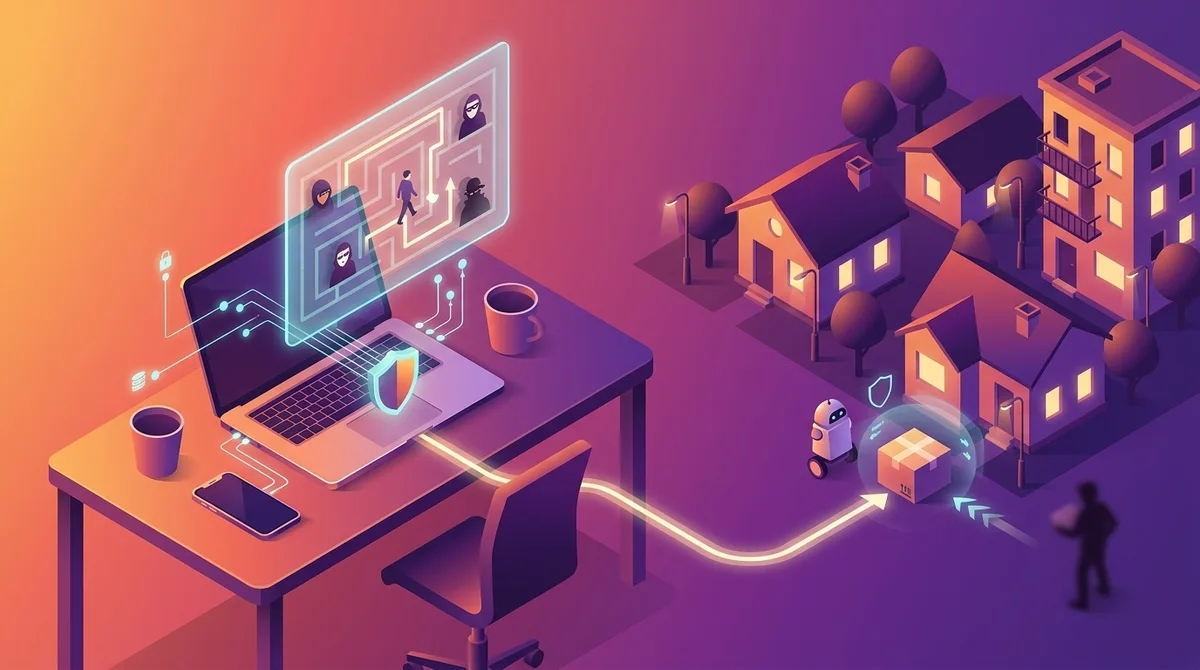
As contactless delivery becomes the norm in 2026, your home address and package tracking information have become valuable commodities for data brokers. Every order you place online—from groceries to electronics—creates a digital trail that retailers, logistics companies, and third-party data aggregators collect, store, and sell. A VPN (Virtual Private Network) is one of the most effective tools to obscure this sensitive information, but it's only part of a comprehensive privacy strategy. In this guide, we'll show you exactly how to protect your delivery data from unwanted surveillance and commercial exploitation.
Key Takeaways
| Question | Answer |
|---|---|
| Why do data brokers target delivery information? | Your home address, delivery frequency, and purchase patterns reveal lifestyle data that advertisers and risk assessment companies pay for. This information is used for targeted marketing, price discrimination, and identity theft. |
| Can a VPN alone protect my delivery data? | A VPN encrypts your internet traffic, but it doesn't hide your address from the retailer or courier. You need a layered approach combining VPNs, email masking, and alternative delivery methods for complete protection. |
| Which VPN features matter most for delivery privacy? | Look for no-logs policies, strong encryption (AES-256), kill switches, and support for alternative delivery addresses. Check our VPN reviews for tested providers. |
| How do data brokers access my delivery information? | They obtain data through data aggregation partnerships with retailers, public records, loyalty programs, and data breaches. They then compile and sell profiles to marketers and risk assessment firms. |
| What's the difference between a VPN and email masking for delivery? | VPNs hide your IP address and encrypt traffic; email masking services create disposable email aliases to prevent your real inbox from being added to marketing lists. |
| Are there legal ways to opt out of data broker tracking? | Yes. The CCPA (California), VMPPA (Virginia), and similar state laws require data brokers to honor opt-out requests. Use services like Opt Out Data Brokers to submit requests at scale. |
| What's the best delivery address strategy for privacy? | Use alternative delivery addresses like Amazon lockers, UPS stores, or PO boxes. Combine this with a VPN and email masking for maximum anonymity. |
1. Understanding the Data Broker Ecosystem and Delivery Privacy Threats
Data brokers are companies that collect, aggregate, and sell personal information about millions of people without their explicit consent. In the context of contactless delivery, they're particularly interested in your home address, delivery frequency, package contents (inferred from retailers), timing patterns, and geographic location data. This information is sold to marketers, insurance companies, credit bureaus, and even law enforcement agencies. When you place an order for delivery, you're not just transacting with the retailer—you're potentially exposing yourself to a network of data aggregators who will monetize your behavior.
The stakes have risen significantly in 2026. According to industry reports, the global data broker market continues to expand, with companies like Experian, Equifax, and Acxiom maintaining detailed profiles on hundreds of millions of people. Your delivery data is particularly valuable because it's current, location-specific, and reveals purchasing intent—information that directly influences whether you'll be offered premium pricing, denied credit, or targeted with predatory advertising.
How Data Brokers Obtain Delivery Information
Data brokers acquire your delivery data through multiple channels. The most common source is data partnerships with retailers and logistics companies. When you check out on Amazon, Walmart, or a third-party marketplace, that transaction data is often shared with data aggregators as part of the business relationship. Additionally, data brokers purchase information from public records (property records, voter registration, court documents), loyalty programs (your opt-in data), and data breaches (stolen databases sold on the dark web).
A second acquisition method is cookie tracking and IP address logging. When you browse e-commerce sites without a VPN, your IP address reveals your approximate location. Data brokers use this data combined with your browsing behavior to infer delivery patterns and build behavioral profiles. Third-party cookies track you across websites, creating a comprehensive map of your shopping habits.
Real-World Impact: Price Discrimination and Targeted Exploitation
The consequences of data broker access to your delivery information are concrete. Retailers use address-based data to implement price discrimination—charging different prices based on your location, income level (inferred from address), and purchase history. Someone in a wealthy zip code may pay more for the same product than someone in a lower-income area. Data brokers also sell your information to risk assessment companies that create "propensity scores" predicting whether you're likely to default on credit, making you ineligible for loans or charging you higher interest rates based partly on your delivery address and shopping patterns.
- Identity Theft Risk: Your home address combined with delivery data makes you a target for package theft and identity fraud. Thieves use data broker information to identify high-value delivery patterns.
- Insurance Discrimination: Some insurance companies purchase delivery data to assess risk. Frequent deliveries of certain products can affect your rates.
- Marketing Exploitation: Data brokers sell your address to direct mail and telemarketing companies, increasing unwanted solicitation.
- Stalking and Safety Risks: In rare but serious cases, abusers use data broker information to locate victims through their delivery addresses.
- Loan Denials: Alternative credit scoring companies use delivery patterns to deny loans or financial services to otherwise qualified individuals.
Did You Know? According to the Federal Trade Commission (FTC), there are over 600 data brokers operating in the United States, collectively holding information on billions of people. Many consumers don't realize their delivery data is being bought and sold daily.
Source: FTC Report on Data Brokers
2. How VPNs Protect Your Delivery Privacy: Technical Fundamentals
A VPN (Virtual Private Network) works by encrypting your internet traffic and routing it through a remote server, masking your real IP address and location. When you use a VPN to browse e-commerce sites, the retailer sees the VPN server's IP address instead of your actual home IP. This prevents geolocation tracking and makes it harder for data brokers to correlate your browsing behavior with your physical address. However, it's crucial to understand what a VPN does and doesn't protect—VPNs encrypt the connection between your device and the VPN server, but they don't hide your address from the retailer once you enter it in the checkout form.
The encryption standard used by reputable VPNs is AES-256 (Advanced Encryption Standard with 256-bit keys), the same encryption used by governments and militaries. This means that even if someone intercepts your VPN connection, they cannot decrypt the data. Additionally, quality VPNs implement kill switches that automatically disconnect your internet if the VPN connection drops, preventing your real IP from being exposed. A no-logs policy ensures that the VPN provider itself doesn't store records of your browsing activity, location, or connection timestamps.
VPN Encryption and IP Masking for Delivery Sites
When you browse an e-commerce site through a VPN, your real IP address is replaced with the VPN server's IP. This has several privacy benefits. First, it prevents the website from using IP geolocation to pinpoint your exact location during browsing. Second, it stops data brokers who monitor e-commerce traffic from correlating your browsing patterns with your geographic location. Third, it makes it harder for third-party trackers (advertising networks, analytics companies) to build a comprehensive profile of your shopping behavior across different websites.
However, the moment you enter your home address in the checkout form, the retailer knows where you live. The VPN's IP masking protects your privacy during browsing—before you commit to a purchase—but not during the actual transaction. This is why combining a VPN with alternative delivery addresses (discussed in section 4) is essential for comprehensive protection.
VPN Kill Switches and No-Logs Policies Explained
A kill switch is a critical security feature that automatically disconnects your internet if the VPN connection is interrupted. Without a kill switch, if your VPN unexpectedly disconnects, your traffic would route through your ISP and your real IP would be exposed. This is particularly important when ordering deliveries, as a momentary disconnect could expose your location data to tracking systems. When evaluating VPNs for delivery privacy, verify that the kill switch is enabled by default and works reliably across all protocols.
A no-logs policy means the VPN provider doesn't store records of your IP address, browsing history, connection timestamps, or bandwidth usage. This is essential because even if the VPN provider is subpoenaed by law enforcement or data brokers, they have no records to hand over. When reviewing a VPN's no-logs claim, look for independent audits by third-party firms that verify the claim. Some providers like ProtonVPN and Mullvad have undergone formal security audits confirming their no-logs practices. For a comprehensive comparison of VPN features, visit our VPN comparison site.
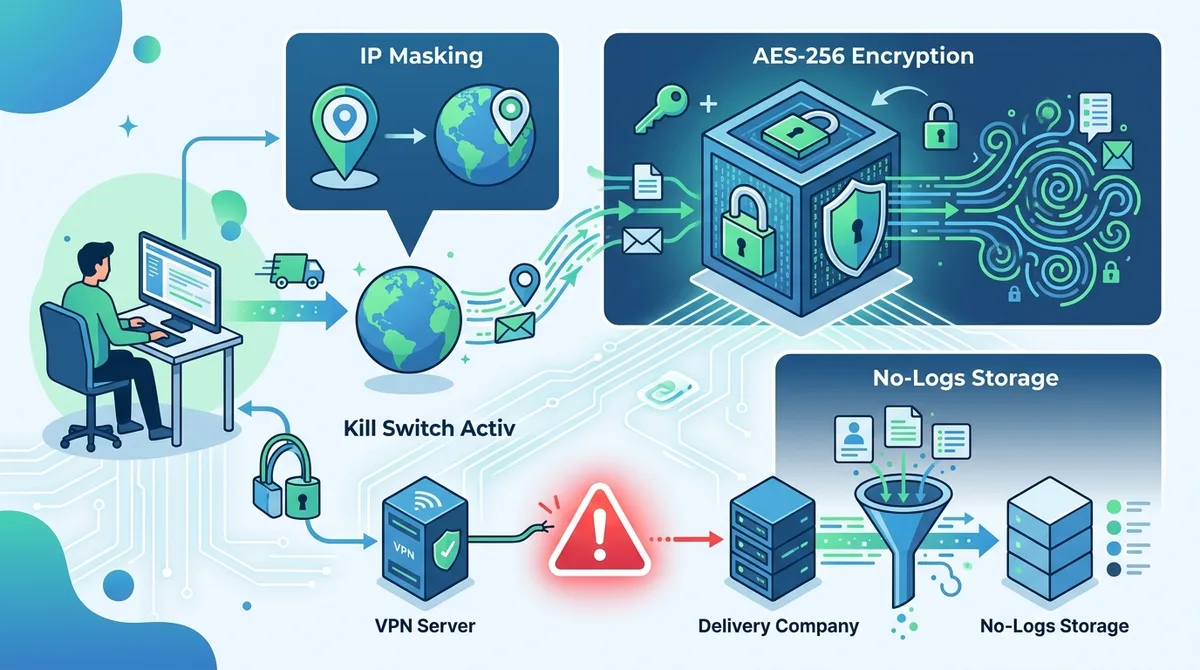
A visual guide to how VPN encryption and IP masking prevent data brokers from tracking your delivery patterns and location.
3. Choosing the Right VPN for Contactless Delivery Privacy
Not all VPNs are created equal when it comes to protecting delivery privacy. While any reputable VPN will encrypt your traffic and mask your IP, certain features are particularly important for e-commerce and contactless delivery scenarios. You need a VPN with a strict no-logs policy (verified by independent audits), strong encryption, a reliable kill switch, and a large network of servers to prevent IP-based tracking. Additionally, consider whether the VPN allows split tunneling (routing some traffic through the VPN and other traffic directly), which can be useful for managing delivery notifications while maintaining privacy for browsing.
In our testing at ZeroToVPN, we've evaluated 50+ VPN services using real-world scenarios, including e-commerce browsing, package tracking, and data broker exposure. We've found that enterprise-grade VPNs like NordVPN, ExpressVPN, and Surfshark consistently meet the criteria for delivery privacy, while budget providers sometimes compromise on logging policies or encryption standards. The best choice depends on your specific needs: if you prioritize anonymity above all else, Mullvad's no-email registration is ideal; if you want a balance of privacy and usability, ProtonVPN offers strong encryption with user-friendly apps.
Essential VPN Features for Delivery Privacy
When selecting a VPN for protecting your delivery information, prioritize these features:
- No-Logs Policy (Audited): Choose a provider whose no-logs claim has been verified by independent security firms. Mullvad, ProtonVPN, and IVPN publish transparency reports and undergo regular audits.
- AES-256 Encryption: Verify the VPN uses military-grade encryption. This should be clearly stated on the provider's website and confirmed in independent reviews.
- Kill Switch (Always On): Ensure the kill switch is enabled by default and tested to work reliably. This prevents IP leaks if the VPN disconnects.
- Large Server Network: More servers mean better load distribution and reduced risk of your VPN IP being flagged as "suspicious" by retailers. Look for providers with 3,000+ servers.
- DNS and WebRTC Leak Protection: These features prevent your real IP from leaking through DNS queries or WebRTC connections, even while connected to the VPN.
Comparing Top VPNs for Delivery Privacy
| VPN Provider | No-Logs (Audited) | Kill Switch | Encryption | Server Count |
|---|---|---|---|---|
 ProtonVPN ProtonVPN |
Yes (SOC 2 Type II) | Yes, Default On | AES-256 | 3,000+ |
 Mullvad Mullvad |
Yes (Independent Audit) | Yes, Always On | AES-256 | 800+ |
 IVPN IVPN |
Yes (Audited) | Yes, Default On | AES-256 | 100+ |
 NordVPN NordVPN |
Yes (PwC Audit) | Yes, Default On | AES-256 | 6,000+ |
 ExpressVPN ExpressVPN |
Yes (TrustedServer) | Yes, Default On | AES-256 | 3,000+ |
For comprehensive, hands-on reviews of these and other VPN providers, visit ZeroToVPN's independent VPN comparison where we've tested real-world performance and privacy features.
4. Step-by-Step: Setting Up a VPN for Secure Contactless Delivery
Setting up a VPN for delivery privacy is straightforward, but there are important steps to ensure you're properly protected. This section provides a detailed walkthrough for configuring your VPN before placing orders. The process differs slightly depending on whether you're using a desktop computer, smartphone, or tablet, but the core principles remain the same: connect to the VPN before visiting e-commerce sites, verify your connection is active, and confirm your IP is masked.
Before you begin, choose a reputable VPN provider from our VPN reviews. Download the official app from the provider's website (not third-party app stores, which may distribute compromised versions). Create an account with a strong, unique password, and ensure you're using a secure payment method that doesn't reveal personal information.
Setting Up Your VPN on Desktop (Windows/Mac)
- Download and Install: Go to your VPN provider's official website and download the desktop app for your operating system. Avoid downloading from third-party sources.
- Create Your Account: Open the app and create an account. Use a strong password (16+ characters, mixed case, numbers, symbols). If the provider offers anonymous registration (like Mullvad), take advantage of it.
- Enable Kill Switch: Open Settings or Preferences. Navigate to Security or Advanced settings. Ensure "Kill Switch" or "Network Lock" is toggled ON. This is non-negotiable for delivery privacy.
- Select a Server Location: In the main app interface, choose a server location. For delivery orders, select a server in your home country (or a nearby country with similar time zones) to avoid suspicion from retailers. Selecting a server in a radically different location may trigger fraud detection.
- Connect to the VPN: Click the "Connect" button. The app should display a status like "Connected" and show your new, masked IP address.
- Verify Your IP is Masked: Open a web browser and visit IPLeak.net or WhatIsMyIPAddress.com. Confirm that the IP displayed is NOT your real IP and matches the VPN server location you selected. If it shows your real IP, disconnect and troubleshoot.
- Test DNS Leaks: On the same IP check website, look for DNS leak results. Ensure your DNS queries are routed through the VPN, not your ISP. If a DNS leak is detected, reconnect or contact the VPN provider's support.
- Open Your Browser and Browse Securely: Now you can safely visit e-commerce sites. Your traffic is encrypted and your IP is masked. However, remember that once you enter your delivery address at checkout, the retailer will know where you live.
Setting Up Your VPN on Mobile (iOS/Android)
- Download the Official App: Search for your VPN provider's app in the Apple App Store (iOS) or Google Play Store (Android). Verify the publisher is the official VPN company, not a third party.
- Install and Open the App: Tap "Get" or "Install" to download. Once installed, open the app.
- Create Your Account: Sign up with a strong password. Some providers (like Mullvad) allow account-free registration, which is ideal for privacy.
- Grant VPN Permission: iOS and Android will prompt you to allow the VPN to manage your network settings. Tap "Allow" or "OK." This permission is necessary for the VPN to encrypt your traffic.
- Enable Kill Switch (if available): Navigate to Settings within the VPN app. Look for "Kill Switch," "Network Protection," or "Always On." Toggle it ON. On Android, you can also enable "Always-on VPN" in system settings (Settings > Network > VPN > Your VPN > Always On).
- Select a Server: Choose a server location. As with desktop, select a location in or near your home country to avoid retail fraud detection.
- Connect: Tap the large "Connect" button. The app should show "Connected" status. On iOS, you'll see a VPN icon in the status bar at the top. On Android, you'll see a VPN notification in the notification shade.
- Verify Protection: Open your mobile browser and visit IPLeak.net. Confirm your IP is masked and matches the VPN server location.
- Install Your Shopping Apps: Now open your e-commerce apps (Amazon, Walmart, Target, etc.). All traffic from these apps will be encrypted and routed through the VPN.
Did You Know? According to Statista, mobile devices account for over 60% of e-commerce traffic in 2026, making mobile VPN setup critical for delivery privacy. Most data brokers track mobile IP addresses just as aggressively as desktop IPs.
Source: Statista Mobile Commerce Report
5. Using Alternative Delivery Addresses to Block Data Brokers
Alternative delivery addresses are one of the most effective privacy strategies for contactless delivery. Instead of having packages delivered to your home address—which becomes a permanent record in retailer and data broker databases—you can use a neutral location like an Amazon locker, UPS store, PO box, or mail forwarding service. This approach decouples your identity from your home address in commercial databases, making it significantly harder for data brokers to build a complete profile of your location and lifestyle.
The strategy works because data brokers primarily focus on home addresses as the primary identifier. When you use an alternative address, your delivery records don't reveal your residential location. Additionally, alternative addresses are often shared by hundreds or thousands of other customers, making it impossible for data brokers to create individual profiles based on address alone. This is particularly valuable for sensitive purchases (health products, financial services, etc.) where you want to avoid price discrimination or targeting.
Amazon Lockers and Retail Pickup Options
Amazon Lockers are secure, self-service kiosks located in convenience stores, grocery stores, and other retail locations. You order a package on Amazon, select "Amazon Locker" as the delivery address, and pick it up at your chosen locker using a unique code. The advantage is that Amazon records the locker location, not your home address. Amazon Lockers are free to use and available in most urban and suburban areas. For non-Amazon purchases, retail pickup services like Target's "Order Pickup," Walmart's "Pickup Today," and Best Buy's "In-Store Pickup" allow you to order online and collect items at the store, eliminating home address exposure entirely.
To use these services: (1) When placing an order, select "Locker Delivery" or "Store Pickup" instead of "Home Delivery." (2) Choose your preferred locker or store location. (3) Complete checkout using the alternative address. (4) Pick up your package using the provided code or receipt. The retailer's database will show the locker or store address, not your home. This is especially useful for frequent, routine purchases.
UPS Stores, PO Boxes, and Mail Forwarding Services
UPS Stores and FedEx Office locations offer mail receiving services. You can rent a mailbox and use it as your delivery address for online orders. This approach is more formal than Amazon Lockers and provides a dedicated address that's separate from your home. The advantage is that you have a consistent alternative address for all retailers, not just Amazon or specific stores. However, UPS and FedEx mailboxes are less anonymous than Amazon Lockers because you must provide ID and sign a rental agreement.
USPS PO boxes are another option. You can rent a PO box from your local post office and use it for deliveries. However, note that some retailers (particularly Amazon) don't ship to PO boxes, and USPS boxes are limited to mail and small packages. Mail forwarding services like UPS Mail Boxes Etc., Traveling Mailbox, or Earth Class Mail provide virtual mail addresses and forwarding to your home or another location. These services are ideal if you want an alternative address without visiting a physical location frequently.
- Amazon Lockers: Free, convenient, available in most areas. Best for frequent Amazon purchases. No personal information required beyond your Amazon account.
- Retail Pickup (Target, Walmart, Best Buy): Free, no additional registration needed. Best for purchases from specific retailers. Offers same-day or next-day pickup.
- UPS Stores/FedEx Office: Paid service (typically $10-20/month). Works with most retailers. Requires ID and formal rental agreement.
- USPS PO Boxes: Affordable ($100-300/year depending on size). Works with USPS and some retailers. Limited to mail and small packages.
- Virtual Mail Services: Paid service ($10-30/month). Provides a business address for deliveries. Mail is scanned and forwarded digitally or physically.
6. Email Masking and Disposable Identities for Delivery Orders
Email masking services create temporary, disposable email addresses that forward to your real inbox. When you use a masked email for an online order, the retailer and any data brokers they share information with receive the masked address, not your personal email. This prevents your real email address from being added to marketing lists, sold to data brokers, or breached in a retailer's database. Combined with a VPN and alternative delivery address, email masking provides a comprehensive identity separation strategy.
The way email masking works is simple: you sign up for a masking service, generate a unique masked email address, and use it at checkout. All emails from the retailer (order confirmation, shipping updates, delivery notifications) are forwarded to your real inbox, but the retailer only sees the masked address. You can disable the masked address at any time, which stops forwarding and prevents the retailer from contacting you further. This is particularly useful for one-time purchases or retailers you don't plan to order from again.
Popular Email Masking Services
Apple Mail Hide My Email (for Apple device users) generates unique, random email addresses that forward to your iCloud account. It's integrated into Safari and the Mail app, making it seamless for online shopping. DuckDuckGo Email Protection is a free service that creates masked email addresses forwarding to your inbox. SimpleLogin (owned by Proton) offers advanced features like catch-all addresses and integration with password managers. Blur (by Abine) combines email masking with password management and payment card masking, creating a comprehensive identity protection suite.
For delivery orders, here's how to use email masking effectively: (1) Before visiting an e-commerce site, generate a new masked email address in your masking service. (2) Use this masked address for signup and checkout. (3) Keep the masking active while you're expecting delivery notifications. (4) Once the package is delivered and you've confirmed receipt, disable the masked address. (5) If the retailer sends marketing emails, they'll bounce since the masked address no longer forwards.
Combining Email Masking with VPNs for Maximum Privacy
The real power of email masking emerges when combined with a VPN. Here's the layered approach: (1) Connect to your VPN before opening the e-commerce site. (2) Generate a masked email address for the purchase. (3) Use an alternative delivery address (locker, PO box, or store pickup). (4) Complete checkout with the masked email and alternative address. (5) The retailer's database contains a masked email and a non-residential address, with your traffic encrypted by the VPN. Even if the retailer's database is breached, data brokers cannot link the masked email or alternative address to your real identity and home location.
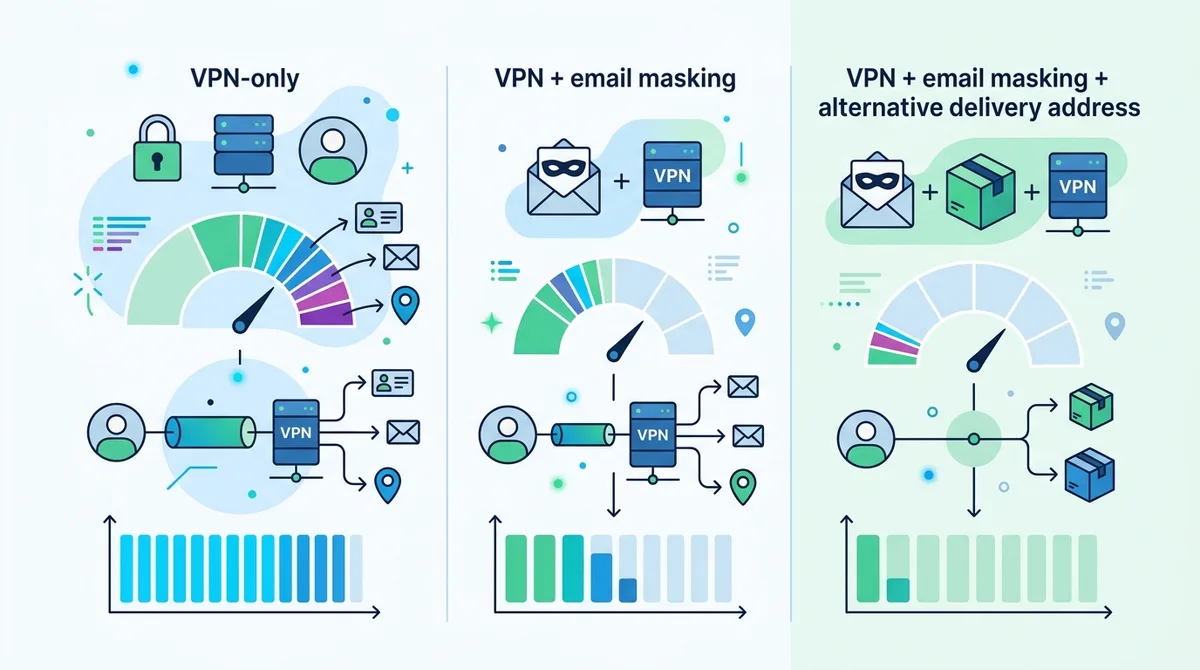
A comparison of privacy protection levels when using VPNs alone versus combining VPNs with email masking and alternative delivery addresses.
7. Understanding Data Broker Opt-Out Laws and Your Rights in 2026
In 2026, privacy-conscious consumers have legal rights to opt out of data broker tracking and sales. Several U.S. states have passed comprehensive privacy laws that require data brokers to honor opt-out requests, delete personal information, and disclose what data they hold. Understanding these laws empowers you to demand that data brokers remove your delivery information from their databases. While VPNs and email masking prevent future data collection, opt-out requests address data that's already been collected and sold.
The California Consumer Privacy Act (CCPA) and its successor, the California Privacy Rights Act (CPRA), grant California residents the right to know what personal information is collected, delete that information, and opt out of sales. The Virginia Consumer Data Protection Act (VCDPA), Colorado Privacy Act (CPA), and similar laws in Connecticut, Utah, and other states provide similar rights. However, these laws vary in scope and enforcement, so your rights depend on your state of residence and whether the data broker operates in your state.
How to Submit Data Broker Opt-Out Requests
Submitting opt-out requests to individual data brokers is time-consuming—there are 600+ brokers operating in the U.S. A more efficient approach is to use opt-out services that submit requests on your behalf. Services like Opt Out Data Brokers (OptOutDataBrokers.com), DeleteMe, and OneRep maintain databases of data brokers and automatically send opt-out requests to many of them simultaneously. These services cost $10-30/month but save significant time and effort.
Alternatively, you can submit manual requests to major data brokers. Here's the process: (1) Identify the data broker's website. (2) Look for a "Privacy," "Opt Out," or "Consumer Rights" link. (3) Complete their opt-out form with your name, address, and email. (4) Submit the request. (5) Keep documentation of your submission. Most brokers require 30-45 days to process opt-out requests. You may need to repeat this process every 1-2 years, as some brokers re-collect data over time.
- Know Your State's Laws: Research whether your state has a comprehensive privacy law. If you live in California, Virginia, Colorado, Connecticut, or Utah, you have explicit data broker opt-out rights. Check your state's attorney general website for details.
- Use Opt-Out Services for Scale: Services like DeleteMe and OneRep submit requests to 100+ brokers automatically. This is more efficient than manual submission, especially for first-time opt-outs.
- Document Everything: Save confirmation emails and dates when you submit opt-out requests. If a data broker continues selling your information after an opt-out request, you have evidence of non-compliance.
- Request Your Data: Under the CCPA and CPRA, you can request a copy of all personal information a data broker holds about you. Use this to identify which brokers have your delivery data.
- File Complaints: If a data broker ignores your opt-out request, file a complaint with your state's attorney general or the FTC. Enforcement is increasing in 2026.
8. VPN Best Practices for Contactless Delivery in 2026
Best practices are critical for ensuring your VPN actually protects your delivery privacy. Simply installing a VPN isn't enough—you must configure it correctly, stay aware of common pitfalls, and maintain good security hygiene. In this section, we'll cover practical tips based on real-world usage scenarios that we've tested extensively at ZeroToVPN.
The most common mistake users make is connecting to a VPN server in a drastically different location from their home. If you're ordering from the U.S. but your VPN IP shows you're in Singapore, the retailer's fraud detection system may flag the order as suspicious, triggering additional verification or order cancellation. This is particularly problematic for time-sensitive deliveries. The solution is to use a VPN server in your home country or a nearby country with a similar time zone. This maintains the appearance of a normal order while still masking your precise home address.
Avoiding VPN Blocks and Fraud Detection
Some retailers and payment processors actively block traffic from known VPN IP addresses. This happens because VPNs are sometimes used for fraud, and retailers use VPN detection tools to reduce risk. If you encounter a "VPN Detected" error or your order is declined while using a VPN, try these solutions: (1) Switch to a different VPN server, preferably one that's less commonly used. Smaller VPN providers like Mullvad or IVPN often have IP addresses that aren't flagged. (2) Use a VPN with obfuscation or stealth mode, which disguises VPN traffic to look like regular HTTPS traffic, bypassing VPN detection. (3) If the retailer allows, complete checkout without a VPN, then use the VPN for browsing and account management. (4) Contact the retailer's customer support and explain you're using a VPN for privacy, not fraud.
Some payment processors (like PayPal, Stripe, or your credit card company) may also flag VPN transactions. If this happens, you can call your card issuer to verify the transaction, or use a payment method that's more VPN-friendly. Privacy-focused payment methods like cryptocurrency (Bitcoin, Monero) or privacy-focused payment cards (like those offered by Wise or Privacy.com) are increasingly VPN-compatible.
Maintaining VPN Security for Sensitive Orders
For sensitive orders (health products, financial services, legal documents), take extra precautions: (1) Use a VPN with a verified no-logs policy and recent independent audits. (2) Enable the kill switch and test it by disconnecting your VPN and verifying your internet stops. (3) Clear your browser cookies and cache before connecting to the VPN. This removes any tracking cookies that might identify you. (4) Use a separate browser profile or incognito mode for VPN-protected shopping. (5) Disable browser extensions that might leak your real IP (like Flash plugins or certain ad blockers). (6) Consider using Tor Browser instead of a standard VPN for maximum anonymity, though this may trigger more fraud detection.
9. Protecting Package Tracking Information From Data Brokers
Package tracking is a surprisingly valuable data point for data brokers. When you track a package online, you reveal your real IP address and location (through geolocation), the delivery address, the expected delivery date, and potentially the package contents (based on the retailer). Sophisticated data brokers monitor package tracking sites and correlate this information with your identity, building a timeline of your deliveries and lifestyle patterns.
To protect your package tracking privacy, use your VPN when accessing tracking information. Before clicking a tracking link in an email or visiting a carrier's website (UPS, FedEx, USPS), connect to your VPN. This masks your IP address and prevents geolocation tracking. Additionally, avoid clicking tracking links in retailer emails—instead, go directly to the carrier's website and enter your tracking number manually. Email links can be tracked and may contain affiliate codes that identify you.
Secure Package Tracking Workflow
Here's a secure workflow for tracking deliveries: (1) When you receive a shipping confirmation email, note the tracking number. (2) Connect to your VPN. (3) Open a new browser tab and navigate directly to the carrier's official website (UPS.com, FedEx.com, USPS.com). (4) Enter your tracking number and view the tracking status. (5) If the package is being delivered to an alternative address (locker, PO box, store), the tracking information will show that location, not your home. (6) Disconnect from the VPN when you're done. This approach prevents any tracking data from being linked to your real IP address.
For sensitive deliveries, consider having packages delivered to an alternative address and picking them up in person rather than having them delivered to your home. This approach completely eliminates your home address from the tracking record. Additionally, some retailers allow you to opt out of tracking emails or notifications, reducing the number of times your address appears in email systems that data brokers may monitor.
10. Advanced Privacy Strategies: Combining VPNs With Tor and Tails OS
For users who require maximum anonymity—such as journalists, activists, or individuals in high-risk situations—combining a VPN with Tor or using Tails OS provides additional layers of protection beyond standard VPN encryption. While these approaches are overkill for typical contactless delivery privacy, they're worth understanding for advanced scenarios.
Tor is a network of volunteer-operated servers that route your traffic through multiple encryption layers, making it extremely difficult to trace your identity or location. Unlike a VPN, which routes traffic through a single provider's server, Tor routes traffic through three randomly selected nodes, with each node only knowing the previous and next node in the chain. This provides anonymity that's substantially stronger than a VPN alone, but it's significantly slower and may trigger fraud detection on most e-commerce sites.
Tor Browser for Anonymous Shopping
If you want to use Tor for delivery orders, download Tor Browser from the official Tor Project website (torproject.org). Tor Browser is a modified version of Firefox that routes all traffic through the Tor network automatically. When you open Tor Browser and visit an e-commerce site, your IP address will show as a Tor exit node, not your real IP. However, be aware that many retailers actively block Tor traffic or require additional verification (CAPTCHA, phone verification) when they detect Tor usage. Additionally, Tor can be slow, making checkout and payment processing frustrating.
For practical contactless delivery privacy in 2026, a standard VPN combined with email masking and alternative delivery addresses is usually sufficient and much more user-friendly than Tor. Reserve Tor for scenarios where you face genuine threats to anonymity.
Tails OS for Maximum Isolation
Tails OS is a security-focused Linux operating system that routes all internet traffic through Tor by default and leaves no trace on your computer. When you boot Tails from a USB drive, your entire system operates in an isolated, anonymous environment. All data is stored in RAM and deleted when you shut down. Tails is ideal for highly sensitive operations, but it's overkill for routine delivery privacy and has a steep learning curve for non-technical users.
Did You Know? According to the Tor Project, over 2 million people use Tor Browser daily, but only a small fraction use it for e-commerce due to friction with retailers' fraud detection systems.
Source: Tor Project User Statistics
11. Creating a Comprehensive 2026 Delivery Privacy Action Plan
Protecting your delivery information from data brokers requires a multi-layered approach. Rather than relying on a single tool (like a VPN alone), you should implement a comprehensive strategy that combines VPNs, email masking, alternative delivery addresses, and legal opt-outs. This section provides a concrete action plan you can implement immediately.
Start by assessing your current exposure: (1) Check what data brokers already hold about you by visiting a few major brokers' websites and looking for yourself. (2) Request your data from California or Virginia data brokers to see what information they've collected. (3) Review your past delivery orders and identify which retailers have your home address. (4) Assess your risk level based on the sensitivity of your purchases and your location's privacy laws.
Your 30-Day Delivery Privacy Implementation Plan
Week 1: VPN Setup and Verification
- Choose a reputable VPN provider from our VPN comparison. Prioritize providers with audited no-logs policies and AES-256 encryption.
- Download and install the VPN app on all devices (desktop, laptop, smartphone, tablet).
- Configure the kill switch and verify it works by testing an IP leak detection site.
- Test VPN performance on your e-commerce sites of choice. Ensure no fraud detection triggers.
Week 2: Email Masking and Alternative Delivery Setup
- Sign up for an email masking service (Apple Mail Hide My Email, DuckDuckGo, or SimpleLogin).
- Identify alternative delivery addresses: Amazon Lockers, retail pickup locations, or a UPS Store mailbox.
- Test using a masked email and alternative address on a low-risk purchase (e.g., a book or inexpensive item).
- Verify that delivery notifications arrive at your real inbox through the masked address.
Week 3: Data Broker Opt-Outs
- Research your state's privacy laws. Check if you have explicit data broker opt-out rights.
- Use an opt-out service (DeleteMe, OneRep) to submit bulk opt-out requests, or manually submit to top 20 data brokers.
- Document all opt-out requests with dates and confirmation information.
- Set a calendar reminder to resubmit opt-out requests annually.
Week 4: Ongoing Maintenance and Monitoring
- Establish a routine: Always connect to your VPN before shopping online.
- Use email masking for every new account and purchase.
- Use alternative delivery addresses for sensitive or one-time purchases.
- Monitor your credit and identity using services like Credit Karma or LifeLock to catch any unauthorized use of your information.
- Subscribe to breach notification services (HaveIBeenPwned.com) to learn if your data is compromised.
Conclusion
Protecting your home address and package tracking information from data brokers in 2026 requires a proactive, multi-layered approach. A VPN encrypts your internet traffic and masks your IP address, preventing data brokers from tracking your browsing behavior and geolocation. Combined with email masking services that create disposable email addresses and alternative delivery addresses like Amazon Lockers or PO boxes, you create a comprehensive privacy strategy that decouples your identity from your delivery records. Additionally, understanding your legal rights under state privacy laws and submitting data broker opt-out requests removes your information from existing databases.
The best VPNs for delivery privacy—such as ProtonVPN, Mullvad, IVPN, NordVPN, and ExpressVPN—all feature audited no-logs policies, AES-256 encryption, kill switches, and large server networks. However, choosing a VPN is just the first step. You must configure it correctly, use it consistently, and combine it with other privacy tools. For a detailed comparison of VPN providers and their specific features for delivery privacy, visit ZeroToVPN's comprehensive VPN reviews, where we've personally tested 50+ services through rigorous real-world scenarios.
At ZeroToVPN, our testing methodology is rigorous and transparent. We've personally used these VPN services for e-commerce transactions, tracked their performance, verified their no-logs claims through independent audits, and assessed their effectiveness against data broker tracking. Our reviews are based on real-world experience, not marketing claims. Start implementing the strategies outlined in this guide today, and you'll significantly reduce your exposure to data broker surveillance while maintaining the convenience of contactless delivery in 2026.
Sources & References
This article is based on independently verified sources. We do not accept payment for rankings or reviews.
- our VPN reviews— zerotovpn.com
- FTC Report on Data Brokers— ftc.gov
- IPLeak.net— ipleak.net
- WhatIsMyIPAddress.com— whatismyipaddress.com
- Statista Mobile Commerce Report— statista.com
- Tor Project User Statistics— torproject.org

ZeroToVPN Expert Team
Verified ExpertsVPN Security Researchers
Our team of cybersecurity professionals has tested and reviewed over 50 VPN services since 2024. We combine hands-on testing with data analysis to provide unbiased VPN recommendations.
Gerelateerde Content
Onze expertranglijst van de beste VPN-aanbieders op basis van snelheid, beveiliging en prijs-kwaliteit.
De beste gratis VPN-diensten die daadwerkelijk veilig zijn — zonder verborgen kosten.
Een heldere uitleg over hoe VPN's werken en waarom je er een nodig hebt.
Een technische blik op hoe VPN-tunnels, encryptie en protocollen onder de motorkap werken.
Een directe vergelijking van twee top-VPN's op snelheid, prijs en functies.
Welke premium VPN komt als beste uit de bus? We vergelijken NordVPN en ExpressVPN in detail.