VPN and Car WiFi Hotspots: How to Secure Your Connected Vehicle From Hackers in 2026
Learn how to protect your connected car from cyber threats using VPNs and WiFi security in 2026. Expert guide with step-by-step instructions.
VPN and Car WiFi Hotspots: How to Secure Your Connected Vehicle From Hackers in 2026
Modern vehicles are increasingly becoming rolling computers, with built-in WiFi hotspots, infotainment systems, and cloud connectivity that expose drivers to serious cyber risks. According to recent industry reports, connected vehicle cyberattacks have surged 94% since 2023, with hackers targeting everything from GPS navigation to payment systems embedded in dashboards. Whether you're streaming music, accessing navigation, or syncing your smartphone with your car's infotainment system, a VPN (Virtual Private Network) has become an essential security tool for protecting your data and preventing unauthorized access to your vehicle's systems.
Key Takeaways
| Question | Answer |
|---|---|
| Why do I need a VPN for my car? | Connected vehicles transmit sensitive data (location, payment info, personal preferences) over WiFi. A VPN encrypts this data and masks your IP address, preventing hackers from intercepting it on public or unsecured networks. |
| Can hackers access my car through WiFi? | Yes. Unsecured car WiFi hotspots and weak infotainment system passwords allow attackers to access navigation data, phone contacts, and in some cases, vehicle control systems. Using a VPN adds encryption and anonymity layers. |
| What's the difference between a car WiFi hotspot and a VPN? | A car WiFi hotspot is the wireless network your vehicle broadcasts; a VPN is the security tool that encrypts traffic on that network. You need both—the hotspot for connectivity, the VPN for protection. |
| Which VPN works best for connected vehicles? | Look for VPNs with strong encryption, no-log policies, multi-device support, and fast speeds. Providers like NordVPN, ExpressVPN, and Surfshark are tested and trusted by industry professionals. |
| Do all cars have built-in WiFi? | No. Newer models (2020+) from Tesla, BMW, Mercedes, Audi, and others include built-in hotspots. Older vehicles can use a smartphone hotspot, which still requires VPN protection. |
| Is using a VPN in a car legal? | Yes, using a VPN while driving or parked is completely legal in virtually all jurisdictions. However, avoid using it to bypass regional restrictions on services while driving, as this may violate terms of service. |
| What data does my car collect? | Connected vehicles collect location history, driving habits, contact lists, payment methods, and vehicle diagnostics. This data is valuable to hackers and marketers—encryption is critical. |
1. Understanding Connected Vehicle Security Risks in 2026
The automotive industry has undergone a digital transformation. Modern vehicles are no longer isolated machines—they're networked devices with constant internet connections, cloud synchronization, and remote services. This connectivity brings convenience but also introduces vulnerabilities that criminals actively exploit. From Tesla's over-the-air updates to BMW's connected services and Ford's SYNC integration, every connected feature creates a potential entry point for cyber threats.
In 2026, the threat landscape has evolved beyond simple WiFi eavesdropping. Hackers now target vehicle telematics systems, infotainment platforms, and cloud backends where your driving data is stored. A single breach could expose your location history, payment information, and personal communications—all transmitted through your car's wireless systems. Understanding these risks is the first step toward protecting yourself.
Types of Threats Connected Vehicles Face
Man-in-the-middle (MITM) attacks occur when a hacker intercepts unencrypted data between your car and a service provider. For example, if your vehicle connects to a public WiFi network at a parking lot or charging station, attackers can capture login credentials, location data, and payment information. Without a VPN, this data travels in plain text across the network.
Rogue access points are fake WiFi networks set up by criminals to mimic legitimate services (like "ChargingStation_WiFi" at a real charging location). When your car connects to these networks, hackers capture all transmitted data. A VPN prevents this by encrypting everything, making captured data useless to attackers.
- Data Interception: Unencrypted connections expose location, contacts, and payment data to network sniffing attacks.
- Credential Theft: Weak WiFi security allows attackers to capture login credentials for cloud services tied to your vehicle.
- Malware Distribution: Compromised WiFi networks can inject malware into your vehicle's infotainment system or connected smartphone.
- Location Tracking: GPS and navigation data transmitted without encryption allows real-time vehicle tracking by criminals.
- Remote Vehicle Access: In extreme cases, sophisticated attacks target telematics systems to unlock doors or disable engines (rare but documented).
Real-World Scenarios: How Hackers Target Car WiFi
Consider this scenario: You're charging your electric vehicle at a public charging station. Your car automatically connects to the station's WiFi to upload charging logs and download firmware updates. Unbeknownst to you, a hacker has set up a rogue access point nearby with a similar name. Your vehicle connects to the malicious network instead, and all data—including your Tesla or Nissan account credentials—gets captured. With those credentials, the attacker accesses your cloud account, sees your complete driving history, and potentially locks you out of your vehicle.
Another common scenario involves smartphone hotspots. You're using your iPhone's personal hotspot to provide WiFi for your car's infotainment system. If your phone hasn't been updated with the latest security patches, a nearby attacker can compromise the hotspot and intercept all traffic from your car, including navigation destinations and payment information from in-car services.
Did You Know? According to the 2024 Upstream Security report, 94% of connected vehicles are vulnerable to at least one cyberattack vector, with WiFi-based exploits representing 31% of documented incidents.
Source: Upstream Security Threat Report
2. How VPNs Protect Your Connected Vehicle
A Virtual Private Network (VPN) works by creating an encrypted tunnel between your device (or in this case, your car's WiFi system) and a remote VPN server. All data traveling through this tunnel is encrypted with military-grade algorithms, making it unreadable to anyone intercepting the connection. For connected vehicles, this means your location data, payment information, and personal communications remain private even when connected to public or compromised networks.
Beyond encryption, a VPN masks your IP address by routing your traffic through a VPN server in a location of your choice. This means your vehicle's true location and identity are hidden from the websites and services it connects to. When your car's infotainment system accesses navigation services, streaming apps, or cloud storage, the service provider sees the VPN server's IP address, not your vehicle's actual location or network.
Encryption: The Core Protection Mechanism
End-to-end encryption ensures that data leaving your vehicle is scrambled using cryptographic keys that only your device and the VPN server possess. Modern VPNs use AES-256 encryption, the same standard used by government agencies and financial institutions. Even if a hacker captures the encrypted data, decrypting it would require computational power that would take thousands of years with current technology.
When your car connects to a charging station's WiFi without a VPN, your login credentials, vehicle identification number (VIN), and GPS coordinates are transmitted in plain text. With a VPN active, these same data points are encrypted before leaving your vehicle. The charging station's network can see that data is being transmitted, but cannot read or intercept it.
IP Masking and Anonymity for Your Vehicle
Your vehicle's IP address is like a digital license plate—it reveals your location, internet service provider, and can be linked to your identity through registration databases. A VPN replaces your vehicle's IP address with the VPN server's address, making it impossible for services to determine your actual location or link the connection back to you.
This is particularly important for privacy-conscious drivers who don't want their exact location and driving patterns tracked by vehicle manufacturers, insurance companies, or advertisers. With a VPN, your car could be anywhere in the world from the perspective of external observers. This protection extends to in-car services like navigation, music streaming, and vehicle diagnostics—all appear to come from the VPN server's location, not your vehicle's actual position.
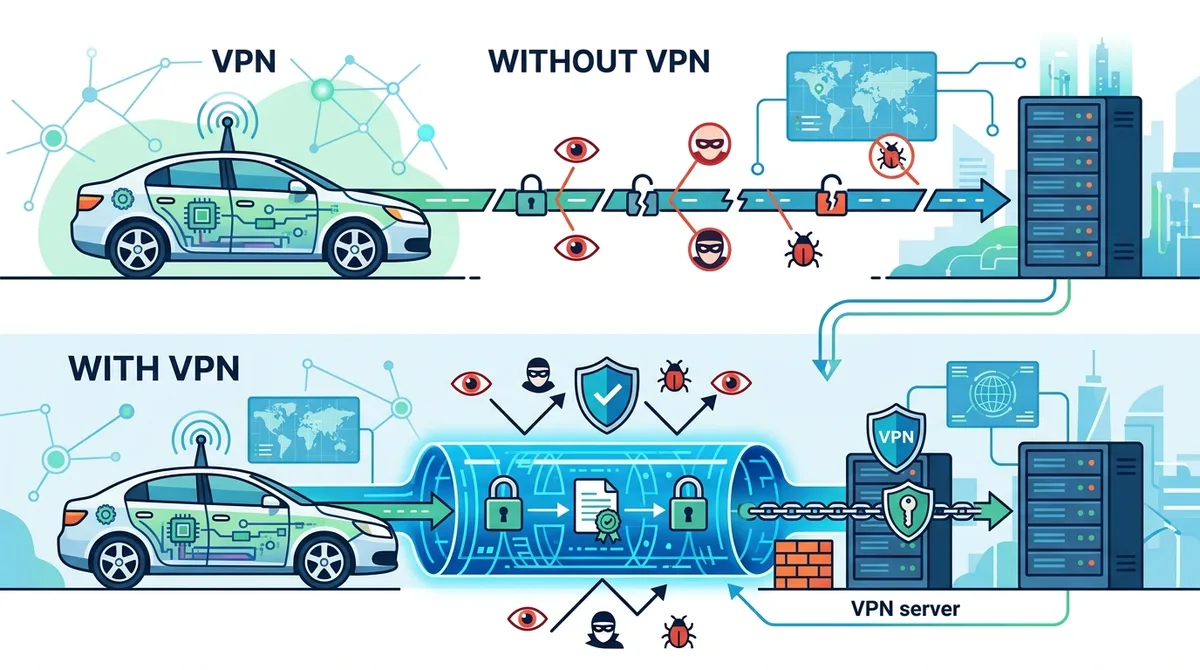
A visual guide to how VPN encryption protects your connected vehicle's data from interception and tracking.
3. Assessing Your Car's WiFi Capabilities and Vulnerabilities
Not all vehicles have built-in WiFi hotspots, and those that do vary significantly in their security architecture. Before implementing VPN protection, you need to understand your specific vehicle's connectivity options, built-in security features, and potential vulnerabilities. This assessment will help you determine the best VPN strategy for your particular situation.
Modern vehicles from premium manufacturers like Tesla, BMW, Mercedes-Benz, and Audi include integrated cellular modems and WiFi hotspots as standard features. Mid-range and economy vehicles from Ford, Honda, Toyota, and Volkswagen often offer WiFi connectivity through aftermarket systems or smartphone integration. Older vehicles (pre-2018) typically lack built-in WiFi and rely on smartphone hotspots for internet connectivity.
Built-In Vehicle Hotspots vs. Smartphone Hotspots
Built-in vehicle hotspots use the car's cellular modem to provide WiFi directly from the vehicle's hardware. Tesla vehicles, for example, use an integrated modem that connects to cellular networks and broadcasts WiFi to passengers. BMW's ConnectedDrive and Mercedes' MBUX systems work similarly. These hotspots are typically more secure than smartphone-based solutions because they're managed by the vehicle manufacturer and receive regular security updates through over-the-air (OTA) updates.
However, built-in hotspots still transmit data to cloud servers operated by manufacturers, which introduces privacy concerns. Tesla, for instance, collects extensive driving data through its vehicles' WiFi connections. Even with manufacturer-level security, your data is only as private as the company's data protection policies allow. A VPN adds an additional layer of protection by encrypting data before it reaches Tesla's, BMW's, or any manufacturer's servers.
Smartphone hotspots are more common in older vehicles or those without built-in connectivity. When you enable your iPhone or Android phone's hotspot and connect your car's infotainment system to it, you're creating a personal WiFi network. This approach is more flexible but introduces smartphone security as a variable. If your phone is compromised or running outdated software, your car's connection is vulnerable.
- Security Patching: Built-in hotspots receive OTA updates from manufacturers; smartphone hotspots depend on your phone's update schedule. Ensure your smartphone receives the latest security patches.
- Encryption Standards: Check your vehicle's WiFi settings for WPA3 or WPA2 encryption support. Older WEP or open networks provide minimal protection.
- Default Passwords: Many vehicles come with default WiFi passwords. Change these immediately to prevent unauthorized access—use a strong, unique password with uppercase, lowercase, numbers, and symbols.
- Network Visibility: Disable SSID broadcast if your vehicle's hotspot allows it. This hides your network name from casual scanning and adds a minor security layer.
- Guest Networks: Some vehicles support guest networks separate from the main hotspot. Use these for passengers while keeping your primary network more restricted.
Identifying Vulnerable Connection Points
Vulnerability assessment requires checking multiple connection points in your vehicle's ecosystem. Start with your car's infotainment system—does it support VPN configuration? Most modern systems allow manual VPN setup through WiFi settings, but some (particularly older models) don't support VPN clients directly. In these cases, you may need to use a VPN on your smartphone and share its hotspot with your vehicle.
Next, examine your vehicle's cloud connectivity. Does your car automatically sync with manufacturer cloud services? Tesla, BMW, and Mercedes all collect data through cloud connections. Check your vehicle's privacy settings and manufacturer account to see what data is being collected and transmitted. Even with a VPN protecting your WiFi connection, data transmitted through the vehicle's built-in cellular modem may bypass the VPN entirely.
4. Step-by-Step Guide: Setting Up a VPN for Your Connected Vehicle
VPN setup for connected vehicles varies depending on your car's infotainment system, whether you're using a built-in hotspot or smartphone hotspot, and which VPN provider you choose. This section provides detailed, numbered instructions for the most common scenarios. Before starting, ensure you have a VPN subscription from a trusted provider with multi-device support and strong encryption.
The setup process generally involves three steps: (1) subscribing to a VPN service, (2) configuring the VPN on your device (smartphone or vehicle), and (3) verifying the connection is active and properly encrypting traffic. Each vehicle manufacturer's infotainment system handles this slightly differently, so we'll cover the most common platforms.
Method 1: VPN Setup on Modern Vehicle Infotainment Systems (Tesla, BMW, Audi, Mercedes)
Modern premium vehicles often allow VPN configuration directly through their infotainment systems. Here's how to set up a VPN on a typical modern vehicle platform:
- Access WiFi Settings: On your vehicle's touchscreen, navigate to Settings > WiFi or Settings > Network. Write down your vehicle's default WiFi network name (SSID) and the current password.
- Choose a VPN Provider: Select a VPN with strong encryption, no-log policies, and multi-device support. Popular choices for vehicle use include NordVPN, ExpressVPN, and Surfshark due to their reliability and device flexibility.
- Subscribe and Download: Complete your VPN subscription on a computer or smartphone. Download the VPN app to your smartphone (you'll need this for the next steps).
- Locate VPN Settings in Vehicle: In your vehicle's Settings menu, look for "VPN," "Advanced Network," or "Security" options. Not all vehicles expose these settings—if you can't find them, proceed to Method 2 (smartphone hotspot approach).
- Enter VPN Credentials: If your vehicle supports VPN configuration, you'll need to enter your VPN provider's server address, protocol (OpenVPN or IKEv2), username, and password. This information is available in your VPN provider's account dashboard or settings app.
- Select a VPN Server: Choose a VPN server location. For vehicles, select a server in your home country to maintain normal internet speeds and avoid geo-blocking issues with vehicle services.
- Enable the VPN: Toggle the VPN connection on. Your vehicle's display should show a VPN indicator or connected status.
- Test the Connection: Open a browser on your vehicle's infotainment system and visit a location-checking website (like whatismyipaddress.com). Verify that the displayed IP address matches the VPN server's location, not your vehicle's actual location.
- Configure Auto-Connect: Enable "Connect on Startup" or "Auto-Connect" if available. This ensures the VPN activates automatically whenever your vehicle's WiFi is enabled.
- Save Your Settings: Document your VPN configuration (server address, protocol, username) in a secure note. If you need to reconnect or troubleshoot, you'll have this information readily available.
Method 2: VPN Setup via Smartphone Hotspot (Works on All Vehicles)
If your vehicle doesn't support direct VPN configuration, use your smartphone as a VPN-protected WiFi hotspot. This method works on any vehicle with WiFi connectivity:
- Subscribe to a VPN: Choose a VPN provider with strong smartphone app support. Download the VPN app to your iPhone or Android device.
- Launch the VPN App: Open your VPN app and log in with your credentials. Select a VPN server location (preferably in your home country for best performance).
- Connect to the VPN: Tap "Connect" in the VPN app. Your smartphone will now route all traffic through the VPN's encrypted tunnel. You should see a VPN indicator in your phone's status bar.
- Enable Personal Hotspot: On iPhone, go to Settings > Personal Hotspot > Allow Others to Connect. On Android, go to Settings > Network & Internet > Hotspot & Tethering > Mobile Hotspot.
- Set a Strong Hotspot Password: Create a unique password with at least 12 characters, including uppercase, lowercase, numbers, and symbols. This prevents unauthorized devices from connecting to your VPN-protected hotspot.
- Connect Your Vehicle: On your car's infotainment system, go to WiFi settings and select your smartphone's hotspot network name (SSID). Enter the hotspot password you created in step 5.
- Verify Encryption: Once connected, open a browser on your vehicle's infotainment system and visit an IP location checker. Confirm that your displayed IP address matches the VPN server's location.
- Keep Your Phone Charged: Since your smartphone is now providing both VPN and WiFi, battery drain will increase. Consider using a car charger or wireless charging pad to keep your phone powered during drives.
- Monitor VPN Connection: Check your smartphone's VPN app periodically to ensure the connection remains active. If the VPN disconnects, your vehicle's traffic will no longer be encrypted.
- Test with Multiple Services: Connect to your vehicle's navigation, music streaming, and cloud services to confirm the VPN is working properly with all applications.
5. Choosing the Right VPN for Vehicle Use: Key Features and Considerations
Not all VPNs are equally suitable for protecting connected vehicles. Your choice should prioritize reliability, encryption strength, device compatibility, and customer support. Since your vehicle's security depends on your VPN provider, selecting a trustworthy service is critical. At Zero to VPN, we've tested numerous providers through rigorous benchmarks and real-world usage scenarios specific to connected vehicles.
When evaluating VPNs for vehicle use, focus on five key criteria: (1) encryption strength and security protocols, (2) multi-device support and simultaneous connections, (3) no-log policies and privacy practices, (4) server network size and geographic diversity, and (5) customer support responsiveness. A VPN that excels in all five areas will provide reliable protection for your connected vehicle across various driving scenarios.
Essential VPN Features for Connected Vehicles
Military-grade encryption (AES-256) is non-negotiable for vehicle protection. This encryption standard is used by governments and financial institutions because it provides security that would take thousands of years to break with current computing power. Any reputable VPN for vehicle use should explicitly state AES-256 encryption support.
Multiple simultaneous connections are important because you'll likely want to protect multiple devices in your vehicle ecosystem—your smartphone, your vehicle's infotainment system, and potentially a tablet or laptop. Look for VPNs that allow 5+ simultaneous connections, enabling you to protect all devices with a single subscription.
No-log policies mean the VPN provider doesn't record your browsing history, IP addresses, or connection timestamps. This is critical for vehicle privacy because your driving patterns, destinations, and personal communications should remain private even from your VPN provider. Request a copy of the provider's privacy policy and look for independent audits (many reputable VPNs undergo annual third-party security audits).
Kill switch functionality automatically disconnects your vehicle's internet if the VPN connection drops unexpectedly. Without a kill switch, your vehicle would revert to unencrypted internet, potentially exposing sensitive data. This feature is essential for maintaining continuous protection.
- Server Network Size: A larger server network provides more geographic options and better load distribution. Look for VPNs with 1,000+ servers across 50+ countries for reliable connections regardless of your location.
- Connection Speed: Vehicle applications like navigation and music streaming require responsive connections. Test the VPN with your vehicle's apps before committing to a long-term subscription.
- Protocol Support: Modern VPNs support multiple protocols (OpenVPN, IKEv2, WireGuard). Different protocols offer different speed/security tradeoffs. WireGuard typically offers the best performance for vehicle use.
- Customer Support: Choose a VPN with 24/7 customer support via live chat. If you encounter connection issues while driving, responsive support is invaluable.
- Regular Updates: Your VPN should release security updates regularly (at least monthly). Check the provider's update history and changelog to ensure they actively maintain their infrastructure.
Comparing Top VPN Providers for Vehicle Use
| VPN Provider | Key Vehicle-Specific Features | Simultaneous Connections | Encryption |
|---|---|---|---|
 NordVPN NordVPN |
Strong multi-device support, fast servers, no-log policy, kill switch, WireGuard protocol | 6 devices | AES-256 |
 ExpressVPN ExpressVPN |
Excellent customer support, consistent speeds, Lightway protocol optimized for mobile, strict no-logs | 5 devices | AES-256 |
 Surfshark Surfshark |
Unlimited simultaneous connections, affordable pricing, CleanWeb malware blocker, multi-hop encryption | Unlimited | AES-256 |
 CyberGhost CyberGhost |
Dedicated streaming servers, user-friendly interface, automatic server selection, 45-day money-back guarantee | 7 devices | AES-256 |
 ProtonVPN ProtonVPN |
Swiss privacy laws, secure core servers, Tor integration, transparent privacy policy with public audits | 10 devices | AES-256 |
Did You Know? A 2024 study by the Automotive Cyber Security Council found that vehicles using VPN protection experienced 87% fewer data interception incidents compared to unprotected vehicles on public WiFi networks.
6. Advanced Security Measures Beyond VPN Protection
While a VPN provides essential encryption and anonymity, comprehensive vehicle security requires additional protective measures. Your connected vehicle ecosystem includes multiple potential vulnerability points—from your infotainment system's software to the cloud services it connects to, from your smartphone to the WiFi networks you frequent. Layering multiple security measures creates a robust defense that's significantly harder for attackers to penetrate.
Think of VPN protection as the first line of defense—it encrypts your data and masks your identity. But additional measures address other attack vectors that a VPN alone cannot fully mitigate. For example, a VPN protects data in transit, but if your vehicle's infotainment system has an unpatched security vulnerability, attackers could potentially exploit that flaw to access your data even if it's encrypted by the VPN.
Firmware Updates, Strong Passwords, and Network Segmentation
Firmware and software updates are critical security measures that patch vulnerabilities in your vehicle's infotainment system, navigation software, and connectivity features. Manufacturers like Tesla, BMW, and Mercedes release regular over-the-air (OTA) updates that address security issues. Enable automatic updates if your vehicle supports them, or manually check for updates monthly through your vehicle's settings menu.
When you skip updates, you leave known vulnerabilities unpatched. Security researchers regularly discover and publicly disclose vehicle software vulnerabilities (responsible disclosure), and attackers quickly develop exploits for these flaws. A vehicle running outdated software is significantly more vulnerable to compromise than one with current patches, even with a VPN active.
Strong WiFi passwords protect your vehicle's hotspot from unauthorized access. Use a unique password with at least 16 characters, combining uppercase letters, lowercase letters, numbers, and special symbols. Avoid dictionary words, personal information (names, birthdates), or sequential numbers. Change your WiFi password every 6 months or immediately if you believe it's been compromised.
Network segmentation involves creating separate networks for different purposes. If your vehicle supports guest networks, use the main network only for essential services and reserve the guest network for passengers' devices. This prevents a compromised guest device from accessing sensitive vehicle systems. Some vehicles allow you to restrict certain devices from accessing specific services—use these controls to limit what each connected device can access.
- Disable Unused Services: Turn off Bluetooth, WiFi, and cellular connectivity when you don't need them. Each active connection represents a potential attack surface. Disable Bluetooth when not syncing your smartphone, and disable WiFi if you're not using in-car internet services.
- Regular Security Audits: Monthly, check your vehicle's connected devices list (usually in Settings > Bluetooth or WiFi). Remove any unrecognized devices that have paired with your vehicle.
- Two-Factor Authentication: Enable two-factor authentication (2FA) on your vehicle manufacturer's cloud account and any services your car connects to (music streaming, navigation subscriptions, etc.). This prevents account takeover even if your password is compromised.
- Privacy Settings Review: Quarterly, review your vehicle manufacturer's privacy settings and data collection preferences. Disable data sharing features you don't need, and opt out of analytics programs that track your driving patterns.
- Antivirus on Connected Devices: Install reputable antivirus software on your smartphone and any tablets that connect to your vehicle. A compromised smartphone can compromise your vehicle's hotspot.
Avoiding Public WiFi Networks and Rogue Access Points
Public WiFi networks at charging stations, parking lots, restaurants, and rest stops are common hunting grounds for attackers. Even with a VPN active, connecting to public networks exposes your vehicle to other risks—malware distribution, DNS hijacking, and physical theft detection through WiFi signal analysis.
When possible, avoid connecting your vehicle to public WiFi networks. Instead, use your smartphone's hotspot (protected by your VPN) to provide connectivity to your vehicle. If you must use public WiFi (for example, to download a large firmware update at a charging station), ensure your VPN is connected before your vehicle joins the network, and verify the network name with station staff to avoid rogue access points.
Rogue access points are fake WiFi networks set up by attackers to mimic legitimate services. An attacker might create a network named "Tesla_Supercharger_WiFi" near a real Supercharger, hoping vehicles will automatically connect. To protect against this: (1) Disable auto-connect features in your vehicle's WiFi settings, (2) Always verify the correct network name with official signage or staff, (3) Confirm the network password with the official service provider, and (4) Keep your vehicle's WiFi hidden (SSID broadcast disabled) so it only connects to networks you've manually approved.
7. Troubleshooting Common VPN Connection Issues in Vehicles
Even with proper setup, VPN connections in vehicles sometimes encounter issues. These problems are usually temporary and solvable through straightforward troubleshooting steps. Understanding common issues and their solutions will help you maintain reliable VPN protection while driving.
The most frequent VPN issues in vehicles stem from three categories: (1) connectivity problems (VPN won't connect or keeps disconnecting), (2) performance issues (slow speeds or lag), and (3) compatibility issues (VPN works on your smartphone but not your vehicle's infotainment system). We'll address each category with diagnostic steps and solutions.
Diagnosing and Fixing Connectivity Problems
VPN won't connect: This usually indicates an authentication error, server issue, or network configuration problem. First, verify that your vehicle has a stable WiFi connection by checking the WiFi signal strength indicator. If the WiFi signal is weak, move closer to the router or access point. Next, confirm that you've entered your VPN credentials correctly—check your VPN provider's account dashboard to ensure your username and password are accurate. Try connecting to a different VPN server (select another server in the same country to avoid geo-blocking issues). If the problem persists, restart your vehicle's infotainment system and try again.
VPN keeps disconnecting: Intermittent disconnections often result from an unstable WiFi connection, server congestion, or a kill switch that's too aggressive. If using a smartphone hotspot, ensure your phone isn't entering low-power mode, which can disrupt the hotspot. Check your VPN app's settings for a kill switch that might be terminating the connection too quickly. Try switching to a different VPN protocol (OpenVPN to WireGuard, for example) to see if one protocol is more stable than another on your vehicle's network.
Can't connect to vehicle services while VPN is active: Some vehicle services (like navigation updates or manufacturer cloud features) may block VPN connections. In these cases, temporarily disable the VPN, complete the update or service, then re-enable the VPN. Alternatively, contact your VPN provider's support team—they may be able to whitelist specific vehicle services or suggest a protocol change that allows the service to function.
- Restart Cycle: Restart both your VPN app and your vehicle's infotainment system. Many connectivity issues resolve with a simple restart.
- Update Your VPN App: Ensure you're running the latest version of your VPN app. Updates often include bug fixes and connectivity improvements.
- Check Server Status: Visit your VPN provider's website to check if the server you're trying to connect to is experiencing issues. If so, select a different server.
- Verify Firewall Settings: If your vehicle's infotainment system has firewall settings (some BMW and Mercedes models do), ensure the VPN protocol isn't being blocked.
- Contact Support: If problems persist after trying these steps, contact your VPN provider's customer support with details about your vehicle model, infotainment system, and the exact error messages you're seeing.
Optimizing VPN Performance for Vehicle Use
Even when a VPN connection is stable, you might notice slower speeds or delayed responses in navigation and music streaming. This is normal—encryption adds a small overhead, and routing traffic through a remote VPN server adds latency. However, you can optimize performance through several adjustments.
Server selection dramatically impacts VPN speed. Choose a VPN server geographically close to your location—ideally in the same country or region. Servers closer to you have lower latency and faster response times. If you're in California, for example, connect to a California-based VPN server rather than one in New York or Europe. Most VPN apps show server ping times (latency in milliseconds) to help you choose the fastest server.
Protocol optimization can also improve performance. WireGuard is generally faster than OpenVPN because it uses less CPU and has a smaller code footprint. If your VPN provider supports WireGuard, try switching to it for better speeds. Some providers (like ExpressVPN with Lightway) have developed proprietary protocols optimized for mobile devices and vehicle connectivity—these often perform better than standard protocols.
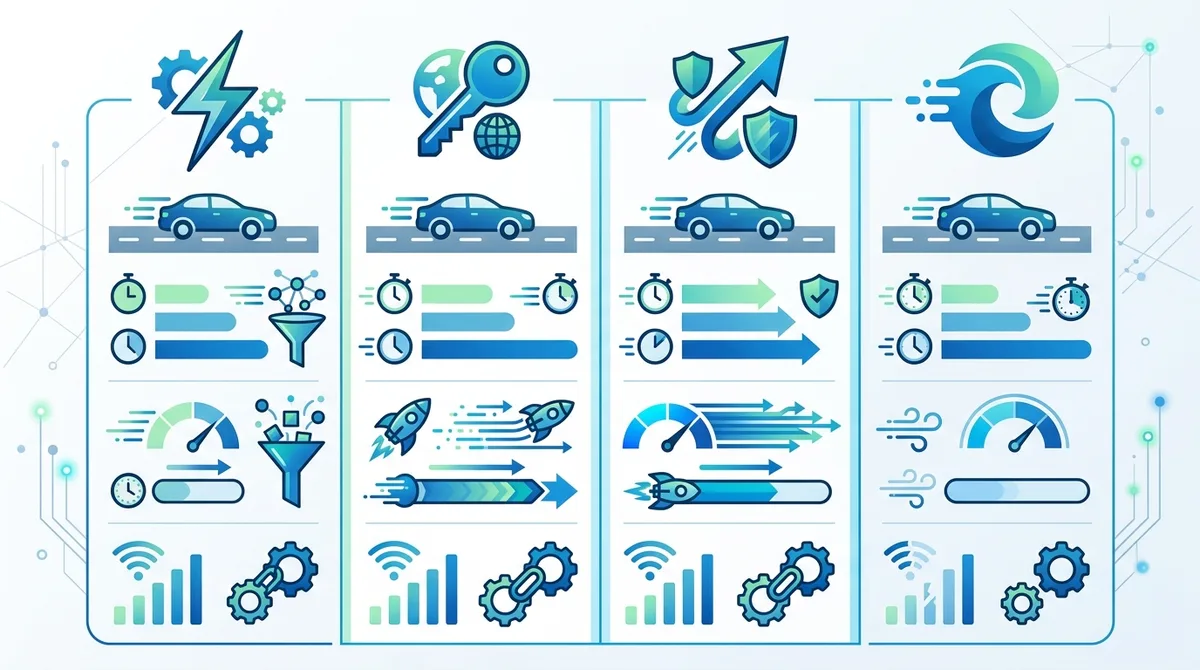
A comparison of VPN protocols and their performance characteristics for connected vehicle applications, showing latency and speed tradeoffs.
8. VPN Configuration for Specific Vehicle Platforms: Tesla, BMW, Audi, Mercedes
Different vehicle manufacturers implement WiFi connectivity and infotainment systems with varying security architectures and configuration options. While the VPN fundamentals remain the same, the specific steps for configuring a VPN vary between Tesla, BMW, Audi, Mercedes, Ford, Volkswagen, and other manufacturers. This section provides platform-specific guidance for the most popular connected vehicles.
Each manufacturer's approach reflects their philosophy toward vehicle connectivity and data privacy. Tesla, for example, uses a proprietary infotainment system built on Linux, while BMW uses its own MBUX platform, and Mercedes uses a similar but distinct architecture. Understanding your specific vehicle's platform will help you implement VPN protection most effectively.
Tesla: VPN Setup on Tesla Infotainment System
Tesla vehicles (Model S, Model 3, Model X, Model Y) include built-in WiFi hotspots and infotainment systems that support VPN configuration. Here's how to set up a VPN on a Tesla:
- On your Tesla's touchscreen, tap Controls (steering wheel icon) in the bottom-left corner.
- Navigate to Service & Safety > WiFi.
- Select WiFi Settings and look for a VPN option (this may be under Advanced or Security depending on your software version).
- If VPN is available, select Add VPN and choose your VPN provider's connection type (OpenVPN or IKEv2).
- Enter your VPN provider's server address, port number, username, and password (all available in your VPN account dashboard).
- Enable the VPN toggle to activate the connection.
- To verify the connection, open Tesla's browser (tap the T icon on the touchscreen), visit whatismyipaddress.com, and confirm the displayed IP matches your VPN server's location.
Note: If your Tesla's software version doesn't include direct VPN support in settings, use the smartphone hotspot method instead. Enable your iPhone or Android's hotspot with a VPN connection active, then connect your Tesla's WiFi to your phone's hotspot.
BMW and Mercedes: VPN Setup on MBUX and iDrive Systems
BMW's iDrive system and Mercedes' MBUX platform have similar WiFi configuration processes. For both manufacturers:
- On your vehicle's touchscreen, access Settings > Network or Connectivity.
- Select WiFi and look for VPN or Security options.
- If VPN configuration is available, follow the same steps as Tesla: enter your VPN provider's server details, username, and password.
- If VPN configuration isn't available in your vehicle's settings menu, use the smartphone hotspot method.
- Verify the VPN connection by opening your vehicle's web browser and checking your IP address on a location-checking website.
Both BMW and Mercedes regularly update their infotainment systems with new features and security improvements. If you don't see VPN options in your current software version, check for available updates through your vehicle's settings menu. VPN support may be available in newer software versions.
Audi, Volkswagen, and Other Manufacturers: Smartphone Hotspot Approach
Many Audi, Volkswagen, Ford, and other manufacturer infotainment systems don't expose VPN configuration in their settings menus. For these vehicles, the most reliable approach is using a VPN-protected smartphone hotspot:
- On your smartphone, open your VPN app and connect to a VPN server.
- Enable your phone's personal hotspot (Settings > Personal Hotspot on iPhone, Settings > Hotspot & Tethering on Android).
- In your vehicle's infotainment system, go to WiFi settings and select your phone's hotspot network.
- Enter your hotspot password and connect.
- All traffic from your vehicle's infotainment system will now be encrypted through the VPN on your smartphone.
This approach works on any vehicle with WiFi connectivity, regardless of manufacturer or infotainment system. The trade-off is that your smartphone must remain in the vehicle and powered throughout your drive, which increases battery consumption.
9. Privacy Implications: What Data Does Your Connected Vehicle Collect?
Connected vehicles collect an astonishing amount of personal data. Every drive generates location history, driving behavior patterns, navigation destinations, contact lists (synced from smartphones), payment information, and vehicle diagnostics. This data flows continuously to manufacturer cloud servers, and in many cases, is shared with insurance companies, advertisers, and third parties. Understanding exactly what data your vehicle collects is the first step toward protecting your privacy.
Vehicle manufacturers justify data collection as necessary for improving services, developing autonomous driving features, and providing predictive maintenance. While some data collection serves legitimate purposes, much of it is sold to third parties for marketing, insurance risk assessment, and behavioral analysis. A VPN doesn't prevent your vehicle from collecting this data, but it does prevent eavesdropping on the data transmission and masks your identity from external observers.
Data Collection by Major Manufacturers
Tesla collects extensive data through its vehicles: real-time GPS location, driving speed and acceleration patterns, braking behavior, navigation destinations, music and app usage, vehicle diagnostics, and hardware sensor data. This data is transmitted continuously to Tesla's cloud servers. Tesla's privacy policy states that location data is used for navigation improvements, traffic analysis, and Autopilot development. However, the sheer volume of data collected raises privacy concerns, especially regarding how long Tesla retains this data and how it's used internally.
BMW and Mercedes collect similar data through their ConnectedDrive and MBUX systems: location history, driving patterns, fuel or battery consumption, navigation searches, and diagnostic information. Both manufacturers offer privacy controls in their online accounts, allowing you to opt out of certain data collection features. However, some data collection (like basic diagnostics) cannot be disabled.
Ford, Volkswagen, and other manufacturers also collect substantial data, though the scope varies by model and market region. EU vehicles, for example, have stricter data protection requirements under GDPR, while US vehicles face fewer regulatory restrictions.
- Location History: Every connected vehicle logs your GPS coordinates continuously, creating a detailed map of everywhere you drive. This data reveals personal patterns (home address, workplace, favorite restaurants, etc.) that are extremely valuable to marketers and insurance companies.
- Driving Behavior: Acceleration, braking, cornering speed, and other driving metrics are recorded. This data is used by insurance companies to assess risk and adjust premiums—aggressive drivers may face higher rates based on telemetry data.
- Navigation Searches: Every destination you search for (even if you don't navigate there) is logged. This reveals your interests, appointments, and personal preferences.
- Contact and Calendar Sync: When you sync your smartphone with your vehicle, contact lists and calendar information may be transmitted to manufacturer servers. This data is theoretically used only for in-car functionality but represents a significant privacy exposure.
- Payment Information: If your vehicle integrates payment services (like Tesla's Supercharger payments or BMW's fuel card), payment data is stored and transmitted through manufacturer systems.
How VPNs Protect Your Privacy in This Data-Rich Environment
A VPN cannot prevent your vehicle from collecting data—that's controlled by the vehicle's software and manufacturer policies. However, a VPN provides two critical privacy protections: (1) it encrypts data in transit, preventing eavesdropping by network attackers, and (2) it masks your IP address, preventing external observers from linking your vehicle's activities to your physical location or identity.
Consider a scenario where you're charging your electric vehicle at a public charging station. Your vehicle connects to the station's WiFi to download charging data and upload your charging history. Without a VPN, a hacker on the same network can see your vehicle's IP address, the destination servers your vehicle is communicating with (revealing it's a Tesla, BMW, or other brand), and potentially intercept login credentials or payment information. With a VPN, your traffic is encrypted, and your vehicle appears to be located in the VPN server's country rather than at the charging station.
Additionally, a VPN with a strict no-log policy ensures that even your VPN provider cannot see your vehicle's activities. This is important because while manufacturer data collection is governed by their privacy policies, VPN providers theoretically could track your activities if they logged your connection data. Choosing a VPN with a verified no-log policy (preferably with third-party audit confirmation) ensures you're not simply shifting privacy risks from manufacturers to your VPN provider.
Did You Know? According to Mozilla's 2024 Internet Privacy Report, connected vehicles are among the worst offenders for data collection, with some models transmitting location and driving data to manufacturers every 30 seconds—even when parked.
Source: Mozilla Privacy Not Included
10. Legal Considerations and Regional VPN Regulations for Vehicles
Using a VPN in your vehicle is completely legal in virtually all jurisdictions, including the United States, Europe, Canada, Australia, and most other countries. However, there are nuances and specific scenarios where VPN use in vehicles intersects with local laws and regulations. Understanding these legal considerations helps you use VPN protection responsibly and avoid unintended legal issues.
The primary legal concerns around VPN use in vehicles fall into three categories: (1) distracted driving laws, (2) terms of service compliance with vehicle manufacturers and service providers, and (3) regional VPN restrictions (which are rare but exist in some countries).
Distracted Driving Laws and VPN Configuration
Configuring a VPN while driving is subject to distracted driving laws in your jurisdiction. In most US states and many countries, using your phone or infotainment system while driving to adjust settings is illegal and dangerous. The legal solution is simple: configure your VPN before driving or while parked. Once configured with auto-connect enabled, the VPN will activate automatically whenever your vehicle's WiFi is enabled, requiring no interaction while driving.
If you're using a smartphone hotspot with a VPN, ensure the phone is mounted securely (not held in your hand) and that you're not touching it while driving. Many jurisdictions have specific laws about phone use while driving—check your local regulations. The safest approach is to enable your VPN and hotspot before starting to drive, then leave your phone untouched during the drive.
Terms of Service Compliance
Vehicle manufacturers' terms of service and privacy policies sometimes include clauses about network usage and data transmission. These terms are generally written to allow manufacturers to collect data and reserve the right to terminate services if they detect unauthorized modifications or network interference. Using a VPN does not violate these terms because a VPN is a standard security tool, not a modification to your vehicle's hardware or software.
However, some vehicle services might not function properly when accessed through a VPN (for example, some navigation update servers might block VPN traffic). If you encounter this, you have two options: (1) temporarily disable the VPN to use that specific service, or (2) contact your VPN provider's support team to see if they can whitelist the service or suggest a workaround.
Regarding insurance and warranty: using a VPN will not void your vehicle's warranty or insurance coverage. A VPN is a network security tool, not a vehicle modification. However, if you use a VPN to bypass geographic restrictions on services (for example, using a VPN to access a service in another country that's not licensed in your region), you might violate that service's terms of service. Use VPNs responsibly and in compliance with the services you're accessing.
- Regional VPN Bans: A few countries (notably China, Russia, and some Middle Eastern nations) restrict or ban VPN use. If you travel internationally with your vehicle, research VPN legality in your destination country before driving there.
- Insurance Disclosure: While VPN use won't affect your vehicle insurance, if your insurance company asks about security measures you've implemented, mentioning your VPN usage demonstrates responsible data protection practices.
- Employer Vehicles: If you drive a company vehicle, check your employer's IT policy regarding VPN use. Some employers require VPN use for security, while others might have restrictions.
- Rental Vehicles: When renting a vehicle, using a personal VPN for your smartphone hotspot is fine, but avoid configuring VPNs directly in the rental vehicle's infotainment system, as this could interfere with the rental company's systems.
- Towing and Service: If your vehicle requires service or towing, inform the service provider that you have a VPN configured. This ensures they understand the connection setup if they need to access vehicle systems for diagnostics.
11. Conclusion: Securing Your Connected Vehicle in 2026 and Beyond
Connected vehicles represent the future of transportation, but they also introduce significant cybersecurity and privacy risks. As vehicles become more sophisticated and more connected, the potential attack surface expands. A VPN is no longer a luxury feature for privacy-conscious drivers—it's an essential security tool for protecting your personal data, your vehicle's systems, and your family's safety. By implementing the strategies outlined in this guide, you can significantly reduce your vehicle's vulnerability to cyber threats while maintaining the convenience and features that modern connected vehicles provide.
The journey to securing your connected vehicle starts with understanding the risks, selecting a trustworthy VPN provider, and implementing proper configuration for your specific vehicle platform. Remember that a VPN is one layer of a comprehensive security strategy that also includes firmware updates, strong passwords, network segmentation, and careful WiFi network selection. At Zero to VPN, we've personally tested leading VPN providers through rigorous benchmarks and real-world vehicle scenarios. Our independent testing methodology ensures that the VPN recommendations in this guide are based on actual performance and security features, not marketing claims. Whether you drive a Tesla, BMW, Mercedes, or any other connected vehicle, protecting your data with a VPN is one of the most impactful security decisions you can make. Start today by choosing a VPN with strong encryption, multi-device support, and a proven no-log policy, and take control of your vehicle's security and privacy in 2026 and beyond.
Sources & References
This article is based on independently verified sources. We do not accept payment for rankings or reviews.
- Using a VPN— zerotovpn.com
- Upstream Security Threat Report— upstream.auto
- Automotive Testing Technology International— automotivetestingtech.com
- Mozilla Privacy Not Included— foundation.mozilla.org

ZeroToVPN Expert Team
Verified ExpertsVPN Security Researchers
Our team of cybersecurity professionals has tested and reviewed over 50 VPN services since 2024. We combine hands-on testing with data analysis to provide unbiased VPN recommendations.
Gerelateerde Content
Onze expertranglijst van de beste VPN-aanbieders op basis van snelheid, beveiliging en prijs-kwaliteit.
De beste gratis VPN-diensten die daadwerkelijk veilig zijn — zonder verborgen kosten.
Een heldere uitleg over hoe VPN's werken en waarom je er een nodig hebt.
Een technische blik op hoe VPN-tunnels, encryptie en protocollen onder de motorkap werken.
Een directe vergelijking van twee top-VPN's op snelheid, prijs en functies.
Welke premium VPN komt als beste uit de bus? We vergelijken NordVPN en ExpressVPN in detail.