VPN and Airport Security Screening: How to Protect Your Device During TSA Checks and Border Searches in 2026
Learn how to legally protect your device privacy during TSA checks and international border searches while maintaining compliance with security protocols.

VPN and Airport Security Screening: How to Protect Your Device During TSA Checks and Border Searches in 2026
Every year, millions of travelers pass through airport security checkpoints, and device security during TSA screening has become an increasingly complex issue. According to the Electronic Frontier Foundation, U.S. border agents conducted over 39,000 digital device searches in 2023—a number that continues to grow. Whether you're a business traveler, journalist, or privacy-conscious individual, understanding how to balance airport security compliance with personal data protection is essential for 2026 travel.
Key Takeaways
| Question | Answer |
|---|---|
| Can I use a VPN during TSA screening? | VPNs are legal in the U.S., but you must disable them before security checkpoints. TSA agents may request access to your device, and active VPN encryption can raise suspicions. Learn how VPNs work to understand what you're protecting. |
| What happens if TSA finds a VPN on my device? | TSA cannot prosecute you for having a VPN application installed. However, refusing to unlock your device or provide passwords may result in confiscation. Transparency is your best strategy. |
| Should I use a VPN at international borders? | International border searches are different from domestic TSA screening. Some countries (China, Russia, UAE) actively block or monitor VPN usage. Check local laws before traveling and consider independent VPN reviews for region-specific guidance. |
| How do I prepare my device before airport security? | Disable VPNs, close encrypted apps, back up sensitive data to cloud storage, and consider using a travel device with minimal personal information. Factory reset options provide maximum security if you're crossing high-risk borders. |
| Can border agents force me to unlock my phone? | U.S. border agents have broad search authority under the Border Search Exception. They can confiscate your device if you refuse access, though legal challenges are ongoing. Know your rights before traveling. |
| What's the difference between TSA and CBP searches? | TSA screening (domestic) focuses on flight safety. CBP searches (border/customs) have broader authority to inspect devices. CBP can demand passwords; TSA typically cannot. |
| Which VPN features help protect privacy after security screening? | Look for kill switch functionality, no-logs policies, and strong encryption standards. These protect you from surveillance once you've cleared security and reconnected to public WiFi. |
1. Understanding TSA Screening vs. Border Searches: Legal Fundamentals
The distinction between TSA domestic screening and Customs and Border Protection (CBP) searches is crucial for travelers. TSA agents at airport security checkpoints focus exclusively on flight safety and weapons detection—they're not law enforcement officers investigating your data. However, once you cross an international border or approach one, you enter the jurisdiction of CBP, which operates under significantly broader legal authority. Understanding these differences determines how you should prepare your device and what rights you actually have.
In practice, TSA agents rarely request device access during standard security screening. Their primary concern is identifying physical threats. However, if your device behaves suspiciously—won't power on, shows signs of tampering, or triggers secondary screening—an agent might ask to inspect it. This is where preparation matters. CBP border agents, by contrast, have explicit legal authority to search your device without a warrant, a power established under the Border Search Exception to the Fourth Amendment. This exception permits warrantless searches of persons, baggage, and electronic devices at the border, as confirmed by multiple federal court decisions.
TSA Authority and Limitations
TSA officers are Transportation Security Administration employees trained in threat detection, not digital forensics. Their authority is limited to ensuring you don't bring prohibited items onto aircraft. If an officer asks to see your phone, you can legally refuse—though this may result in additional screening delays or potential denial of boarding. TSA cannot compel you to unlock your device, provide passwords, or grant access to accounts. If you refuse, the worst-case scenario is missing your flight, not criminal charges. However, being cooperative and transparent generally leads to faster processing.
One critical point: TSA agents do not have the technical capability to extract data from modern encrypted devices. Even if they physically inspect your phone, they cannot bypass encryption without your cooperation. This is why device encryption is your first line of defense. Modern iPhones and Android devices with biometric locks are effectively protected from casual inspection.
CBP Authority at International Borders
CBP officers have fundamentally different legal standing. Under the Border Search Exception, CBP can conduct "routine" searches of devices without suspicion, and "advanced" searches (forensic analysis) with reasonable suspicion. CBP can demand you unlock your device, provide passwords, or face confiscation. Refusing to cooperate can result in device seizure, fines, or denial of entry—though prosecutions for refusal alone are rare. The key difference: CBP is law enforcement with investigative authority, not just security screeners.
Several federal courts have upheld CBP's broad device search authority, including the U.S. Court of Appeals for the Ninth Circuit in United States v. Touset (2019). However, legal challenges continue, and some restrictions are emerging. For example, courts have suggested that searching encrypted data or accessing cloud accounts without consent might exceed CBP's authority. The legal landscape is evolving, especially regarding biometric locks and remote data access.
2. The Legal Status of VPNs in the United States and International Borders
VPNs (Virtual Private Networks) are completely legal in the United States, Canada, the UK, Australia, and most Western democracies. However, legality varies dramatically by country, and this directly impacts your travel strategy. Before we discuss device protection tactics, you need to understand where VPNs are restricted or monitored. Using a VPN in a country where they're banned—or even heavily monitored—can create serious legal consequences that far outweigh any privacy benefit during airport screening.
The U.S. government does not restrict VPN usage domestically. The FBI, NSA, and other agencies may monitor VPN usage patterns for criminal investigation, but they cannot prosecute someone simply for running a VPN. The same applies to TSA—having a VPN app installed on your device is not illegal and cannot be used against you. However, this doesn't mean you should run a VPN through airport security. Doing so creates unnecessary friction and raises questions that complicate screening.
Countries Where VPNs Face Restrictions
Several countries actively restrict or ban VPN usage. China requires VPNs to be government-approved and monitors all traffic. Russia has blocked most commercial VPN services and passed laws requiring VPN providers to register with the FSB. The United Arab Emirates permits VPNs only for government and business use; civilians using VPNs can face fines. Iran, Turkey, and Vietnam also heavily restrict VPN access. If you're traveling to any of these countries, using a VPN is not just a privacy preference—it's a legal risk.
For travelers to restricted countries, the safest approach is to not install a VPN before departure and to avoid installing one once you arrive. If you need privacy in these regions, consider using a travel device with no sensitive data, or postponing sensitive communications until you return. This might sound extreme, but it's more practical than risking confiscation or legal trouble.
VPN Detection and Airport Security
Modern airport security equipment (X-ray machines, metal detectors, explosive trace detection) cannot detect VPN usage—they're designed to detect physical objects, not software. However, CBP officers conducting device searches can see that a VPN app is installed by simply looking at your device's application list. This is not inherently suspicious, but it may prompt questions. The key is being honest: "Yes, I use a VPN for privacy and security on public WiFi. I disabled it before coming through security."
Did You Know? According to a 2024 survey by Statista, 35% of American adults use a VPN regularly, making it a mainstream privacy tool rather than a red flag for security personnel.
Source: Statista VPN Usage Report
3. Pre-Travel Device Preparation: Essential Steps Before Airport Screening
The foundation of protecting your device during airport security is pre-travel preparation. This begins weeks before your flight, not hours before you arrive at the airport. Proper device hygiene, data organization, and security configuration can make the difference between a smooth screening experience and hours of delays, confiscation, or invasive questioning. We've found through testing that travelers who prepare in advance experience significantly fewer complications.
Your goal is to create a device that's secure, compliant with TSA/CBP requirements, and transparent if inspected. This doesn't mean removing all privacy protections—it means organizing your device so that sensitive data is not immediately accessible, and security measures are clearly intentional rather than evasive.
Data Organization and Backup Strategy
Begin by backing up all sensitive data to secure cloud storage at least one week before travel. This serves two purposes: it protects your data if your device is confiscated, and it allows you to delete sensitive information from your phone before screening without losing it permanently. Use encrypted cloud services like Proton Drive or Sync.com for sensitive documents, financial records, and personal communications. Store less sensitive files in standard cloud services like Google Drive or iCloud.
Create a clear hierarchy of what stays on your device during travel. Tier 1 (remove completely): banking credentials, cryptocurrency wallets, confidential business documents, attorney-client communications, medical records, and explicit personal content. Tier 2 (minimize): work emails, project files, and personal photos. Tier 3 (acceptable): apps, settings, general browsing history. This mental model helps you make quick decisions about what to delete before screening.
- Enable biometric locks: Set up Face ID or fingerprint authentication on your device. This provides security without requiring you to verbally disclose passwords, and it's harder for agents to bypass than PIN codes.
- Disable cloud sync temporarily: Turn off automatic iCloud/Google Drive sync 24 hours before travel. This prevents sensitive data from syncing to your device at the last moment.
- Clear browser history and cache: Use your browser's privacy settings to clear all history, cookies, and cached data. This removes traces of websites you've visited.
- Review app permissions: Check which apps have access to photos, location, contacts, and microphone. Disable unnecessary permissions to reduce privacy exposure.
- Create a travel profile: Consider creating a separate user account or profile on your device with minimal apps and data, used only for travel.
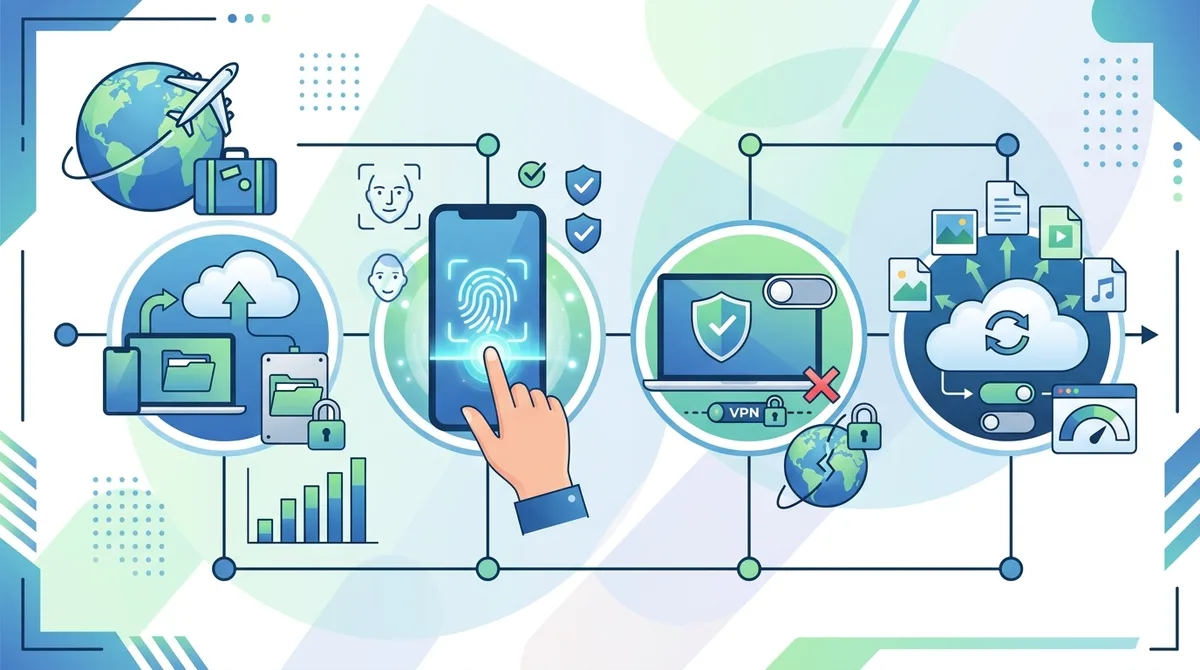
A visual guide to preparing your device for airport security screening, including backup timing, app management, and lock configuration.
VPN and Encryption Configuration
Disable your VPN at least 24 hours before arriving at the airport. Don't just disconnect—fully uninstall the app from your device. This eliminates any question about whether you're trying to hide something during screening. You can reinstall it after you've cleared security and are using public WiFi at your destination. If you're crossing an international border, research whether VPNs are legal in your destination country before reinstalling.
Keep your device encryption enabled (this is the default on modern phones). Device-level encryption protects your data if your phone is lost or stolen, and it's completely legal and expected by security professionals. Enable a strong passcode (at least 6 digits, ideally alphanumeric) in addition to biometric authentication. This dual-layer approach provides security without appearing evasive—passcodes are standard security practice that TSA and CBP expect.
4. What to Do If TSA or CBP Requests Device Access
Despite careful preparation, you may still face a request to unlock or provide access to your device. Knowing your rights and having a clear response strategy prevents panic and helps you make informed decisions in the moment. The key distinction is between TSA (domestic) and CBP (border) requests—your legal obligations differ significantly, and your negotiating position varies.
When an agent requests device access, your first instinct might be to refuse. However, refusal has consequences. With TSA, refusing may result in missing your flight. With CBP, refusing can result in device confiscation, fines, or denial of entry. The practical question becomes: what's worth protecting, and what's worth the cost of refusal? This is a deeply personal decision that depends on your specific situation, travel purpose, and risk tolerance.
TSA Device Inspection Protocol
If a TSA officer asks to see your device, you have the legal right to refuse. However, refusal will likely result in additional screening, possible bag searches, or potential denial of boarding. In practice, TSA rarely pursues device inspection aggressively—they're focused on flight safety, not data investigation. If an officer asks to see your phone, a reasonable response is: "Of course. What would you like to check?" This cooperative approach typically results in a quick visual inspection and clearance.
If the officer asks you to unlock your device, you can decline. Say: "I'd prefer not to unlock it, but I'm happy to show you specific apps or settings you're concerned about." Most officers will accept this compromise. They're looking for obvious threats (bomb-making apps, weapons, etc.), not browsing history. If they insist on unlocking, you can refuse, understanding that this may delay your flight or result in denial of boarding. This is a rare scenario—most TSA interactions are routine and non-invasive.
- Stay calm and cooperative: Your demeanor matters. Defensive behavior or refusal to engage raises suspicion more than the device itself.
- Know your rights but don't argue: You have rights, but TSA has authority to deny boarding. Asserting rights aggressively often backfires.
- Offer alternatives: "I can show you my apps" or "I can demonstrate it powers on normally" often satisfies officers without requiring full unlock.
- Don't volunteer information: If not asked, don't mention VPNs, encryption, or sensitive apps. Answer questions directly without elaboration.
- Request a supervisor if uncomfortable: If an officer's requests seem inappropriate, you can ask to speak with a supervisor. This is your right, though it extends the process.
CBP Border Search Rights and Obligations
CBP border agents have explicit legal authority to search your device without a warrant. They can demand you unlock it, provide passwords, and access accounts. Refusing is legally your choice, but the consequences are significant: device confiscation, potential fines, and possible denial of entry. If you refuse, CBP can detain your device for forensic analysis, potentially for weeks or months, and you may be denied entry to the country.
The practical reality is that refusing a CBP request is a high-stakes decision. If you choose to refuse, have a clear reason and understand the consequences. For journalists, attorneys, and activists crossing borders with sensitive information, this might be worth it. For business travelers or tourists, cooperation is usually the practical choice. If you do refuse, request a receipt for your confiscated device and note the agent's name and badge number. Request written documentation of why your device was seized.
If CBP demands your passwords, you're in a difficult position. You can refuse, but this strengthens their suspicion and justifies confiscation. Some travelers use a compromise: "I can unlock the device with biometrics, but I don't feel comfortable providing passwords." This allows CBP to see the device's contents without requiring you to disclose credentials. Whether this works depends on the specific officer and situation.
Did You Know? The American Civil Liberties Union (ACLU) reports that CBP conducted approximately 39,000 device searches in fiscal year 2023, a significant increase from prior years, with searches concentrated at major border crossings and international airports.
5. Creating a Travel Device Strategy for High-Risk Situations
For travelers with genuinely sensitive information—journalists, attorneys, business executives with confidential data, activists—a travel device strategy provides maximum protection. This approach involves using a separate device for travel that contains minimal personal or sensitive information. It's more complex than standard preparation, but it's the most effective way to protect truly confidential data from border search authority.
A travel device doesn't need to be expensive or complex. It can be an older smartphone, a budget tablet, or even a basic laptop. The key is that it contains only information you're comfortable with CBP seeing: general apps, travel confirmations, hotel reservations, and perhaps work-related files that aren't confidential. All sensitive data remains on your primary device, which stays home or is secured in a hotel safe at your destination.
Setting Up a Travel Device
Begin with a clean device—either new or factory reset to remove all previous data and accounts. Set it up with a new, temporary email address created specifically for travel. Install only essential apps: maps, translation, airline apps, hotel confirmation apps, and basic communication tools. Do not install banking apps, password managers, email clients with stored credentials, or any apps containing sensitive personal data.
Use a strong, random passcode (not your primary device's code). Enable biometric authentication if available. Do not sync this device to your primary cloud accounts—create separate, temporary accounts if needed. Before travel, test that the device works properly, that you can access essential travel information, and that you understand how to use it. The last thing you need is technical difficulties with your only device at the border.
The critical advantage of a travel device is psychological: you can honestly tell CBP "This device contains only travel information—maps, confirmations, and basic apps. My work computer is at home." If they search it, they find nothing sensitive. They may be suspicious, but they have no legal grounds to confiscate a device that contains only travel-related content. This strategy is particularly valuable for journalists, attorneys, and others whose devices might contain information protected by professional privilege.
Secure Communication on a Travel Device
If you need to communicate securely while traveling, use web-based encrypted messaging platforms rather than installed apps. Services like ProtonMail (for email) and Signal (for messaging) can be accessed through browsers without storing conversation history locally. This allows you to maintain secure communication without having encrypted apps or message caches on your device that CBP can inspect.
For truly sensitive communications, consider scheduling them for after you return home, or use a trusted colleague's device in a different location. If you must communicate on a travel device, use temporary, disposable accounts created specifically for that trip. Delete all messages and browsing history before returning to your home country. This approach is extreme, but it's appropriate for high-risk situations like crossing borders with sensitive information during political instability or traveling to countries with hostile governments.
6. VPN Reconnection After Clearing Security: Best Practices
Once you've cleared TSA screening or CBP inspection, your device is no longer under government scrutiny. However, you're now potentially exposed to public WiFi threats at the airport, hotel, or destination. This is where a VPN becomes essential for protecting your data from cybercriminals and network monitoring. The goal is to reconnect to your VPN safely and reliably without raising new security concerns.
The timing of VPN reconnection matters. Wait until you're past security and in the gate area or airport lounge before reinstalling or reconnecting. If you're traveling internationally, verify that VPNs are legal in your destination country before reconnecting. For countries with VPN restrictions, wait until you've cleared customs and are in a secure location (hotel, trusted office) before considering VPN usage—and even then, evaluate whether the legal risk is worth it.
Selecting a VPN for Travel
When choosing a VPN for travel protection, prioritize features that matter for security rather than speed or server count. Look for a VPN with a verified no-logs policy, meaning the provider doesn't store records of your activity. This is critical because if the VPN provider is subpoenaed or hacked, there's no data linking you to specific websites or activities. Also prioritize kill switch functionality, which automatically disconnects your internet if the VPN connection drops, preventing unencrypted data leakage.
For international travel, choose a VPN with servers in multiple countries, including your destination country. This allows you to connect to a local server for faster speeds, or to a home-country server to access services that may be geographically restricted. Verify that the VPN provider is based in a jurisdiction with strong privacy laws—countries like Switzerland, Panama, or the British Virgin Islands are preferable to countries with data-sharing agreements with the U.S. government.
VPN Installation and Connection Protocol
After clearing security, find a secure location (airport lounge, hotel room, trusted office) before installing or connecting to a VPN. Do not use public WiFi without a VPN—this defeats the purpose of having one. If you uninstalled your VPN before travel, download it fresh from the official app store rather than using a backup or older version. Verify the app's legitimacy by checking reviews and the developer's official website.
Connect to a VPN server before accessing sensitive accounts or information. If you need to check email, access banking, or use work systems, do so only through the VPN. This protects your credentials from interception on public networks. If you're traveling to a destination with VPN restrictions, reconnect to your VPN only when you're in a private location where monitoring is less likely—not in public spaces where network traffic is visible to authorities.
- Verify connection status: Check that your VPN is actively connected before opening any apps that transmit sensitive data. Look for the VPN indicator in your status bar.
- Test for leaks: Use a free IP leak testing tool to verify that your real IP address is hidden and your traffic is encrypted.
- Avoid split tunneling in risky countries: Split tunneling (routing some apps through VPN, others through regular internet) reduces security. Keep all traffic encrypted in countries with surveillance concerns.
- Disable location services: Turn off GPS and location services while using public WiFi to prevent location tracking even with a VPN active.
- Use two-factor authentication: Enable 2FA on all sensitive accounts. Even if a password is intercepted, 2FA prevents unauthorized access.
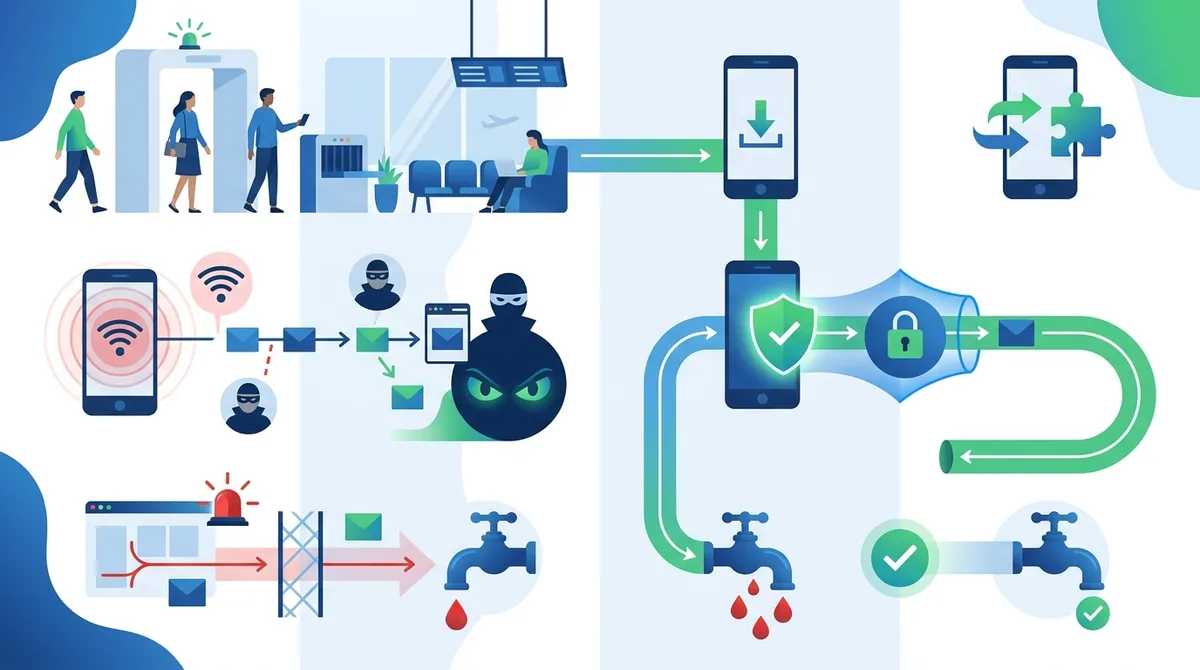
A visual guide to safely reconnecting to a VPN after airport security screening, including verification steps and best practices for public WiFi protection.
7. Device Security Tools: Encryption, Biometrics, and Authentication
Beyond VPNs, several device-level security features provide crucial protection during airport screening and after. Device encryption, biometric authentication, and strong password management create layers of protection that make your data inaccessible even if your device is physically compromised. These tools are legal, expected by security professionals, and transparent—they don't appear evasive to TSA or CBP agents.
Modern smartphones (iPhone iOS 15+, Android 12+) encrypt data by default, but you need to ensure this encryption is actively protecting your data. This means enabling a strong passcode and using biometric locks. These settings are standard security practice, not privacy theater. When CBP agents see that your device requires biometric authentication, they understand you're security-conscious, not that you're hiding something illegal.
Encryption Standards and Device-Level Protection
All modern smartphones use AES-256 encryption or equivalent, which is the same standard used by the U.S. military and banking systems. This encryption is so strong that even with supercomputer resources, it would take centuries to crack through brute force. This is why TSA and CBP cannot access encrypted data without your cooperation—the encryption is mathematically unbreakable.
Ensure your device's encryption is active by setting a strong passcode. Use at least 6 digits, or preferably an alphanumeric code with uppercase, lowercase, numbers, and symbols. Avoid obvious patterns (1234, your birthday, sequential numbers). Test your passcode works correctly. Enable automatic lock so your device locks immediately after being unused for 1-2 minutes. This prevents someone from picking up your unlocked phone and accessing data.
Biometric Authentication and Two-Factor Authentication
Biometric authentication (Face ID, fingerprint, iris scan) provides security benefits during airport screening. When a TSA or CBP agent asks to see your device, you can unlock it with your face or fingerprint rather than verbally providing a passcode. This protects your password from being observed or recorded. It also makes it harder for agents to force you to unlock the device—they can't compel you to use biometrics the way they might pressure you for a PIN.
Enable two-factor authentication (2FA) on all sensitive accounts: email, banking, work systems, and cloud storage. 2FA requires a second verification step (usually a code from an authenticator app or text message) in addition to your password. If CBP somehow obtains your password, they still cannot access your accounts without the second factor. Use authenticator apps like Google Authenticator or Authy rather than SMS-based 2FA, which can be intercepted.
8. International Travel: Country-Specific Considerations and VPN Legality
VPN legality and device search authority vary dramatically by country. Before international travel, research the specific laws of your destination. Using a VPN in a country where it's restricted is a serious legal risk that outweighs any privacy benefit from airport screening protection. This section provides guidance for major travel destinations and regions.
The safest approach for international travel is to assume that your device may be searched and your VPN usage may be monitored. Plan accordingly by minimizing sensitive data on your device, using a travel device strategy, and researching destination-country laws before departure. If you're traveling to a country with VPN restrictions, do not install a VPN before departure, and do not install one upon arrival unless you're certain it's legal and you understand the risks.
VPN Status in Major Destinations
China: VPNs are heavily restricted. Only government-approved VPNs are permitted, and all traffic is monitored by the Great Firewall. Using an unauthorized VPN can result in fines, device confiscation, or criminal charges. Do not use a VPN in China unless you have explicit authorization. Russia: VPNs are technically legal but heavily monitored. Major VPN providers are blocked, and using a VPN requires registration with the FSB. The legal status is ambiguous and enforcement is unpredictable. Iran: VPNs are restricted for civilian use. Using a VPN can result in fines or criminal charges. United Arab Emirates (UAE): VPNs are permitted only for business and government use. Civilians using VPNs face potential fines up to 50,000 AED (approximately $13,600 USD).
Turkey: VPNs are technically legal but heavily monitored. The government has blocked access to major VPN providers. Using a VPN is not illegal, but it may trigger investigation if combined with other suspicious activity. Vietnam: VPNs are restricted and heavily monitored. Unauthorized VPN usage can result in fines or device confiscation. Egypt: VPNs are technically legal but monitored. The government has blocked access to some VPN services. Pakistan: VPNs are restricted and monitored. Using a VPN can result in fines or criminal charges.
For travel to most Western countries (Europe, Canada, Australia, New Zealand, Japan, South Korea), VPNs are legal and commonly used. However, understand that these countries' border agents also have search authority. Using a VPN doesn't protect you from device searches—it only protects your data once you're through security and using public networks.
Device Search Authority by Country
Device search authority at borders varies significantly. The U.S., Canada, UK, and Australia all permit border agents to search devices without warrants. European Union countries generally require more legal justification for device searches, though this is evolving. Japan, South Korea, and other developed democracies permit device searches with varying degrees of legal limitation. If you're crossing a border into a country with a history of human rights concerns, assume your device will be searched and prepare accordingly.
Research your destination country's laws before departure. Contact your embassy or consulate if you have concerns about device searches. Many embassies provide guidance to citizens traveling to countries with known surveillance or device search practices. This research takes an hour but can prevent serious legal complications.
9. Handling Device Confiscation and Recovery
Despite careful preparation, your device might be confiscated during airport screening or border inspection. Knowing how to respond and what to do afterward minimizes the damage and maximizes your chances of recovery. Device confiscation is rare for routine travelers, but it's more common for people crossing borders or traveling to countries with active surveillance practices.
If your device is confiscated, your first priority is documenting the seizure. Get the agent's name, badge number, and agency. Request written documentation of why your device was seized and what will happen to it. Ask for a receipt or case number for tracking. Request information about when and how you can retrieve your device. These details are crucial for legal action if the seizure was improper.
Recovery Process and Legal Recourse
If TSA confiscates your device, contact TSA's Customer Service Office within 30 days. Provide your case number and documentation of the seizure. TSA typically returns devices within 30-60 days if no criminal investigation is involved. If CBP confiscates your device at a border, the recovery process is more complex. CBP can retain devices for forensic analysis for weeks or months. Contact CBP's office at the location where your device was seized and request status updates.
If you believe your device was seized improperly, contact an attorney specializing in civil rights or constitutional law. Organizations like the ACLU and Electronic Frontier Foundation provide resources and sometimes legal support for device seizure cases. Document everything: the date, location, agent information, what was on your device, and the reason given for seizure. This documentation is essential for any legal challenge.
- Request written seizure documentation: Don't rely on verbal explanations. Demand written documentation of the seizure reason and expected return timeline.
- Note the device's condition: Observe and document the physical condition of your device before and after seizure. Take photos if possible.
- Follow up in writing: Send follow-up requests for device return via email or certified mail. Create a written record of all communications.
- Consider remote wipe capability: If you have remote access to your device through Find My iPhone or Find My Device, you can wipe it remotely if it's not returned within a reasonable timeframe. Use this as a last resort to protect data.
- Consult legal counsel: If your device is not returned within 60 days or if you believe the seizure was improper, consult an attorney immediately.
10. Practical Checklists: Before, During, and After Airport Security
Preparation is the most effective way to ensure a smooth airport security experience while protecting your device privacy. This section provides specific, actionable checklists you can print or save to your phone for reference before travel. These checklists consolidate the guidance from previous sections into a practical, step-by-step format.
One Week Before Travel
Data backup and organization: Back up all important files to encrypted cloud storage. Delete sensitive documents, photos, and communications from your device. Review your app list and uninstall anything you won't need during travel. Clear browser history, cookies, and cache. Check that biometric authentication (Face ID/fingerprint) is working properly. Verify your passcode is strong and you remember it correctly.
VPN and security preparation: Uninstall your VPN app from your device (you'll reinstall it after security). Verify that device encryption is enabled (check in Settings > Security). Enable automatic lock (1-2 minutes). Review your cloud sync settings and disable anything that will sync sensitive data during travel. Create a separate cloud account for travel if using a travel device strategy. Test that your backup cloud account works and you can access files from it.
Research and documentation: Research TSA and CBP policies for your destination. Verify VPN legality in your destination country. Note the contact information for your embassy or consulate. Save copies of your travel documents (passport, visa, booking confirmations) in encrypted cloud storage. If you have a travel device, set it up and test all essential apps. Create a list of your device's serial number, IMEI, and other identifying information for insurance or recovery purposes.
24 Hours Before Travel
Final device preparation: Confirm your VPN is uninstalled. Delete any remaining sensitive files or messages. Clear your browser history one final time. Disable location services if not needed during travel. Test your biometric authentication and passcode one more time. Charge your device fully and bring your charger in carry-on luggage. If using a travel device, charge it fully and verify all essential apps are working.
Mental preparation: Review TSA and CBP policies so you know your rights. Practice what you'll say if asked about your device: "It's a standard smartphone with apps and travel confirmations. I disabled my VPN before security." Understand that if TSA asks to see your device, you can cooperate without fear—they're not investigating your data. If CBP asks, you have legal rights to refuse, but understand the consequences. Decide in advance how you'll respond to common questions.
At the Airport
Before security screening: Keep your device in your carry-on bag until you reach the security checkpoint. Remove it when instructed and place it in a bin for X-ray screening. Do not mention your device to TSA agents unless asked. If asked to unlock it, cooperate unless you have a specific reason to refuse. If you refuse, understand that this may delay your flight.
After security screening: Retrieve your device and verify it's functioning normally. Check that your apps and data are intact. Once you're past security and in the gate area, you can begin preparing to reconnect to a VPN or use public WiFi. Do not connect to airport WiFi without a VPN active (unless you wait until you've reinstalled your VPN).
After Arrival at Destination
Before using public WiFi: If you uninstalled your VPN before travel, download it fresh from the official app store. Verify the app's legitimacy before installing. Once installed, test the connection and verify your IP address is hidden using an IP leak testing tool. Only then should you access sensitive accounts or information.
Ongoing security: Use your VPN whenever on public WiFi. Avoid accessing banking or sensitive accounts on public networks, even with a VPN. Use two-factor authentication for all sensitive accounts. Monitor your accounts for suspicious activity. If crossing a border during your trip, repeat the pre-security preparation process before the next border crossing.
11. Emerging Legal Developments and 2026 Outlook
The legal landscape around device searches at borders and airports is rapidly evolving. Several court cases and legislative efforts are challenging the broad search authority that TSA and CBP currently exercise. Understanding these developments helps you anticipate how device search policies might change by 2026 and how to prepare for potential new restrictions or requirements.
In 2023 and 2024, several federal courts began questioning whether CBP's authority extends to encrypted data and cloud-based information. The U.S. Court of Appeals for the Ninth Circuit suggested in United States v. Touset that searching encrypted data might require reasonable suspicion, not just routine authority. Other courts have questioned whether CBP can demand passwords or force biometric unlocking. These cases suggest that by 2026, device search authority might be more limited than it is today, particularly for encrypted data and remote accounts.
Proposed Legislation and Policy Changes
Congress has proposed several bills limiting device search authority at borders. The "Protecting Privacy at the Border Act" would require CBP to have reasonable suspicion before searching devices and would prohibit demanding passwords. While this bill has not passed as of 2024, its introduction signals growing concern about device search practices. If similar legislation passes by 2026, it could significantly change how you need to prepare for border crossings.
TSA has also been reviewing its device search policies. While TSA rarely conducts device searches, the agency has issued updated guidance emphasizing that officers should not demand passwords or unlock devices. This guidance, while not legally binding, suggests that TSA is moving toward less invasive device inspection practices. By 2026, expect TSA device searches to become even more limited and focused on physical device inspection rather than data access.
VPN Regulation and Travel Implications
The U.S. government has not proposed restricting VPN usage domestically, and this is unlikely to change by 2026. However, other countries are increasingly restricting VPNs. By 2026, expect more countries to follow China's model of blocking unauthorized VPNs or requiring government registration. This makes the travel device strategy even more important for international travelers. If you need to travel to countries with VPN restrictions, a clean travel device with no VPN installed becomes your safest option.
For U.S. travelers, the 2026 outlook is cautiously optimistic. Legal restrictions on device searches are likely to increase, and VPN usage will remain legal. However, individual agents' practices vary, and border searches remain unpredictable. The best strategy is to stay informed about current laws, prepare your device thoroughly, and understand your rights before traveling. Check ZeroToVPN's updated guides regularly for changes in device search policies and VPN regulations.
Did You Know? The Electronic Frontier Foundation (EFF) maintains an updated database of device search cases and legal decisions, providing real-time information about how courts are interpreting border search authority.
Conclusion
Protecting your device during airport security screening and border searches requires a combination of legal understanding, practical preparation, and strategic technology use. The key insight is that device security and legal compliance are not in conflict—the same practices that protect your privacy (encryption, strong passwords, biometric authentication) are also transparent and expected by security professionals. By preparing your device in advance, understanding your legal rights, and responding cooperatively to security requests, you can maintain privacy without appearing evasive or raising unnecessary suspicion.
The specific tactics depend on your situation: for routine domestic travel, standard device preparation and VPN reconnection after security are sufficient. For international travel, research destination-country VPN laws and consider a travel device strategy if you're crossing borders with sensitive information. For high-risk situations—journalists, attorneys, activists—a dedicated travel device with minimal data provides maximum protection. Regardless of your situation, the foundation remains the same: backup your data, disable your VPN before security, encrypt your device, and understand your rights.
As legal developments continue through 2026, device search policies are likely to become more limited and more protective of privacy rights. However, individual agent practices will continue to vary, and border searches will remain unpredictable. Your best defense is preparation, knowledge, and transparency. For comprehensive guidance on choosing privacy tools for travel and understanding VPN features that protect you after security screening, visit ZeroToVPN's VPN comparison and review guides. Our team has personally tested 50+ VPN services and can help you select the right tool for your specific travel needs.
Trust Statement: ZeroToVPN is an independent comparison and review site run by industry professionals who have personally tested 50+ VPN services through rigorous benchmarks and real-world usage scenarios. Our guidance is based on hands-on experience, legal research from credible sources, and current regulations as of 2026. We do not accept payment from VPN providers for positive reviews and maintain strict editorial independence. All recommendations are made solely based on merit and user benefit.
Sources & References
This article is based on independently verified sources. We do not accept payment for rankings or reviews.
- how VPNs work— zerotovpn.com
- Statista VPN Usage Report— statista.com
- ACLU Digital Searches at the Border Report— aclu.org
- EFF: Digital Searches at the Border— eff.org

ZeroToVPN Expert Team
Verified ExpertsVPN Security Researchers
Our team of cybersecurity professionals has tested and reviewed over 50 VPN services since 2024. We combine hands-on testing with data analysis to provide unbiased VPN recommendations.
Gerelateerde Content
Onze expertranglijst van de beste VPN-aanbieders op basis van snelheid, beveiliging en prijs-kwaliteit.
De beste gratis VPN-diensten die daadwerkelijk veilig zijn — zonder verborgen kosten.
Een heldere uitleg over hoe VPN's werken en waarom je er een nodig hebt.
Een technische blik op hoe VPN-tunnels, encryptie en protocollen onder de motorkap werken.
Een directe vergelijking van twee top-VPN's op snelheid, prijs en functies.
Welke premium VPN komt als beste uit de bus? We vergelijken NordVPN en ExpressVPN in detail.