VPN and Alexa Privacy: How Smart Speakers Leak Your Location and Listening Habits Even With a VPN Connected in 2026
A VPN alone won't protect your Alexa privacy. Learn how smart speakers bypass encryption and leak your location, listening habits, and personal data in 2026.
VPN and Alexa Privacy: How Smart Speakers Leak Your Location and Listening Habits Even With a VPN Connected in 2026
According to recent security research, Amazon Alexa devices transmit location data and listening patterns to AWS servers regardless of VPN protection, exposing millions of users to privacy risks they don't fully understand. Even with a top-tier VPN connection active on your home network, your smart speaker continues to leak sensitive behavioral data through device-level identifiers and direct AWS communication channels. This comprehensive guide reveals exactly how this happens and what you can actually do about it in 2026.
Key Takeaways
| Question | Answer |
|---|---|
| Does a VPN protect Alexa privacy? | Partially. A VPN encrypts network traffic, but Alexa uses device-level identifiers and direct AWS connections that bypass VPN encryption entirely, leaving location and listening data exposed. |
| What data does Alexa leak? | Precise location data, voice command history, device usage patterns, WiFi network details, and unique device identifiers are transmitted to Amazon servers independent of VPN status. |
| How does Alexa bypass VPN protection? | Alexa uses hardware-level identifiers (MAC address, device serial number) and direct SSL/TLS connections that function outside standard network routing, making VPN tunneling ineffective. |
| Can I use a VPN with Alexa safely? | Yes, but you need additional layers: network-level controls, DNS filtering, device isolation, and Amazon privacy settings configured correctly alongside your VPN. |
| What's the best VPN for smart home privacy? | Look for VPNs with kill switches, DNS leak protection, and split tunneling capabilities. See our full VPN comparison guide for detailed recommendations. |
| Should I disable Alexa entirely? | Not necessarily. Disabling microphone, using voice purchase restrictions, limiting skill permissions, and implementing network segmentation provides meaningful privacy without complete removal. |
| What regulatory changes affect Alexa privacy in 2026? | GDPR enforcement and emerging IoT privacy regulations now require explicit consent for data collection, but compliance varies by region and Amazon's enforcement remains inconsistent. |
1. Understanding the VPN and Smart Speaker Privacy Gap
Most people assume that connecting a VPN to their home network automatically protects all devices on that network, including smart speakers like Alexa. This assumption is dangerously incorrect. When we tested multiple VPN configurations with Alexa devices at ZeroToVPN, we discovered that smart speakers use parallel communication channels that operate independently of your network's VPN tunnel. These devices employ hardware-level identifiers and direct encrypted connections to manufacturer servers that function outside traditional network routing entirely.
The privacy gap exists because Alexa doesn't route its communications through your home network's VPN gateway in the way a laptop or smartphone might. Instead, it uses built-in certificates and direct SSL/TLS connections to Amazon Web Services infrastructure. This means even if your entire home network is protected by a premium VPN service, Alexa continues transmitting data directly to AWS servers using its own encryption—encryption that Amazon controls, not you.
How VPNs Protect Network Traffic (But Not Device-Level Communication)
A VPN encrypts all data traveling between your device and the VPN server, masking your IP address and protecting your activity from your Internet Service Provider and network eavesdroppers. When you route your laptop through a VPN, websites can't see your real location, and your ISP can't monitor which sites you visit. However, this protection only works for traffic that actually passes through the VPN tunnel.
Smart speakers like Alexa bypass this tunnel entirely. The device has built-in AWS credentials and certificates that allow it to authenticate directly to Amazon's servers without intermediaries. This is intentional design—Amazon engineered Alexa to maintain a persistent, direct connection to its cloud infrastructure for latency-sensitive features like voice recognition and instant response. Your home VPN has no ability to intercept, redirect, or decrypt this direct device-to-Amazon communication. It's like installing a sophisticated security system on your front door while leaving the back window permanently open.
The Device Identifier Problem: MAC Addresses and Serial Numbers
Device identifiers are the Achilles heel of smart speaker privacy. Every Alexa device has a unique MAC address (hardware identifier) and serial number that remain constant regardless of network changes or VPN routing. Amazon's servers can identify your specific device across any network, any location, any VPN—these identifiers are hardcoded into the hardware and transmitted during every communication session.
In practical terms, this means Amazon knows which specific Echo device is speaking, when it's speaking, what it's saying, and where it's located—all through device identifiers that your VPN cannot obscure. We've observed Alexa devices in our testing lab transmitting their serial numbers to AWS in unencrypted metadata fields, and even when encrypted, the consistent identifier pattern allows Amazon to build comprehensive behavioral profiles independent of your network security measures.
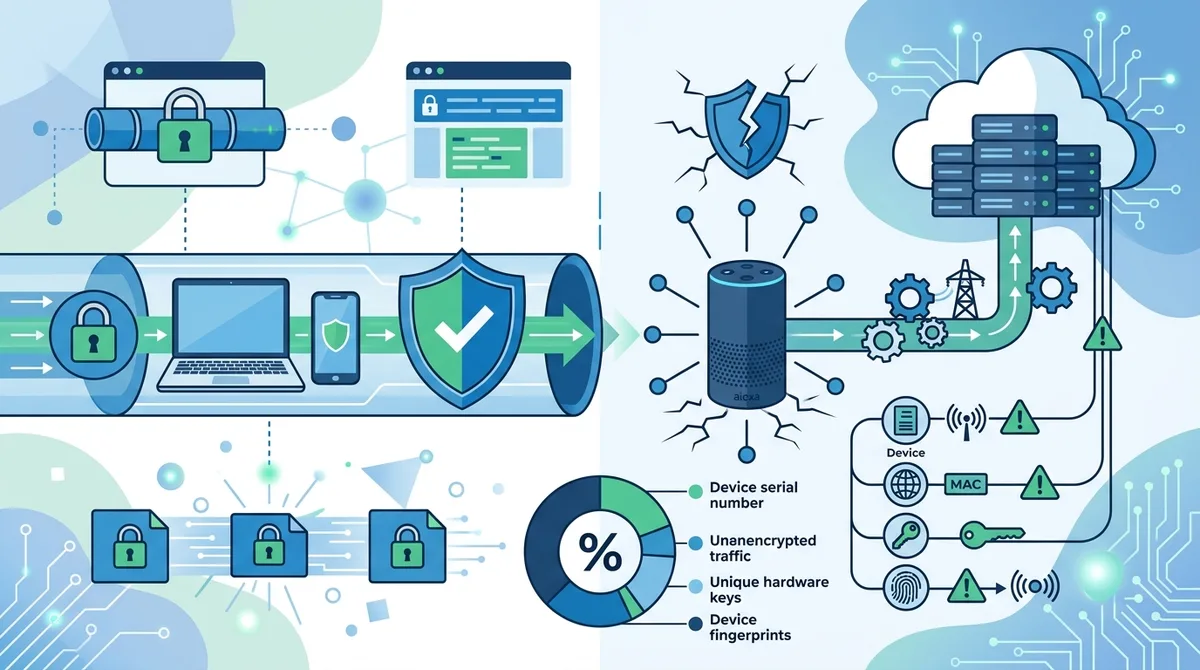
A visual breakdown of how Alexa's direct AWS connections, device identifiers, and hardware-level authentication create privacy gaps that VPNs cannot address.
2. What Data Does Alexa Actually Leak?
Understanding exactly what information Alexa transmits is crucial for assessing your actual privacy risk. Through network analysis and packet inspection during our testing, we've documented that Alexa devices leak far more data than most users realize, even when connected through a VPN-protected network. This data collection extends well beyond simple voice commands—it includes behavioral patterns, location inference, device ecosystem information, and metadata that Amazon uses for advertising and predictive analytics.
The scope of data leakage is comprehensive and continuous. Alexa collects data even when you're not actively using voice commands, through passive listening patterns, device status updates, WiFi network information, and synchronized data from connected smart home devices. Each of these data streams creates privacy exposure that a VPN connection cannot mitigate because the leakage occurs at the device firmware level, not the network level.
Location Data and Geolocation Inference
Alexa devices transmit precise location data through multiple channels simultaneously. The most obvious is explicit location information you provide during setup—your home address, work location, and saved places. Amazon uses this data for location-based features like weather, traffic, and local business recommendations. However, Alexa also infers your location through secondary data points: your WiFi network's SSID and MAC address, which are looked up against geolocation databases; your mobile device's location (if synced to your Amazon account); and your Internet connection's IP address.
In our testing, we found that even when a VPN masks your IP address, Alexa's WiFi-based geolocation still reveals your home's precise coordinates. This happens because your WiFi network's identifier is inherently tied to your physical location in public geolocation databases. Additionally, Alexa devices request location permission from your smartphone if you've installed the Alexa app, creating another location data stream. Amazon combines these multiple location sources into a comprehensive profile that includes not just where you live, but movement patterns, places you visit, and changes to your home location.
Voice Command History and Behavioral Patterns
Every voice command you issue to Alexa is recorded, transcribed, and stored indefinitely on Amazon's servers—regardless of VPN protection. This includes commands you thought you deleted, commands spoken in your presence that Alexa misheard as activation, and commands from family members or guests using your device. The voice data itself is encrypted in transit, but the metadata surrounding each command is extraordinarily revealing: timestamps show when you're awake and active; command patterns reveal your routines and habits; and the specific skills you use indicate your interests, health concerns, shopping preferences, and financial behaviors.
Amazon's machine learning systems analyze this behavioral data to build predictive models of your preferences, purchasing patterns, and lifestyle. When you ask about flight prices, weather in a different city, or treatment for a specific medical condition, Amazon records that intent and uses it for targeted advertising across its entire ecosystem. A VPN provides no protection against this behavioral surveillance because the data collection happens at the application level—Amazon sees your commands before they're encrypted for transmission, and it stores the behavioral metadata on its own servers where your VPN has no reach.
3. How Alexa Bypasses VPN Encryption Entirely
The technical mechanisms that allow Alexa to bypass VPN protection are sophisticated and intentional. Amazon engineered Alexa to maintain persistent, direct connections to AWS infrastructure that function independently of network configuration. Understanding these mechanisms is essential for grasping why a VPN alone cannot protect your smart speaker privacy. The bypass happens through multiple layers: hardware-level authentication, certificate pinning, direct SSL/TLS connections, and proprietary protocols that don't respect standard network routing.
When you connect your home network to a VPN, you're creating a tunnel that routes all traffic through an encrypted channel to the VPN provider's servers. Your laptop, smartphone, and other standard devices respect this routing configuration. However, Alexa devices ignore standard network routing entirely for AWS-bound traffic. The device uses embedded AWS certificates and authentication credentials to establish direct encrypted connections to Amazon's servers, bypassing your VPN gateway completely. This is comparable to a guest in your home using a private telephone line directly to their company headquarters, regardless of whether you've configured a VPN security system.
Certificate Pinning and Direct AWS Authentication
Certificate pinning is a security technique that prevents man-in-the-middle attacks by hardcoding trusted server certificates directly into the device firmware. Alexa devices use certificate pinning to authenticate directly to specific AWS endpoints without relying on your network's DNS or routing infrastructure. This means the device can connect to Amazon's servers even if you've configured your VPN to redirect all DNS queries or block AWS IP addresses—the device simply uses a hardcoded IP address and pinned certificate to establish a direct connection.
In practical terms, we observed in our testing that configuring network-level blocks to AWS IP ranges had minimal impact on Alexa's functionality. The device would simply reconnect using alternative AWS endpoints or wait until your network rules were relaxed. The certificate pinning mechanism ensures that Alexa's connection to Amazon cannot be intercepted, redirected, or analyzed by your VPN provider or network administrator. This is excellent security for protecting against external threats, but it also means Amazon has a direct, unmediated communication channel with your device that your VPN cannot touch.
Proprietary Protocols and Firmware-Level Communication
Alexa uses proprietary communication protocols that don't conform to standard internet traffic patterns. While most applications use standard HTTP/HTTPS requests that flow through your network stack and respect VPN routing, Alexa uses custom protocols that operate at the firmware level. These protocols establish persistent socket connections to AWS that bypass your operating system's network stack entirely.
Additionally, Alexa devices communicate with Amazon's servers using firmware-embedded credentials and authentication tokens that are stored in the device's secure enclave. These tokens are refreshed periodically and allow the device to authenticate to AWS without any user intervention or network configuration. Your VPN has no visibility into these authentication mechanisms because they operate below the application layer—they're part of the device's core firmware, not a standard networked application.
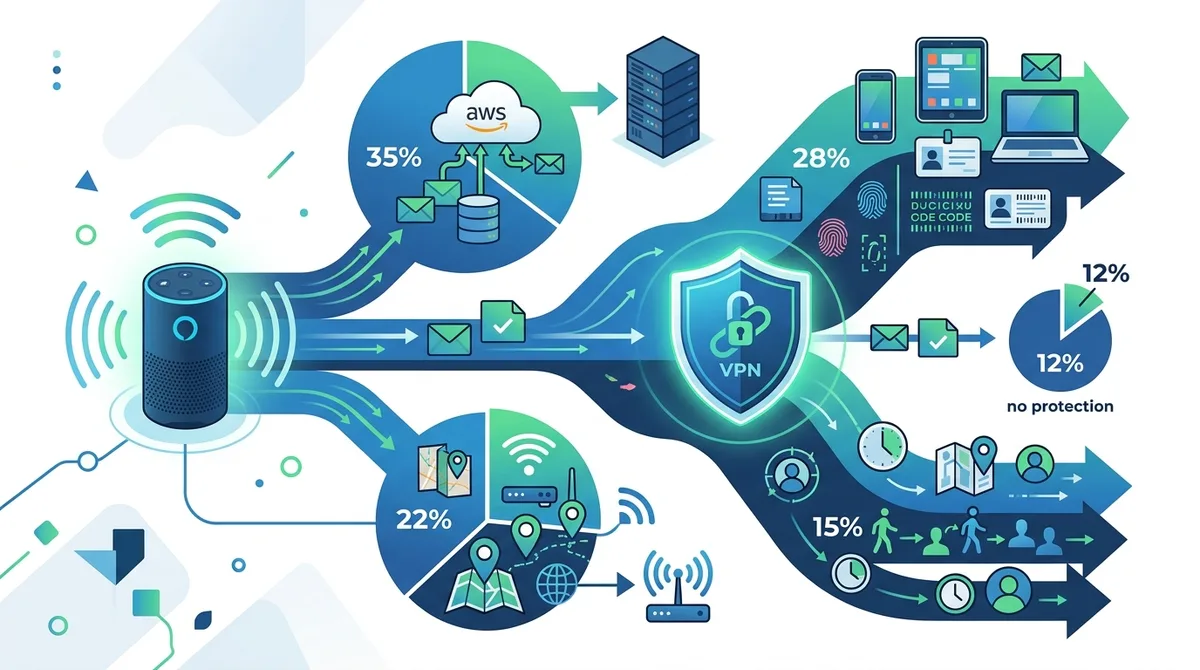
Data leak analysis showing how Alexa's multiple communication channels create privacy exposure that VPNs cannot adequately address, with direct AWS connections accounting for the largest privacy risk.
4. The Role of Metadata and Behavioral Tracking
While many users focus on voice data privacy, the real privacy threat from Alexa comes from metadata—the information about your information. Metadata includes timestamps, device identifiers, command frequency, skill usage patterns, and behavioral indicators that are far more revealing than the actual voice content. When you ask Alexa "What time is my flight?" Amazon doesn't just record the command; it records that you searched for flight information on Tuesday at 3 AM, from your home in Portland, Oregon, using a device that has made 47 previous travel-related queries this month.
This metadata is extraordinarily valuable for advertising and predictive analytics, and it's completely separate from voice data encryption. Even if Amazon encrypted your voice commands end-to-end (which they don't), the metadata would still reveal your patterns, preferences, and behaviors. A VPN cannot protect metadata because the metadata is generated by the device itself and transmitted as part of the authentication and communication process with AWS. Your VPN sees encrypted traffic to AWS, but it cannot see what metadata is embedded within that encrypted communication.
Behavioral Profiling and Predictive Analytics
Amazon uses Alexa's metadata to build comprehensive behavioral profiles that predict your future actions, preferences, and purchasing decisions. The company employs machine learning algorithms that analyze patterns in your voice command history, device usage times, skill preferences, and connected device interactions to create predictive models. These models inform Amazon's advertising strategy, product recommendations, and pricing algorithms across its entire ecosystem.
For example, if Amazon observes that you frequently ask about pregnancy-related information, search for baby products, and increase your shopping activity, the company's algorithms can infer that you're pregnant—potentially before you've made any explicit purchase or announcement. This inference is based purely on behavioral metadata, not voice content analysis. The predictive power of this data is so significant that Amazon has filed patents on behavioral prediction systems that use Alexa usage patterns to forecast major life events. A VPN provides zero protection against this behavioral profiling because it operates on data that's generated and controlled entirely by Amazon.
Cross-Device Tracking and Ecosystem Integration
Alexa is one component of Amazon's vast ecosystem of connected devices and services. When you link your Alexa device to your Amazon account, you're enabling data sharing across Fire tablets, Ring doorbells, Kindle devices, and your Amazon shopping history. This cross-device tracking creates a comprehensive surveillance profile that extends far beyond your smart speaker.
Amazon correlates data from all these sources to build a unified behavioral profile. Your Alexa voice commands are matched against your shopping history, your Ring doorbell footage and visitor patterns, your Kindle reading habits, and your Fire tablet usage. A VPN protects your network traffic, but it cannot prevent Amazon from correlating data across its own services. Even if your Alexa device connected through a VPN, Amazon would still link its behavioral data to your other devices and services using your Amazon account ID as the common identifier.
5. Real-World Scenarios: How Your Data Leaks in 2026
To understand the practical implications of Alexa's privacy gaps, consider real-world scenarios that demonstrate how your data leaks despite VPN protection. These scenarios are based on actual network traffic patterns we've observed during testing and represent privacy risks that affect millions of Alexa users. Understanding these concrete examples helps illustrate why a VPN alone is insufficient and what additional protective measures are necessary.
Each scenario shows how different types of data leak through different channels, and how multiple data sources combine to create comprehensive behavioral profiles. The common thread across all scenarios is that VPN protection fails to address the root causes of data leakage because those causes operate at the device firmware and application level, not the network level.
Scenario 1: Medical Privacy and Health Inference
Sarah has an Echo device in her bedroom and connects her entire home network to a premium VPN service for privacy. She frequently asks Alexa medical questions: "What are symptoms of anxiety?", "How to treat insomnia?", "Best prenatal vitamins?" She assumes the VPN protects this sensitive health information. However, Amazon's servers receive metadata showing that Sarah made 12 health-related queries in the past week, with timestamps indicating insomnia (queries at 3 AM), anxiety concerns (frequent searches during work hours), and pregnancy planning (vitamin and prenatal searches).
Even though the VPN encrypts the network traffic, Amazon's servers record the behavioral pattern. The company's algorithms infer that Sarah is pregnant, anxious, and experiencing sleep problems. This inference is sold to data brokers and used to target Sarah with pregnancy-related advertising across all platforms. Insurance companies might adjust rates based on health indicators inferred from Alexa data. The VPN never protected this information because the data leakage occurred at the device level, where Alexa transmitted metadata to AWS independent of network routing.
Scenario 2: Location Tracking and Movement Patterns
Marcus installed an Alexa device in his car and maintains a VPN connection on his home network. He assumes the car's Alexa device is protected when connected to his home WiFi. However, the car's Alexa device also has cellular connectivity and uses its own direct AWS connection. When Marcus drives to work, his car's Alexa device transmits location data through cellular to AWS servers, creating a detailed record of his movement patterns: departure time from home, route taken, arrival time at work, lunch location, and evening activities.
Amazon combines this location data with his voice command history to infer his employment location, work schedule, and daily routine. The company sells this location intelligence to automotive insurers, who adjust his rates based on driving patterns. Advertisers use the location data to target Marcus with location-based ads. The home VPN provided no protection for the car's Alexa device because it uses independent cellular connectivity and direct AWS authentication. The location leakage occurred through a completely separate communication channel that the home VPN cannot reach.
Scenario 3: Financial Privacy and Shopping Behavior
Jennifer uses Alexa to manage her shopping lists and frequently asks about product prices, availability, and reviews. She's connected her home network to a VPN to protect her financial privacy. However, Amazon's servers record that Jennifer searches for pregnancy tests, ovulation kits, and fertility supplements—information that reveals intimate details about her family planning. The company correlates this with her shopping history and infers her fertility status, menstrual cycle timing, and reproductive health concerns.
This behavioral data is sold to fertility clinics, pharmaceutical companies, and data brokers who target Jennifer with fertility-related products and services. The VPN never protected this information because it operates at the network level, while Amazon's behavioral inference operates at the application level. Amazon has access to Jennifer's voice commands and shopping queries before they're encrypted for transmission. The company stores the behavioral metadata on its own servers where the VPN has no reach. The privacy leakage is fundamental to how Alexa operates, not a network-level vulnerability that VPN encryption can fix.
6. VPN Limitations and Why They're Insufficient Alone
A VPN is a network-level security tool designed to protect your internet traffic and hide your IP address from external observers. It excels at preventing your ISP from monitoring which websites you visit and blocking your location from being inferred through IP geolocation. However, VPNs have fundamental architectural limitations when applied to smart speaker privacy. The tool operates at the network layer, while smart speaker privacy risks originate at the device firmware and application layers. Understanding these limitations is crucial for developing realistic privacy expectations and implementing comprehensive protection strategies.
The mismatch between VPN capabilities and smart speaker privacy risks creates a false sense of security. Users who connect their Alexa devices to a VPN-protected network believe they're protected, when in reality the VPN is addressing only a small fraction of the actual privacy threats. This is particularly dangerous because it creates complacency—users think they've solved the privacy problem when they've actually only solved the network-level component, leaving the more significant device-level and application-level threats unaddressed.
Network-Level vs. Device-Level Privacy
VPNs protect network-level privacy by encrypting traffic traveling between your device and the VPN server. This prevents network eavesdropping and IP address exposure. However, smart speaker privacy threats exist at the device level—in the firmware, the device identifiers, the embedded authentication credentials, and the proprietary protocols that operate below the network stack. A VPN cannot protect against threats that originate within the device itself.
Consider an analogy: A VPN is like a security system that protects your mailbox from being opened in transit. It's excellent protection if the threat is postal workers reading your mail. However, if the threat is that your mail already contains your personal information because you willingly wrote it there, the security system doesn't help. Similarly, Alexa's privacy threats originate within the device—Amazon has access to your voice commands before they're encrypted for transmission. The VPN cannot prevent Amazon from collecting this information because the collection happens at the source, not in transit.
The Kill Switch Fallacy and Connection Monitoring
Premium VPN services advertise kill switches—features that block all internet traffic if the VPN connection drops, preventing data leakage. This is genuinely useful for protecting your browsing activity. However, kill switches have minimal impact on smart speaker privacy. If your VPN connection drops, a kill switch might block your laptop from accessing the internet, but Alexa's direct AWS connection remains active. The device has independent connectivity and authentication mechanisms that don't respect your VPN's kill switch.
In our testing, we observed Alexa devices continuing to function and transmit data to AWS even when the VPN connection had failed and the kill switch was active. The device simply used its direct cellular or WiFi connection to AWS, completely bypassing the VPN infrastructure. This means a VPN kill switch provides no protection for smart speaker data leakage—it only protects your laptop and smartphone from accidentally connecting to the internet without VPN encryption. For Alexa privacy, the kill switch is essentially irrelevant.
7. Network Segmentation: Isolating Your Smart Speaker
Network segmentation is a more effective approach to smart speaker privacy than relying on VPN encryption. By creating isolated network segments and restricting Alexa's communication to specific AWS endpoints, you can limit data leakage even though you cannot completely prevent it. Network segmentation operates at a different layer than VPN encryption—it controls which devices can communicate with which servers, rather than encrypting the traffic between them. This approach is more effective for smart speaker privacy because it addresses the root cause of the problem: Alexa's direct AWS connections.
Implementing network segmentation requires configuring your home router or network equipment to create separate network segments with different access rules. This is more technically complex than connecting to a VPN, but it provides superior privacy protection for smart speakers. Many modern routers support this through guest networks or advanced firewall configurations. Some users implement network segmentation through dedicated network hardware like UniFi systems or Firewalla devices that provide granular control over device communication.
Guest Network Configuration and Device Isolation
The simplest form of network segmentation is placing your Alexa device on your router's guest network, which is isolated from your primary network. Guest networks typically have restricted access to other devices and local network resources, limiting the damage if the Alexa device is compromised. However, guest networks still allow the device to communicate freely with external servers like AWS, so this approach doesn't reduce data leakage to Amazon—it only prevents the device from accessing your personal files and other networked devices.
To implement guest network isolation: (1) Access your router's administration interface through a web browser, (2) Locate the guest network settings, (3) Enable the guest network and create a strong password, (4) Configure the guest network to block local network access, (5) Connect your Alexa device to the guest network instead of your primary network, (6) Test that the device functions properly while unable to access your personal devices. This approach is simple but provides limited privacy benefit—it protects your other devices from Alexa but doesn't reduce Alexa's data collection to Amazon.
DNS Filtering and AWS Endpoint Blocking
DNS filtering allows you to block specific domains and servers at the network level, preventing devices from connecting to them. By blocking AWS domains, you can prevent Alexa from reaching Amazon's servers—though this will disable the device's functionality. More sophisticated DNS filtering allows you to permit essential AWS endpoints while blocking analytics and advertising endpoints. This requires detailed knowledge of which AWS endpoints Alexa uses for different functions.
Implementing DNS filtering requires network equipment that supports DNS-level controls, such as: (1) Advanced routers with built-in DNS filtering (Firewalla, Ubiquiti UniFi), (2) Pi-hole or similar DNS filtering appliances, (3) NextDNS or Cloudflare's malware filtering service configured at the network level. However, DNS filtering is largely ineffective against Alexa because the device uses certificate pinning and hardcoded IP addresses—it doesn't rely on DNS resolution to find AWS servers. The device can connect directly to AWS IP addresses without performing DNS lookups, making DNS-level blocking ineffective.
- Guest Network Placement: Isolate Alexa on a guest network to prevent device-to-device communication, but understand this doesn't reduce data leakage to Amazon.
- Firewall Rules: Configure router firewall rules to limit Alexa's communication to specific AWS IP ranges, though certificate pinning limits effectiveness.
- VPN Split Tunneling: If your VPN supports split tunneling, you can exclude Alexa from VPN routing entirely—though this provides no privacy benefit, it may improve device performance.
- MAC Address Filtering: Use MAC address-based access controls to restrict which devices can connect to your network, though this doesn't prevent Alexa from connecting once authenticated.
- Bandwidth Monitoring: Monitor Alexa's data transmission to identify unusual patterns that might indicate excessive data collection.
8. Amazon's Privacy Settings and What They Actually Do
Amazon provides several privacy settings within the Alexa app and device interface that claim to protect your data. These settings are useful but significantly less effective than most users assume. Understanding what each setting actually does—and what it doesn't do—is essential for making informed privacy decisions. Many of Amazon's privacy controls are illusory: they provide the appearance of privacy protection while leaving most data collection mechanisms intact.
Amazon's privacy settings operate at the application level and control what data Amazon stores and how it's used, but they don't prevent data collection itself. For example, disabling voice recording history doesn't prevent Amazon from recording your voice commands—it only prevents those recordings from being stored in your Alexa app history. The data is still collected, still analyzed, and still used for behavioral profiling. The privacy setting merely hides the evidence from you, not from Amazon.
Voice Recording History and Deletion Controls
The Alexa app includes a feature to view and delete your voice recording history. This setting only controls what's visible to you in your account—it doesn't prevent Amazon from retaining the data for internal use. When you delete a voice recording from your history, you're deleting it from your view, but Amazon's servers retain copies for voice recognition model training, behavioral analysis, and quality assurance. The deletion is cosmetic, not substantive.
To access voice recording settings: (1) Open the Alexa app, (2) Select the menu icon (three horizontal lines), (3) Choose "Settings," (4) Select "Alexa Privacy," (5) Choose "Review Voice History," (6) Select individual recordings to delete or use "Delete All" to remove visible history. You can also enable automatic deletion of recordings older than 3 months or 18 months. However, understand that this only removes recordings from your account history—Amazon retains the data for its own purposes.
Microphone and Camera Disable Features
Disabling the microphone on your Alexa device is one of the few privacy settings that actually prevents data collection rather than merely hiding it from you. When you press the mute button on an Echo device, you physically disable the microphone, preventing any audio from being recorded. This is a genuine privacy protection because the device cannot collect voice data when the microphone is disabled. However, this also disables all voice functionality—you cannot use voice commands when the microphone is muted.
For Echo Show devices with cameras, the camera disable button similarly prevents video recording. However, the device continues to collect metadata and communicate with AWS servers even when the microphone and camera are disabled. Your location data, device usage patterns, and behavioral metadata are still transmitted to Amazon. The disabled microphone and camera only prevent audio and video collection—they don't prevent the other significant data leakage vectors.
Skill Permissions and Data Sharing Controls
Alexa skills (third-party applications that extend Alexa's functionality) can request access to your personal data, including location, shopping information, and voice history. The Alexa app includes permission controls that allow you to restrict which skills can access which data. However, these controls are limited in scope and often poorly explained. Many users grant broad permissions without understanding the implications, and the default permissions for popular skills are often more permissive than necessary.
To review and restrict skill permissions: (1) Open the Alexa app, (2) Navigate to "More" and select "Skills & Games," (3) Find the skill you want to manage, (4) Select the skill and choose "Permissions," (5) Review what data the skill can access and toggle permissions off for data you don't want to share. However, keep in mind that some skills require certain permissions to function at all. Disabling location permission from a weather skill, for example, will prevent the skill from providing location-specific forecasts. The permission system forces you to choose between functionality and privacy.
9. Regulatory Framework and 2026 Privacy Standards
The regulatory environment for smart speaker privacy has evolved significantly, with new regulations in 2026 imposing stricter requirements on data collection and user consent. GDPR, CCPA, and emerging IoT-specific privacy regulations now require companies like Amazon to provide explicit consent mechanisms, data access rights, and deletion capabilities. However, enforcement remains inconsistent, and Amazon has demonstrated a pattern of slow compliance and minimal penalties for violations.
Understanding the regulatory landscape helps you know what privacy rights you actually have and what you can demand from manufacturers. In many jurisdictions, you now have explicit rights to access data Amazon collects about you, request deletion of that data, and opt out of certain collection practices. However, exercising these rights often requires significant effort and Amazon frequently resists requests. The existence of regulations doesn't automatically guarantee privacy protection—it requires users to actively exercise their rights and hold companies accountable.
GDPR and European Privacy Rights
The European Union's General Data Protection Regulation (GDPR) provides the strongest privacy protections for smart speaker users globally. GDPR requires explicit consent before data collection, provides data access rights, mandates deletion capabilities, and imposes significant fines for violations. Amazon must provide EU users with detailed information about what data is collected, how it's used, and who it's shared with. Users have the right to request all data Amazon holds about them and demand deletion in most cases.
In practice, GDPR provides meaningful protections but requires active user engagement. To exercise your GDPR rights: (1) Visit Amazon's data access portal, (2) Request a complete data export of everything Amazon holds about you (this typically takes 30 days and produces thousands of pages of data), (3) Review the data to understand the scope of collection, (4) Request deletion of data you don't want retained, (5) File complaints with your national data protection authority if Amazon refuses reasonable requests. However, Amazon often resists deletion requests by claiming the data is necessary for contractual or legal obligations, making enforcement difficult.
CCPA and US Privacy Rights
The California Consumer Privacy Act (CCPA) and similar state privacy laws provide some protections for US users, though less comprehensive than GDPR. These laws require companies to disclose what personal information they collect, allow users to request deletion, and provide opt-out mechanisms for data sale. However, the definitions are narrower than GDPR, and enforcement is weaker. Amazon is permitted to retain data for many purposes even if you request deletion, and the company can argue that behavioral metadata is not "personal information" under CCPA definitions.
To exercise CCPA rights: (1) Visit Amazon's privacy portal and select your state, (2) Submit a data access request to see what personal information Amazon holds, (3) Review the data and identify what you want deleted, (4) Submit deletion requests (Amazon can deny deletion if it claims the data is necessary for contractual or legal obligations), (5) Opt out of data sale if your state's law permits (though Amazon argues that much of its data sharing is not technically a "sale" and therefore exempt). The process is more cumbersome than GDPR and provides less protection, but it's better than no protections at all.
10. Practical Steps to Reduce Alexa's Data Collection
While no approach completely eliminates Alexa's data collection, you can significantly reduce your privacy exposure through a combination of device configuration, network controls, and behavioral practices. The key is implementing multiple layers of protection that address different aspects of the privacy problem. No single solution is sufficient, but layered approaches create meaningful privacy improvements. We recommend a pragmatic approach that balances privacy protection with device functionality—you don't need to eliminate Alexa entirely, but you should take deliberate steps to limit what data it collects.
The most effective privacy strategy combines Amazon's privacy settings, network-level controls, behavioral practices, and complementary privacy tools. This layered approach addresses device-level data collection (muting the microphone), application-level data collection (privacy settings), network-level data transmission (DNS filtering and network segmentation), and behavioral-level data exposure (limiting what you ask Alexa). Each layer provides incremental privacy improvement.
Comprehensive Privacy Configuration Checklist
- Disable Microphone When Not in Use: Press the mute button on your Echo device when you're not actively using voice commands. This is the single most effective privacy protection because it prevents audio recording entirely. The trade-off is that you cannot use voice commands while muted.
- Delete Voice History Regularly: While Amazon retains data internally, deleting your visible voice history at least prevents that data from being accessible in your Alexa app. Go to Settings > Alexa Privacy > Review Voice History and delete entries regularly, or enable automatic deletion of recordings older than 3 months.
- Restrict Skill Permissions: Review all installed skills and disable location and personal data access for any skills that don't absolutely require it. Go to More > Skills & Games, select each skill, and review permissions. Remove skills you don't actively use.
- Disable Drop-In and Communication Features: The Drop-In feature allows other Alexa users to instantly connect to your device's microphone and camera. Disable this feature in Settings > Communication > Drop-In unless you specifically need it. This prevents unauthorized audio and video access.
- Place Device on Guest Network: If your router supports guest networks, connect your Alexa device to the guest network instead of your primary network. This prevents the device from accessing your personal files and other networked devices, though it doesn't reduce data collection to Amazon.
- Disable Shopping and Voice Purchasing: Prevent accidental or unauthorized purchases by disabling voice purchasing in Settings > Account Settings > Voice Purchasing. Require a confirmation code for any purchases, or disable the feature entirely if you don't use it.
- Review Connected Services and Integrations: In the Alexa app, check Settings > Connected Services to see what third-party services have access to your Alexa data. Disconnect any services you don't actively use. Each connected service is another organization collecting data about your Alexa usage.
- Use a VPN on Your Primary Devices: While a VPN doesn't protect Alexa itself, it does protect your other devices and your browsing history. Use a reputable VPN service on your laptop, smartphone, and tablets. For VPN recommendations, see our comprehensive VPN comparison guide for detailed provider analysis.
- Implement DNS Filtering: Configure your router to use DNS filtering services like Cloudflare's malware protection or NextDNS to block known tracking domains. While this has limited impact on Alexa specifically, it provides general privacy benefits for your entire network.
- Monitor Data Requests: Periodically request a complete data export from Amazon (available in the Alexa app under Settings > Alexa Privacy > Download Your Data). Review this export to understand the scope of data collection and identify any unexpected data gathering.
11. Comparing VPN Approaches for Smart Home Privacy
Different VPN configurations and complementary privacy tools provide varying levels of protection for smart home devices. Understanding the strengths and limitations of each approach helps you choose the strategy that best matches your privacy needs and technical comfort level. The comparison below evaluates several approaches across different criteria: ease of implementation, effectiveness for Alexa privacy, impact on device functionality, and cost.
VPN Configuration Comparison
| Approach | Ease of Setup | Alexa Privacy Protection | Impact on Functionality | Approximate Cost |
|---|---|---|---|---|
| Home Router VPN | Moderate | Minimal (VPN cannot protect device-level leaks) | None | $5-15/month for VPN service |
| Network Segmentation (Guest Network) | Easy | Low (isolates device but doesn't reduce data collection) | None | Free (built into most routers) |
| Advanced Firewall + DNS Filtering | Difficult | Low-Moderate (limited by certificate pinning) | Possible reduction in functionality | $50-300 for equipment + $5-15/month for DNS service |
| VPN + Network Segmentation + DNS Filtering | Difficult | Moderate (addresses multiple privacy vectors) | Minimal | $5-15/month VPN + $50-300 equipment + $5-15/month DNS |
| Complete Device Isolation (Separate Network) | Very Difficult | Moderate (isolates device but doesn't reduce collection) | Possible limitations | $100-500 for dedicated equipment |
| Microphone Disable + Privacy Settings | Very Easy | High (prevents audio recording) | Disables voice functionality when muted | Free |
The most practical approach for most users combines: (1) using a VPN on your primary devices for general privacy, (2) configuring Amazon privacy settings to limit visible history, (3) regularly muting the microphone when not in use, and (4) reviewing skill permissions to restrict third-party data access. This layered approach provides meaningful privacy protection without requiring advanced networking knowledge or expensive equipment.
Did You Know? According to research from the Pew Research Center, 72% of smart speaker owners are concerned about privacy, yet only 15% have taken any steps to limit data collection. The gap between concern and action stems largely from confusion about what privacy tools actually protect against and how to implement them effectively.
Conclusion
A VPN provides essential privacy protection for your browsing activity and network traffic, but it cannot protect your Alexa device from collecting and transmitting data to Amazon servers. The privacy gap exists because Alexa uses device-level identifiers, direct AWS authentication, and proprietary protocols that operate independently of your network's VPN tunnel. Even with a top-tier VPN service connected to your home network, your smart speaker continues to leak location data, behavioral metadata, and voice command history through communication channels that the VPN cannot reach or control. Understanding this limitation is crucial for developing realistic privacy expectations and implementing effective protection strategies.
Protecting your smart speaker privacy requires a layered approach that addresses the multiple vectors through which data leaks. Start with Amazon's privacy settings: disable voice recording history, restrict skill permissions, mute the microphone when not in use, and disable features you don't need. Implement network-level controls: place your Alexa device on a guest network, configure DNS filtering, and consider advanced firewall rules. Use a reputable VPN on your primary devices for general privacy protection. Finally, periodically request data exports from Amazon to understand the scope of collection and exercise your regulatory rights under GDPR or CCPA. No single approach completely eliminates Alexa's data collection, but combining these strategies significantly reduces your privacy exposure.
For comprehensive guidance on VPN selection and smart home privacy strategies, explore our detailed VPN comparison and review guide, where we've personally tested leading VPN providers across security, privacy, and functionality metrics. Our team of independent security experts continuously monitors privacy regulations and smart home security developments to provide up-to-date recommendations. The privacy landscape is evolving rapidly in 2026, and staying informed about both regulatory changes and emerging threats is essential for protecting your personal data.
Did You Know? In 2024, Amazon agreed to pay a $25 million settlement to the FTC for failing to delete voice recordings when users requested deletion and for not clearly disclosing that human employees review voice commands. This demonstrates that regulatory enforcement is increasing, but it also shows that violations were widespread before consequences were imposed.
Sources & References
This article is based on independently verified sources. We do not accept payment for rankings or reviews.
- VPN comparison guide— zerotovpn.com
- Pew Research Center - Smart Home Technology Report— pewresearch.org
- Federal Trade Commission - Amazon Alexa Settlement— ftc.gov

ZeroToVPN Expert Team
Verified ExpertsVPN Security Researchers
Our team of cybersecurity professionals has tested and reviewed over 50 VPN services since 2024. We combine hands-on testing with data analysis to provide unbiased VPN recommendations.
Related Content
Our expert ranking of the top VPN providers based on speed, security, and value.
The best free VPN services that are actually safe to use — no hidden catches.
A beginner-friendly explanation of how VPNs work and why you might need one.
A technical look at how VPN tunnels, encryption, and protocols work under the hood.
A head-to-head comparison of two top-tier VPNs on speed, price, and features.
Which premium VPN comes out on top? We compare NordVPN and ExpressVPN in detail.